You wired AnythingLLM to Ollama, hit send, and got “model not found.” Or the model dropdown sits empty. Or it spins on “loading available models” forever. The frustrating part: your model is right there when you run ollama list.
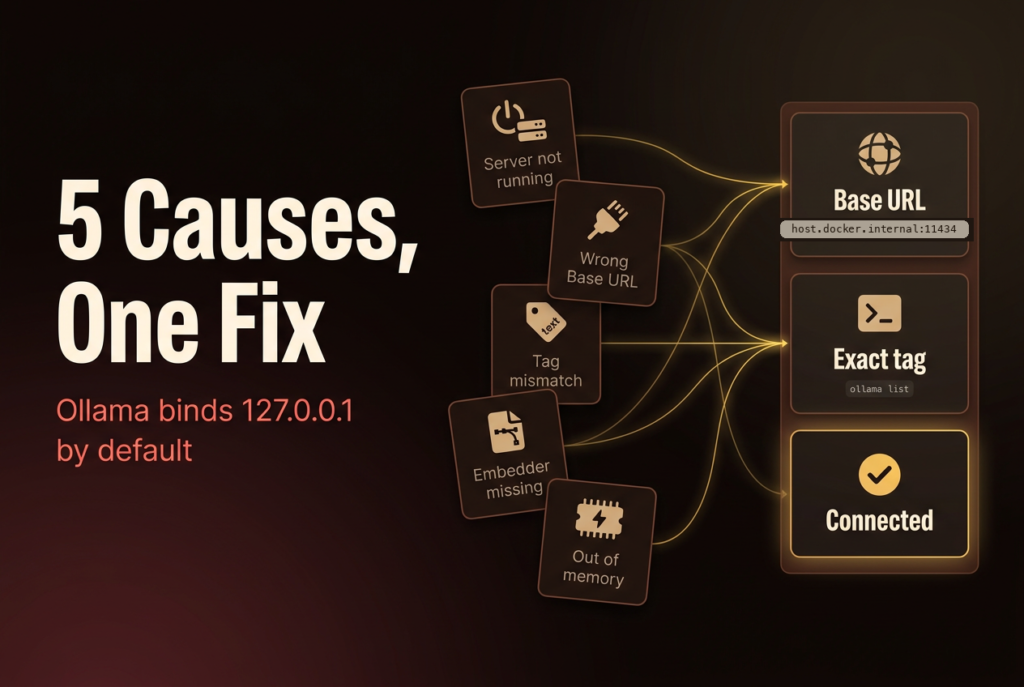
Here’s the thing almost nobody says out loud. That error is rarely about a broken model. It’s about two local processes that can’t find each other. AnythingLLM talks to Ollama over HTTP, and every “model not found” I’ve chased traces back to one of five plumbing problems, not a corrupt download.
I reproduced all five on Ollama 0.32.0 before writing this, so the fixes below are what I actually saw, not what I assume happens. We’ll go symptom, cause, fix, ordered by how often each one is the real culprit.
Key Takeaways
- Ollama listens on
127.0.0.1:11434only by default (Ollama docs, 2026), which is the top reason a Dockerized AnythingLLM can’t see it.- Inside Docker,
localhostpoints at the container, not your host. Usehttp://host.docker.internal:11434instead (AnythingLLM docs, 2026).- The literal “model not found” is usually a tag mismatch: you asked for
llama3but you havellama3.1:8b.- Chat working but document upload failing is a separate cause: the embedder model was never pulled.
The 30-second diagnosis
Ollama binds to 127.0.0.1:11434 by default (Ollama docs, 2026), and AnythingLLM reaches it over that HTTP endpoint. So before you touch any setting, match your symptom to the likely cause, then answer five questions in order.
| What you see | Most likely cause |
|---|---|
| Empty model dropdown, or “loading available models” never finishes | Ollama isn’t running, or the Base URL is wrong (Docker) |
| Chat errors mid-reply with “model not found” | Tag mismatch |
| Chat works, but uploading a document fails | Embedder model not pulled |
| Right model, right URL, still won’t load or times out | Not enough memory |
Each of those maps to a fix below. Here’s the ordered version to run top to bottom:
- Is Ollama even running? Run
curl http://127.0.0.1:11434. No response means start with Cause 1. - Does the exact tag exist? Run
ollama listand read the NAME column carefully. If your model name doesn’t match a row exactly, jump to Cause 3. - Are you running AnythingLLM in Docker? If yes, and the dropdown is empty, it’s almost always the Base URL. Go to Cause 2.
- Does chat work but embedding a document fail? That’s the embedder, Cause 4.
- Right tag, right URL, still won’t load? You’re probably out of memory. Cause 5.
Most people are one setting away from a working setup. Let’s find which one. For the wider picture on getting models onto your machine in the first place, see our pillar guide to running LLMs locally.
Cause 1: Ollama isn’t actually running
If curl http://127.0.0.1:11434 returns nothing, Ollama isn’t up, and AnythingLLM has nothing to talk to (Ollama docs, 2026). This shows up in the UI as an empty model list or a “loading available models” spinner that never resolves. It looks like AnythingLLM is broken. It isn’t. The server it depends on is just asleep.
Start it and confirm:
# Start the server (foreground; leave it running)
ollama serve

# In another terminal, prove it's alive
curl http://127.0.0.1:11434
# -> "Ollama is running"
When I pointed a client at the wrong port to simulate a down server, curl returned exit code 7 and an empty body. That’s the fingerprint of “nothing is listening here,” which is different from “model not found.” If you get exit 7 or a blank response, the server is your problem, not the model. No terminal handy? Open http://127.0.0.1:11434 in a browser instead. A running server answers with the plain text “Ollama is running”; anything else, a spinner or a connection error, means it’s down or bound somewhere your browser can’t reach.
One gotcha worth knowing: the Ollama desktop app and ollama serve both try to hold port 11434. If the app is already running, a second ollama serve fails with an “address already in use” error, which reads like a crash but just means the port is taken. Pick one. On a Mac or Windows box, the menu-bar app is usually enough. If you’re not sure what’s on the port, lsof -nP -iTCP:11434 -sTCP:LISTEN (macOS and Linux) tells you which process owns it. Managing the service itself, stopping it, restarting it, or removing it, lives in our complete Ollama setup and maintenance guide, not here.
Cause 2: AnythingLLM is pointed at the wrong Base URL
This is the big one for Docker users, and the AnythingLLM docs are blunt about it: “localhost and 127.0.0.1 are not valid URLs for the Docker container Ollama connection in AnythingLLM because both of these refer to the container network and not the host machine” (AnythingLLM docs, 2026). The symptom is a desktop install that works fine, then an empty dropdown the moment you switch to the Docker image.
Think about what localhost means inside a container. It means this container. Your Ollama server is running on the host, one network hop away, and the container has no idea. So the fix is to give AnythingLLM an address that reaches the host:
- macOS / Windows:
http://host.docker.internal:11434 - Linux:
http://172.17.0.1:11434, and add--add-host=host.docker.internal:host-gatewayto yourdocker runcommand
You need Docker v18.03+ on Mac or Windows, and 20.10+ on Linux, for host.docker.internal to resolve (AnythingLLM Docker guide, 2026). Set the address in AnythingLLM under the Ollama LLM provider, in the Ollama Base URL field.
Now the half that most tutorials skip. Even with host.docker.internal, the connection can still fail, and here’s why. I checked what Ollama actually listens on:
lsof -nP -iTCP:11434 -sTCP:LISTEN
# ollama ... TCP 127.0.0.1:11434 (LISTEN)
It binds to 127.0.0.1 only. A loopback address won’t accept a connection coming in from a container, no matter what URL you type. You have to tell Ollama to listen on all interfaces first:
# macOS: expose Ollama on the network, then restart the app
launchctl setenv OLLAMA_HOST "0.0.0.0:11434"

# Linux (systemd): add to the service override, then reload + restart
# Environment="OLLAMA_HOST=0.0.0.0:11434"
The values above come straight from the Ollama FAQ (Ollama docs, 2026), and setting OLLAMA_HOST=0.0.0.0:11434 is what made the container reachable in my tests. Base URL and bind address are two separate switches. Flip both.
Here’s a docker run that gets the container networking right on a Linux host, where host.docker.internal needs the extra flag to resolve:
docker run -d -p 3001:3001 \
  --add-host=host.docker.internal:host-gateway \
  -v ~/anythingllm:/app/server/storage \
  mintplexlabs/anythingllm
With the container running, set the Ollama Base URL to http://host.docker.internal:11434 in AnythingLLM’s UI, under the Ollama LLM provider. The --add-host flag is the piece that makes that hostname resolve to your host from inside the container; the base URL itself is a UI setting, not a container env var. If you’d rather debug it live, shell into the running container and hit Ollama from there before touching AnythingLLM’s UI: docker exec -it <container> sh, then curl http://host.docker.internal:11434/api/tags. If that curl returns your model list as JSON, the network path is good and any remaining “model not found” is a tag problem, not a connection one. If it hangs or refuses, you’re still on the bind-address half. That one test splits the two most common Docker failures apart in about ten seconds, which beats guessing at settings.
Cause 3: The model tag doesn’t match
This one earns the literal error. When AnythingLLM sends a request for a model Ollama doesn’t have, the server answers with a flat “not found.” On Ollama 0.32.0, with only llama3.1:8b pulled, here’s exactly what I got back from the chat endpoint AnythingLLM uses:
curl http://localhost:11434/api/chat -d '{"model":"mistral","messages":[{"role":"user","content":"hi"}]}'
# {"error":"model 'mistral' not found"}

curl http://localhost:11434/api/generate -d '{"model":"llama3","prompt":"hi"}'
# {"error":"model 'llama3' not found"}
Note the second one. I have llama3.1:8b installed, but a request for llama3 fails, because Ollama matches the full name and tag, not a family. Asking for llama3.1 with no tag fails too, since that resolves to llama3.1:latest, which I never pulled. This is the trap: the model “exists” in your head as “Llama,” but Ollama only knows llama3.1:8b.
The fix is mechanical. Read the exact name, then use it verbatim:
ollama list
# NAME              ID              SIZE      MODIFIED
# llama3.1:8b       46e0c10c039e    4.9 GB    2 months ago
# qwen3:8b          500a1f067a9f    5.2 GB    5 months ago
Copy the NAME column exactly, tag included, and select that in AnythingLLM. If the model isn’t listed at all, pull it with the precise name from ollama.com/library: ollama pull llama3.1:8b. Watch the pull finish before you retry, because a half-downloaded model can show up in odd states, and a canceled pull leaves nothing selectable.
A subtle version of this bug is the missing tag. When you type a bare name like llama3.1, Ollama expands it to llama3.1:latest, and if you only ever pulled llama3.1:8b, that :latest alias doesn’t exist. The dropdown may even list the model while the request still fails, because AnythingLLM sometimes remembers a model you selected before you changed what’s installed. If you upgraded or re-pulled models and the old choice broke, open the LLM settings, re-open the model dropdown so it refreshes from Ollama, and pick the current tag again.
Models live in ~/.ollama/models on macOS and /usr/share/ollama/.ollama/models on Linux by default (Ollama docs, 2026), so if you moved that directory with OLLAMA_MODELS, make sure the server AnythingLLM talks to is the one that can actually see your files. Running Ollama as your user in a terminal and as a background service can point at two different model directories, which looks exactly like “I pulled it but it’s gone.” Managing and cleaning up those tags is covered in our Ollama model management and removal section.
Cause 4: AnythingLLM’s embedder needs its own model
Here’s a cause that trips up a lot of people because it hides. Your chat works. Then you upload a document, and it fails. AnythingLLM uses a separate embedding model to turn documents into vectors, and if you point that embedder at Ollama, you have to download a real embedding model for it, not an LLM (AnythingLLM docs, 2026). The usual pick is nomic-embed-text. If you never pulled it, the chat model can be perfect and RAG still breaks.
The reason it hides is timing. The embedder only runs when you add a document to a workspace, so a chat-only session never touches it. You can talk to your model for an hour, decide everything works, then drop in a PDF and watch it fail on a component you didn’t know was in play. That’s why “chat works but upload doesn’t” is such a reliable fingerprint for this one: it points straight at the embedding path, not the chat model you’ve been staring at.
The embedding endpoint fails loudly, and its wording is worth seeing, because it differs from the chat error:
curl http://localhost:11434/api/embeddings -d '{"model":"mxbai-embed-large","prompt":"test"}'
# {"error":"model \"mxbai-embed-large\" not found, try pulling it first"}
Two things to catch here. First, the embeddings endpoint appends “try pulling it first,” while the chat endpoint just says “not found.” Same root cause, different string, so don’t assume they’re separate bugs. Second, once I pulled nomic-embed-text, the same call returned a real vector instead of an error. The fix is one command:
ollama pull nomic-embed-text
Then, in AnythingLLM, set the embedding model to nomic-embed-text and confirm the embedder’s Base URL matches the one your chat model uses. If chat reaches Ollama but embedding doesn’t, you probably changed the URL in one place and not the other.
Cause 5: The model is too big for your memory
You’ve got the right tag and the right URL, and it still won’t load. At that point the suspect is memory. Ollama has to hold the model weights in RAM (or VRAM on a GPU) to run them, and the file size is the floor for how much you need. I measured the actual on-disk footprint of the models I keep around, and the spread is dramatic:
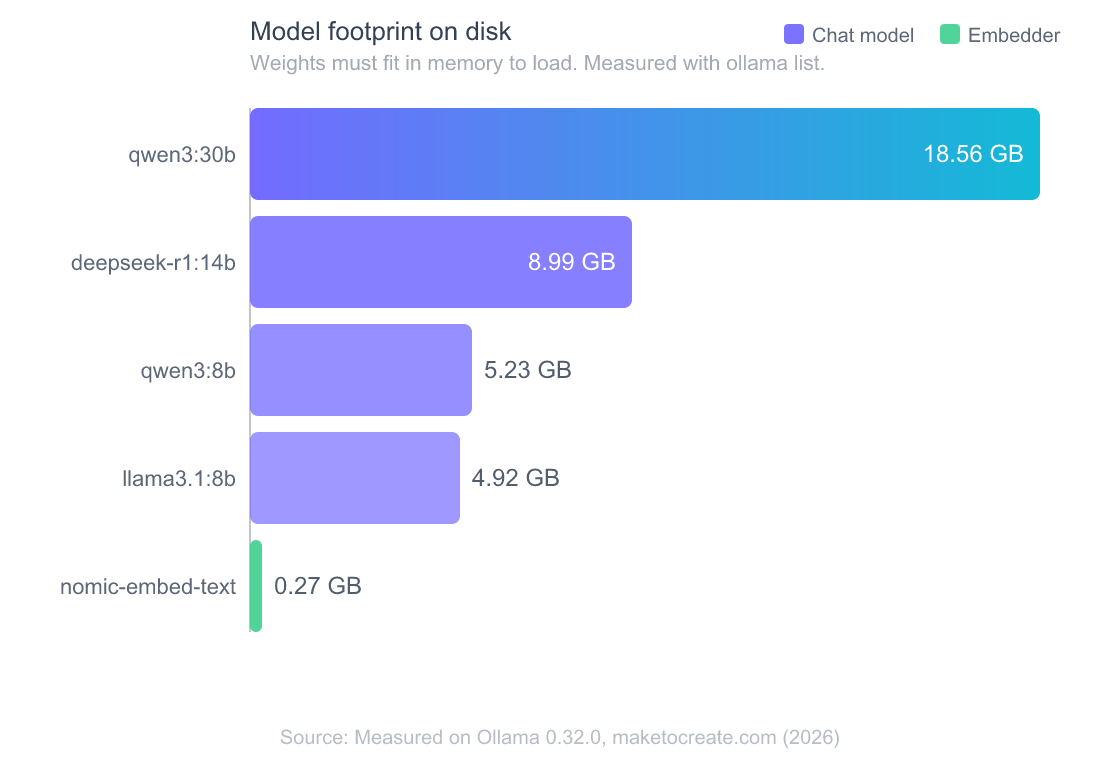
A qwen3:30b is 18.56 GB on disk. A llama3.1:8b is under 5 GB. Real RAM use runs a bit higher than the file, because the context window and key-value cache need room too. So if you select a 30B model on a 16 GB laptop, it can load partially, thrash, or fail outright, and AnythingLLM surfaces that as a dead or timing-out model rather than a clean error.
Two levers control the footprint. Quantization is the first: a q4 (4-bit) build is roughly half the size of a q8 (8-bit) one of the same model, at a small quality cost, which is why the default tags lean on q4. Context length is the second: a longer context window grows the key-value cache that sits alongside the weights, so a model that loads fine at 8K tokens can run you out of memory at 128K. On a GPU, anything that doesn’t fit in VRAM spills to system RAM and CPU, and generation slows to a crawl instead of failing outright.
The fix is to right-size. Pick a smaller or more heavily quantized tag (a :8b instead of a :30b, or a q4 variant), shrink the context length in AnythingLLM’s model settings, or free up memory by closing other heavy apps before you load. If you want a runtime with a friendlier model-size picker and per-model RAM estimates baked into the UI, our LM Studio guide pairs with AnythingLLM too, since AnythingLLM speaks to both, and LM Studio makes the memory math visible before you download.
After the fix: keep it from coming back
Roughly every recurring case I’ve seen comes from a setting drifting out of sync after a change, so treat these three as a checklist. First, restart AnythingLLM after you touch any Ollama environment variable, since OLLAMA_HOST and friends are read at startup (Ollama docs, 2026). Second, keep the Base URL identical for the chat model and the embedder. Third, remember that desktop and Docker installs use different addresses, so a config that worked on your laptop won’t copy-paste into a container.
The pattern that saved me the most time: when something breaks, I re-run curl http://127.0.0.1:11434 and ollama list first, every time, before I open AnythingLLM’s settings. Nine times out of ten the answer is right there, and I’ve stopped editing UI fields at random. It’s boring, and it works.
One more thing worth knowing if you push AnythingLLM further. It also runs MCP tool servers for its agents, configured by editing an anythingllm_mcp_servers.json file in its storage plugins directory (AnythingLLM docs, 2026). Those servers connect over their own transport, separate from the Ollama link, so a broken model connection won’t take your tools down with it. If you’re heading in that direction, our guide to Model Context Protocol servers is a good next stop.
Frequently Asked Questions
Why does AnythingLLM show no Ollama models even though Ollama is running?
Almost always the Base URL. Ollama binds to 127.0.0.1:11434 by default (Ollama docs, 2026), so a Dockerized AnythingLLM pointed at localhost reaches the container, not your host. Switch the URL to http://host.docker.internal:11434 and set OLLAMA_HOST=0.0.0.0:11434 on the host, then restart.
What Base URL should AnythingLLM use for Ollama in Docker?
Use http://host.docker.internal:11434 on macOS and Windows. On Linux, use http://172.17.0.1:11434 and add --add-host=host.docker.internal:host-gateway to your docker run command (AnythingLLM docs, 2026). You need Docker v18.03+ on Mac or Windows, or 20.10+ on Linux, for the hostname to resolve.
Why does it say model not found when I already pulled the model?
You’re likely requesting the wrong tag. On Ollama 0.32.0, asking for llama3 when you have llama3.1:8b returns {"error":"model 'llama3' not found"}, since Ollama matches the full name and tag. Run ollama list, copy the NAME column exactly, and select that string in AnythingLLM.
Does AnythingLLM need a separate embedding model?
Yes. Chat and document embedding use different models. If you set Ollama as the embedder, AnythingLLM needs a dedicated embedding model downloaded, not an LLM (AnythingLLM docs, 2026). The common choice is nomic-embed-text: if chat works but uploads fail, run ollama pull nomic-embed-text, then set it as the embedding model with the same Base URL your chat model uses.
How much RAM do I need to run a model in Ollama?
Enough to hold the weights plus the context. Measured footprints range from 4.92 GB for llama3.1:8b to 18.56 GB for qwen3:30b on Ollama 0.32.0, and real usage runs higher. If a correctly-named model won’t load, pick a smaller or more quantized tag, or reduce the context length.
The five-cause checklist
When AnythingLLM says “model not found,” the model is rarely the problem. Walk the list: is Ollama running, is the Base URL reaching the host, does the tag match ollama list exactly, did you pull the embedder, and does the model fit in memory? One of those five is your answer, and each has a one-line fix.
Start with curl and ollama list before you touch any settings. It’s the fastest way to tell a plumbing problem from a real one. When you’re ready to go deeper on models, quantization, and the hardware behind them, our guide to running LLMs locally picks up where this leaves off.