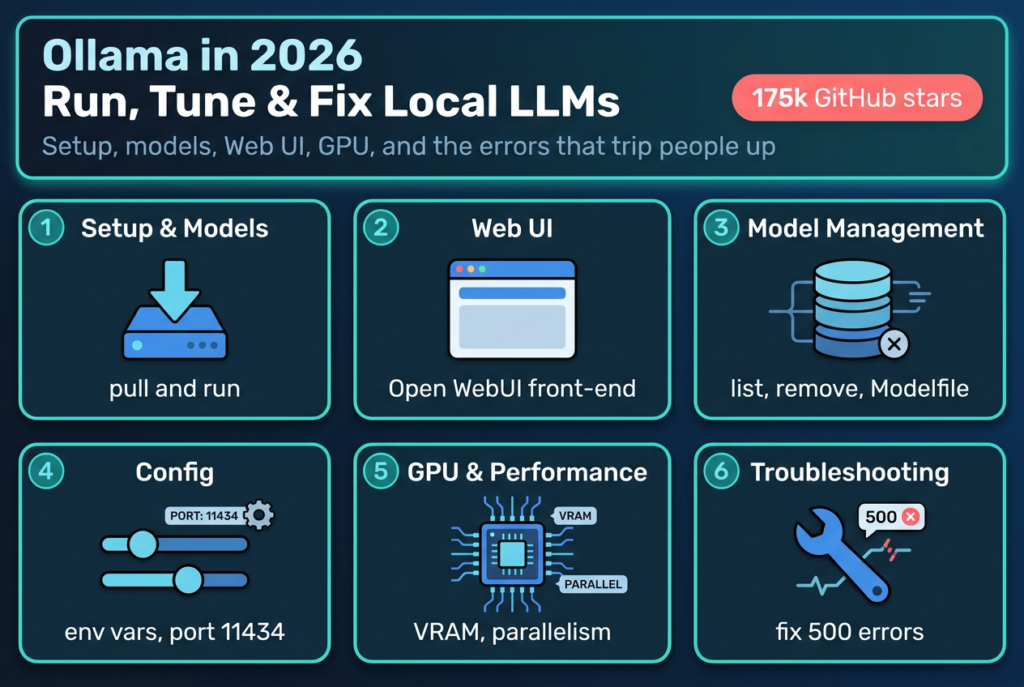
Ollama is the fastest way to get a real language model running on your own machine, and the numbers back that up: the project sits at roughly 175,000 GitHub stars and 16,700 forks, which makes it one of the most starred developer tools on the platform (GitHub, ollama/ollama, 2026). You install it, run one command, and a model is answering on localhost. That simplicity is also where most of the trouble starts, because the defaults hide a lot: where models live, whether your GPU is actually being used, how to expose the server to other machines, and what to do when it throws a 500. This guide covers the whole loop. Install, model selection, a web UI, model management, configuration, GPU tuning, integrations, the alternatives worth knowing, and the errors that send people to search at 2am.
Key Takeaways
- Ollama wraps a local inference engine behind three commands you actually use:
ollama pull,ollama run, andollama serve. It binds to127.0.0.1:11434by default (Ollama docs, 2026).- There is no single “best” model. Pick by job and by VRAM. A 7-8B model fits a typical 8GB laptop GPU; OpenAI’s
gpt-oss:20bis built to run in as little as 16GB of memory (Ollama blog, 2025).- Add a web UI with Open WebUI (about 143,000 GitHub stars), the de facto front-end for Ollama (GitHub, open-webui, 2026).
- Most “GPU not used” and “500 error” problems are config, not bugs. The fixes are environment variables:
OLLAMA_HOST,OLLAMA_MODELS,OLLAMA_KEEP_ALIVE,OLLAMA_NUM_PARALLEL.- Local stays free forever. The paid Ollama Cloud tiers ($20 and $100 a month) are for renting bigger models, not for using Ollama on your own hardware (Ollama pricing, 2026).
What Ollama actually is (and why so many people run it)
Ollama is a local model runner. It bundles an inference engine (built on the same family of work as llama.cpp), a model registry, a REST API, and a small command line into one binary you install on macOS, Linux, or Windows. The friendly llama logo and the one-line install hide the real pitch, which is control: the model weights sit on your disk, the prompts never leave your network, and there is no per-token bill.
That pitch lands because the market is nervous about exactly those things. In Kong’s 2025 enterprise survey of 550 engineers and IT decision-makers, 72% said they expect their organization’s LLM spending to rise, and security and compliance were named the biggest blockers to adoption (Kong, 2025). Running models locally is the cleanest answer to both: a fixed hardware cost instead of a metered API, and data that physically stays put. Ollama is not the only tool that does this, but it is the one most people reach for first.
For the full landscape of how local runtimes differ (Ollama versus llama.cpp versus vLLM, plus hardware sizing), our pillar guide to running LLMs locally is the place to go deep. This article stays focused on Ollama itself.
Installing Ollama and running your first model
On macOS and Windows you download the desktop app from the Ollama site. On Linux the one-liner is curl -fsSL https://ollama.com/install.sh | sh. After install, three commands carry most of the work:
ollama pull llama3.2        # download a model to disk
ollama run llama3.2         # download if needed, then start a chat
ollama list                 # see what you have locally
ollama run is the one you will type most. It pulls the model on first use, loads it into memory, and drops you into an interactive prompt. Behind the scenes a background server is listening on port 11434, which is the default Ollama binds to on 127.0.0.1 (Ollama docs, 2026). That server is the important part: anything that speaks to Ollama (a web UI, your Python script, an IDE plugin) talks to http://localhost:11434, not to the CLI.
One thing worth knowing on day one: a model name like llama3.2 resolves to a default tag, usually a 4-bit quantized build sized to run on normal hardware. You can ask for a specific size or quantization with a tag, for example ollama run llama3.1:70b or ollama run qwen3:14b-q8_0. The tag is how you trade quality for memory.
The best Ollama models in 2026 (and how to pick)
There is no universal “best Ollama model,” and anyone who gives you one answer is selling something. The right pick is a function of the job and your VRAM. Here is how I think about the main families on the registry. The repo’s own description now leads with Kimi-K2.6, GLM-5.1, MiniMax, DeepSeek, gpt-oss, Qwen, and Gemma, which tells you where the center of gravity is (GitHub, ollama/ollama, 2026).
- General chat and assistants: the Llama family (Meta’s Llama 4 builds) and Google’s Gemma are the safe defaults. Gemma’s smaller sizes are unusually good for their footprint, which makes them easy laptop picks.
- Coding:
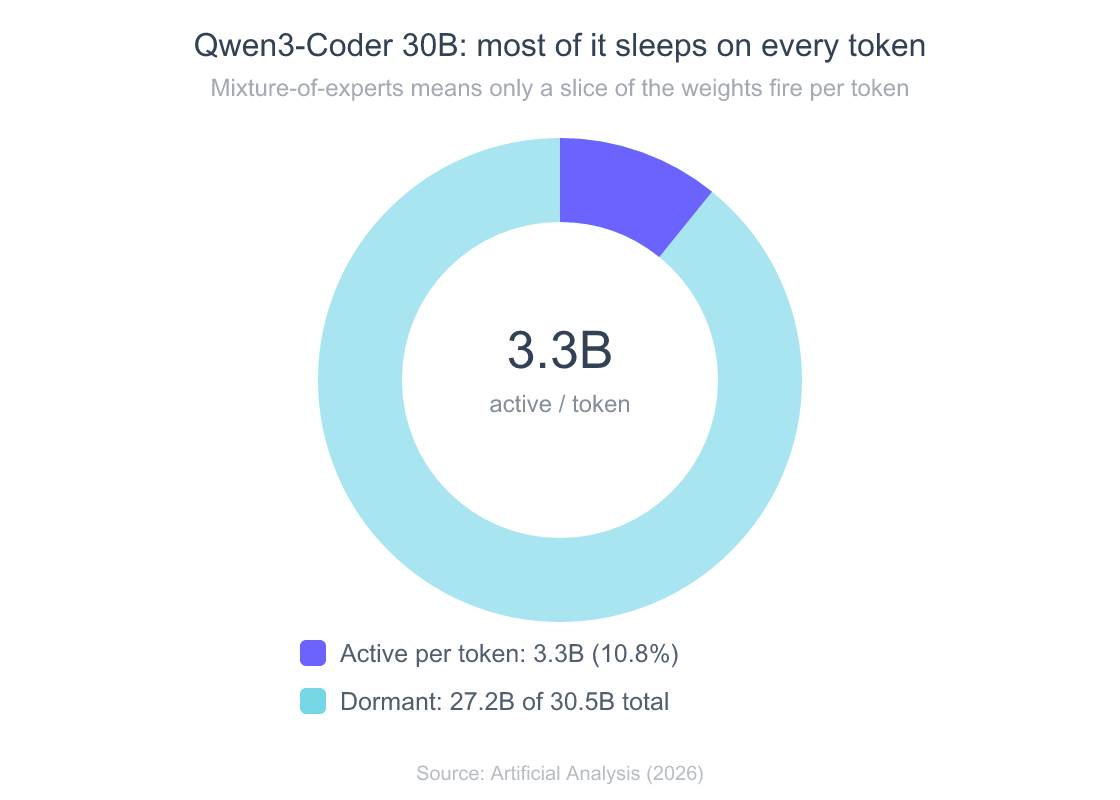
qwen3-coderis the model I reach for. The 30B “A3B” build is a mixture-of-experts design with 30.5B total parameters but only 3.3B active per token, a 262K-token context window, and around 100 tokens per second of output on capable hardware (Artificial Analysis, 2026). That sparse design is why a “30B” coding model can feel quick on a single GPU. - Reasoning and math:
deepseekmodels (the R1 line and the V3 series) are the popular local reasoning picks, which is whyollama deepseekis one of the most searched model terms. GLM (theglm-4.5builds) andphi4, Microsoft’s compact reasoner, round out the field. - OpenAI’s open models: since August 2025 you can run OpenAI’s
gpt-ossweights locally through Ollama, in partnership with OpenAI. Thegpt-oss:20bbuild targets machines with as little as 16GB of memory;gpt-oss:120bis sized to fit a single 80GB GPU (Ollama blog, 2025). - Embeddings, not chat:
bge-m3is the multilingual embedding model people pull for retrieval and RAG. It does not chat. You call it through the embeddings endpoint to turn text into vectors.
A practical rule that has held up across my own machines: a 7-8B model at 4-bit quantization wants roughly 6GB of free VRAM, a 13-14B model wants double that, and a 70B model wants 40GB or more. If you only remember one thing, remember that the model has to fit in memory or it spills to CPU and crawls. For the deeper “which model is genuinely best for writing code” question, including hosted models, see our ranked guide to the best LLMs for coding and the specific “best Ollama model for coding” picks there. If you want models that skip the safety refusals for legitimate work, that is a different decision covered in guide to running uncensored models locally.
Giving Ollama a web UI
The CLI is fine for testing, but nobody wants to chat in a terminal all day. The standard answer is Open WebUI, a self-hosted, fully offline interface that talks to Ollama (and any OpenAI-compatible API) and adds chat history, multi-model switching, document upload, and built-in RAG. It is wildly popular for a reason: around 143,000 GitHub stars and a large active community (GitHub, open-webui, 2026). When people search “ollama web ui,” “openwebui ollama,” or “web ui for ollama,” this is almost always what they mean.
The quickest way to run it is Docker, pointed at your existing Ollama server:
docker run -d -p 3000:8080 \
  --add-host=host.docker.internal:host-gateway \
  -v open-webui:/app/backend/data \
  --name open-webui \
  ghcr.io/open-webui/open-webui:main
Open http://localhost:3000, create the first account (it stays local), and your pulled models appear in the picker. If Open WebUI cannot see your models, it is almost always the network binding, not the UI. Inside Docker, localhost means the container, so Ollama has to be reachable on the host. That is the same OLLAMA_HOST setting covered in the config section below. Lighter alternatives exist (Hollama, Lobe Chat, the Page Assist browser extension), but Open WebUI is the default I recommend unless you specifically want something smaller.
Managing models: list, remove, Modelfiles, and where they live
Models are large, and a pull-happy week will quietly eat your disk. The management commands are short:
ollama list                 # everything you have, with sizes
ollama rm llama3.1:70b       # delete a model (same as "remove")
ollama show qwen3-coder      # inspect a model's parameters and template
ollama ps                    # what is loaded in memory right now
ollama rm is the answer to both “ollama delete model” and “ollama remove model,” which are the same command. To reclaim space, ollama rm the big tags you are not using and check ollama list for surprises.
Where Ollama stores models is the other common question, because the blobs are big and you may want them on another drive. The defaults (Ollama docs, 2026):
- macOS:
~/.ollama/models - Linux:
/usr/share/ollama/.ollama/models - Windows:
C:\Users\%username%\.ollama\models
To move them, set the OLLAMA_MODELS environment variable to a new directory and restart the server. On Linux, give the ollama service user access to the new path with sudo chown -R ollama:ollama <directory>, or the server will fail to read its own models.
Modelfiles are how you customize a model without retraining anything. A Modelfile is a short recipe: a base model, a system prompt, and parameters like temperature. You build a named variant from it with ollama create:
# Modelfile
FROM llama3.2
SYSTEM "You are a terse senior engineer. Answer in code first, prose second."
PARAMETER temperature 0.4
ollama create terse-eng -f Modelfile
ollama run terse-eng
That is the whole “ollama create from modelfile” workflow. It is also how you import an arbitrary GGUF file you downloaded from Hugging Face: point FROM at the local .gguf path and ollama create wraps it into a runnable model. People sometimes call this “fine tuning,” but it is not. A Modelfile changes behavior through prompting and parameters, not weights. Actual fine tuning happens outside Ollama; you then import the resulting GGUF this way.
Configuring Ollama: ports, network access, and system prompts
Almost every “advanced” Ollama question comes down to environment variables. These are the ones that matter (Ollama docs, 2026):
OLLAMA_HOSTsets the bind address. The default is127.0.0.1:11434, which means localhost only. To reach Ollama from another machine (or from a Docker container, or your phone), setOLLAMA_HOST=0.0.0.0:11434and restart the server. That is the fix behind nearly every “ollama serve 0.0.0.0” search. The default port is11434, and that is the number to remember for “ollama default port.”OLLAMA_MODELSchanges where weights are stored (see above).OLLAMA_KEEP_ALIVEcontrols how long a model stays in memory after a request. The default is 5 minutes. Set it to24hto keep a model hot for the day,-1to never unload it, or0to drop it immediately and free the VRAM (Ollama docs, 2026).OLLAMA_NUM_PARALLELsets how many requests a loaded model handles at once. Bump it if you are serving more than one user or running an agent that fires concurrent calls.
How you set these depends on the platform. On Linux with systemd you edit the service with systemctl edit ollama.service and add Environment="OLLAMA_HOST=0.0.0.0". On macOS you use launchctl setenv. On Windows you set a user environment variable and restart Ollama. The base URL other tools ask for is just this address: http://localhost:11434 locally, or http://<your-ip>:11434 once you have opened the bind.
For a per-conversation system prompt, you can set it in a Modelfile (permanent), pass it in the API call’s system field (per request), or type /set system "..." inside an interactive ollama run session. To uninstall Ollama, remove the app on macOS or Windows the normal way; on Linux, stop and disable the service, then delete the binary and the /usr/share/ollama data directory. Deleting ~/.ollama also clears your downloaded models, so back them up first if you want to keep them.
Getting the GPU to actually work
“Ollama not using GPU” is the single most common performance complaint, and it is almost always one of three things. First, the model does not fit. If a 70B model needs more VRAM than your card has, Ollama offloads layers to the CPU, and the whole thing slows to a crawl. Run ollama ps while a model is loaded; it shows the CPU/GPU split. If you see a big CPU percentage, you are over your VRAM budget. Pick a smaller tag or a heavier quantization.
Second, the drivers or container are not wired up. On NVIDIA you need a current driver and CUDA; in Docker you need the NVIDIA Container Toolkit and the --gpus all flag, or the container never sees the card. Third, you are on hardware Ollama supports unevenly. Apple Silicon works out of the box through Metal. AMD support has matured. Intel GPU support (“ollama intel gpu”) is the weakest of the three and often the reason a machine quietly runs on CPU.
A few knobs help once the GPU is recognized. OLLAMA_NUM_PARALLEL raises throughput for concurrent requests. For multi-GPU setups, Ollama splits a model across cards automatically when one card is not enough, though you usually get the best single-request latency by keeping a model on one GPU when it fits. And remember the memory math: gpt-oss:120b is explicitly built to fit a single 80GB GPU, while gpt-oss:20b runs in as little as 16GB (Ollama blog, 2025). Those two numbers are a useful mental yardstick for everything else.
Plugging Ollama into your stack
The reason Ollama spread so fast is that it speaks an OpenAI-compatible API, so most tools can point at it with a base URL change. The high-traffic integrations people search for:
- Python:
pip install ollama, thenollama.chat(model="llama3.2", messages=[...]). Under the hood it is just HTTP tolocalhost:11434, so the official OpenAI Python client works too if you setbase_url="http://localhost:11434/v1". - Editors: Cursor and VS Code (via Continue or similar extensions) both accept a custom OpenAI-compatible endpoint, which is how “cursor ollama” and “vscode ollama” setups work. You point the extension at your local base URL and pick a pulled model.
- Automation: n8n ships an Ollama node, so “n8n ollama integration” is a first-class path for local AI workflows. Dify, the LLM app platform, connects the same way.
- Documents and home:
paperless-aiuses Ollama to tag and summarize scanned documents, one of the most-searched Ollama integrations. Home Assistant can use a local model as a voice assistant. AnythingLLM andbrowser-useboth plug in for RAG and browser automation respectively. - Image pipelines: ComfyUI nodes can call Ollama for prompt expansion and captioning alongside image generation.
If you are wiring Ollama into agentic tools, the Model Context Protocol is increasingly how those tools expose capabilities. Our guide to MCP servers covers that side. The pattern across all of these is identical: set the base URL to your Ollama server, pick a model, and confirm the server is reachable (the 0.0.0.0 bind again if the tool runs in a container).
Ollama alternatives, Turbo, and pricing
Ollama is the popular default, not the only option, and “ollama alternatives” is a fair search. The honest framing: alternatives split into desktop apps and headless runners. Among open-source local runners, Ollama’s star count dwarfs the field, but GPT4All, LocalAI, and Jan all have real, active communities.
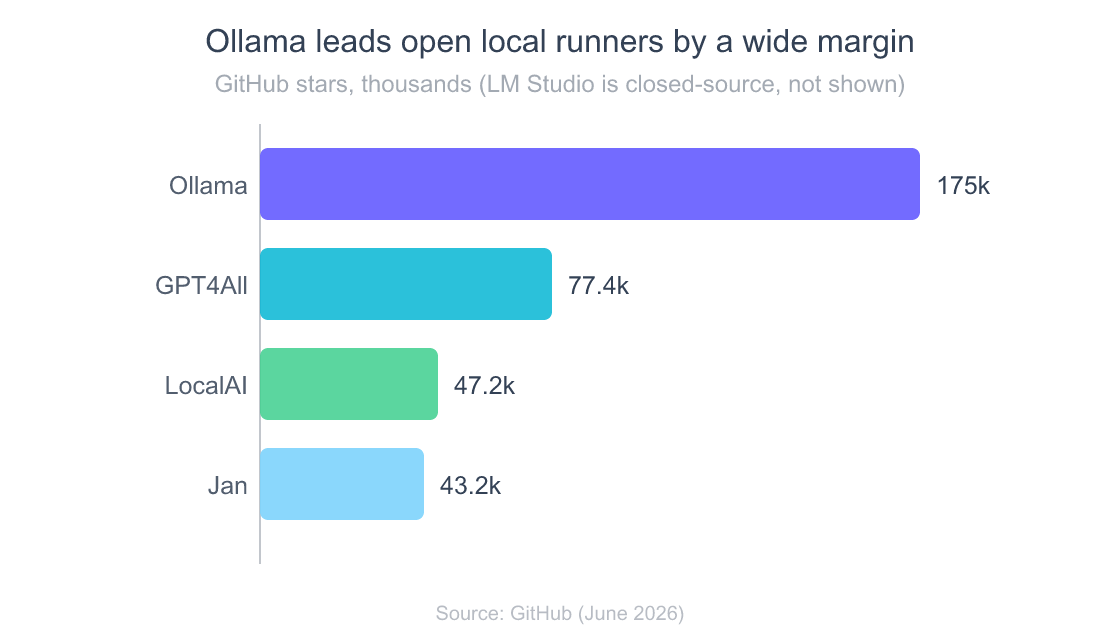
The comparison most people actually want is Ollama versus LM Studio, because LM Studio is the closest competitor with a polished GUI. That head-to-head has its own home: see our guide to LM Studio and which local tool to pick. The short version is that Ollama is the better fit when you want a scriptable server and an API; LM Studio leans toward a desktop app experience. For the broader runtime question (where llama.cpp and vLLM fit), the pillar guide owns that comparison.
Ollama Turbo deserves a clarification, because the name confuses people. Turbo was the preview name for Ollama’s cloud inference, now folded into Ollama Cloud. It lets you run larger models than your hardware allows by renting datacenter GPUs, billed as a flat subscription rather than per token. Crucially, this is optional and separate from local use.
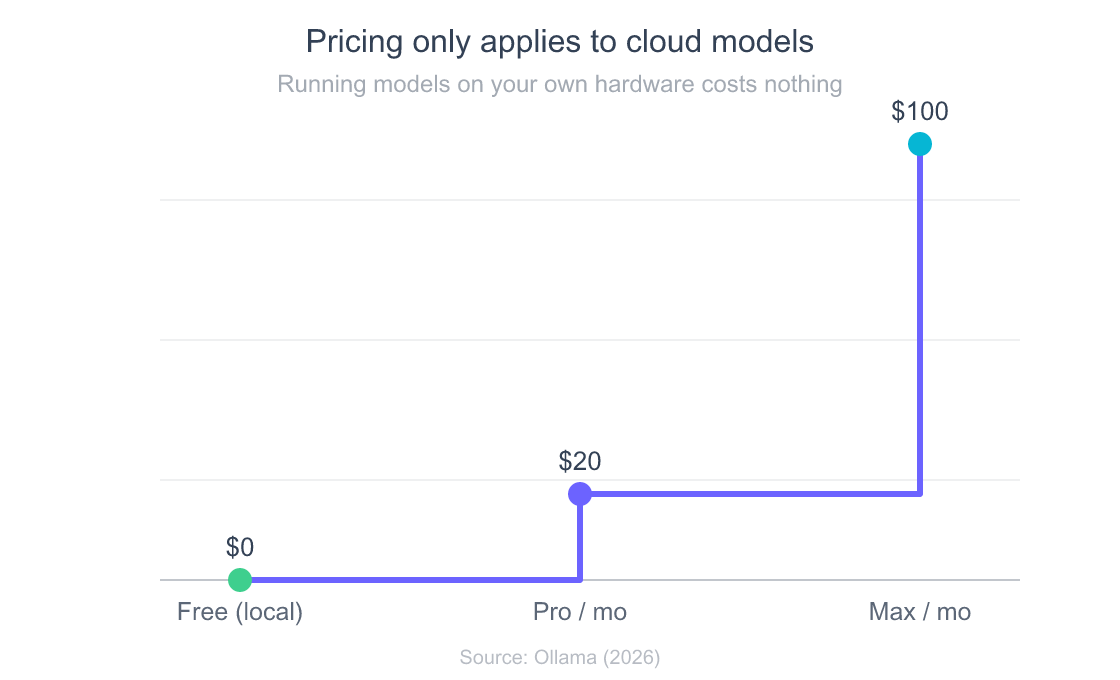
On pricing: running Ollama on your own machine is free, forever, with no account required. The paid tiers are only for the cloud models. Free is $0, Pro is $20 a month (or $200 a year) and adds bigger cloud models plus more usage, and Max is $100 a month for heavier concurrency (Ollama pricing, 2026). If you came here to run models locally, you never touch this page.
Fixing the errors everyone hits
These four are the searches that bring people here in a panic. The fixes are usually mundane.
Ollama 500 internal server error. This is a server-side failure, not a client bug, and the cause is almost always memory. A model too big for your RAM/VRAM throws a 500 when it tries to load. Drop to a smaller tag, close other GPU apps, or raise the available memory. The “remote host” variant of this error (a 500 when calling Ollama from another machine) is a different beast: it usually means the request reached the server but the model failed to load there, so check the server’s logs and its memory, not the network.
Why is Ollama not opening / Ollama offline. On desktop, “not opening” usually means the background server did not start, or another process already holds port 11434. Check whether something is on that port (lsof -i :11434 on macOS/Linux), and try ollama serve from a terminal to see the actual startup error. “Ollama offline” in a tool like Open WebUI almost always means the UI cannot reach the server, which loops back to the OLLAMA_HOST=0.0.0.0 bind and the firewall.
Error: unable to load model. A corrupted or partial download, or a model file that does not match the runtime, throws this. The reliable fix is to ollama rm the model and ollama pull it again. If it persists on a specific GGUF you imported, the file or its quantization is likely the problem, not Ollama.
The pattern across all four is the same: Ollama errors are usually about memory or networking, in that order. Check ollama ps for the memory split and confirm the bind address before you assume something is broken.
Frequently Asked Questions
What is the default Ollama port?
Ollama binds to 127.0.0.1 on port 11434 by default. To accept connections from other machines or containers, set OLLAMA_HOST=0.0.0.0:11434 and restart the server (Ollama docs, 2026).
Where does Ollama store models?
By default, models live in ~/.ollama/models on macOS, /usr/share/ollama/.ollama/models on Linux, and C:\Users\%username%\.ollama\models on Windows. Set the OLLAMA_MODELS environment variable to move them to another drive (Ollama docs, 2026).
Is Ollama free?
Yes, for local use. Downloading and running models on your own hardware costs nothing and needs no account. The paid Pro ($20/month) and Max ($100/month) tiers are only for Ollama’s cloud-hosted models (Ollama pricing, 2026).
What is the best Ollama model for coding?
For most local setups, qwen3-coder is the strongest pick. Its 30B mixture-of-experts build activates only 3.3B of 30.5B parameters per token and carries a 262K context window, so it stays fast on a single GPU (Artificial Analysis, 2026). For the full ranking, including hosted models, see our best LLM for coding guide.
Why is Ollama not using my GPU?
The usual cause is that the model is too large for your VRAM, so Ollama offloads layers to the CPU. Run ollama ps to see the CPU/GPU split, then pick a smaller model tag or a heavier quantization. The other common causes are missing GPU drivers or, in Docker, a container started without --gpus all.
How do I give Ollama a web interface?
Run Open WebUI, the standard self-hosted front-end for Ollama, usually via Docker pointed at http://localhost:11434. It adds chat history, model switching, and document RAG, and runs fully offline (GitHub, open-webui, 2026).
What is Ollama Turbo?
Turbo was the preview name for Ollama’s cloud inference service, now part of Ollama Cloud. It runs larger models on rented datacenter GPUs for a flat subscription instead of a per-token bill. It is optional and entirely separate from running Ollama locally.
The bottom line
Ollama earns its 175,000 stars by making the first ten minutes effortless, then it asks you to learn a handful of environment variables to go past the demo. The whole tool fits in your head once you internalize three facts: the server lives at localhost:11434, models have to fit in memory or they fall back to the CPU, and almost every problem is solved by an OLLAMA_* variable rather than a reinstall. Pick a model that matches your VRAM, add Open WebUI if you want a real interface, set OLLAMA_HOST=0.0.0.0 if anything else needs to reach it, and you have a private, free, capable model running on your own machine.
When you are ready to compare Ollama against the other ways to run models locally, or to size hardware for bigger weights, start with our complete guide to running LLMs locally.