Why Ask an AI Before You Press Play?
You clicked the thumbnail. Two minutes in, the host is still recapping their last video. Three minutes in, they’re reading a sponsor segment. Four minutes in, you finally hear the first concrete claim, and you’ve already started wondering if any of this was actually worth the time you committed.
This is the YouTube triage problem, and it quietly eats more of my week than any single meeting does. YouTube said back in 2017 that viewers were already watching a billion hours of video every day (YouTube Official Blog, 2017). One industry estimate puts the average video at 12 minutes 26 seconds in 2025, up from just over 9 minutes in 2015 (Photutorial, 2025). My read is that most of that growth wasn’t viewer-driven. YouTube lowered the minimum length for mid-roll ads from 10 minutes to 8 in July 2020 (Tubefilter, 2020), and creators have been padding toward that line ever since.
So the question stops being “what should I watch?” and starts being something more useful: should I be watching this at all? That’s a judgment call AI is now genuinely good at, if you pick the right kind of AI tool. Below is what’s actually changed, why most YouTube summarizers can’t be trusted as a verdict, and how I’ve started letting an AI pre-screen videos before I commit a single minute of attention.
how solo founders are stacking AI agents
Key Takeaways
- YouTube viewers were watching 1B+ hours a day as far back as 2017, and one 2025 estimate puts the average video at 12:26, up from about 9 minutes in 2015 (Photutorial, 2025).
- 55% of viewers are gone by the 60-second mark and the average video keeps just 23.7% of its audience, per a 10,000-video benchmark (Retention Rabbit, 2025, archived). Most of that is mismatched packaging, not short attention spans.
- Summarizers make things up. On Vectara’s HHEM-2.3 leaderboard (September 2026), mainstream models hallucinate in 3.1% to 13.6% of summaries. Transcript-grounded verdict tools like youtube-verdict cite verbatim quotes with timestamps, so you can check them.
- The right pre-watch question isn’t “summarize this”, it’s “should I watch this at all?”
Table of Contents
- Why Has YouTube Become a Decision Fatigue Problem?
- What’s Actually In a 12-Minute YouTube Video?
- How Do AI Tools Decide If a Video Is Worth Watching?
- Why Do Most AI Summarizers Hallucinate?
- How Do You Run a Pre-Watch Verdict in 30 Seconds?
- When Should You Trust an AI Verdict Over Your Own Judgment?
- FAQ
Why Has YouTube Become a Decision Fatigue Problem?
YouTube reached 84% of U.S. adults in Pew’s 2025 survey, with about half visiting at least once a day and 33% visiting several times a day (Pew Research Center, 2025). That isn’t social media use, it’s infrastructure. And for heavy users, a surprising share of that daily time goes to picking what to watch next rather than watching it.
The triage problem is structural. YouTube’s recommender wants engagement; it doesn’t care whether you regret the watch afterward. Monetized creators can turn on mid-roll ads in any video that runs 8 minutes or longer (YouTube Help), so the editorial economics of the platform tilted toward longer videos. A 9-minute video that used to be tight became a 12-minute video with a sponsor read, a recap, and a “before we get into it” intro that runs three minutes.
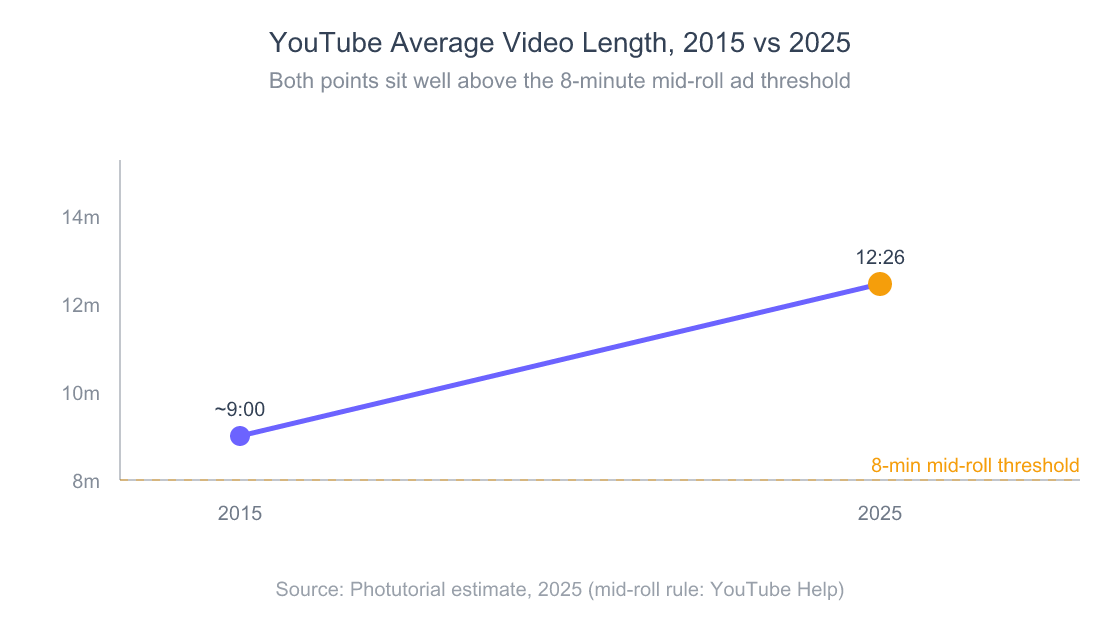
The estimated average YouTube video grew by more than three minutes between 2015 and 2025. YouTube doesn’t publish an official average, so treat both points as industry estimates.
Now layer the attention math on top. Microsoft’s 2025 Work Trend Index data found that employees get interrupted every two minutes during core work hours, 275 times a day, by meetings, emails or chats (Microsoft WorkLab, 2025). In that environment, one badly chosen 12-minute video isn’t 12 minutes of cost. It’s 12 minutes plus the effort of climbing back into whatever you were doing before it. The decision of whether to click matters more than what to click next.
I started tracking my own YouTube regret rate for a month: the share of videos where, by the end, I’d have rather had the 10–15 minutes back. It was 60%. Not because the videos were bad in absolute terms. They were just the wrong content for me, and I had no fast way to find that out before pressing play. That regret rate is the thing AI is now well positioned to fix.
Citation capsule: YouTube viewers were already watching a billion hours of video per day by 2017 (YouTube Official Blog, 2017), and one 2025 estimate puts the average video at 12 minutes 26 seconds (Photutorial, 2025). Combined with Microsoft’s 2025 finding that employees are interrupted every two minutes during core hours, a single mis-clicked YouTube video costs more than its runtime, which makes pre-watch triage the highest-leverage decision in the whole viewing flow.
why agents now make pre-decisions, not just summaries
What’s Actually In a 12-Minute YouTube Video?
More than 55% of viewers are gone by the 60-second mark, and fewer than 45% make it past the first minute regardless of video length, according to Retention Rabbit’s 2025 benchmark of 10,000+ videos across 1,000+ creators (Retention Rabbit, 2025, archived). The same report puts the viewer’s “consideration window” at about 8 seconds. This isn’t a short-attention-span story, it’s a packaging-versus-content mismatch story. A lot of the people who clicked were sold on a thumbnail and a title that the actual video didn’t deliver on, and they bailed before the hook even landed.
The structural anatomy of a long-form YouTube video, after watching enough of them, looks roughly like this: a 30-to-60-second hook, a 30-to-90-second intro and channel logo, a 60-to-120-second sponsor read, a 60-second “what we covered last time” recap, then the actual substance, then an outro asking you to like and subscribe. On a 12-minute video, you might get 6–8 minutes of real content. On a 22-minute “deep dive,” you might get 10. Everything else is structural overhead. That’s my own rough tally, not a study, but it matches what the verdict reports keep flagging.
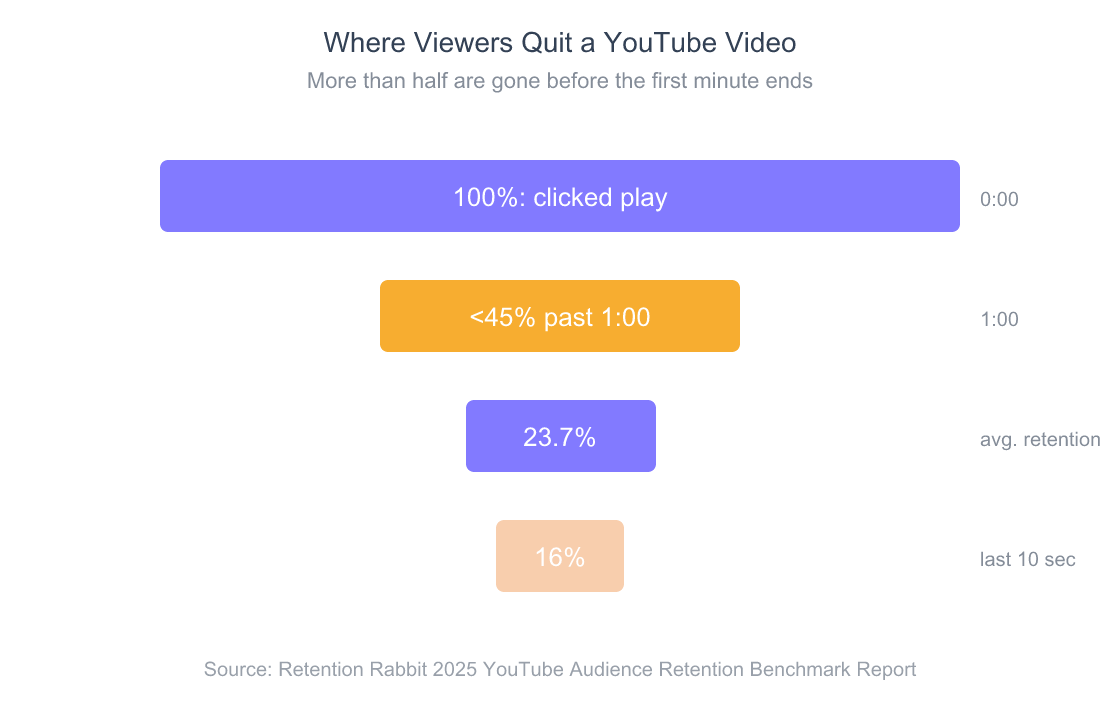
More than half of viewers leave inside the first minute, and only 16% are still there for the last ten seconds. The triage problem isn’t viewer attention spans: it’s that videos get packaged to attract clicks, not to deliver on them.
Sponsor reads compound the bloat. YouTube’s mid-roll rules let monetized creators turn on ads in any video of 8 minutes or more (YouTube Help). So creators stretched. Editing a 7-minute video into an 8-and-a-half-minute video isn’t dishonest; it’s optimal for the creator. But the cost of that stretch is paid by every viewer who clicks expecting a tight watch.

What you actually want, then, isn’t a summary of the video. You want a verdict. You want to know: of these 12 minutes, how many minutes contain something you don’t already know? Where are the actual claims? Are they backed by evidence shown on screen, or are they vibes? Is there a pitch coming, and when? Does the host eventually get to the point or just circle around it? That’s a structurally different question from “what’s the gist,” and most AI tools answer the wrong one.
Citation capsule: More than 55% of YouTube viewers are gone by the 60-second mark, the average video retains just 23.7% of its audience, and only 16% of viewers reach the final 10 seconds, based on 10,000+ videos analyzed in 2025 (Retention Rabbit, 2025, archived). Those early exits aren’t proof of a short attention span. They’re proof that thumbnails and titles routinely promise content the video doesn’t deliver. A pre-watch verdict tool turns that gut “this isn’t what I clicked for” reaction into a deliberate decision made before play.
how AI is rewriting the click-and-consume model
How Do AI Tools Decide If a Video Is Worth Watching?
Three categories of pre-watch tools have emerged, and they aren’t equivalent. NotebookLM’s mobile app alone hit 8 million monthly active users by late 2025, with web users more than doubling year-over-year (a16z State of Consumer AI, 2025), a sign that “throw a long thing at AI and ask it questions” has gone mainstream. But the three approaches give very different answers when applied to YouTube.
Vibes summarizers are the largest category: Chrome extensions and chatbot plugins that paste a transcript into a general LLM and ask “summarize this video.” They’re fast and free. They’re also the most prone to hallucination because they typically don’t preserve timestamp grounding, and the model is nudged to “be helpful” by smoothing rough edges, inventing missing structure, and softening pitches into neutral content.
Transcript-grounded summarizers like NotebookLM, Glasp, and Perplexity’s video features actually keep the source document attached and cite passages back. They’ll happily summarize, but they don’t end in judgment. You still have to read the summary, decide what’s signal and what’s filler, and compare it against your own attention budget. That’s better than vibes, but the decision is still on you.
Verdict tools are the newest category and the smallest. The defining trait isn’t summarization; it’s that the output ends in a committed label tied to a score, with the watch-worthy minutes called out by timestamp. The Claude Code skill youtube-verdict is the one I built and use daily. It returns WATCH or SKIP with a 0–10 score, and scores of 5 and 6 aren’t allowed, so it can’t hide in the middle. Alongside the verdict you get a best-minutes range, a title-vs-content and thumbnail-vs-content gap rating, a substance-density read (concrete claims versus vague ones), and three follow-up questions. Every flag is backed by a verbatim transcript quote with a timestamp, so you can spot-check the AI’s reasoning instead of trusting it.
full walkthrough of the youtube-verdict skill and its dashboard
The shift from “summarize this” to “decide this” is the real product change. Summaries are a tool; verdicts are an editor. A summary tells you what a video is about. A verdict tells you, given your goals and the opportunity cost of 15 minutes, whether to spend them. That’s a fundamentally different relationship to the AI, closer to a research assistant who says “skip this one, the substance is thin” than a transcript reader who hands you 200 words and walks away.
Citation capsule: NotebookLM’s mobile app reached 8 million monthly active users by late 2025, with web users more than doubling year-over-year (a16z, 2025), proof that AI-mediated content consumption has crossed into mainstream behavior. The next step isn’t better summarization but verdicts: AI that ends in a recommendation rather than a recap, turning passive content extraction into active gatekeeping.
Why Do Most AI Summarizers Hallucinate?
The Vectara HHEM-2.3 hallucination leaderboard tests models on summarizing source documents, and its September 22, 2026 update is unforgiving. Several well-known models introduce unsupported content in more than 10% of summaries, including Claude Opus 4.7 (12.0%) and the Gemini 3.1 Pro preview (10.4%), while the much smaller GPT-5.4 Nano sits at 3.1% (Vectara, 2026). Anthropic’s Claude 5 models (Fable 5.1, Opus 5.5, Sonnet 5.5) weren’t on the board yet when I checked in October 2026. The smartest-sounding model isn’t automatically the most faithful one. That’s exactly the wrong property if you’re using AI to decide whether to watch a video.
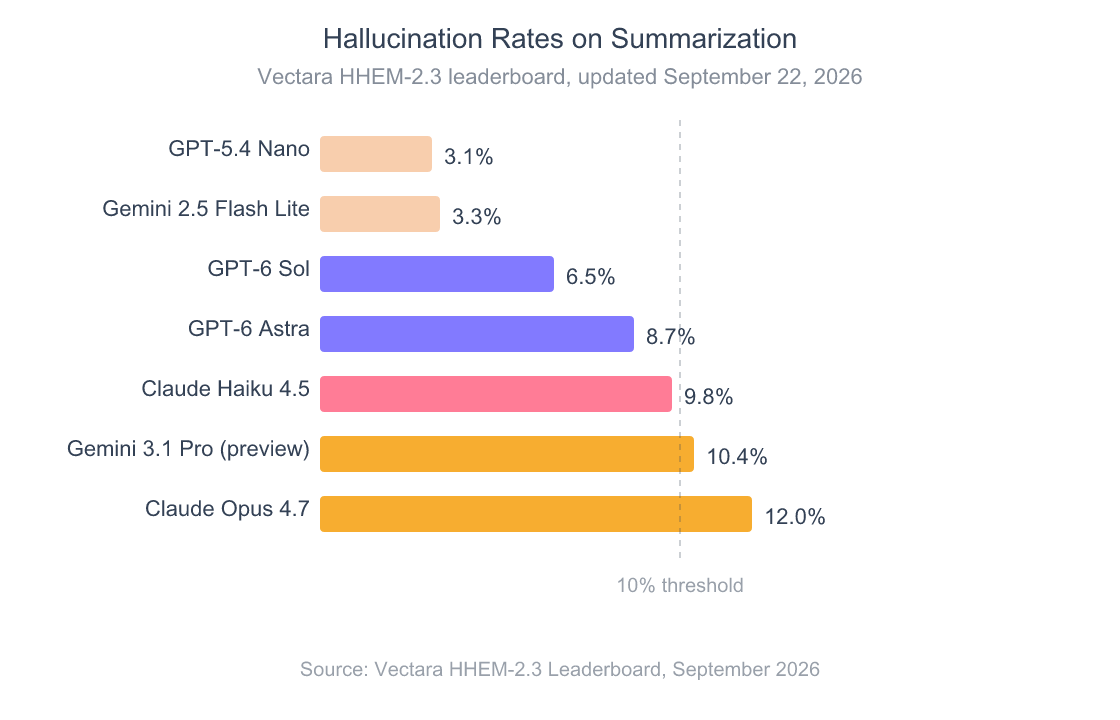
Bigger, newer frontier models aren’t automatically more faithful summarizers than small ones: the opposite of intuition. For YouTube triage, that means a transcript-grounded tool that quotes the source verbatim is structurally safer than a “smart” free-form summary.
Why does this happen? My working theory: frontier models are tuned to elaborate, infer, and connect, which is useful when answering open questions and dangerous when faithfulness to a source matters. When a transcript has a vague claim, a capable model often “helps” by filling in plausible context that wasn’t in the source. The summary reads sharper than the video. It’s also wrong about the video.
This is the structural reason verdict tools beat vibes summaries. A transcript-grounded verdict requires the AI to cite every flag (every “this is good,” “this is filler,” or “this claim is unsubstantiated”) with a verbatim quote and a timestamp. The grounding constraint is the hallucination cure. If the AI can’t find a quote to back its claim, it can’t make the claim. The youtube-verdict skill enforces this explicitly: it runs a structure pass, then a claim-and-evidence inventory one section at a time, and it ships a quote-verification step that checks every cited line is a real substring of the transcript.
When I first wired this up, I expected the AI to be roughly 80% right. What I didn’t expect was how much I’d start trusting the timestamps over the verdict. Even when I disagreed with the score, the timestamp citations let me jump straight to the moment in question and judge for myself. Five seconds of spot-check beats fifteen minutes of unfiltered watching every single time.
Citation capsule: Vectara’s HHEM-2.3 hallucination leaderboard, updated September 22, 2026, shows frontier models such as Claude Opus 4.7 (12.0%) and the Gemini 3.1 Pro preview (10.4%) introducing unsupported content in more than 10% of document summaries, while smaller models like GPT-5.4 Nano (3.1%) and Gemini 2.5 Flash Lite (3.3%) stay far more faithful (Vectara, 2026). For YouTube pre-watch decisions, transcript-grounded tools that cite verbatim quotes with timestamps are structurally safer than free-form summarizers, because the grounding constraint closes off the most common hallucination paths.
why grounded outputs matter for AI evaluation
How Do You Run a Pre-Watch Verdict in 30 Seconds?
The actual workflow is shorter than reading about it. With a transcript-grounded verdict tool like youtube-verdict, the flow is: paste the URL, wait roughly 20–30 seconds for the transcript fetch and analysis passes, and read the dashboard. Total elapsed time per decision: about half a minute, against an opportunity cost of 12+ minutes if the verdict is SKIP. Re-runs on the same video come straight from a local cache.
Step by step, here’s what happens under the hood when I paste a YouTube link:
- Transcript fetch. A small Python script (built on
yt-dlpandyoutube-transcript-api) pulls the captions and metadata directly from YouTube: title, channel, duration, language, thumbnail, full timestamped transcript. Videos under 3 minutes, live streams, playlists, and non-English content get rejected with a documented error rather than partial garbage. - Pass 1: structure extraction. The AI reads the transcript and segments it: hook, main sections, sponsor reads and pitches, outro. This is the table-of-contents pass, figuring out what the video is built from.
- Pass 2: claim and evidence inventory. Section by section, the AI inventories every concrete claim and asks: is this backed by evidence the host actually shows or names? Or is it vague? Each finding gets attached to a verbatim quote with a
[mm:ss]timestamp. - Pass 3: thumbnail read. If the host model can see images, it extracts the thumbnail’s text overlays and promises (say, “$10K/DAY”) so the verdict can check them against what the transcript actually delivers. If not, this pass is skipped silently.
- Verdict synthesis. Everything compresses into a
WATCHorSKIPlabel, a 0–10 score, a best-minutes range (e.g., “watch 03:45–07:20”), title and thumbnail gap ratings, a who-should-watch / who-should-skip split, and three questions worth asking next.

The output isn’t just a vibe check. It’s a report (saved to ~/youtube-reports/ with the date, a slug and the video ID in the filename, so I can grep my history later) and it includes a substance density count (concrete claims vs. vague ones), an evidence count (does the host actually show data or just gesture at it), and pitch flags (is there a course, a newsletter, a paid product being sold, and at what timestamp). Knowing a video is WATCH (7/10): best minutes 4:30–8:10, sponsor at 9:00, course pitch at 14:20 is the difference between watching it strategically and watching it passively.
The 88% AI-at-work figure from EY’s 2025 Work Reimagined Survey (EY, 2025) cuts both ways. The same survey found most of that use is limited to basic tasks like search and summarization, and only 5% of workers use AI in advanced ways. The compounding gains come from using AI as a gatekeeper: not just to answer, but to decide what’s worth your attention next. Pre-watch verdicts are the smallest, most concrete version of that idea.
Citation capsule: A pre-watch verdict on a 12-minute YouTube video runs in roughly 20–30 seconds in my use (a transcript fetch plus multi-pass AI analysis: structure extraction, then a claim and evidence inventory) and outputs a
WATCHorSKIPlabel with a 0–10 score and timestamped citations. Against an estimated 12:26 average video length (Photutorial, 2025), the time arbitrage on a singleSKIPverdict is roughly 25-to-1.
When Should You Trust an AI Verdict Over Your Own Judgment?
Not always. The places AI verdicts are sharpest are exactly the places gut-feel triage is weakest: long-form educational content, technical talks, conference keynotes, podcast clips, and any video where the title and thumbnail oversell badly enough that most viewers leave inside the first minute. For that bucket, an AI that has read the entire transcript before you start beats a human guessing from a thumbnail.
Where verdicts get worse: entertainment content where the value isn’t in the claims (sketches, music, vlogs, narrative storytelling), niche topics where the AI doesn’t know what’s actually new versus what’s well-established, and any video where the value is in how something is delivered rather than what’s said. A 10-minute essay video by a great communicator can score SKIP (4/10) on substance density and still be one of the best things you’ll watch that week.
Worth noting: A
SKIPverdict isn’t a value judgment about the video. It’s a value judgment about the match between the video and the asker. The same video can be aWATCHfor someone learning the topic for the first time and aSKIPfor someone three years deep. The youtube-verdict skill includes a who-should-watch / who-should-skip split partly to make this explicit: the score is a relationship, not a property.
The rule I’ve landed on after a few months of using verdicts: trust the timestamps, treat the score as a recommendation, and override freely on entertainment. When the AI says SKIP on a tutorial because every claim is vague, it’s almost always right. When it says SKIP on something a friend recommended because the structure is loose, that’s worth a second look. The friend knows you. The AI knows the transcript.
where AI judgment is reliable and where it isn’t
Try It on Your Next Open Tab
You don’t need a complicated setup to test this. Pick the next YouTube video you were about to watch (preferably one that’s longer than 10 minutes) and run it through a transcript-grounded verdict tool before you press play. youtube-verdict installs with npx skills add nishilbhave/youtube-inspector plus two Python packages, and it runs inside Claude Code, Cursor, Antigravity, or Codex using the model you already pay for: paste the URL, wait about 30 seconds, read the dashboard. If you’d rather not install anything, NotebookLM and Glasp are reasonable transcript-grounded substitutes. Just keep in mind they’ll summarize without ending in a verdict, so you’ll still be making the final call.
how to stack AI gatekeepers across the rest of your workday
Frequently Asked Questions
Is “is this YouTube video worth watching” something AI can actually answer reliably?
Yes, when the AI is grounded to the transcript and required to cite verbatim quotes with timestamps. Vectara’s HHEM-2.3 leaderboard (September 2026) shows frontier models like Claude Opus 4.7 still hallucinating in 12% of document summaries (Vectara, 2026), so vibes summarizers are unreliable. Verdict tools that enforce citation-backed flags (like youtube-verdict) are structurally safer because every flag has to point at a real line you can check.
How long does it take to get a pre-watch AI verdict on a YouTube video?
Roughly 20–30 seconds for a typical 12-minute video in my use. Most of that time is the transcript fetch plus the LLM passes (structure extraction, then claim and evidence inventory, then the verdict). Compared to the estimated 12-minute 26-second average video length (Photutorial, 2025), the time arbitrage on a single skipped video is roughly 25-to-1.
Why are YouTube videos getting longer?
Mostly ad economics. YouTube lets monetized creators insert mid-roll ads in videos 8 minutes or longer (YouTube Help), a threshold it lowered from 10 minutes in July 2020 (Tubefilter, 2020). One industry estimate has average video length growing from just over 9 minutes in 2015 to 12:26 in 2025.
What’s the difference between a YouTube summarizer and a YouTube verdict tool?
A summarizer compresses the video into a paragraph and stops there. A verdict tool ends in a WATCH or SKIP recommendation, a score, and a best-minutes range, telling you whether to watch and which segments are worth watching, not just what the video covered. Verdict tools also typically require timestamp-cited evidence for every flag, which limits hallucination.
Do AI verdicts work for non-English videos?
Most verdict and summarization tools depend on English captions. The youtube-verdict skill, for example, rejects non-English videos with a documented error rather than producing low-quality output. If your captions are in another language, run them through a translation step first or use a tool with explicit multilingual transcript support.
Should I trust an AI more than my own taste in video?
For long-form educational content where the title-vs-content mismatch is high, yes: the AI has read the whole transcript before you start. For entertainment, comedy, narrative storytelling, or any video where the value is in delivery rather than claims, your taste wins. The right framing is to use AI as a gatekeeper for information density, not as a critic of style.
Conclusion
YouTube isn’t going to slow down. Shorts alone were averaging 200 billion daily views by mid-2025 (YouTube CEO Neal Mohan at Cannes Lions 2025, via TheWrap), and the long-form side keeps drifting past the 8-minute ad threshold. None of that reverses. The platform’s incentives are tilted toward more content, longer content, and stickier thumbnails. The triage problem only gets worse from here.
The fix isn’t watching less. It’s watching more deliberately, using AI to pre-screen the videos you were going to watch anyway and turning a 60% regret rate into intentional watch time. A 30-second verdict that ends in SKIP is the most underrated AI use case I’ve found in 2026. Not because it’s flashy, because it compounds. Twenty skipped 12-minute videos a month is about four hours of recovered deep work, every month.
The next time you reach for a YouTube tab and feel that flicker of “I’m not sure this is worth it”, that’s your prompt. Run the verdict first.