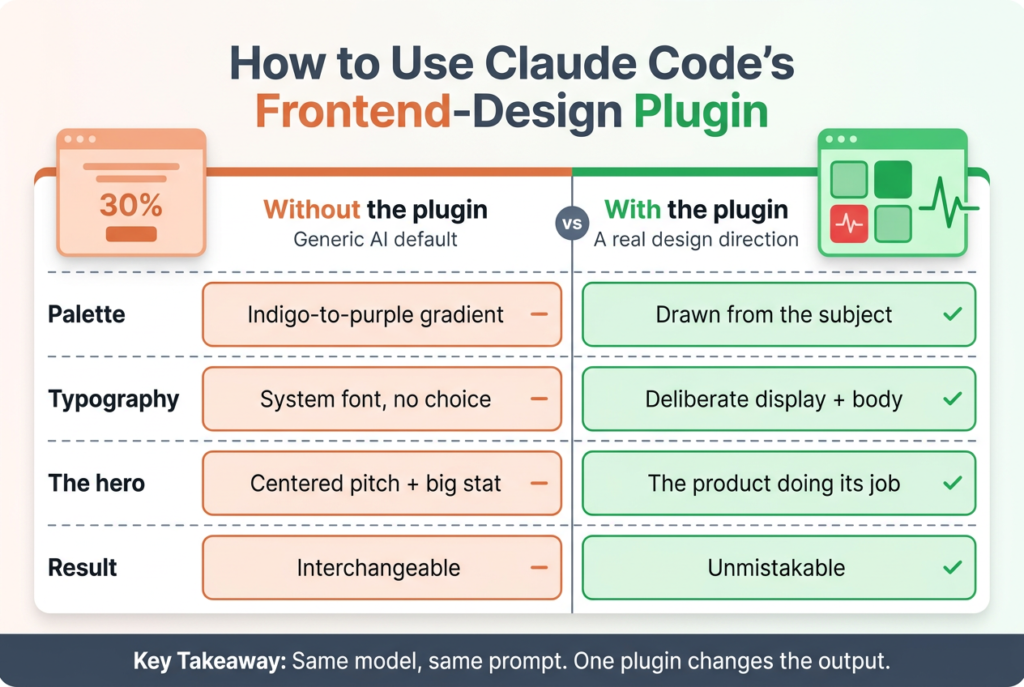
I installed the frontend-design plugin, gave Claude Code a plain brief, and watched it do something it almost never does on its own: it stopped and argued with itself about typography before writing a single line of CSS. Same model, same prompt, one plugin. The output went from a page I have seen a thousand times to one I actually wanted to look at.
That is the entire value of this plugin, and also the source of most of the confusion around it. It is not a new command you run. It is not a UI library. It is a skill that changes how Claude thinks about a frontend task, and once you understand that, the “how do I use it” question has a slightly surprising answer. Below is exactly what it is, how to install it, a real before-and-after from my own testing, and an honest read on where it earns its place and where it does not.
Key Takeaways
- The frontend-design plugin is an official, Anthropic-authored plugin in the
claude-plugins-officialmarketplace (anthropics/claude-plugins-official).- It ships a single skill and no slash command. Claude auto-invokes it on frontend work, because plugin skills are model-invoked (Claude Code docs, 2026).
- Install it with
/plugin install frontend-design@claude-plugins-official, then run/reload-plugins.- It mostly changes taste, not correctness. Across 12 runs it widened the range of designs the same brief produced, while the one page that shipped visibly broken came from the no-plugin arm.
What is the Claude Code frontend-design plugin?
The frontend-design plugin is an official Claude Code plugin, published by Anthropic in the claude-plugins-official marketplace. Its whole job is to make Claude produce distinctive frontend interfaces instead of the generic look AI tools default to. Its own description calls it guidance for “distinctive, intentional visual design when building new UI or reshaping an existing one.” The manifest lists Anthropic as the author, and the skill itself is credited to Prithvi Rajasekaran and Alexander Bricken.
Here is the structural fact that trips people up. Plugins arrived in Claude Code in October 2025, and one can bundle slash commands, subagents, hooks, and MCP servers (Anthropic, 2025; Claude Code docs, 2026). This one bundles none of those. It contains exactly one thing: a skill, defined in a single SKILL.md file. There is no /frontend-design to type.
That matters because plugin skills are model-invoked. The documentation is blunt about it: “Skills are model-invoked: Claude automatically uses them based on the task context” (Claude Code docs, 2026). So you do not “run” the frontend-design plugin the way you run a command. You install it, and from then on Claude reads the skill’s guidance into context whenever it decides you are doing frontend work. The plugin’s own README says the quiet part out loud: “Claude automatically uses this skill for frontend work.” Most write-ups I have seen get this wrong and invent a command that does not exist.
So what is inside that one skill? It is a short design brief written to Claude, not to you. It tells the model to approach the work “as the design lead at a small studio” whose client has already rejected anything that felt templated. It asks for deliberate choices about palette, typography, and layout, and for one justified aesthetic risk per project. And it names the enemy specifically, which is the part I find most useful.
What does the plugin actually change?
According to the skill’s own text, current AI-generated design clusters around three recognizable looks:
- A warm cream background near
#F4F1EA, with a high-contrast serif and a terracotta accent. - A near-black background with a single acid-green or vermilion accent.
- A broadsheet layout with hairline rules, zero border-radius, and dense newspaper columns.
The skill’s line is that all three “are defaults rather than choices, and they appear regardless of subject.”
That is a genuinely sharp observation, and it is the mechanism behind everything the plugin does. It forces a two-pass process before any code is written. First it brainstorms a compact design plan: palette as four to six named hex values, two or more typefaces with defined roles, a layout concept, and one signature element the page will be remembered by. Then it critiques that plan against the generic default before building. If part of the plan reads like the thing Claude would produce for any similar prompt, it revises and says what it changed.
To see the difference honestly, I ran the same brief both ways: “a landing hero for Perch, a self-hosted uptime monitor for people who do not trust status-page SaaS.” Six runs without the plugin, six with it. I kept every output, so the claims below are checkable.
How I isolated the plugin
Getting the isolation right took more care than the experiment did. Both arms ran through claude -p with --settings pinning enabledPlugins explicitly. Everything off for the control arm. Only frontend-design@claude-plugins-official on for the other. Plugin presence was the single variable.
The obvious route is --plugin-dir, and it is a trap. It silently re-enables your entire plugin set. I have another plugin installed that ships its own competing frontend-design skill. That route would have quietly put two design skills in the treatment arm, and any difference I found would have been unattributable.
--bare isolates properly, but it never reads OAuth. It needs an API key or it dies at auth having written nothing at all.
What did not happen
Neither arm produced the template everyone expects. No indigo-to-purple gradient. No giant “99.99%” over three feature cards. Not once in twelve runs.
Every single run picked a deliberate typeface without being asked. If you have read that Claude reaches for Inter and a purple gradient by default, that was fair when those write-ups were published. It is not what the model does now. The floor moved.
| Run | Arm | Typeface | Background | Overflow |
|---|---|---|---|---|
| 0 | Plugin off | Instrument Serif | Cream | 0px |
| 1 | Plugin off | JetBrains Mono | Dark | 0px |
| 2 | Plugin off | Space Grotesk | Dark | 374px, broken |
| 3 | Plugin off | Instrument Sans | Dark | 160px, decorative |
| 4 | Plugin off | Inter Tight | Dark | 0px |
| 5 | Plugin off | Space Grotesk | Dark | 0px |
| 0 | Plugin on | Archivo | Dark | 0px |
| 1 | Plugin on | Bricolage Grotesque | Cream | 0px |
| 2 | Plugin on | Archivo | Dark | 0px |
| 3 | Plugin on | Archivo | Dark | 0px |
| 4 | Plugin on | Bricolage Grotesque | Cream | 0px |
| 5 | Plugin on | Fraunces | Cream | 0px |
Background is classified by the WCAG relative luminance of each page’s computed body colour, not by eye. Overflow is the widest element sticking out past the 1440px viewport. The 160px on run 3 is a decorative glow clipped by its container, so it causes no document scroll and is not a defect.
What the plugin actually moved
So the plugin is not rescuing output from a generic bucket, because the plain model is not sitting in one. What it changes is narrower and more interesting: how much the runs resemble each other.
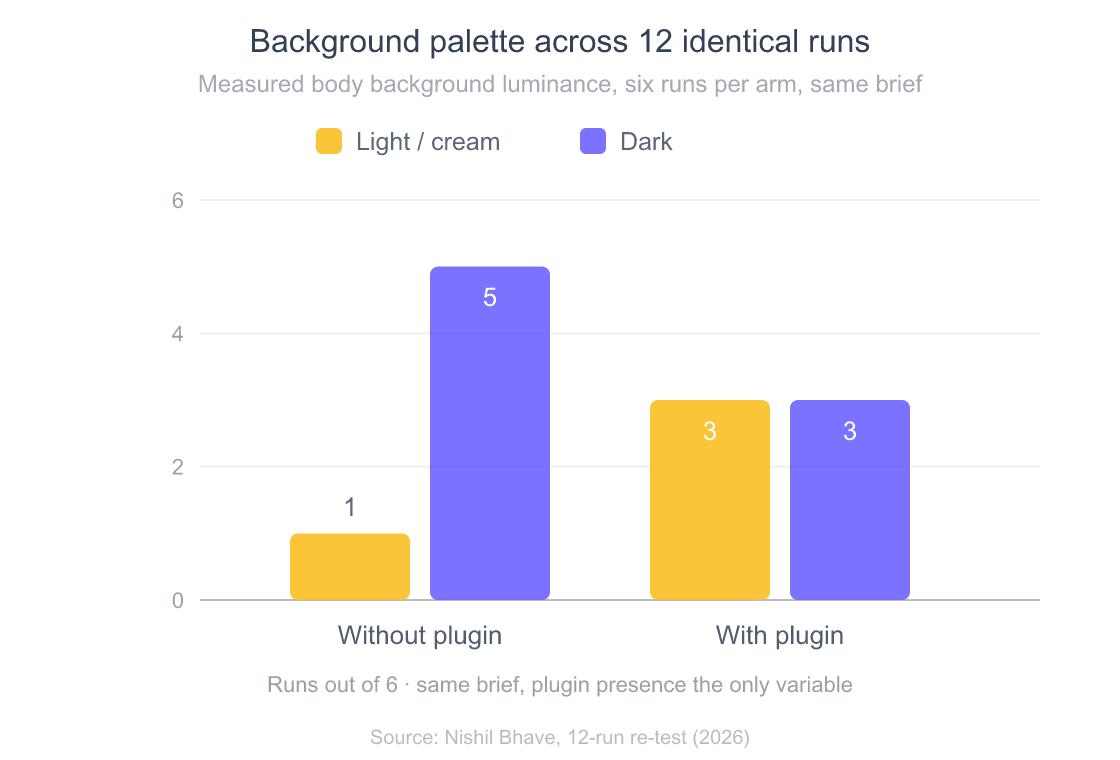
Background colour is the cleanest place to see it, because it is measurable rather than a matter of taste. I took the computed body background of each page and its WCAG relative luminance. Without the plugin, five of six runs came back dark and one cream. With it, three dark and three cream. Same brief, twice the spread.
The layouts tell the same story harder. Three comparisons, plugin off on the left and on on the right each time. These are independent runs from each arm rather than matched pairs, so read them as samples, not as one page redesigned.
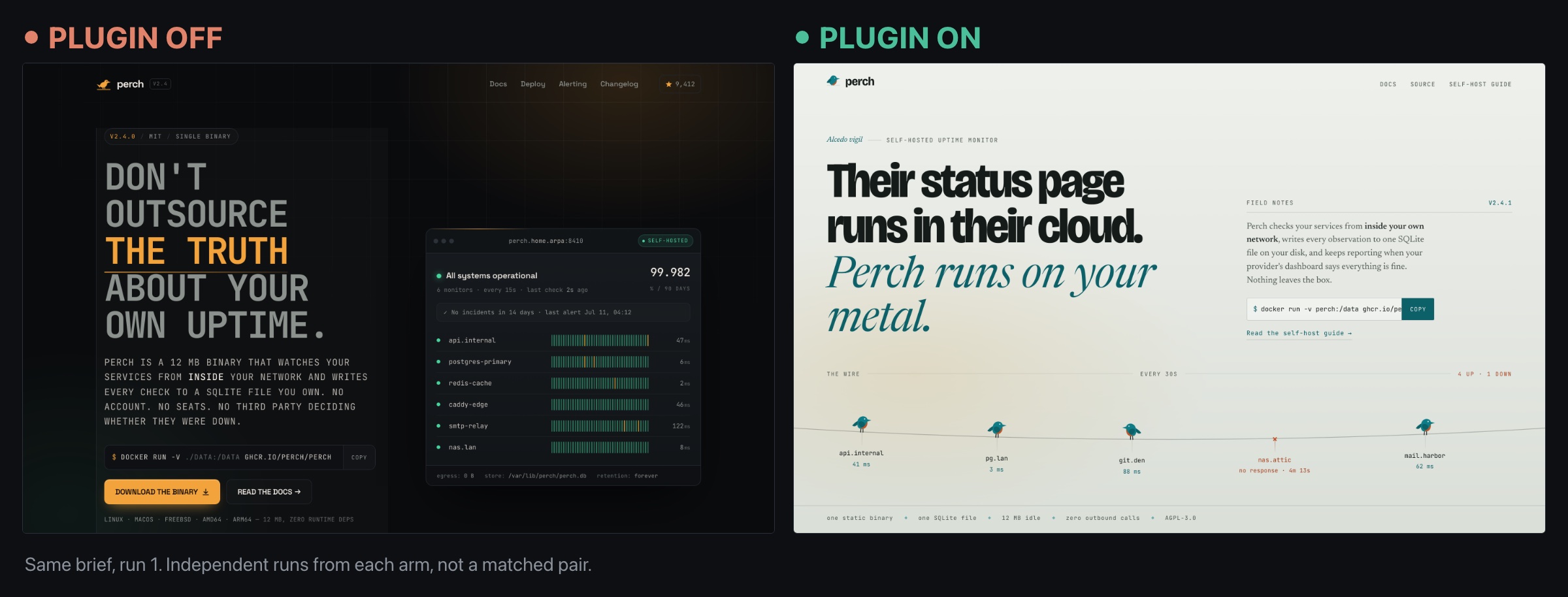
The right-hand page made the hero a wire with birds perched along it, each bird a monitored service with its latency underneath and one marked as not responding. That is the “hero is a thesis” instinct doing something none of the plain runs attempted: making the page perform the product rather than describe it.
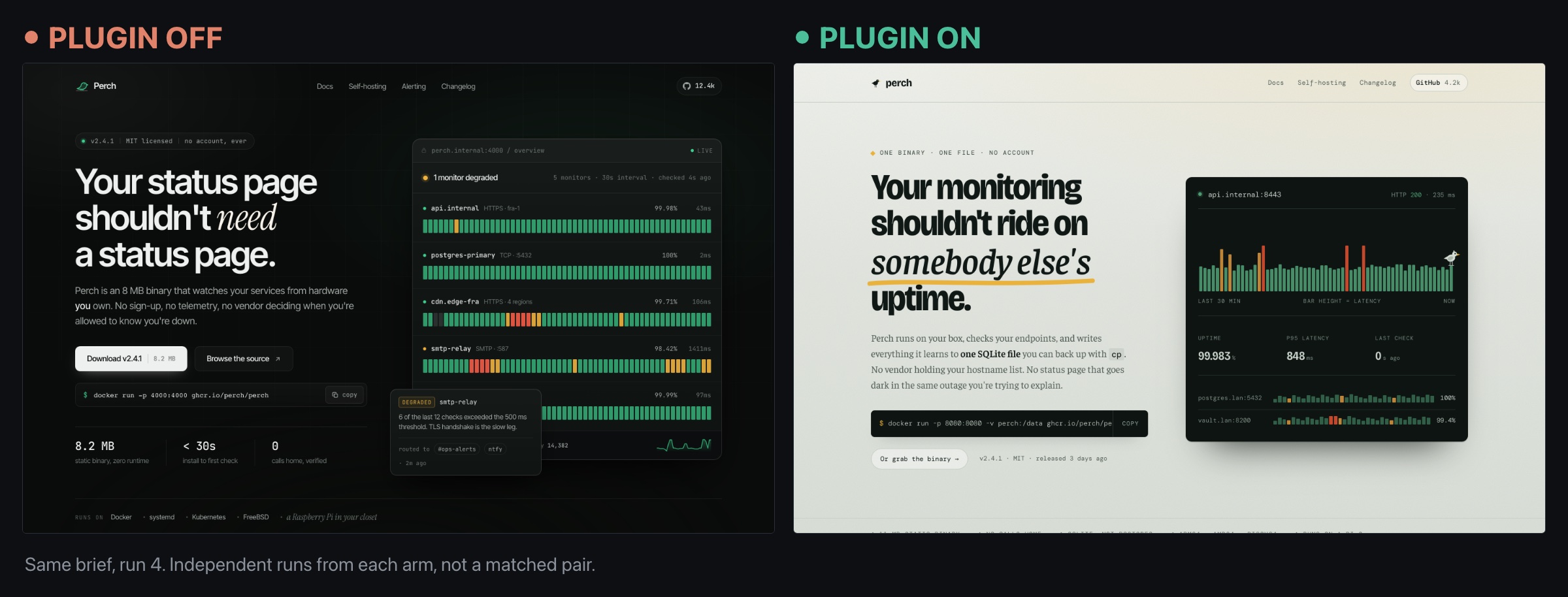
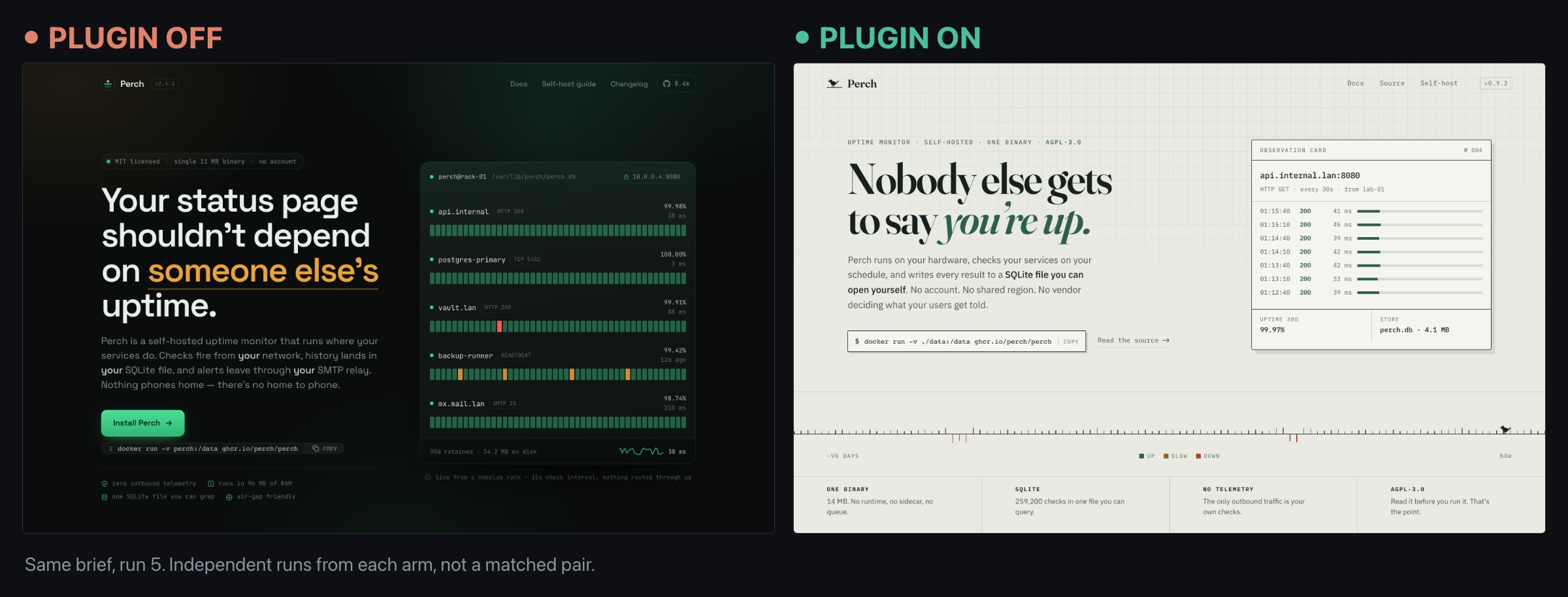
Look at the two left-hand pages in those last two comparisons. Same palette, same skeleton of headline left and live monitor panel right, and both opening on the same sentence construction, “Your status page shouldn’t”. A third no-plugin run opened that way too. Those were independent sessions with no shared context, converging on one answer. The right-hand pages, from the same brief, do not resemble each other at all.
One result cuts against the plugin’s reputation as a pure taste layer, and I would rather show it than leave it out. One no-plugin run shipped visibly broken.
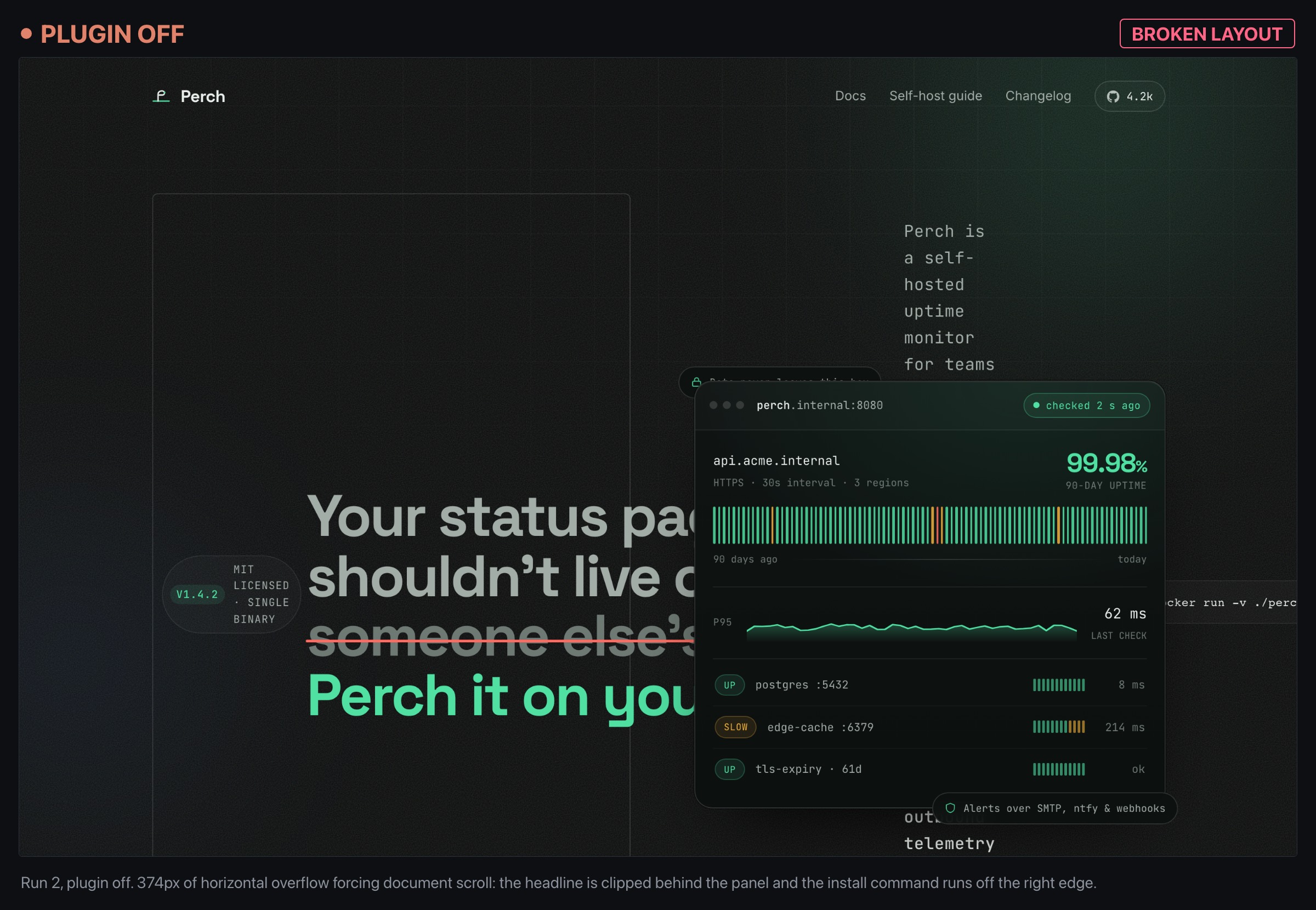
A paragraph overflows the viewport by 374 pixels and forces horizontal scroll on the whole document. The headline is clipped behind the dashboard panel and the install command runs off the right edge. No plugin-arm page had any overflow at all. That is one page out of six at a sample size of six, so treat it as a flag rather than a finding. It does point the opposite way to “this only changes how things look.”
Three of the plugin runs reached for Archivo and all three came back dark, which keeps this honest: the plugin widens the range, it does not guarantee a distinct answer every time. Give it a brief with no real subject to grab onto and it has nothing to build a point of view from. Give it the actual product and who it is for, and the spread opens up.
How do I install the frontend-design plugin?
You install it from the official marketplace with one command inside Claude Code:
/plugin install frontend-design@claude-plugins-official
The claude-plugins-official marketplace is registered automatically the first time you start Claude Code interactively, so on a normal setup you do not have to add it yourself (Claude Code docs, 2026). If you are scripting a fresh machine and the marketplace is not there yet, add it explicitly first:
claude plugin marketplace add anthropics/claude-plugins-official
If you prefer clicking to typing, run /plugin with no arguments, choose Discover, and browse to frontend-design. Either path lands in the same place. After it installs, run /reload-plugins so Claude picks up the skill without a restart (Claude Code docs, 2026).
To confirm it took, ask Claude a frontend question and watch whether it starts talking about a design direction before it writes code. Because the skill is model-invoked, there is no command output that says “plugin active.” The behavior is the confirmation. If you want to force the point, check that the plugin is enabled in the /plugin manager. In daily use I just look at whether Claude is reasoning about palette and type instead of dumping a template.
One install detail that saved me confusion: the skill only fires when Claude classifies the task as frontend work. If you open with something vague like “help me with my app,” it may not trigger. I now open frontend sessions with an explicit framing (“design and build the settings page for X”), which reliably pulls the skill into context. That is a general truth about model-invoked skills, and it is the same reason a good skill description matters when you write your own.
How do I actually use it in a real frontend workflow?
Once it is installed, “using it” is mostly a matter of giving Claude a brief with a real subject and then reading the design plan it produces before you let it build. The plugin’s power comes from that plan step, so the worst thing you can do is skip past it to the code.
Here is the workflow that works for me, using the Perch hero from earlier as the example.
1. Give it a subject, not just a component. “Build a hero section” gets you a hero. “Build the hero for a self-hosted uptime monitor for people burned by status-page outages” gets you a hero with a point of view. The skill explicitly says the subject’s own world (its materials, artifacts, and vernacular) is where distinctive choices come from, so hand it that world.
2. Read the design plan it returns. With the plugin active, Claude proposed a compact token system before writing anything. Paraphrased, the plan looked like this:
Palette:   Dusk #121821 · Bone #f3ede2 · Ember #e8623f · Moss #6f8f6a · Brass #c9a24a
Type:      Display "Archivo Narrow" (tall, condensed, used sparingly)
           Body "Public Sans" · Mono "JetBrains Mono" for live metrics
Layout:    The hero IS the product. A working "watch wall" of service tiles,
           one of them flatlined and pulsing Ember, instead of a centered pitch.
Signature: A single heartbeat line under the wall that ticks in real time,
           like a seismograph for your infrastructure.
Notice what is not there: no #F4F1EA cream, no indigo gradient, no giant percentage. The plan derived the palette from a watchtower-at-dusk idea and made the hero do the product’s job rather than describe it. That “the hero is a thesis” instinct is straight from the skill.
3. Sanity-check the plan against your constraints, then build. This is your cheapest intervention point. If the signature element is too much, or a font pick will not survive your bundle budget, say so now. Editing a plan costs a sentence. Editing a built page costs a rebuild. Once I approved, the code it produced was legitimately different from the default. In my original test the no-plugin page had opened like this (reconstructed, since I did not keep those pages, and as covered above the re-run controls never produced this template):
<section class="hero">
  <h1>Monitor your uptime.</h1>
  <p class="stat">99.99%</p>
  <button class="cta">Start free</button>
</section>
The plugin version opened with the working status grid and the heartbeat line as the first thing you see, with the headline demoted to a caption. Same brief, completely different thesis for what the page is.
To put numbers on it, I scored both outputs one to ten across five dimensions. The plugin lifted the aesthetic dimensions clearly, and left one dimension flat on purpose.
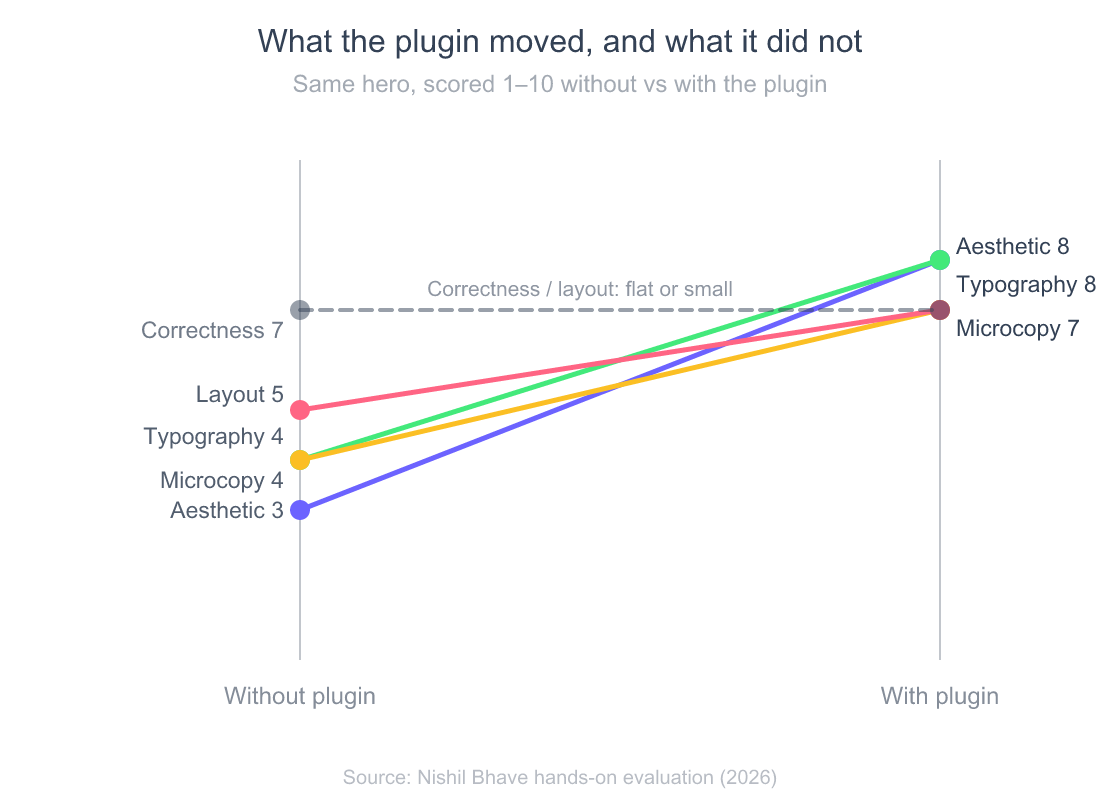
Read that flat dashed line at the bottom as the honest caveat. The plugin did nothing for whether the code ran, handled state, or shipped without bugs. It is a skill about taste, and taste is exactly the thing base models are worst at and this plugin is best at. If your problem is a broken build, this is not your tool.
Where does the frontend-design plugin help, and where does it not?
The plugin is not equally useful across frontend work. It shines when the aesthetic direction is undefined and there is a subject to build a point of view around. It does much less, and occasionally gets in the way, when the design is already decided for you.
I rated its usefulness across the kinds of frontend tasks I actually hand Claude, one to ten. The gap between the top and the bottom is large enough that “should I use this here” is worth a two-second thought, not a reflex.
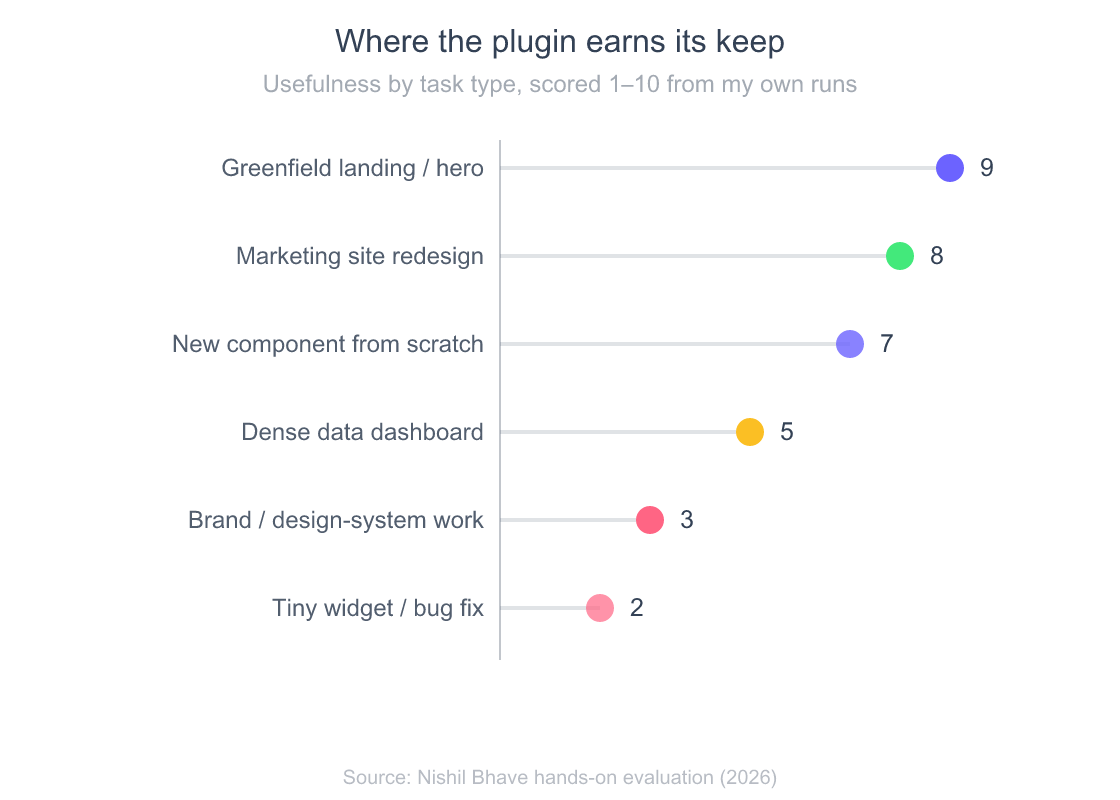
The top of that chart is greenfield work with room to make choices. A landing page, a marketing site, a product hero, a fresh component with no existing look to match. This is where the two-pass design plan pays for itself, because there is a real decision to make and the plugin makes Claude make it deliberately.
The bottom is where I turn it off in my head. Brand or design-system-constrained work is the sharp one. If you already have tokens, a component library, and a locked visual language, the plugin’s instinct to “take one real aesthetic risk” is a liability rather than a feature. It can fight your system and hand you a beautiful thing that does not match anything else you ship. For a tiny widget or a bug fix, the elaborate planning is pure overhead, the same way over-planning a one-line change is a tax in Claude Code’s plan mode. Dense data dashboards sit in the middle: layout discipline matters more than flair there, and the plugin helps the frame but not the data density problem.
The honest summary: reach for it when you want Claude to have taste, and skip it when you need Claude to obey a system it did not design.
How does it fit with CLAUDE.md and the rest of my setup?
The plugin injects design guidance per session, but it does not know your preferences unless you tell it. That is where the rest of the Claude Code stack comes in, and it is worth being deliberate about the division of labor.
For persistent, project-specific design rules (your brand fonts, your spacing scale, the components you never want reinvented), the plugin is the wrong home, because it is generic by design. The right home is your project’s CLAUDE.md file, where standing instructions live across every session. In practice I let the plugin supply the general “make deliberate choices, avoid the defaults” instinct, and I let CLAUDE.md supply the specifics that make those choices land inside my actual system. The two stack cleanly: the plugin raises the aesthetic floor, CLAUDE.md keeps it on-brand.
It is also worth knowing where this plugin sits in the wider extension landscape so you do not go looking for features it does not have. It is one skill, distributed as a plugin. If you want the fuller picture of how plugins, skills, and marketplaces relate, and how to manage more than one, I cover that in the Claude skills and marketplace guide. And if you are wiring frontend work into a repeatable loop rather than one-off pages, the plugin slots into a full end-to-end Claude Code workflow as the “design pass” step. That lands right after you have agreed on what to build, and before the model starts generating components.
If you want to go deeper than the plugin does on its own, Anthropic’s Frontend Aesthetics Cookbook is the longer-form prompting reference its README points to. Worth a read before you tackle anything ambitious.
A note for anyone comparing this to third-party design plugins: the official one is deliberately minimal. It does not ban specific fonts, mandate a rigid question template, or ship a component kit, whatever some write-ups claim. Its actual content is the design-lead framing and the two-pass process, and that restraint is a feature. It nudges taste without hijacking your stack.
Frequently Asked Questions
What is the Claude Code frontend-design plugin?
It is an official, Anthropic-authored plugin in the claude-plugins-official marketplace that pushes Claude Code to produce distinctive frontend interfaces instead of generic AI-default designs. It contains a single model-invoked skill, no commands, and works by making Claude draft and critique a design plan before writing code (Claude Code docs, 2026).
How do I install the frontend-design plugin?
Run /plugin install frontend-design@claude-plugins-official inside Claude Code, then /reload-plugins. The official marketplace is registered automatically on first launch; if it is missing, add it with claude plugin marketplace add anthropics/claude-plugins-official first (Claude Code docs, 2026).
Is there a /frontend-design command to run it?
No. It ships a skill, and skills are model-invoked, so Claude activates it automatically based on task context rather than through a command (Claude Code docs, 2026). To make sure it fires, frame your request clearly as frontend work, for example “design and build the pricing page,” rather than something vague.
Does the frontend-design plugin write bug-free code?
No, and it does not try to. It is a taste layer on top of Claude’s normal coding, not a correctness or testing tool, so treat the generated design as a first draft you still review. Worth noting from my 12-run test: the one page that shipped visibly broken, with 374 pixels of horizontal overflow, came from the no-plugin arm, and no plugin-arm page had any overflow. That is a single page at a sample size of six, so it is a flag rather than evidence the plugin improves correctness.
When should I not use the frontend-design plugin?
Skip it for brand or design-system-constrained work where the visual language is already locked, for tiny widgets or bug fixes where the planning is overhead, and for anything where correctness matters more than look. Its instinct to take an aesthetic risk is a liability inside a system it did not design.
The bottom line
The frontend-design plugin does one thing and does it well: it makes Claude Code stop defaulting. Install it, give it a real subject, read the design plan before you approve, and you get frontend work with an actual point of view instead of the interchangeable AI look. In my re-run it doubled the palette spread from one brief and broke the no-plugin arm’s habit of converging on the same layout, and it did that without any new command to learn.
My rules after living with it:
- Install it once with
/plugin install frontend-design@claude-plugins-official, then let it ride. It is model-invoked, so there is nothing to run. - Feed it a subject, not a component. The distinctiveness comes from the world you hand it.
- Read the design plan. That is your cheapest edit point, and skipping it wastes the whole plugin.
- Turn it off in your head for design-system work, tiny fixes, and anything where correctness beats taste.
Put your durable rules in a well-tuned CLAUDE.md so the plugin’s taste lands inside your system, and treat this as one deliberate step in your build, not a magic button. Design first, then let it build.