The moment that made me stop and think wasn’t a bug. It was Claude Cowork asking, politely, whether it could open the folder where I keep client contracts. I said no. Then I sat there wondering why my instinct was so fast, and whether it was even right.
That’s the real question under every “is Claude Cowork safe” search. It’s an agent that reads, writes, and edits files on your Mac or Windows machine, runs multi-step tasks on its own, and does it all on Opus 4.8. I live in Claude Code every day, so I’m not agent-shy. But letting a model touch my file system is a different kind of trust than letting it write code in a terminal I’m watching. So I read Anthropic’s actual docs, tested the consent flow, and here’s my honest read on the risks, the legal questions, and what the plugin system quietly widens.
Key Takeaways
- Cowork only reaches folders you explicitly connect, and it can’t touch anything else. Permanently deleting a file always needs your approval, in every mode (Claude Cowork docs, 2026).
- Its work runs in an isolated, temporary environment on Anthropic’s servers that can’t reach your home or company network, and gets wiped when the session ends (Claude Cowork docs, 2026).
- Prompt injection is the risk that matters most. OWASP ranks it the #1 LLM vulnerability for the second edition running (OWASP, 2025).
- Data handling depends on your plan. Commercial and Enterprise don’t train on your data by default; consumer Pro and Max follow the consumer policy, so check your privacy toggle (Anthropic Privacy Center, 2026).
- The legal exposure isn’t the tool, it’s the folder you point it at. You stay responsible for every action Claude takes on your behalf.
Is Claude Cowork safe to use?
Cowork is about as safe as the scope you give it, and the defaults lean conservative. It can’t reach anything outside the folders you connect, and it asks before it does anything significant (Claude Cowork, 2026). The risk isn’t that it goes rogue across your whole drive. The risk is the access you hand it and the instructions it might read inside that access.
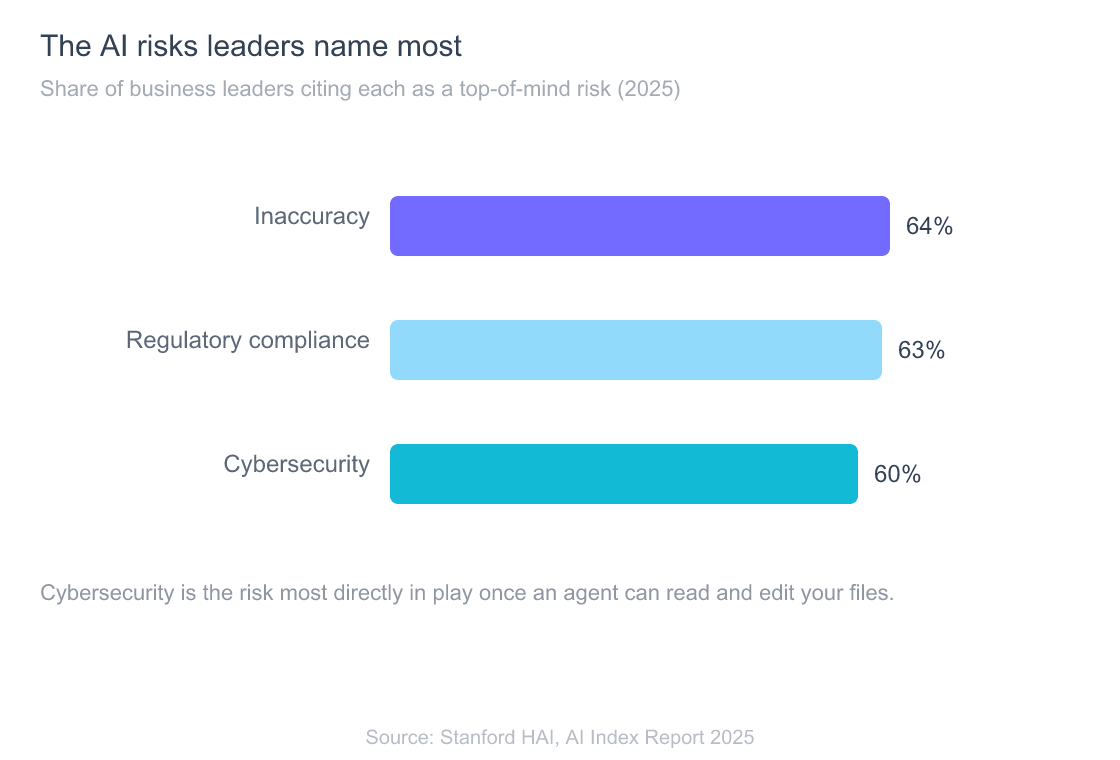
Here’s why the question feels loaded, and why your caution is reasonable. Enterprise leaders already rank cybersecurity among their top AI worries (Stanford HAI AI Index, 2025), and most organizations are nowhere near ready for autonomous tools. In IBM’s 2025 breach study, 63% of breached organizations either had no AI governance policy or were still developing one (IBM Cost of a Data Breach, 2025). An agent that edits files lands right in that gap.
So when people ask if it’s safe, I split the answer. Is the tool built with sane guardrails? Mostly yes, and I’ll show the receipts below. Will it be safe in your hands? That depends entirely on what you connect it to and which approval mode you leave running.
For the full picture of what the product is and who it’s for, see the complete guide to what Claude Cowork is and does. This piece stays on the part that keeps people up at night: security, legal, and the access surface.
What can Claude Cowork actually access on your computer?
Cowork can read your files, browse the web, run code, use apps you connect, and take screenshots to understand your screen, but only within the folders and tools you grant (Claude Cowork docs, 2026). The product page puts the boundary bluntly: “You choose the folders and tools. Claude can’t reach anything else” (Claude Cowork, 2026).
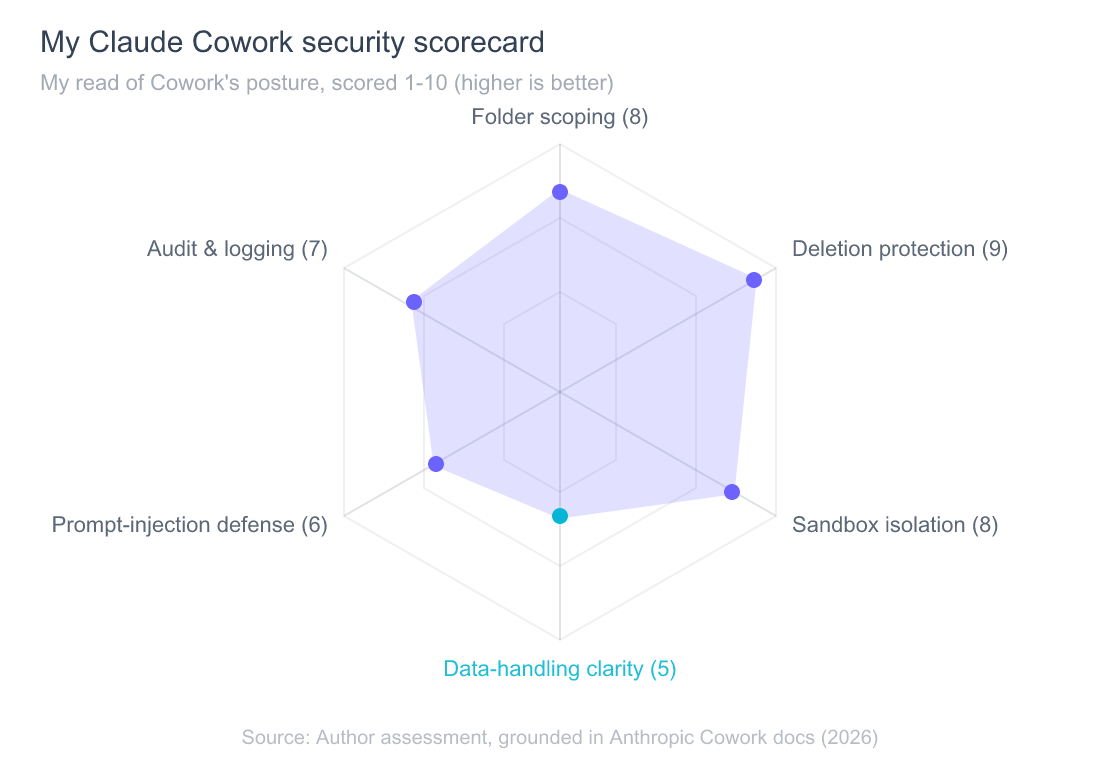
That folder boundary is the single most important security fact about the tool. It isn’t scanning your whole machine. It sees what’s inside the directories you connect, and nothing above or beside them. Anthropic’s own guidance is to create a dedicated working folder rather than granting broad access, which is exactly how I’d set it up.
There’s a second layer people miss. The actual work runs in an isolated, temporary environment on Anthropic’s servers, separate from your computer, and that environment can’t reach your home or company network. It’s removed when the session ends (Claude Cowork docs, 2026). If the desktop app is offline, the session can’t reach your computer at all. So the blast radius has two walls: the folders you pick, and a sandbox that can’t wander onto your LAN.
When it does need to act in the world, it prefers your connectors and integrations first, falls back to your browser when needed, and only uses your screen as a last resort (Claude Cowork, 2026). Direct screen and app control, the “computer use” capability, is still labeled a research preview, and it asks permission before accessing each application.
What it can’t do: reach files outside your connected folders, touch your local network from its sandbox, or permanently delete anything without asking. Those aren’t settings you configure. They’re how the tool is built.
How does the Claude Cowork consent and permissions flow work?
Cowork gives you three approval modes, and one protection holds across all of them: it always asks before permanently deleting files (Claude Cowork docs, 2026). The modes are manually approve, where you sign off on each action; automatically approve, where Claude reviews an action for safety before running it; and skip all approvals, where it just goes.
| Approval mode | What runs without asking | What always asks |
|---|---|---|
| Manually approve | Nothing; you sign off on each action | Everything, including deletion |
| Automatically approve | Actions Claude’s safety review clears | Permanent file deletion |
| Skip all approvals | Everything else | Permanent file deletion |
That deletion guarantee is the detail I keep coming back to. Even in “skip all approvals,” a permanent delete still stops and waits for you. It’s a small design choice that closes off the scariest failure mode, the one where an agent quietly erases the wrong directory. On the buyer-intent question of whether it’s free to try, it’s included on every paid plan, so you can test the consent flow yourself before trusting it with anything real (what Cowork costs and why it’s free on paid plans).
In practice, I run manual approve for anything new and only relax it once I’ve watched the tool work in a folder for a while. The permissions setting can also show you Claude’s plan and wait for your approval before anything significant happens, which is the same “read the plan before you execute” rhythm I lean on in Claude Code. If you want to see how that plays out step by step during a real task, that’s covered in how permissions actually behave during a live Cowork session.
The real caveat: skip all approvals is a loaded gun for a reason I’ll get to in the risks section. Deletion is protected, sure. Everything else in that mode runs without you in the loop.
What does Anthropic do with your Claude Cowork data?
This is where the plan you’re on changes the answer, so read carefully. For commercial products, Anthropic’s default is clear: “By default, we will not use your inputs or outputs from our commercial products to train our models” (Anthropic Privacy Center, 2026). That covers Claude for Work, the API, and Enterprise. If you’re running Cowork under a commercial or Enterprise org, your files aren’t training fodder by default.
Consumer plans are different, and this is the part I’d want a lawyer-adjacent friend to underline. Free, Pro, and Max follow the consumer data policy, where chats can be used for model improvement unless you opt out in your privacy settings. Deleted conversations are removed from your history immediately and purged from the backend within about 30 days, while data you opt into training on can be retained de-identified for up to five years (Anthropic Privacy Center, 2026).
Here’s the gap worth flagging plainly. Anthropic’s Cowork safety docs don’t spell out a Cowork-specific “we do or don’t train on the files you open” line, and neither does the consumer training policy, which never names Cowork at all. By reasonable inference, Cowork on consumer Pro or Max inherits the consumer policy, and Cowork under a commercial org inherits the no-train default. One nuance the consumer policy does state: raw content from connectors, including remote and local MCP servers, is excluded from training (Anthropic Privacy Center, 2026). That’s a connector carve-out, not a file-contents one.
So a blanket claim that “Anthropic never trains on your Cowork files” isn’t something I can stand behind for consumer plans. Check your training toggle, and if the files are sensitive, don’t rely on the default.
One more distinction that trips people up: Zero Data Retention. ZDR applies to eligible Anthropic APIs, products using a commercial org API key, and Claude Code for Enterprise. It does not apply to Claude Free, Pro, or Max (Anthropic Privacy Center, 2026). If your compliance story depends on ZDR, a consumer Cowork seat won’t give it to you.
Claude Cowork legal considerations: client data, confidentiality, and who’s liable
The legal risk with Cowork isn’t hypothetical model behavior, it’s the data you route through it and the promises you’ve already made about that data. Anthropic states it directly: “You remain responsible for all actions taken by Claude performed on your behalf” (Claude Cowork docs, 2026). That sentence is the whole legal posture in one line. The tool is a delegate, not a shield.
So before you point it at a folder, ask the boring questions that actually matter. Do you have a confidentiality obligation on those files? Are they covered by a client NDA, a DPA, HIPAA, or GDPR? On a consumer plan without ZDR and with the training toggle in an uncertain state, running privileged documents through Cowork could put you sideways with a contract you signed. That’s not a Cowork flaw. It’s the same rule that applies to any cloud tool, just with an agent doing the moving.
This is why my instinct on the contract folder was right, even before I could explain it. My working rule: consumer Cowork is fine for my own drafts, notes, code, and research. Anything under someone else’s confidentiality terms goes through a commercial or Enterprise org with the no-train default and, ideally, an org where an admin has set the guardrails. If you’re a solo user weighing whether that’s worth it, the comparison in how Cowork’s file access model differs from Claude Code’s is a useful gut-check on where each tool fits.
What about a “Claude Cowork legal plugin”? That search maps to something real, and it’s worth being precise. Legal is one of the named plugin categories Anthropic ships, alongside finance, HR, and the rest (Claude plugins docs, 2026). A legal-category plugin can package skills and connectors for legal work, but installing one doesn’t change your obligations or grant any special privacy protection. It’s convenience, not compliance. Treat any plugin, legal-branded or not, as another thing widening what the agent can reach.
Claude Cowork plugins and capabilities: what they add to the access surface
Plugins extend what Cowork can do by bundling skills, connectors, and sub-agents into one package, and on desktop the plugins you add yourself are saved locally to your computer (Claude plugins docs, 2026). That’s the capabilities story people search for under “claude code cowork plugins capabilities 2026,” and it’s genuinely useful. It’s also where the access surface quietly grows.
Think about what a connector actually is. Cowork supports MCP connectors, both local servers on your machine and remote HTTP servers, across Free, Pro, Max, Team, and Enterprise plans (Claude connectors docs, 2026). Every connector you add is a new door: a database, a SaaS app, a remote endpoint. The folder boundary still holds for files, but connectors open reach into systems that live outside those folders entirely.
Here’s the part I’d underline for anyone in a company. On Enterprise, admins can restrict which actions are available within each connector, for example allowing read access but disabling write operations, and those permissions apply org-wide (Making Claude Cowork ready for enterprise, 2026). That read-only-per-connector control is the most underrated safety feature in the product. If I ran a team deploying this, I’d wire every connector read-only until a specific workflow earned write access.
Enterprise also gets the audit trail that consumer plans don’t. Cowork emits OpenTelemetry events for tool and connector calls, files read or modified, and whether each action was approved manually or automatically (Making Claude Cowork ready for enterprise, 2026). One caveat from the docs: Cowork activity isn’t captured in the Compliance API yet, so Team and Enterprise route it to a SIEM through OpenTelemetry instead (Anthropic, 2026). If you need a record of what the agent touched, that’s your path.
The Claude Cowork security risks I actually watch for
If I had to rank the real risks, prompt injection sits at the top, and it’s not close. OWASP lists prompt injection as the #1 vulnerability for LLM applications, for the second edition in a row, with “excessive agency” and “sensitive information disclosure” also in the top ten (OWASP, 2025). All three describe a file-touching agent almost perfectly.
Anthropic names the threat itself: malicious instructions embedded in external content that Claude reads, and it trains Claude to detect these attacks with external safeguards on top (Claude Cowork docs, 2026). The docs also give two flat warnings I’d take seriously: avoid granting access to local files with sensitive information like financial documents, and be cautious about using Claude in the browser for anything sensitive. Detection helps. It isn’t a guarantee.
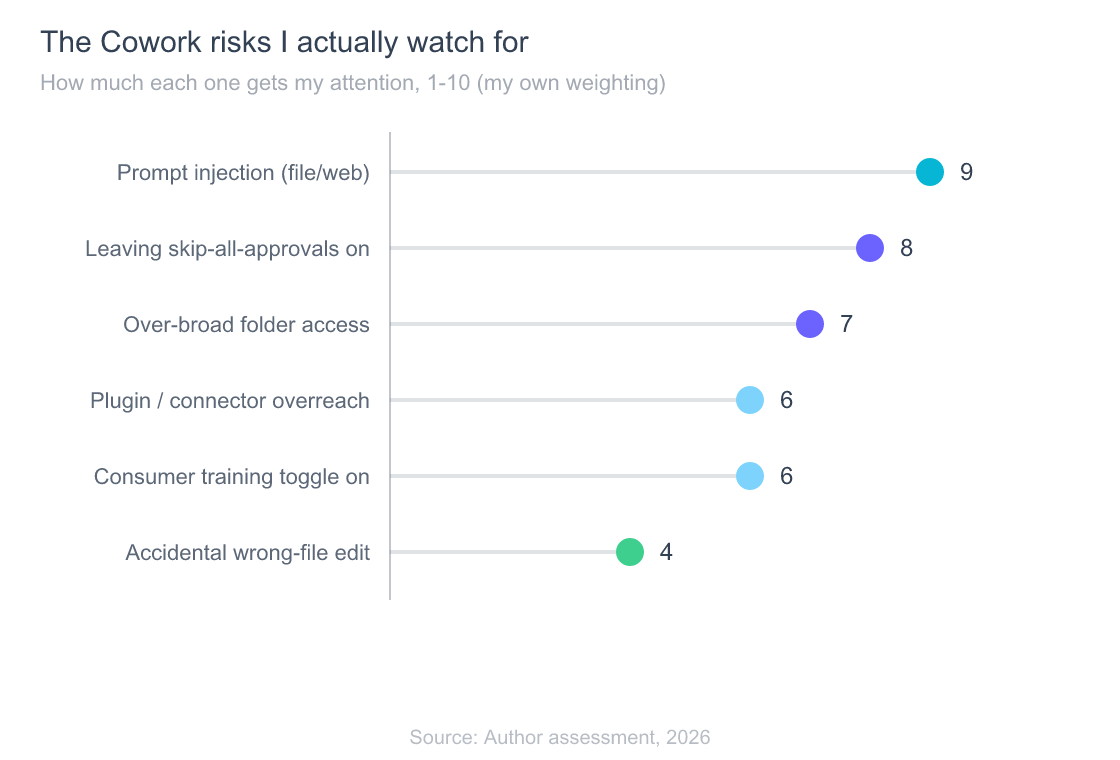
Second on my list is the interaction between skip all approvals and that injection risk. Permanent deletion is still gated in every mode, which closes the worst case. But injection steering the agent into non-deletion actions is no longer hypothetical. Security firm PromptArmor demonstrated a prompt-injection attack against Cowork: a .docx carrying concealed white-on-white instructions steered the agent into exfiltrating the victim’s largest file to an attacker-controlled account, with no human approval required at any point (PromptArmor, 2026). I haven’t seen a public report of injection-triggered file writes or edits specifically, but the exfiltration case settles the principle: a poisoned document can drive real actions without you in the loop. Either way, I keep sensitive folders out of auto-approve.
The rest of my list is mundane on purpose: over-broad folder grants, plugins and connectors expanding reach, a consumer training toggle left in the wrong position, and the plain old accidental wrong-file edit. None of these are exotic. All of them are yours to control.
How to use Claude Cowork safely
The safest setup takes about two minutes and removes most of the risk above. Give Cowork a dedicated working folder instead of broad access, exactly as Anthropic recommends, and never point it at directories holding secrets, credentials, or files you’re contractually bound to protect (Claude Cowork docs, 2026). Scope is your strongest lever, and it costs nothing.
Here’s the checklist I’d hand a teammate:
- Scope tight. One project folder, not your home directory or Documents root.
- Keep secrets out. No
.envfiles, no password stores, no client contracts in the connected folder. - Default to manual approve for anything new, and only relax it once you trust the pattern.
- Wire connectors read-only where you can, and add write access per workflow, not blanket.
- Check the training toggle on consumer plans, and use a commercial or Enterprise org for anyone else’s data.
- On a team, turn on the audit trail via OpenTelemetry so you can see what the agent touched.
That’s genuinely how I run it. Watching an agent work in a tightly scoped folder for a few sessions is the fastest way to calibrate trust, and it’s a lot cheaper than learning the boundaries the hard way. For the moment-to-moment version of this, including what the approval prompts look like during a task, see the hands-on walkthrough of Cowork permissions in a real session.
Frequently Asked Questions
Is Claude Cowork safe to let touch my files?
Reasonably, if you scope it. Cowork only reaches folders you connect, runs in an isolated server-side sandbox that can’t touch your local network, and always asks before permanently deleting files (Claude Cowork docs, 2026). The main residual risk is prompt injection, so keep sensitive folders out of auto-approve.
Can Claude Cowork delete my files without asking?
No. Cowork always asks before permanently deleting files, in every approval mode, including skip all approvals (Claude Cowork docs, 2026). Deletion is the one action the tool won’t automate. Other actions, like edits and moves, can run without a prompt if you’ve enabled auto or skip modes.
Does Anthropic train its models on my Cowork data?
It depends on your plan. Commercial and Enterprise don’t train on your inputs or outputs by default (Anthropic Privacy Center, 2026). Consumer Free, Pro, and Max follow the consumer policy, where data can be used for model improvement unless you opt out. Check your privacy toggle before using sensitive files.
Is it legal to use Claude Cowork for client or work files?
That’s on you, not the tool. Anthropic states you remain responsible for all actions Claude takes on your behalf. If files carry NDA, DPA, HIPAA, or GDPR obligations, use a commercial or Enterprise org with the no-train default rather than a consumer seat, and confirm the arrangement meets your contract’s terms.
What can Claude Cowork plugins access?
Plugins bundle skills, connectors, and sub-agents, and they can widen reach well beyond your files, into databases and SaaS apps through MCP connectors (Claude plugins docs, 2026). A legal-branded plugin adds legal skills, not legal protection. Add connectors read-only where possible and treat each one as a new access door.
The bottom line
Is it safe to let Claude Cowork touch your file system? My honest answer, as someone who does almost everything in Claude Code and came in skeptical: yes, within a folder you’ve scoped tightly, on a plan whose data terms match your obligations, with skip all approvals switched off for anything sensitive. The guardrails Anthropic ships, folder boundaries, a network-isolated sandbox, and deletion that always asks, are real and sensible.
The risk that remains is the same one that tops every AI security list, prompt injection, plus the ordinary human risk of granting too much access. Both are yours to manage, and both are cheap to manage well. Scope the folder, keep secrets out, default to manual approve, and match the plan to the sensitivity of the data. Do that and Cowork earns a place in the workflow. Skip it and you’re the vulnerability, not the tool.
For the full product picture, platforms, and eligibility, the complete guide to Claude Cowork is the hub. This page is the one to bookmark before you connect that first folder.