Stack Overflow’s 2025 Developer Survey put it bluntly: 51% of professional developers now use AI tools daily, but only 29% trust the output (Stack Overflow, 2025). The gap is where most of the actual workflow friction lives, and the GitHub MCP server is the single biggest tool I’ve found for closing it on git-and-PR work.
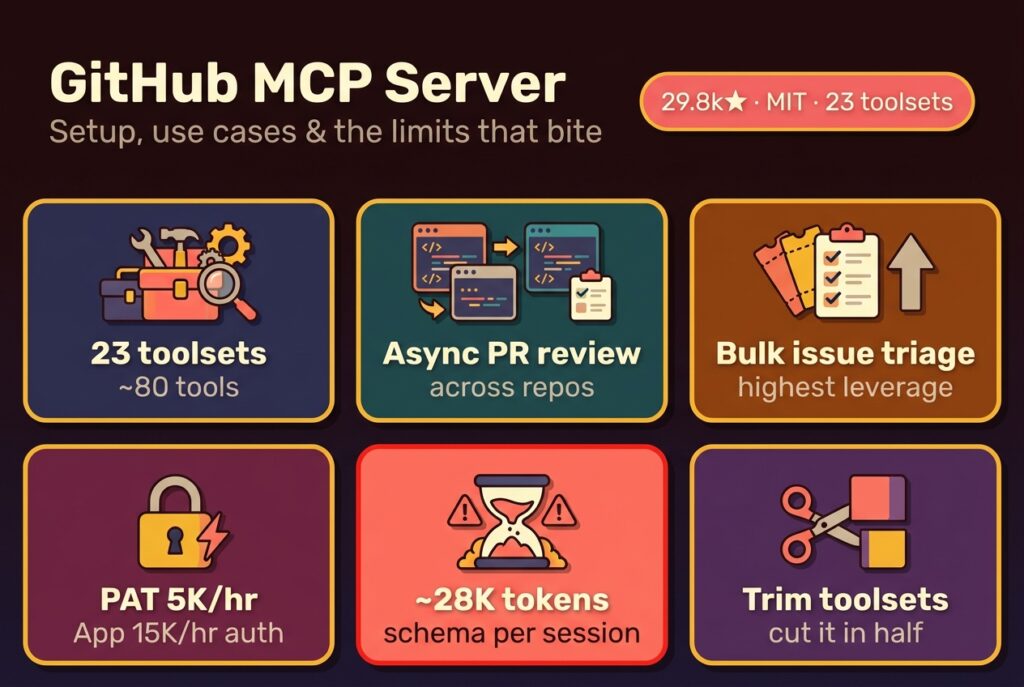
The official github/github-mcp-server repo hit 29.8k stars in May 2026 and now exposes 23 toolsets across roughly 80 tools: pull requests, issues, code search, Actions logs, Dependabot, Projects V2. Most write-ups so far just repeat the README. This one’s the field notes: eight months of running it in Claude Code and Cursor, the auth choices that matter, the rate limits that actually bite, and the cases where I still reach for the gh CLI instead. For the broader protocol context (what MCP is, which other servers are worth installing alongside it, and how the ecosystem has shifted to Streamable HTTP) see the complete 2026 guide to MCP servers.
Key Takeaways
- GitHub maintains its own MCP server at github/github-mcp-server (29.8k stars, MIT, 23 toolsets), reachable as a hosted endpoint at
api.githubcopilot.com/mcp/or a local Docker container.- Use the remote endpoint for solo dev work with a fine-grained PAT (5,000 req/hr). Use the GitHub App path if you need 15,000 req/hr on Enterprise Cloud or org-installed access.
- The two highest-leverage use cases are async PR review across multiple repos and bulk issue triage. Codebase Q&A is great until the Search API’s 30/min secondary limit catches up to you.
- GitHub MCP loads ~28,000 tokens of tool schemas per session, about 22% of a 128k context window. Trim with
--toolsets=context,repos,issues,pull_requeststo cut that roughly in half (MindStudio, 2026).- Where it falls short: org admin (teams, SAML, audit log), webhook push (still polling-only), and large-diff PR review. The gh CLI keeps winning on bulk content creation thanks to the 80 writes/min secondary limit.
Table of Contents
- What Does the GitHub MCP Server Actually Unlock?
- Should You Use the Remote Endpoint or Run It Locally?
- How Do You Set Up GitHub MCP in Claude Code?
- How Do You Set Up GitHub MCP in Cursor?
- PAT or GitHub App: Which Auth Method Should You Use?
- What Are the 7 Use Cases Worth the Setup?
- What Rate Limits Will You Hit in Practice?
- Where Does the GitHub MCP Server Currently Fall Short?
- The Verdict: When GitHub MCP Earns Its Slot
- Frequently Asked Questions
What Does the GitHub MCP Server Actually Unlock?
The GitHub MCP server is officially maintained by GitHub in the github/github-mcp-server repo: MIT-licensed, currently sitting at 29.8k stars, hit version 1.0.4 on May 11, 2026, exposing 23 toolsets with roughly 80 individual tools to any MCP-compatible client (github/github-mcp-server, 2026). It speaks JSON-RPC over stdio or streamable HTTP. Two deploy paths exist: a hosted remote endpoint at api.githubcopilot.com/mcp/, or a local Docker container / Go binary you run yourself.
The unlock vs. the gh CLI is contextual, not capability-based. The CLI has done PR reviews and issue triage for years. What MCP adds is that the AI assistant doesn’t have to compose shell commands, it just asks. Claude doesn’t run gh pr list --json title,author,labels and parse the output; it calls a pr_list tool with structured arguments and gets a typed JSON response. No bash escaping, no flag rediscovery, no jq piping.
That structured-call advantage compounds when you string operations together. A single conversation might fetch open PRs, pull a diff, read linked issues, scan recent base-branch commits, and post a review comment, without composing six separate shell invocations.
Why I switched eight months ago: I had a
gh-summary.shwrapper doing most of what I wanted. It worked. But every two weeks I’d hit a flag I half-remembered, or get a JSON shape Claude couldn’t quite parse. MCP turns “compose the right shell pipeline” into “describe what you want.” That’s the entire pitch, not more capability, just lower friction.
Should You Use the Remote Endpoint or Run It Locally?
For most developers the remote endpoint at api.githubcopilot.com/mcp/ is the right default: zero install, OAuth handshake handles auth, and GitHub keeps it patched (GitHub Docs, 2026). The local Docker option exists for two cases: GitHub Enterprise Server (where remote isn’t routable), and security-sensitive environments where you’d rather not send repo paths to a third-party MCP endpoint, even GitHub’s.
The remote endpoint requires a Copilot subscription on the account you authenticate with. Without one, the local Docker container is your only path, and it’s straightforward:
# Local GitHub MCP via Docker, PAT-authenticated
docker run -i --rm \
  -e GITHUB_PERSONAL_ACCESS_TOKEN=$GH_PAT \
  ghcr.io/github/github-mcp-server
Wire that command into your client’s mcp.json. The Docker image pins to a specific version, which is a small security plus, it sidesteps the npm @latest supply-chain trap that affects every stdio-via-npx server.
A third path I run on one machine is the prebuilt Go binary from the releases page: faster startup than Docker, identical feature set, but you’re responsible for updates.
Tradeoffs across modes aren’t dramatic. Remote for convenience, Docker for control, Go binary for cold-start speed. Toolset filtering, rate limits, and tool behavior are identical.
How Do You Set Up GitHub MCP in Claude Code?
Claude Code’s setup is one CLI command for the remote endpoint and one JSON block for the local container (Claude Code MCP docs, 2026). If you’ve never set up MCP in Claude Code before, the step-by-step Claude Code MCP configuration guide covers scope hierarchy, JSON anatomy, and the debugging loop in depth. At user scope (so it’s available across every project on this machine):
# Remote MCP endpoint - recommended for most devs
claude mcp add --transport http --scope user github \
  https://api.githubcopilot.com/mcp/

# OR local Docker variant - for Enterprise Server or no-Copilot setups
claude mcp add --scope user github -- \
  docker run -i --rm \
  -e GITHUB_PERSONAL_ACCESS_TOKEN \
  ghcr.io/github/github-mcp-server
The remote endpoint opens an OAuth flow in your browser the first time it’s invoked. The local variant reads GITHUB_PERSONAL_ACCESS_TOKEN from your shell environment, keep the actual token out of the JSON file.
To create the PAT, go to github.com/settings/tokens → Fine-grained tokens → Generate new. Grant repository access to the specific repos you want the agent to touch, not “all repositories.” Scopes for a typical workflow: contents:read, pull_requests:write, issues:write, metadata:read. Skip anything you don’t actively need: admin, secrets, packages, workflow.
Verify with claude mcp list and claude mcp get github. Inside a session, /mcp opens a panel listing loaded toolsets. If PR / issues / repos aren’t showing, the OAuth flow didn’t complete or the PAT lacks scopes.
To trim schema overhead, GitHub MCP loads ~28,000 tokens of tool definitions per session (MindStudio, 2026), pass --toolsets to narrow which tools register:
{
  "github": {
    "type": "http",
    "url": "https://api.githubcopilot.com/mcp/",
    "args": ["--toolsets=context,repos,issues,pull_requests"]
  }
}
Four toolsets cover ~80% of typical use and roughly halve the schema cost. The full 23-toolset surface is overkill for day-to-day work.
How Do You Set Up GitHub MCP in Cursor?
Cursor reads MCP config from ~/.cursor/mcp.json (global) or .cursor/mcp.json at the project root (Cursor MCP docs, 2026). The shape is identical to Claude Code’s: JSON-RPC over the same transports. For the remote endpoint:
{
  "mcpServers": {
    "github": {
      "url": "https://api.githubcopilot.com/mcp/"
    }
  }
}
For Docker:
{
  "mcpServers": {
    "github": {
      "command": "docker",
      "args": [
        "run", "-i", "--rm",
        "-e", "GITHUB_PERSONAL_ACCESS_TOKEN",
        "ghcr.io/github/github-mcp-server"
      ],
      "env": {
        "GITHUB_PERSONAL_ACCESS_TOKEN": "${GH_PAT}"
      }
    }
  }
}
Once saved, Cursor’s Settings → MCP panel will list github with a green dot if it connected. On Windows the same cmd /c npx wrapper trick that affects Claude Code applies here too. Cursor spawns subprocesses the same way via CreateProcess, and stdio servers built around .cmd shims need the explicit wrapper.
VS Code with the Copilot extension takes a third route: Settings → GitHub Copilot → MCP → Add Server. Same OAuth or PAT flow, GUI instead of JSON. Continue.dev mirrors Claude Code’s JSON shape almost exactly. Cline uses a slightly different cline_mcp_settings.json schema but accepts the same command/args/env triple.
Whichever client you pick, the server doesn’t change: same toolsets, same rate limits, same OAuth scopes. The only client-side choice that meaningfully varies behavior is whether it supports streamable HTTP transport or stdio-only.
PAT or GitHub App: Which Auth Method Should You Use?
Three auth paths exist, with sharply different rate-limit ceilings. A personal access token gets 5,000 REST requests per hour, identical to OAuth apps. A GitHub App installed in a personal or org context starts at 5,000 base + 50 per repo + 50 per user, capped at 12,500: unless the account is on GitHub Enterprise Cloud, where the App ceiling jumps to 15,000 (GitHub Docs, 2026).

For solo dev work, a fine-grained PAT is almost always right. For team workflows where the MCP server is shared (a CI agent doing PR triage, a Slackbot triggering reviews) the GitHub App path matters because it provides installation-level identity, audit logging on github.com, and scoped access without tying everything to one human account.
Scope minimum I’d grant for a typical Claude or Cursor session: contents:read, pull_requests:write, issues:write, metadata:read. Notably absent: anything admin:*, the legacy too-broad repo scope, delete_repo, or workflow unless you want the agent to dispatch CI. Resist scope creep, the MCP server only exposes tools whose scopes were granted, so over-scoping a PAT is just inviting future blast radius.
What surprised me: GitHub added OAuth scope filtering on the MCP server itself in January 2026 (GitHub Changelog, 2026). You can grant a PAT broad scopes and still restrict which tools the server registers via
--toolsets. That decouples auth scope from agent surface area, the PAT is your boundary, the toolset flag is your runtime policy. Most guides ignore this and end up with PATs scoped to exactly one workflow, which fights you the next time you add a use case.
What Are the 7 Use Cases Worth the Setup?
Use GitHub MCP primarily for cases where you’d otherwise burn five minutes context-switching to the web UI or composing a multi-flag gh invocation. GitHub’s own data tells the bigger story: 43.2 million pull requests merge on the platform every month, up 23% year-over-year, and the Copilot code-review agent authored over a million PRs in its first five months of GA (GitHub Octoverse 2025, 2025). PR review and triage are where AI eats workflow time.
The seven I reach for weekly:
-
Async PR review across repos. “List PRs opened in the last 48 hours across my active repos, flag any without reviewers, and summarize the diff for the smallest three.” Hits
repos,pull_requests, andusersin one chain. -
Issue triage by label. “Pull every open issue tagged
bugin the auth repo. Group by component. Addpriority:p2to anything mentioning login flow.” One conversation, ~15 API calls, three minutes. -
Codebase Q&A on small-to-medium repos. “Where in this repo do we set the JWT expiry?” Code-search via the GitHub search API, fast answers without cloning. Constrained by the 30/min search ceiling.
-
Commit message generation from diffs. Paste a diff, ask for a conventional-commits-style message referencing the affected files. The MCP tools are barely used here, but matter when you ask the agent to push the commit too.
-
Release notes from commit ranges. “Generate release notes for v2.0.4 covering commits since v2.0.3, grouped by feat/fix/chore.” Walks the commit graph via
git,pull_requests, andrepos. -
Repo audit / health check. “List repos with no README, no LICENSE, or stale Actions workflows.” Useful quarterly. Three to five tool calls per repo, scales fine for under ~50 repos.
-
Cross-repo dependency tracing. “Find every repo importing
auth-utilsand list pinned versions.” The Dependabot toolset (public preview, May 2026) helps; code search covers the rest (GitHub Changelog, 2026).

Where I keep going back to the gh CLI: bulk content creation (the 80-writes-per-minute secondary limit makes MCP slow for “open 30 issues from a CSV”), and operations where I already know the exact gh command, typing gh pr create is faster than describing it. MCP is great for the ad-hoc; the CLI still wins on the well-rehearsed.

What Rate Limits Will You Hit in Practice?
GitHub’s classic 5,000-requests-per-hour ceiling rarely binds for individual MCP use: a typical PR review chat consumes 10 to 30 API calls, so you can run 150 to 500 such sessions an hour before hitting the primary REST limit (GitHub Docs, 2026). The secondary limits are where MCP sessions actually break, and they don’t show up in the headline numbers.
Three secondary ceilings matter in practice:
-
Search API at 30 queries per minute. Five minutes into a code-search-heavy workflow (“find every place we call
fetchacross all my repos”) and you’ll hit it. The MCP server doesn’t degrade gracefully, the next tool call returns a 403 with a retry-after header, and Claude or Cursor usually surface that as a tool error rather than auto-retrying. -
Content-creating endpoints at 80/min, 500/hr. Issues, comments, PR reviews, gists. Bulk runs of “open 100 PRs as draft and assign them” trip this. Adding a
sleepbetween writes works locally but is awkward inside an MCP session, there’s no first-class delay primitive. -
GraphQL points at 5,000/hr. A deeply nested query (PR + reviews + commits + comments + files) can cost 100+ points per call. The MCP server uses GraphQL internally for several reads, so a session that feels small might be burning hundreds of points without surfacing it.

GitHub App installations on Enterprise Cloud lift the primary REST limit to 15,000/hr, which matters most for CI-driven agents doing nightly repo audits. For solo work, the auth method barely moves the practical ceiling, you’ll bottleneck on search or write secondary limits long before you exhaust the primary hourly bucket. Worth knowing before spending an afternoon migrating to a GitHub App for “more headroom.”
Where Does the GitHub MCP Server Currently Fall Short?
Three categories of gap show up in real use: org admin operations, large-content workflows, and connection reliability.
Org admin is thin. The orgs toolset reads org metadata, membership, and teams but doesn’t manage them. Adding members, creating teams, configuring SAML, accessing the audit log, all still require the web UI or dedicated GraphQL admin endpoints. The 2026 MCP roadmap mentions org admin tooling but ships nothing yet (The New Stack, 2025).
Large PR diffs hit context limits before rate limits. A 4,000-line diff via pull_request_get_diff runs ~30k tokens. Combine that with ~28k of tool schema overhead loaded at session start and you’re using half your context window on plumbing before the model has thought about anything. Workaround: --toolsets=pull_requests first. For diff-only review, gh pr diff | less is still hard to beat.
Webhook push isn’t supported. The MCP server is poll-only, no way for GitHub to push a new-PR or new-comment event to your agent. Fine for batch workflows, painful for real-time agents.
The Search API throttle is the most common real-world bottleneck. 30 queries per minute means a code-search-heavy session has a ~3-second floor between searches. For “what’s the typical pattern for X across all my repos” the agent hits the wall inside a minute or two (Endor Labs, 2025). The 403 / retry-after error isn’t handled gracefully by most clients.
Connection reliability isn’t perfect. Independent benchmarks logged failure rates in the 20-30% range for long-running streamable-HTTP MCP sessions (OnlyCLI, 2026). Personal anecdote: about one disconnect a day. Small enough to ignore, big enough to notice mid-review.

The Verdict: When GitHub MCP Earns Its Slot
If you spend meaningful time in PR review or issue triage and already use Claude Code, Cursor, or VS Code with Copilot, the GitHub MCP server is one of the highest-leverage installs in your stack. Setup is one CLI command. The PAT-vs-App choice is straightforward once you know the rate-limit math. The 28k tokens of schema overhead are a real cost but easily trimmed with --toolsets. If you’re weighing whether a capability even belongs in an MCP server versus a lighter-weight Claude skill, I unpack that token-cost trade-off separately.
Where I’d push back on the install-everything narrative: if your work is mostly bulk content creation, heavy code search, or anything org-admin shaped, the gh CLI still wins. No shame in keeping both. MCP is a workflow compressor for the ad-hoc, conversational style of git ops. For everything else, the CLI’s lower token cost and predictable behavior remain a defensible choice. Pick the tool that matches the shape of the problem. And when you’re deciding which other servers deserve a slot alongside GitHub’s, our ranked directory of 50+ MCP servers sorts the actively maintained from the abandoned forks.
Frequently Asked Questions
Does the GitHub MCP server work with private repos?
Yes, as long as your PAT or GitHub App installation has access to those repos. With fine-grained PATs, you explicitly select which repos the token can touch, the MCP server inherits exactly that scope. There’s no separate visibility setting on the server side (GitHub Docs, 2026).
How is GitHub MCP different from the existing gh CLI?
The gh CLI requires the AI to compose shell commands; the MCP server lets it call typed tools with structured JSON responses. Same underlying GitHub API, different interface contract. The CLI is roughly 32x cheaper in tokens but requires the model to remember flag syntax (OnlyCLI benchmark, 2026).
Do I need a GitHub Copilot subscription to use the remote MCP endpoint?
Yes, api.githubcopilot.com/mcp/ requires Copilot. If you don’t subscribe, the local Docker container at ghcr.io/github/github-mcp-server is the supported alternative and uses a PAT for auth. Functionality is identical between the two paths; only the deployment model differs.
How many tokens does the GitHub MCP server cost per session?
Roughly 28,000 tokens of schema overhead before your first message, about 22% of a 128k context window, when all 23 toolsets are loaded (MindStudio, 2026). Pass --toolsets=context,repos,issues,pull_requests to cut that roughly in half if you don’t need security or Projects tools.
Can I use GitHub MCP for org-wide audit log or team management?
Not really. The orgs toolset is read-only metadata; team management, SAML config, and audit log access still require the web UI or dedicated REST/GraphQL admin endpoints. The 2026 MCP roadmap lists org-admin tooling but nothing has shipped yet (The New Stack, 2025).
The GitHub MCP server is at the awkward stage where the protocol is mature, the official server is solid, and integration across clients is good: but rate limits, token overhead, and gaps in org admin still shape what’s worth attempting. The 5,000-req-per-hour primary limit isn’t the constraint. The 30/min search ceiling is, along with the 28k-token schema cost and the absence of webhooks.
One thing to try tonight: install at user scope with the four-toolset narrow config, point it at the remote endpoint with a fine-grained PAT, and run a single PR-review session before anything else. Most value concentrates in two or three workflows. The rest is nice-to-have.
If you’re already running it, I’d love to see what you’ve broken, drop your mcp.json (sans secrets) and the use case eating most of your sessions. The follow-up to this post is a reader teardown.