Claude Cowork went generally available on April 9, 2026, “on all paid plans” (Anthropic, 2026). It is Anthropic’s desktop agent for non-coding work: it reads, writes, and reorganizes files on your Mac or Windows machine, runs multi-step tasks, and (since July 2026) keeps working in the cloud while your laptop sleeps. That is a lot more machinery than a chat box. And more machinery means more ways to break before you ever type a prompt.
I live in Claude Code, not Cowork. So when Cowork started throwing errors, I triaged it the way I triage a broken terminal session: find the layer that failed, then fix that layer. The useful realization came fast. Cowork does not fail like a chat window. It boots a local agent workspace, and its errors split cleanly into three layers: is the app even allowed to show Cowork, can that workspace boot, and can it reach the network. Match the symptom to the layer and most of these clear in a minute.
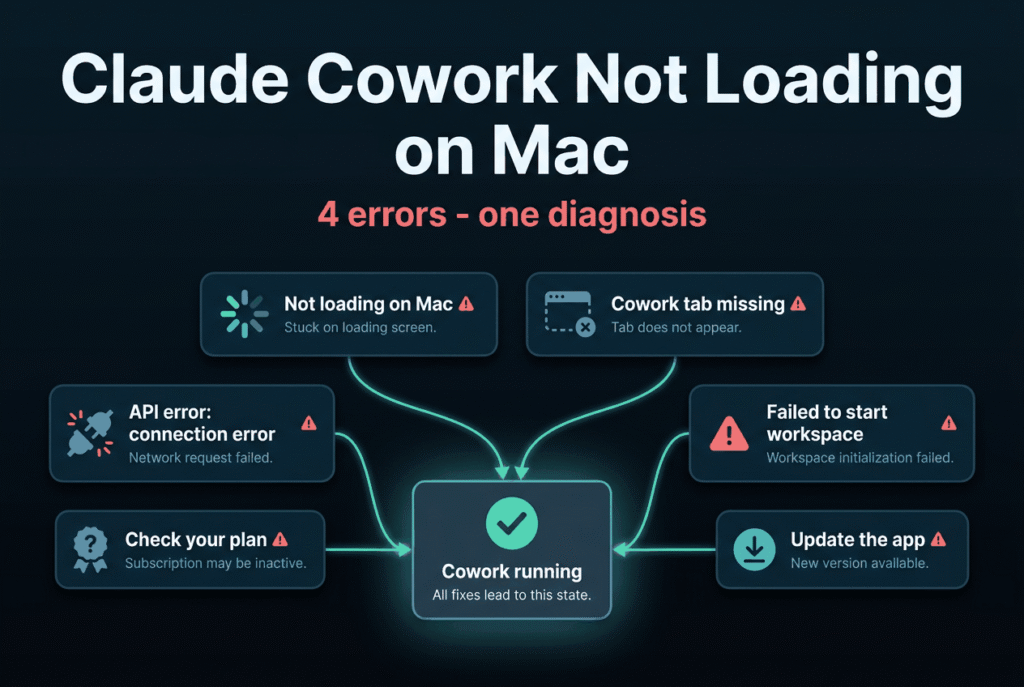
This guide covers the four states people actually search for: Cowork not loading on a Mac, the Cowork tab missing entirely, API error: connection error mid-task, and Cowork not starting. For each one I give you only fixes I can point to a real source for. Where a fix genuinely needs a local reproduction I have not done, I say so instead of guessing, because inventing troubleshooting steps is exactly how you brick a working setup.
what Claude Cowork is and who it is for
Key Takeaways
- Most “not loading” and “tab missing” reports trace to eligibility or a stale app, not a corrupt install. Cowork needs a paid plan (Pro, Max, Team, or Enterprise) and the latest desktop build (Anthropic Help Center, 2026).
API error: connection erroris a network-layer failure, not a bad request: the TCP connection to the API never completed (Claude Code docs, 2026). Check status.claude.com before you touch settings.- “Failed to start Claude’s workspace – VM service not running” is fixed on Windows, still open on macOS. Version v1.30096.1 (2026-08-13) auto-restarts the stopped background service behind it, so updating is the real fix; the macOS report tied to build v1.1.3189 remains open (Anthropic changelog and GitHub #27801, 2026).
- A missing “Cowork tab” is often not missing. Since v1.26832.0 (2026-08-06) the default UI merges Chat and Cowork into one Home composer, so there may be no separate tab to find; separately, an administrator can switch Cowork off entirely, and it now hides rather than greys out (Anthropic changelog, 2026).
- The rest of the “tab missing” cases are server-side gating, not something you can fix locally. The most thorough documented clean install still didn’t surface it (GitHub #51208, 2026).
How Do You Triage a Cowork Failure in 60 Seconds?
Before you uninstall anything, answer one question: which layer failed? Anthropic’s official error documentation splits failures the same way, distinguishing a connection-layer error (the request never reached the API) from an API error (the request arrived and was rejected) (Claude Code docs, 2026). Cowork adds a third layer on top: the local workspace that has to boot before any task runs.
So start here, in order:
- Open status.claude.com. If there’s an active incident, stop. It is not your Mac. Anthropic has had platform-wide connectivity incidents that hit the app, the API, and Claude Code at once (status.claude.com, 2025).
- Check your plan and app version. Cowork requires a paid plan and a current build. This one fact resolves a surprising share of “it’s just gone” reports.
- Read the exact on-screen text. “Tab missing” (no Cowork option at all), “stuck loading” (Cowork opens but never renders), “connection error” (a task fails mid-run), and “failed to start workspace” (Cowork loads but the agent can’t boot) are four different problems with four different fixes.
The decision tree below is the same shape I use for Claude Code errors, adapted to Cowork’s layers. Follow the branch that matches your screen.
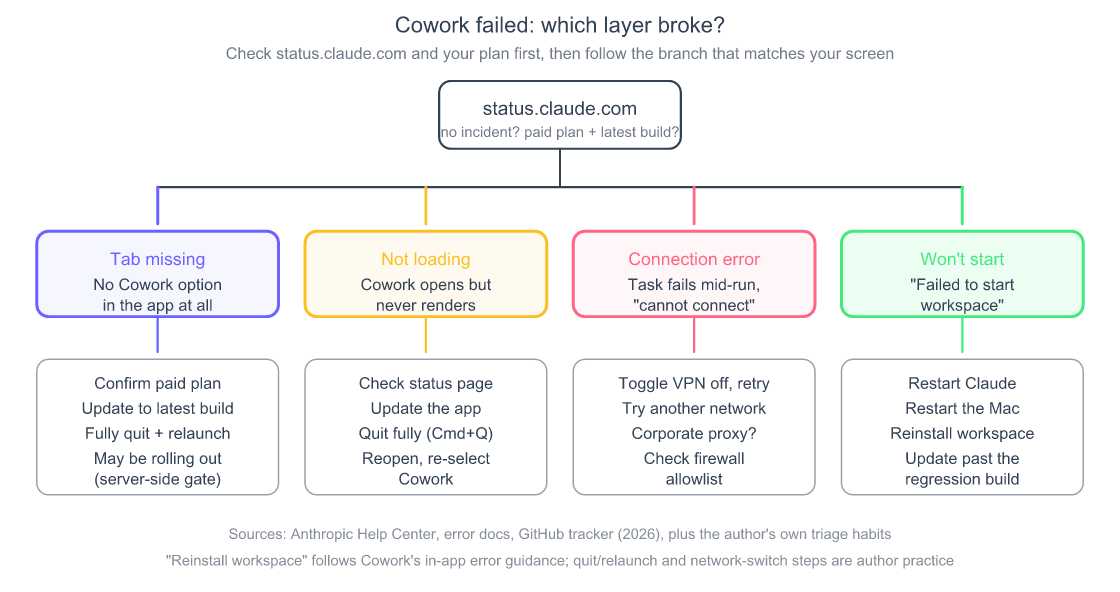
Triage by symptom, not by panic. Each branch ends at a first move you can source.
Why Won’t Claude Cowork Load on My Mac?
If Cowork opens but never renders on a Mac, the usual causes are an ineligible or stale setup, not a corrupted app. Cowork is “available for paid plans (Pro, Max, Team, Enterprise)” and, on macOS, needs the Claude Desktop app for Mac installed and current (Anthropic Help Center, 2026). Rule those two out before anything drastic.
Work through this order:
- Confirm the plan. Cowork does not appear on the free tier at all. If you recently downgraded or your Team seat lapsed, the surface can go blank. which plans include Cowork
- Update Claude Desktop, then fully quit. New Cowork capabilities ship in recent builds. Install any update from the app, then do a full Cmd+Q quit and relaunch (my standard practice after any update, not an official step). The official install docs list macOS 11 Big Sur or higher as the floor for the desktop app (Anthropic Help Center, 2026), so an ancient macOS is worth ruling out too.
- Check the status page. A stuck loading state can be Anthropic’s side. During the September 22, 2025 connectivity incident, claude.ai, the API, and Claude Code all failed together for roughly half an hour (status.claude.com, 2025). Cowork sits on the same backend.
There is a fourth cause worth knowing, and it is the one nobody guesses: Cowork’s workspace lives on disk, and a hang at load is often a disk or download problem, not a UI problem. Anthropic’s changelog is unusually candid here. One release fixed “leftover session workspaces building up on disk until new sessions could fail with a disk-space error” (v1.26832.0, 2026-08-06). An earlier one fixed “workspace setup repeatedly failing with the same checksum error after a corrupted download, until the cache was cleared” (v1.15962.0, 2026-06-25). Another fixed “the workspace download restarting from zero after a network interruption” (v1.17377.1, 2026-06-30) (Anthropic changelog, 2026).
That gives you a real, official recovery instead of a guessed one. Since v1.11847.5 (2026-06-09) the app ships a “Free Up Cowork Disk Space” option under Help > Troubleshooting, and Cowork “cleans up caches and old temporary files automatically when its workspace disk runs low” (Anthropic changelog, 2026). If Cowork hangs at load, that menu item is the supported way to clear its cache, and it is the step I would take before anything drastic.
What I still will not do is hand you a file path. The secondary “fix it” pages that tell you to rm -rf a specific Application Support directory are inventing specifics, and the in-app option above does the same job through a supported route. If the hang survives a disk cleanup, a full quit, and an update, you are past what a local fix reaches.
What I can tell you from experience: the “reddit” in this search exists because people go looking for a thread confirming it is not just them. Often it is not. When a brand-new agent product hangs at load, the fastest signal is whether other people are reporting it right now, and the status page plus Anthropic’s public issue tracker answer that faster than a subreddit scroll.
Why Is the Cowork Tab Missing From the Desktop App?
A missing Cowork tab is one of the most-reported versions of this problem, and for many users it is not something a reinstall fixes. Anthropic’s own guidance for people who don’t see Cowork is blunt: “Cowork on web and mobile is rolling out gradually across paid plans. Make sure you’re on an eligible plan and, on mobile, that you’ve updated to the latest version of the app” (Anthropic Help Center, 2026). Translation: even on a paying plan with a current app, you can be behind a server-side rollout gate.
The evidence for that sits on Anthropic’s public tracker. One reporter on Windows 11, on a paid Pro plan and running a current desktop build, did a full uninstall, manually deleted %APPDATA%\Claude and %LOCALAPPDATA%\Claude, removed the app package via PowerShell, reinstalled as administrator, and still had only Chat and Code tabs, no Cowork (GitHub #51208, 2026). The telling detail: no log files were generated at all, suggesting “Cowork never attempted to initialize and was blocked before generating any logs.” That issue was closed as not planned, tagged duplicate, with no local fix offered. A separate Windows 11 report on the same symptom is still open and labeled area:cowork (GitHub #48407, 2026).
That is the strongest argument in this whole guide against the reinstall reflex: the most thorough clean install anyone has documented did not surface the tab.
So do the two things you control, then stop reinstalling:
- Verify the plan and update the app. This clears the cases that are genuinely a stale build or a lapsed entitlement.
- Fully quit and relaunch after any update. My working theory, not a documented mechanism: a background restart doesn’t re-check entitlements the way a clean relaunch does.
Before you conclude you’re behind a rollout, rule out two causes that the “missing tab” framing hides, both documented in Anthropic’s changelog.
Your administrator may have switched it off. On managed Team and Enterprise machines, the Cowork tab is an administrable setting. A release note from v1.25927.0 (2026-08-04) fixed “the home composer and sidebar still offering Cowork when an administrator has turned the Cowork tab off,” and states that “Cowork is now hidden instead of greyed out, while Chat and Projects remain available” (Anthropic changelog, 2026). Read that carefully: on a current build, an admin-disabled Cowork looks exactly like a Cowork that was never there. No greyed-out control, no explanation. If you’re on a work machine, ask IT before you reinstall anything.
Or the tab may not exist anymore. This is the one that catches people. In v1.26832.0 (2026-08-06), Anthropic “added the merged Chat and Cowork home as the default,” where “the ‘New’ button starts a chat or a task from one composer, and the sidebar shows Home, which lists chats and tasks together, alongside Code” (Anthropic changelog, 2026). On a build with the merged home, hunting the top nav for a tab labelled “Cowork” is hunting for something that was deliberately folded away. You start a Cowork task from the composer instead. The Help Center describes the same flow: “In the message box, select ‘Cowork'” (Anthropic Help Center, 2026).
So the honest hierarchy for a missing tab, in the order worth checking: the UI merged and you’re looking for the wrong thing, an administrator disabled it, your plan lapsed, your build is stale, or you’re behind the gradual rollout. Only the last one is a genuine wait-it-out. None of them is fixed by wiping directories, which is what the tracker evidence keeps showing.
On Windows specifically, a missing tab can also be a virtualization or background-service problem, which is its own rabbit hole. Windows install and first-run failures, including the background service
What Does “API Error: Connection Error” Mean in Cowork?
API error: connection error means the request never reached Anthropic’s servers. This is a network-layer failure, not a rejected request. Anthropic’s error reference defines “unable to connect to API” as a case where “the TCP connection to the API failed or never completed,” which is distinct from an API error that returns a status code (Claude Code docs, 2026). No status code in the error usually means the traffic died between your machine and the API.
That distinction tells you where to look: everything between your Mac and api.anthropic.com. The failure is real and current. One open report shows the raw form of it, Unable to connect to API (ConnectionRefused) with an underlying ECONNREFUSED, filed under area:networking on macOS (GitHub #53346, 2026). That one is a Claude Code CLI report rather than a Cowork desktop report, so treat it as evidence of the failure shape, not of Cowork behaviour specifically.
My triage order for a connection-layer failure, built on Anthropic’s error docs:
- Rule out an outage. Check status.claude.com before touching anything local. Anthropic’s docs point to the status page for server-side errors (Claude Code docs, 2026); making it the first stop for any connection failure is my own habit, and it’s the cheapest test on this list.
- Kill the VPN or switch networks. A stale VPN tunnel is a classic cause; on macOS the docs suggest checking for leftover tunnel interfaces (Claude Code docs, 2026). Trying a second network, like a phone hotspot, is my own isolation test rather than a documented step.
- Handle a corporate proxy or firewall. If you are behind a corporate proxy, Anthropic’s guidance is to configure it and ensure your firewall allows Anthropic’s hosts (Claude Code docs, 2026).
One caveat on those steps: the proxy and gateway instructions are written for Claude Code, the CLI, where you set environment variables like HTTPS_PROXY before launching. The network-layer causes (outage, VPN, firewall, corporate TLS inspection) apply to any Anthropic client, but I have not seen Anthropic document the same environment-variable knobs for the Cowork desktop app, so I am not going to tell you to run a command that may not apply. For the CLI-specific version of this error, the breakdown lives in the Claude Code errors guide. the CLI version of connection and API errors, with the exact env-var fixes
What Anthropic has documented is that the desktop app is proxy-aware and that blocked corporate networks are a recognised scenario, which is useful if you’re arguing with an IT team. A July release added Cowork telemetry export over gRPC specifically “when no network proxy is configured,” implying the app reads a system proxy when one is (v1.20186.0, 2026-07-09). More directly, an August release added an admin setting, updateViaUpdatesHost: set it to true and the app reads its update feed from releases.claude.com, described as “a host that serves only the desktop update check and carries no model API, so networks that block api.anthropic.com can still receive updates” (v1.26832.0, 2026-08-06) (Anthropic changelog, 2026).
That second one is worth reading twice if you’re on a work network. Anthropic shipped a setting whose entire reason to exist is that some corporate networks block api.anthropic.com outright. If your Cowork connection errors started the day you joined a new network, and the status page is green, an egress rule is a far likelier culprit than anything on your Mac. The fix is a firewall allowlist, which is an IT conversation, not a settings toggle.
Why Does Cowork Fail to Start With “VM Service Not Running”?
If Cowork loads but the agent won’t start, the workspace VM failed to boot, and Anthropic’s own error banner is your best first source. The exact text users see is: “Failed to start Claude’s workspace – VM service not running. The service failed to start. Restarting Claude or your computer sometimes resolves this. If it persists, you can reinstall the workspace or share your debug logs to help us improve” (GitHub #27801, 2026). That banner is not filler. It is Anthropic telling you the supported recovery path.
This one has a known regression attached. The report, filed on macOS, ties the failure to Claude Desktop build v1.1.3189 (2026-02-14), notes that the UI still loads partially (the prompt box and model selector appear) but the workspace VM cannot start, and confirms the error persisted even after a full reboot (GitHub #27801, 2026). The issue is still open. That matters: if a specific build broke workspace startup for you, updating past it is the logical durable move, though with the issue unresolved nobody has confirmed a guaranteed fix.
Follow the banner’s own escalation ladder, plus the one step it doesn’t mention:
- Restart Claude, then the machine. The banner lists this first because it clears transient VM-service states.
- Update the desktop app. The banner doesn’t say this, but with a build regression on record, getting off the affected build is the step I’d take second.
- Reinstall the workspace if it persists, which is the banner’s explicit next step (distinct from reinstalling the whole app).
- Share debug logs with Anthropic, which the banner invites and which is the right move for a still-open regression.
On Windows, Anthropic confirmed the cause and shipped a fix
If you’re on Windows, this error has a documented resolution, and it landed recently. Version v1.30096.1 (2026-08-13) “fixed Cowork on Windows failing on every launch with ‘VM service not running’ after its background service had stopped,” and notes that “the service is now restarted automatically, and otherwise the error explains that restarting the computer restores it” (Anthropic changelog, 2026).
That single line answers three things at once. A stopped background service really was the cause on Windows, so the secondary blogs pointing at a service were directionally right. Anthropic now restarts it for you, so updating to v1.30096.1 or later is the actual fix. And where it still fails, restarting the computer is Anthropic’s own stated recovery, not folklore.
What I still won’t repeat is the specific commands those pages hand you. Search this error and you’ll find confident instructions to restart a named “CoworkVMService,” clear a VM disk image, or delete a bundle directory. Anthropic never names a service in its changelog or docs, so those service names are someone’s guess, and running the wrong sc.exe command against a guessed service name achieves nothing. Update the app instead; that is the sourced path.
There is a second documented Windows cause worth checking if updating doesn’t clear it. Version v1.24012.0 (2026-07-21) fixed “the Windows workspace failing to start when its virtual disk files were compressed” (Anthropic changelog, 2026). If you run NTFS compression on the drive holding your user profile, or a disk-cleanup tool that compresses cold files, that is a real and non-obvious way to break workspace startup. The virtualization requirements behind all of this are their own topic. Windows virtualization requirements and the background service behind Cowork
On macOS, the regression is still open
Do not read the Windows fix as a fix for your Mac. Issue #27801 is filed on macOS, ties the failure to build v1.1.3189, and remains open with no Anthropic response and no confirmed resolution (GitHub #27801, 2026). The Windows background-service fix is a different defect on a different platform. For a Mac stuck on this error, the banner’s ladder above is still the honest extent of it: restart, update, reinstall the workspace, send the debug logs.
Why “just update” is better advice than it sounds
Telling someone to update their app is usually filler. Here it isn’t, and the changelog shows why. Between June and August 2026, Anthropic shipped seven separate fixes to Cowork’s workspace and disk layer, roughly one every ten days. If your workspace is misbehaving, the odds that your specific failure already has a fix waiting in a newer build are genuinely high.
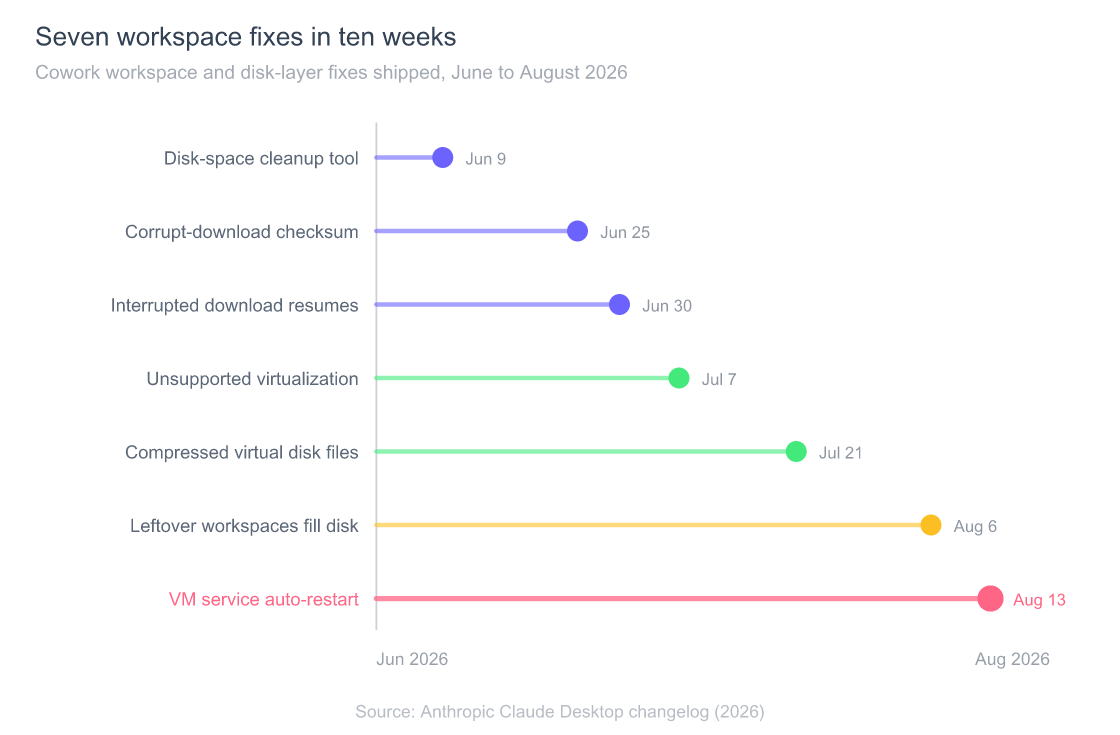
The rose entry at the bottom is the one that matters most if you are on Windows and stuck on “VM service not running.” It is nine days old at the time of writing, which means a machine that hasn’t updated in a fortnight is very likely hitting a defect Anthropic has already closed.
How Do You Tell If It’s Anthropic’s Problem, Not Yours?
Check the status page first, every time, because platform incidents present exactly like a local failure. On September 22, 2025, an incident titled “Claude App and API connectivity errors” took down claude.ai, the Console, the API, and Claude Code together, with services restored inside about 32 minutes (status.claude.com, 2025). During a window like that, a “not loading” Cowork or a “connection error” is not yours to fix.
The rule I use: if Cowork breaks and the status page shows an active incident, close the laptop and come back in an hour. If the status page is green, then it is worth working the branch that matches your symptom above. This single habit saves more time than any command, because it stops you from uninstalling a perfectly good app to fix an outage you cannot fix.
There is a second reason to lead with the status page for Cowork specifically. Since July 7, 2026, Cowork can run remote and scheduled sessions in the cloud, expanding to mobile and web (9to5Mac, 2026). The more of Cowork’s work happens server-side, the more an outage, not your Mac, is the thing that broke your task.
Frequently Asked Questions
Is Claude Cowork free, and does that affect whether it loads?
Cowork is not on the free tier. It is included with paid plans only: Pro, Max, Team, and Enterprise (Anthropic Help Center, 2026). If Cowork suddenly disappeared or won’t load, a lapsed or downgraded plan is one of the first things to rule out. full Cowork pricing and free-plan answer
Do I have to keep the desktop app open for Cowork to work?
For remote work, no; for local work, yes. Anthropic states sessions “keep running even when the desktop app is closed or your computer is asleep,” but “if your task uses local files, your browser, or your computer, keep the desktop app open” (Anthropic Help Center, 2026). A task that quietly stalls may be a local task that lost the app it needed.
Does restarting actually fix “failed to start workspace”?
Sometimes, per Anthropic’s own banner, which says “restarting Claude or your computer sometimes resolves this” and to reinstall the workspace if it persists (GitHub #27801, 2026). Because the failure has been linked to a specific desktop build, updating past that build is the logical durable move, though the issue remains open without a confirmed fix.
The Cowork tab is missing even though I’m on a paid plan. What now?
Update the app, fully quit, and relaunch. If it still doesn’t appear, you may be behind Anthropic’s gradual rollout, which the help center confirms is real (Anthropic Help Center, 2026). Reports on eligible plans have stayed unresolved by reinstalling (GitHub #51208, 2026), so contacting support beats wiping directories.
Is “API error: connection error” my internet or Anthropic’s servers?
Usually the path between you and the API, not the API itself. Anthropic defines it as the TCP connection failing or never completing (Claude Code docs, 2026). Check status.claude.com for an outage, then rule out VPN, proxy, and firewall before assuming your setup is broken.
The Bottom Line
Cowork breaks in more ways than a chat window because it does more than a chat window: it gates on your plan, boots a local workspace, and reaches out over the network for every task. That is exactly why a single generic fix does not exist, and why anyone handing you one confident command for all four errors is guessing.
Match the symptom to the layer. Tab missing is almost always eligibility or a rollout gate. Not loading is usually a stale app or an active incident. Connection error is the network path. Failed to start is the workspace VM, with a known build regression behind many cases. Check the status page first, work the branch that fits, and stop before you uninstall a working app to fix a server-side problem.
once it’s running, here is how to actually put Cowork to work
the full picture of what Cowork is, its platforms, and eligibility