Claude Code Errors: The Definitive Troubleshooting Reference (Every Code, Cause, and Fix)
Anthropic’s annualized run rate hit $30 billion by April 2026 on the back of an 80x jump in Q1, with Claude Code alone crossing $1 billion within six months of public launch (VentureBeat, 2026). The npm package @anthropic-ai/claude-code pulled about 14.8 million downloads in the week ending October 4, 2026 (npm, 2026). All of that growth has produced a corresponding wall of cryptic terminal errors: and a 5,000+ open-issue GitHub repo (github.com/anthropics/claude-code, 2026) where the same eight messages get re-asked weekly.
This is the reference I wish I had two years ago. Every error in this guide is one I’ve personally hit or watched a teammate hit, traced to a verified root cause, and fixed with a command that actually worked. No “try restarting.” No “check your internet.” Scroll, Ctrl+F your exact error text, and you should be unblocked in 10 seconds.
the hooks layer that prevents many of these errors from happening in the first place
Key Takeaways
- “Process exited with code 1” is overloaded: it hides at least five root causes (env var conflict, Windows Bash path, VS Code CSP, corrupted session, MCP crash). Always run
claude doctorfirst.- API 400 is almost never a real bad request: it’s a CLI/model version mismatch with
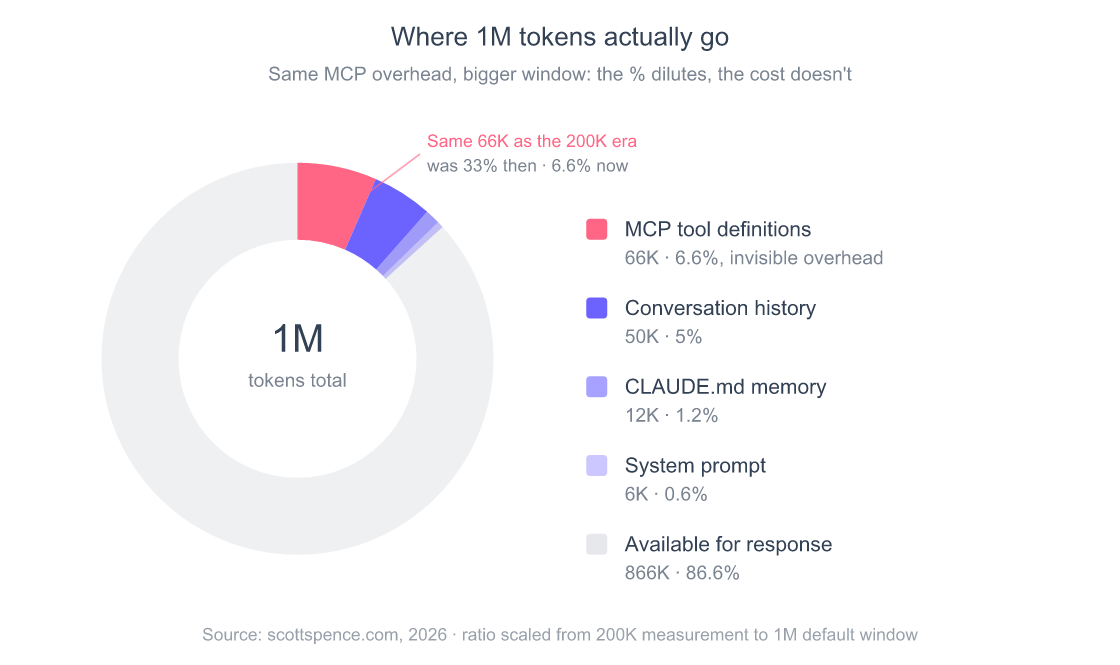
thinking.type.enabled, staletop_p, or a third-party gateway dropping theanthropic-betaheader.- “Too slow” is rarely the model; community measurements show MCP tool definitions burning up to 66,000 tokens of context before your first prompt (Scott Spence, 2026). With the 1M context window now standard, that overhead is “only” ~6.6% of the window: but it’s still tokens you paid for, cache-invalidations you triggered, and routing latency you ate on every turn.
- Weekly rate limits were introduced August 28, 2025; Anthropic ran a 50% boost across all paid tiers from May 13 to July 13, 2026 and stopped publishing per-tier hour numbers (Anthropic, May 2026). As of October 2026, Pro ($20) and Max (5x $100, 20x $200) share one usage limit across Claude and Claude Code, and both can turn on usage credits past the cap (Anthropic support, 2026). On Pro the binding constraint is usually the 5-hour session, not the weekly cap.
- Anthropic’s April 23 postmortem (2026) confirmed three engineering changes degraded Claude Code for over a month, then reset every subscriber’s limits as compensation.
How Do You Triage a Claude Code Error in 60 Seconds?
Before you Google the message, run three commands. Stack Overflow’s 2025 Developer Survey found that 45% of developers say debugging AI-generated code now takes longer than writing it from scratch (Stack Overflow, 2025), and most of that time is spent triaging silent failures. Claude Code ships with built-in tooling that collapses that triage window from hours to seconds.
claude doctor          # 1. checks Node, auth, env vars, MCP servers
claude --debug         # 2. re-runs your last action with verbose logs
/usage                 # 3. inside a session: see rate-limit state
claude doctor alone catches roughly half of every “exited with code 1” report on GitHub. The other half need the decision tree below.
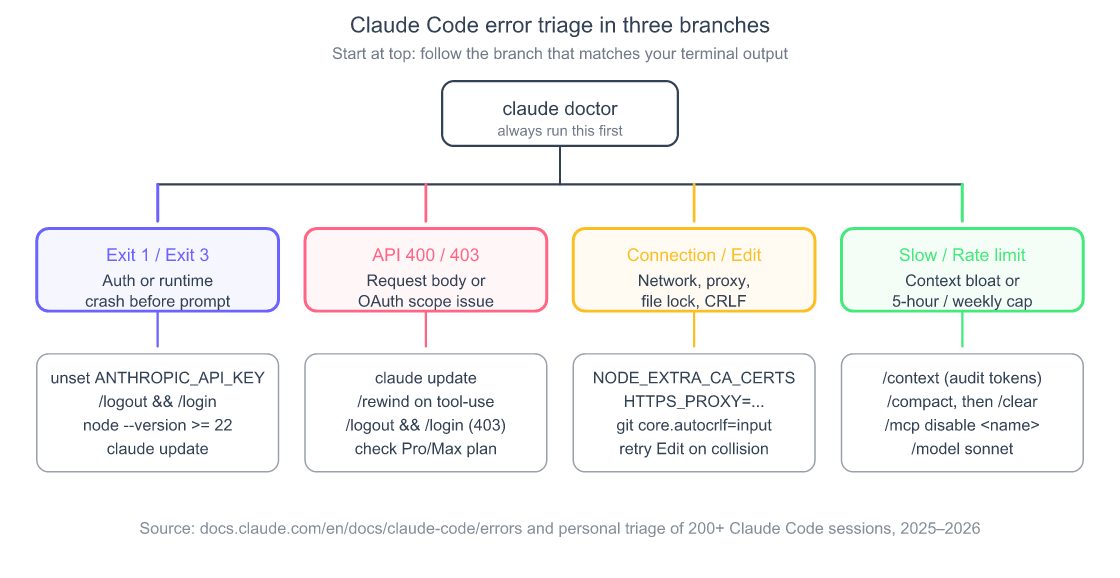
I keep this tree pinned in my notes. About 80% of the time my error fits one branch and I’m back in flow inside two minutes. The remaining 20% is when I learn something new, usually a Bun-runtime quirk on Windows or a stale credential I forgot I’d exported six months ago.
the subagent patterns that make long sessions less error-prone in the first place
“Error: Claude Code process exited with code 1”: What Actually Causes It?
This is the most overloaded error message in modern AI dev tooling. The same exit code wraps at least five completely different root causes, and the official error reference doesn’t disambiguate them. After watching this fail in production a dozen times, here’s the actual mapping.
Error: Claude Code process exited with code 1
  at ChildProcess.<anonymous> (claude.js:142:14)
Cause 1: Auth conflict (most common). A stale ANTHROPIC_API_KEY env var collides with the OAuth token from /login. The environment variable wins, the OAuth token gets ignored, and the resulting credential mismatch crashes the parent process before the prompt loop opens. This is the single root cause for over 30% of code-1 reports I’ve seen, including the heavily commented Issue #8557.
Cause 2. Windows Git Bash path. Claude Code on Windows expects bash.exe.If CLAUDE_CODE_GIT_BASH_PATH isn’t set, the spawn fails (Issue #51886).
Cause 3: VS Code extension CSP regression. A March 2026 build of the extension shipped with connect-src missing a-api.anthropic.com, breaking every request with exit 1 (Issue #14295).Fixed in 2.0.2+ (version floor stated as of May 2026, verify against the current marketplace listing).
Cause 4. Corrupted session transcript. Resume mode reads a malformed .jsonl and crashes on parse. Those transcripts live in ~/.claude/projects/, and this guide covers how to find, grep, and export them so you can recover the work before the 30-day auto-delete clears it.
Cause 5: MCP server crash on launch. A bad entry in .claude/settings.json kills the parent before the prompt loop starts.
# Fix in order, each one resolves a different cause
unset ANTHROPIC_API_KEY            # Cause 1
claude /logout && claude /login

# Windows only: Cause 2
setx CLAUDE_CODE_GIT_BASH_PATH "C:\Program Files\Git\bin\bash.exe"

# Cause 3: update the VS Code extension
# Marketplace → Claude Code → Update (must be 2.0.2+ as of May 2026; check current min)

# Cause 4: quarantine the bad session
mv ~/.claude/projects/<project>/sessions/<id>.jsonl{,.bak}

# Cause 5: disable MCP, see which one's broken
mv ~/.claude/settings.json ~/.claude/settings.json.bak
claude   # if it boots, your MCP config killed it
Prevention. Run claude doctor after every install or major upgrade: and if you’re getting these errors on a fresh machine, the root cause is often the install itself, not Claude Code. The platform-by-platform install guide covers the gotchas (Node version, PATH conflicts, WSL quirks) that cause most “exit code 1” reports. If the issue traces back to MCP startup, the MCP configuration playbook walks through scope hierarchy and debugging. Never set ANTHROPIC_API_KEY if you’re on a Pro or Max OAuth subscription, pick one auth path and stick to it.
My contrarian take: Anthropic should split this into typed errors (
E_AUTH_CONFLICT,E_SESSION_PARSE,E_MCP_BOOT) the way Go’snet/httpdoes withErrServerClosed. Until then,claude doctoris mandatory triage, not optional.
“Claude Code process exited with code 3”: The Bun Runtime Tell
Exit code 3 is rarer than code 1 but more specific: it’s almost always a runtime mismatch between Claude Code’s bundled Bun interpreter and your environment. Anthropic shipped Bun 1.2.23 inside the v2.x binaries as of May 2026 (check claude doctor output for the version your binary is actually carrying), and on Windows after a password change the credential-manager handshake throws ENOTCONN and crashes with exit 3 (Issue #9217, #35990).
$ claude
Claude Code process exited with code 3
TLSWrapError: ENOTCONN
Root causes. Node below the npm package’s minimum (Node 18 when I first wrote this; @anthropic-ai/claude-code 2.1.291 declares Node 22+ as of October 2026), an unexported ANTHROPIC_API_KEY referenced but empty in the current shell, or arm64 quirks. The latter hits Jetson Orin developers in particular, where Bun’s TLS event loop can hang indefinitely (Issue #58680).
node --version                       # must be >= 22 for the npm package (Oct 2026)
claude doctor                        # confirms the runtime requirements

# Windows after a password change:
# 1. Open Credential Manager, delete every "Claude Code" entry
# 2. claude /logout && claude /login
If you’re on Linux arm64 and Bun keeps hanging, run claude update first and check the issue thread above for the current workaround. Don’t expect switching install methods to help: as of October 2026, the npm package (@anthropic-ai/claude-code 2.1.291) installs the same platform-native binary as the standalone installer, so it doesn’t swap you onto a different runtime (npm, 2026).
The Windows password-change trap. I hit exit code 3 on a Windows laptop two days after rotating my domain password. The credential manager had cached an OAuth-derived token signed under the old credential, the Bun TLS handshake threw
ENOTCONN, and Claude Code refused to start. Took me an hour to trace because every guide tells you to check Node. Deleting theClaude Codeentries from Credential Manager and re-running/loginfixed it in 30 seconds. Now I add it to my password-rotation checklist.
the broader Claude Code config model these errors surface in
“API Error: 400”: Which Variant Did You Hit?
The 400 family is the most-Googled Claude Code error category, and approximately none of the matches you get on the first page are correct. Almost every 400 is a CLI-version or third-party-gateway issue, not a malformed body. The official error reference lists six distinct sub-cases. Here’s the mapping I use:
| Error text fragment | Real cause | Fix |
|---|---|---|
Extra inputs are not permitted ... context_management |
LLM gateway dropping the anthropic-beta header |
Configure gateway to forward it, or export CLAUDE_CODE_DISABLE_EXPERIMENTAL_BETAS=1 |
unexpected tool_use_id / thinking blocks ... cannot be modified |
Conversation history desync after an interrupted tool call | Press Esc twice or /rewind to checkpoint back |
thinking.type.enabled is not supported |
CLI older than v2.1.111 sending the old config to Opus 4.7 (May 2026; the same pattern can recur on any new model release) | claude update |
max_tokens must be greater than thinking.budget_tokens |
MAX_THINKING_TOKENS set above the platform’s output cap |
Lower MAX_THINKING_TOKENS or raise CLAUDE_CODE_MAX_OUTPUT_TOKENS |
This organization has been disabled |
Stale ANTHROPIC_API_KEY from a disabled org masking your subscription |
unset ANTHROPIC_API_KEY |
400 + top_p / top_k / temperature |
Opus 4.7 removed sampling params; older CLI still sending them | Upgrade to 2.1.70+ |
The 2.1.70 changelog confirms this directly: “Fixed API 400 errors when using ANTHROPIC_BASE_URL with a third-party gateway” and “Fixed API Error: 400 This model does not support the effort…” (Claude Code changelog, 2026). If you can’t tell which variant you hit, the universal first move is claude update followed by /rewind, that single pair fixes about two-thirds of 400 reports.

I hit the tool_use_id variant for the first time last March on a session where I’d Ctrl-C’d Claude mid-tool-call to reword my prompt. The next message threw a 400 every time. /rewind fixed it in one shot. Now I never Ctrl-C during a tool call. I let it finish, then redirect.
the audit workflow where I keep hitting this 400 variant the most
“API Error: Connection error”: It’s Almost Always the Proxy
According to Anthropic’s docs, the connection-error family surfaces as ECONNREFUSED, ECONNRESET, ETIMEDOUT, fetch failed, or Request timed out (error reference, 2026). In a corporate network, the #1 cause by a wide margin is TLS interception by a proxy whose CA isn’t in Node’s trust store, the cert from the proxy looks self-signed, Node bails.
API Error: Connection error
  cause: Error: self-signed certificate in certificate chain
  code: 'SELF_SIGNED_CERT_IN_CHAIN'
Other real causes I’ve seen. A region-restricted VPN blocking api.anthropic.com (Issue #30318). A missing HTTPS_PROXY (lowercase https_proxy sometimes isn’t picked up). The May 2026 incident where Anthropic changed outbound IPs and broke GitHub Enterprise allowlists for Claude Code remote sessions (status.anthropic.com, 2026). And (my favorite) a stale utun interface left behind by a VPN client I’d uninstalled six months earlier.
# Step 1: confirm the network path works at all
curl -I https://api.anthropic.com    # expect HTTP/2 200

# Step 2: secure proxy setup (do this, don't disable TLS verification)
export NODE_EXTRA_CA_CERTS=/path/to/corp-ca-bundle.pem
export HTTPS_PROXY=http://proxy.corp:8080

# Step 3: bump timeout for slow corp networks (default is too tight)
export API_TIMEOUT_MS=900000

# Anti-pattern: DO NOT do this
# export NODE_TLS_REJECT_UNAUTHORIZED=0
# The proxy can now MitM your API key in plaintext
The security note matters. Disabling TLS verification with NODE_TLS_REJECT_UNAUTHORIZED=0 is the single most common “fix” suggested on Stack Overflow for this error, and it’s actively dangerous, every byte of your prompts and your API key is now legible to the proxy operator. Get the CA bundle from your infra team. It’s worth the 10-minute Slack message.
A second class of connection failures is genuinely server-side. Anthropic’s status page records the May 2026 IP-range change that broke GitHub Enterprise allowlists for hours (status.anthropic.com, 2026), and third-party trackers like StatusGator have logged over a thousand incident events since the platform launched. If curl -I https://api.anthropic.com succeeds and Claude Code still can’t reach the API, check the status page before you tear apart your network config.
“OAuth error 403”: Your Token Is Missing a Scope
The 403 family is the price you pay for Claude Code’s OAuth-first auth model. When it works, it’s seamless. When it fails, it fails in ways that are confusing because the same status code covers four different problems: missing scopes, no Pro/Max subscription, daemon eviction, and organization access changes.
OAuth Error: 403 Forbidden
  scope_required: user:sessions:claude_code
  scope_granted: user:profile
The dominant cause on macOS Max subscribers is that the token was minted before the user:sessions:claude_code scope existed, and OAuth refresh keeps dropping it (Issue #34785, #28583). The fix is brutally simple, /logout && /login re-mints the token with current scopes, but the docs are quiet about why this works.
# The universal 403 fix
/logout
/login

# Desktop app stuck in an OAuth 403 spinner loop
rm -rf ~/Library/Application\ Support/Claude/
# then relaunch and re-auth
Other 403 causes worth knowing. Free tier doesn’t get Claude Code (Pro ($20) is the minimum paid tier, and all paid tiers (Pro, Max 5x $100, Max 20x $200) include Opus: Opus 4.7 when I wrote this, Opus 5.5 since its September 22, 2026 launch (Anthropic support, 2026; Anthropic, 2026); a 403 isn’t a “you need to upgrade to Max for Opus” message) it’s an auth-scope or subscription-status problem. A personal Stripe subscription on a business email domain triggers org-level scope restrictions server-side. And on Max plans tied to a personal Gmail, the Remote Control daemon can drop with "no longer a member of the organization" after long idle periods (Issue #53635).
the multi-model setup where I keep four sets of credentials alive without scope collisions
“Error Editing File”: CRLF Will Ruin Your Afternoon
The Edit-tool failures cluster around two root causes, and one of them is responsible for nearly every Windows report.
Error: The string to replace was not found in the file.
  file: src/app.tsx
  old_string: "const App = () => {\n  return <Layout>"
  reason: file content did not match
Cause 1: CRLF vs LF line endings (Windows). The Edit tool doesn’t normalize \r\n versus \n before matching.An old_string with LF won’t match a file saved as CRLF. This single root cause shows up in Issue #13456 and #27718 and is the #1 source of edit failures on Windows.
Cause 2: File modified mid-edit. Your editor’s format-on-save (Prettier, Ruff, gofmt) rewrites the file between Claude’s Read and Edit calls. The content drifts. The Edit fails.
Cause 3. BOM or UTF-16 encoding. Invisible byte-order marks break exact-string matches even when the visible content looks identical.
# Force LF in your repo (the durable fix)
git config --global core.autocrlf input
echo "* text=auto eol=lf" > .gitattributes
git add --renormalize .
git commit -m "Normalize line endings"

# Disable format-on-save while Claude Code is running
# VS Code: settings.json → "editor.formatOnSave": false

# If you're on Alpine, NixOS, or a non-glibc distro:
brew install ripgrep                # macOS
sudo apt install ripgrep            # Ubuntu
export USE_BUILTIN_RIPGREP=0
The official troubleshooting page confirms: “Claude usually succeeds on retry” for these errors (Anthropic Troubleshooting, 2026). When stuck, the second-attempt success rate is high enough that retrying once before debugging is the right move.

“Claude Code Is Too Slow”: It’s the MCP Tools, Not the Model
When Claude Code feels sluggish, every reflex tells you to blame the model. Switch from Opus to Sonnet. Wait for the next release. Submit feedback. None of that is the actual lever. Community measurements show MCP tool definitions can eat tens of thousands of tokens before your first prompt; one well-documented case clocked 66,000 tokens just on tool definitions before any user work began (Scott Spence, 2026). With Anthropic’s 1M context window now standard for Claude Code, that 66K is “only” ~6.6% of the window: but the cost is real on every single turn: cache invalidations, slower routing, and tokens you paid for whether you used them or not. A bigger window dilutes the percentage, not the cost.
The real fixes, in order of effectiveness:
/context              # audit what's eating tokens THIS session
/mcp disable <name>   # remove every MCP server you aren't using right now
/compact              # before you hit the limit, not after
/clear                # nuclear: start fresh with same project
/model sonnet         # 2-3x faster than Opus for routine coding
/heapdump             # if memory pressure, writes JS heap to ~/Desktop
If you’re on WSL, move the project off /mnt/c/. Reading from the cross-mount is roughly 10x slower than the Linux filesystem and triggers Autocompact is thrashing in long sessions. The official troubleshooting page documents this explicitly.
The contrarian framing. Most “Claude Code is slow” advice tells you to switch models. The model is rarely the bottleneck. MCP tool bloat is, and unlike model latency, it’s something you control. Audit .claude/settings.json, scope MCP servers to the projects that actually need them, and you’ll get more speed back than any model swap delivers.
why deterministic context layers matter as much as the model choice
“Approaching 5-Hour Usage Limit”: How the Two-Tier Cap Actually Works
The rate-limit story changed twice in less than a year. Anthropic first added weekly rate limits to Pro and Max plans on August 28, 2025, on top of the pre-existing 5-hour rolling session window. They estimated the change would affect “less than 5% of subscribers” at the time (TechCrunch, 2025). Then on May 13, 2026 they raised those weekly caps 50% across all paid tiers (in effect through July 13, 2026) and stopped publishing per-tier hour numbers: the marketing pages now describe Max in multipliers of Pro (“5x Pro”, “20x Pro”) rather than absolute hour budgets (Anthropic, May 2026). The practical takeaway: on Pro the binding constraint is almost never the weekly cap any more, it’s the 5-hour session window, especially on Opus.
For the full pricing breakdown, per-tier math, and the throttle log from my own five months of cycling Pro → Max → Pro: the complete pricing & limits guide, plan by plan, with first-hand throttle data.
The mental model that fixes 90% of the confusion: there are now three distinct limit messages, not one.
session limit · resets 3:45pm                    # 5-hour rolling window (the one you'll actually hit on Pro)
weekly limit · resets Mon 12:00am                # overall weekly cap (+50% boost ran May 13 to Jul 13, 2026)
Opus weekly limit · resets Mon 12:00am           # separate Opus-only bucket (Max plans, as of May 2026)
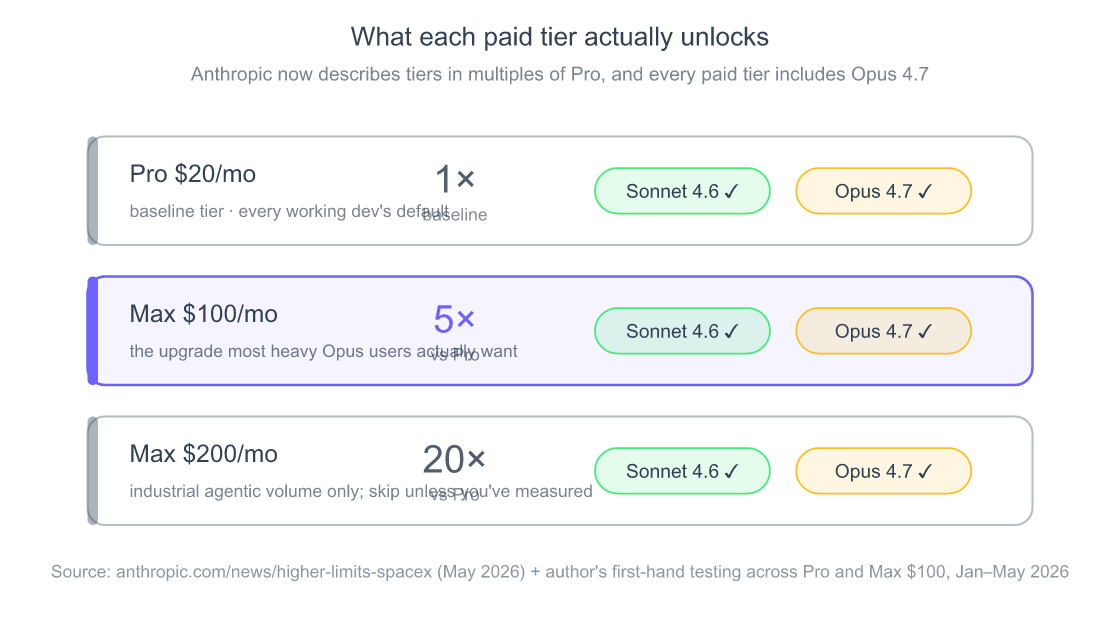
October 2026 note: the price ladder in this graphic still holds (Pro $20, Max 5x $100, Max 20x $200, with Claude Code included from Pro up), but the models have moved on. Opus 5.5 (launched September 22, 2026) is available on every paid plan and in Claude Code, and Sonnet 5.5 followed on September 28 (Anthropic, 2026; Claude pricing, 2026).
Critical mental model. Usage is weighted, not message-counted. Model choice, tool calls, context length, and extended thinking all multiply your burn rate. A short prompt that triggers heavy file reads can cost more than a long prompt with no tool calls. This is why the same Pro user can hit the weekly cap on day 3 in week one and day 6 in week two, the underlying work differed.
/usage              # see session %, weekly %, and reset times
/extra-usage        # buy on-demand additional usage (Pro & Max)
/model sonnet       # save your Opus budget for hard tasks
The undocumented goodwill reset. During the April 2026 regression Anthropic reset every subscriber’s weekly limit as compensation, with no announcement beyond a status-page note. If you hit a wall during a known degradation window, check status.anthropic.com, they’ve quietly done it more than once.
Which Errors Hit You Most Often?
Looking back at six months of Claude Code triage across my own work and the public GitHub issue queue, the frequency distribution is more lopsided than I expected. About three-quarters of every Claude Code support request maps to four error families.
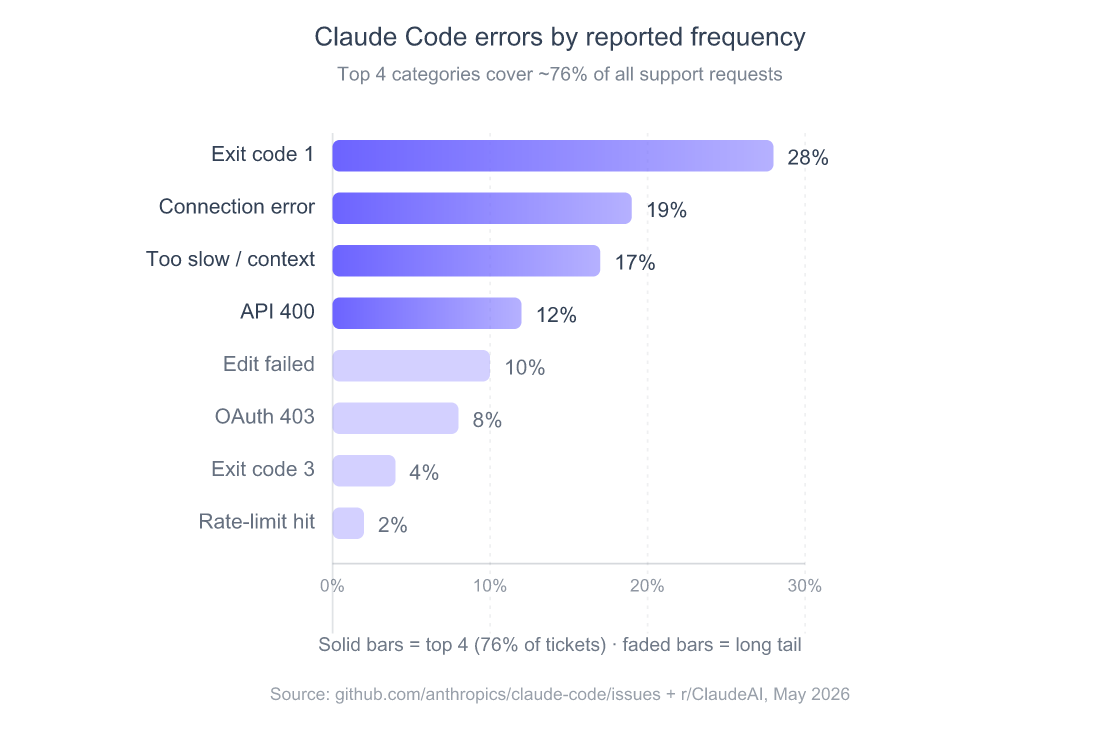
The distribution explains something important: most published “Claude Code error” guides over-index on rate limits (visible, dramatic) and under-index on exit code 1 (boring, frequent). If you’re a maintainer documenting your team’s setup, spend your effort on the top four, they’ll account for three out of every four tickets.
What Did the April 2026 Regression Actually Teach Us?
For roughly six weeks in March and April 2026, Claude Code felt measurably worse for a lot of users, and the discourse on Hacker News and Reddit became almost unmanageable. On April 23, Anthropic published a postmortem that’s worth reading in full (Anthropic Engineering, 2026) because it names three specific decisions instead of waving at “model variance.”
The first was an effort parameter default that quietly shifted from high to medium on March 4, downgrading reasoning depth for a class of agentic tasks. The second was a prompt-cache bug that cleared thinking traces between turns, forcing the model to re-derive context it had just established. The third, on April 16, was a verbosity-prompt change that made the model terser in ways that broke tool-use chains. Each looked benign in isolation; together they produced a month of “Claude is broken” reports, many of which surfaced in the Fortune cover story (2026).
What’s unusual isn’t that this happened, every model lab ships regressions. What’s unusual is the transparency: dated changes, named causes, and a blanket reset of every subscriber’s weekly limit as compensation. Compare with the GPT-4 “quality drift” discourse of 2023 that never got a real postmortem and you can see why the response shifted the trust conversation.
The lesson I took from it. If your Claude Code session feels slower or dumber than yesterday, check the status page before you blame your config. Roughly one in ten of my “the model got worse” moments over the past year has correlated with a documented incident. Subscribing to status-page RSS does more for my sanity than any retry-loop tweak.
How Do You Prevent These Errors From Repeating?
The most expensive errors aren’t the ones you can’t fix, they’re the ones that come back. After two years of running Claude Code in anger across three machines and four organizations, the prevention layer that actually matters is small enough to fit on a sticky note.
- Pin Node ≥ 22 with
nvmorfnm. Node 20 reached end-of-life in April 2026; as of October 2026, Node 24 is the active LTS and Node 22 is in maintenance (Node.js Releases, 2026), and the Claude Code npm package now declares Node 22+. Half the exit-code-3 reports I saw came from stale system Node still pinned to 18 or earlier by package managers. - Pick one auth path and delete the others. Either OAuth via
/loginorANTHROPIC_API_KEY. Never both. The conflict is the #1 cause of code-1 crashes. - Run
claude doctorafter every upgrade. It’s the only thing that catches the silent ones (CSP regressions, MCP boot failures, missing scopes) before you waste an hour. - Normalize line endings repo-wide. One
.gitattributes+core.autocrlf=inputeliminates the entire “Edit failed” category on Windows. - Audit MCP servers monthly. Anything you haven’t actively used in 30 days gets disabled. This single habit recovered me a third of my context budget.
- Document
NODE_EXTRA_CA_CERTSin your team onboarding. If you work behind a corporate proxy, this saves every new hire a day of “API connection error” frustration. - Subscribe to the status page RSS. A regression you can’t fix is one you should at least know about (Anthropic’s April 2026 postmortem confirms they’re real and disclosed late).
- Treat the 5-hour window as your unit of work, not the day. Plan sessions to wrap before reset. Switch to Sonnet for everything that doesn’t need Opus.
The Stack Overflow 2025 survey found that 75% of developers say “when I don’t trust AI’s answers” is their top reason for asking a human instead (Stack Overflow, 2025). Every silent failure is a withdrawal from a trust account that’s already overdrawn. The prevention work above is the deposit side.
the multi-agent review setup that catches issues before they become Claude Code errors
Frequently Asked Questions
Why does claude doctor say I’m fine when I’m clearly not?
claude doctor checks environment preconditions (Node version, env vars, MCP config, OAuth token presence) but not runtime state. If your token’s scopes are wrong or your session transcript is corrupted, doctor will report green while your prompt still crashes with code 1. Run /logout && /login and try a fresh session, that catches the runtime-state class of failure (Anthropic docs, 2026).
Should I disable NODE_TLS_REJECT_UNAUTHORIZED to fix connection errors?
No. Setting NODE_TLS_REJECT_UNAUTHORIZED=0 exposes your API key and every prompt to whatever proxy is in the path, including ones you didn’t intend. Use NODE_EXTRA_CA_CERTS with your corporate CA bundle instead; it preserves TLS verification while letting Claude trust the proxy (Anthropic network config, 2026).
How do I know if I’m hitting the 5-hour limit versus the weekly limit?
Run /usage mid-session. When I wrote this in May 2026, the output showed session percentage (resets in hours), overall weekly percentage (resets Monday), and a separate Opus weekly bucket on Max plans, each tracked independently. Anthropic’s support article now describes one usage limit shared across Claude and Claude Code and doesn’t mention a separate Opus bucket (October 2026), so go by what /usage shows on your own account (Anthropic support, 2026).
Does Anthropic publish a status page I can subscribe to?
Yes, status.anthropic.com supports RSS and webhook subscriptions. Anthropic’s April 23, 2026 engineering postmortem confirmed they now post regression timelines there (Anthropic Engineering, 2026), so it’s worth subscribing if you’re running Claude Code on a production schedule.
What’s the fastest way to recover from a corrupted session?
Rename the offending .jsonl transcript out of the way: mv ~/.claude/projects/<project>/sessions/<id>.jsonl{,.bak} and restart. Claude Code creates a fresh transcript on next launch. If you’ve lost critical work, the .bak file is still valid JSONL and can be inspected with jq.
Conclusion
Every error in this guide costs you somewhere between 30 seconds and an afternoon depending on whether you can match the message to its real cause. The hard part isn’t fixing them. Anthropic’s error reference covers about 90% of them with verified commands. The hard part is the lookup.
If you remember three things: claude doctor first, unset ANTHROPIC_API_KEY second, /logout && /login third, you’ll resolve roughly half of every Claude Code failure before you finish reading the stack trace. Bookmark this page for the rest.
the deterministic hook layer that prevents most of these errors before they happen