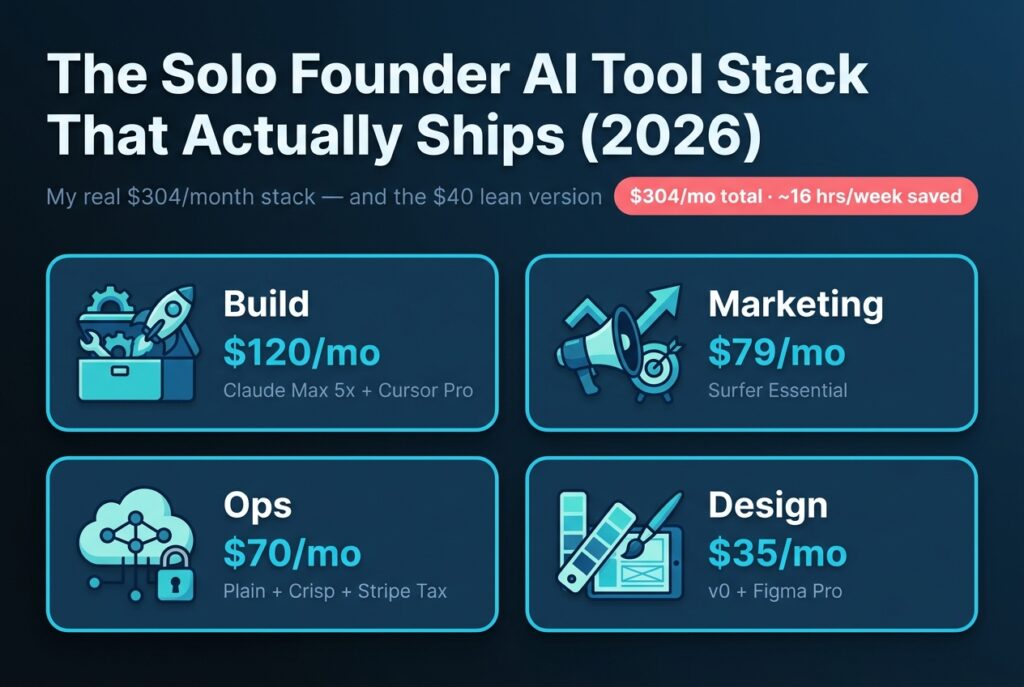
Solo Founder AI Tool Stack 2026: What I Pay and What I Cut
Every week another “top 30 AI tools you need” list shows up in my feed. Almost all of them are useless. Half the tools listed have free tiers their authors never tested past the welcome modal, and the other half charge $200+ a month for features I cancelled after a two-week trial.
So here’s something different: my actual current AI stack as a solo founder shipping a real SaaS. Real $365 a month at October 2026 list prices. Real time saved. Real ROI math, not hypothetical. I’ll show you the four tools I cut in 2026 with the specific failure mode for each, not “wasn’t useful,” but exactly what broke.
In the 2025 Stack Overflow survey, 84% of developers used or planned to use AI tools, yet 46% actively distrusted the accuracy of the output (Stack Overflow Developer Survey 2025, 2025). That gap is where most stacks bleed money. Mine doesn’t anymore. Here’s the line-item breakdown.
Key Takeaways
- My current solo founder AI stack runs $365/month at October 2026 prices across Build, Design, Marketing, and Ops (it was $304 when I first totaled it in May), full receipts below
- DX’s analysis of 135,000 developers found AI saves an average of 3.6 hours a week (Second Talent, 2026). My stack saves about 16 hours a week
- I cancelled 4 tools in H1 2026 (Pilot, Jasper, Bolt.new, Notion AI), saving $573/month, each for a specific reason
- The “minimum viable” version of this stack runs $48/month ($40 of it AI tools) and still ships product
What’s Actually In My 2026 AI Tool Stack?
The full stack is seven tools across four categories costing $365/month, against roughly 16 hours per week saved at a conservative $75/hour rate. Stack Overflow’s 2025 survey found 51% of professional developers use AI tools daily (Stack Overflow, 2025), but daily use only matters when the underlying tools actually pull weight.
Here’s the chart first, then the explanation. I repriced every line from the official pricing pages in October 2026, not estimates or “starts at” marketing copy. When I first totaled this stack in May it came to $304. Since then v0 replaced its $20 tier with a $30 Plus plan, Surfer reshuffled its plans, and Plain and Crisp both list higher entry prices than the tiers I signed up on. Same tools, about $60 more a month. That drift is the whole reason I audit the bill quarterly.
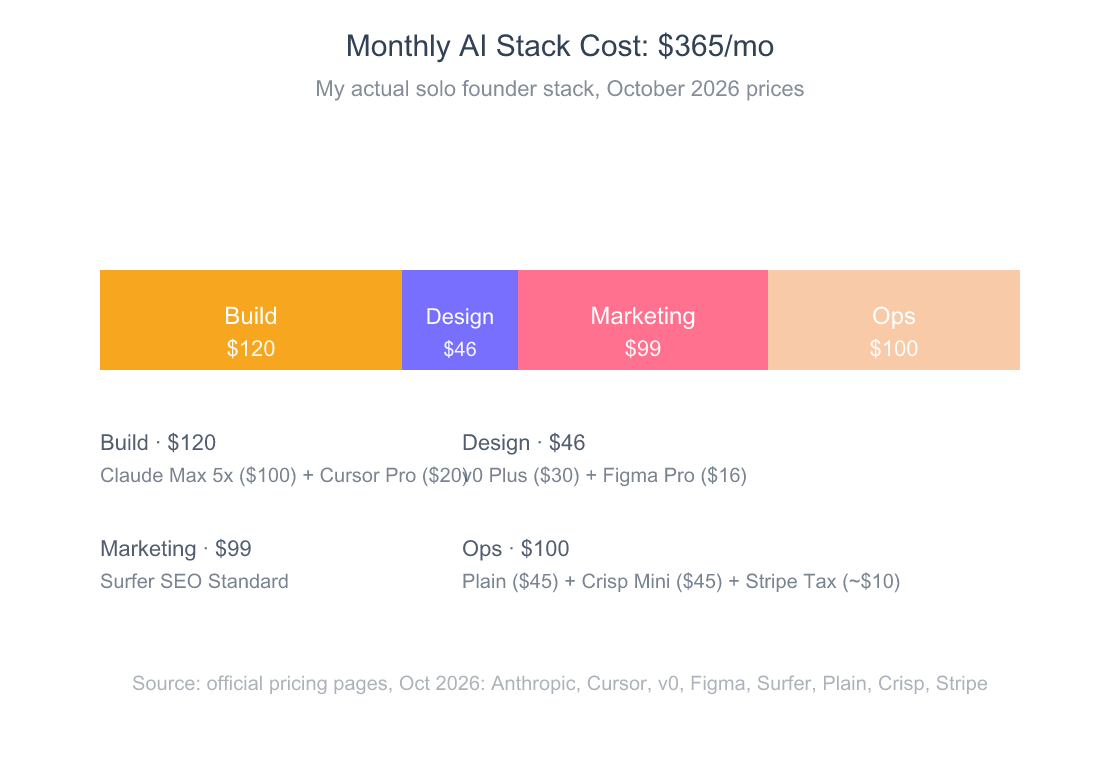
The first thing to notice: Build dominates. That’s intentional. Code is where I create the most value, so it’s where the budget concentrates. Marketing and Ops are nearly tied behind it. Marketing earns its line because content is how new customers find the product. Ops is two support tools and nothing else, because at sub-$10K MRR, ops complexity is a distraction, not a feature.
The second thing to notice: there’s no AI writer in there beyond what comes bundled with Claude. We’ll get to why.
How Do I Choose Between Claude Code and Cursor?
Claude Code handles long autonomous tasks. Cursor handles in-flow IDE edits. I run both because they fail differently, and the failure modes are complementary. Claude Code comes with the $20/month Claude Pro plan, so you don’t need Max to start. I pay for Max 5x ($100/month) because it gives me enough Claude Code budget to delegate full features end-to-end, and Max 20x ($200/month) exists if you push harder (Anthropic, 2026). Cursor’s $20/month Pro plan handles the 30-second edits between meetings (Cursor, 2026).
Here’s the split that works for me. When I’m doing focused build work (implementing a new feature, refactoring a tangled module, writing a migration) I use Claude Code in agentic mode. I describe the goal, hand it the relevant files, and let it work for 5 to 20 minutes. The output is genuinely production-quality maybe 70% of the time, and a 60-second cleanup pass on the rest.
When I’m doing reactive work, fixing a bug a user just reported, tweaking copy on a page, adjusting a query, I use Cursor. The Tab autocomplete and inline edit shortcut are faster than reaching for a separate window. GitHub’s research found that developers using AI assistants completed an HTTP-server task 55.8% faster than the control group (GitHub Research, arxiv, 2023). That number still holds for the kind of small, well-scoped work Cursor excels at.
What I learned the hard way: I spent two months in early 2026 trying to use only Cursor for everything. The agent mode is real but not as good as Claude Code at multi-file, multi-step work. I’d burn 90 minutes nudging Cursor through what Claude Code would finish in 15 with one clean prompt. The $100 for Max 5x paid for itself in the first week I split the workload properly.
GitHub’s Octoverse 2025 reported that nearly 80% of new developers on GitHub use Copilot in their first week (GitHub Octoverse, 2025). The interesting question for solo founders isn’t whether to use AI coding tools, it’s which combination, and what to spend.

Which Design AI Tools Are Worth Paying For?
For a solo founder shipping a SaaS UI, v0 Plus plus a Figma Professional seat cover roughly 95% of design needs at $46/month combined. More than 4 million people have used v0, per Vercel’s February 2026 relaunch post (Vercel, 2026). Plus costs $30/month with $30 of included credits, and the free tier caps you at 7 messages a day (v0, 2026). A Figma Professional full seat is $16/month (Figma, 2026).
My usage split is simple. v0 generates landing pages, marketing components, and quick UI scaffolds I can paste straight into Next.js. Figma is for static mockups when I need to show a customer or a prospective contractor what something will look like before writing code. I rarely use Figma’s own AI features; the integration with v0 made that unnecessary.
Now the rejected list. Lovable and Bolt.new (Pro is $25/month, per Bolt, 2026) both look great in demos and both have the same fatal flaw for me: they want to own the deployment. v0 produces standalone Next.js code I can paste into my repo and own forever. Lovable and Bolt produce something that lives inside their environment and feels like work I’m renting. For a solo founder building long-term, that’s a deal breaker.
There’s also a quieter point about brand consistency. When you generate a component with v0 and paste it into a real codebase with real Tailwind tokens and a real design system, the next generation can pick up that context. With Lovable’s hosted environment, the codebase you build there is its own thing, and re-platforming later is painful.
Gartner’s February 2025 forecast said that through 2026, organizations will abandon 60% of AI projects unsupported by AI-ready data (Gartner, 2025). That number rhymes with what I see in solo SaaS land: too many founders pick the most impressive demo and end up locked into a tool that doesn’t survive contact with their actual codebase.

Which AI Writers Do I Actually Use (And Reject)?
Surfer SEO is the only marketing AI tool I keep paying for in 2026: the Standard plan is $99/month (Surfer, 2026), and it covers content briefs, on-page optimization, and a content score I trust. Jasper (I was on the $39/month Creator plan) and a Copy.ai trial both got cut after I realized I was rewriting almost everything they produced. Today Jasper’s entry tier is Pro at $59/month billed annually, and Copy.ai’s Chat plan is $29/month (Jasper, 2026; Copy.ai, 2026).
The reason is straightforward: the LLM behind Jasper is a wrapper. The LLM behind Copy.ai is a wrapper. The LLM behind Claude is Claude. Why pay $39 or more a month for a sanded-down version of a model I already pay $100 for? When I want a draft, I open Claude and prompt with my actual brand voice, the source data, and the structural template. The output is consistently better than what Jasper produced after eight rounds of brand voice calibration.
What Surfer does is genuinely different. It runs the SERP analysis, builds the keyword map, and gives me a content score against the top-ranking competitors. That’s a workflow problem, not a writing problem, and it’s worth the $99.
The contrarian take here is that the entire “AI writer” SaaS category is being commoditized by foundation models with better instruction-following. If your AI writer’s value proposition is “we write blog posts for you,” and Claude or GPT will do that natively for $20/month, you’re a feature pretending to be a product. The tools that survive will be the ones doing real workflow integration, not generation.
So my marketing stack is: Surfer for briefs and scoring, Claude for actual writing, and a Notion doc for editorial calendar. Total cost: $99/month plus the Claude Max I’m already paying for. Good enough.
What’s My AI Ops Stack for Accounting and Customer Support?
Customer support runs on Plain Foundation ($45/user/month, billed annually) and Crisp Mini ($45/month). Accounting runs on a spreadsheet, Stripe Atlas (already paid annually), and a quarterly review with a human. Pilot and Puzzle both lost out: at sub-$10K MRR, the bookkeeping-service math doesn’t work yet. Pilot’s bookkeeping now starts at $99/month on Essentials, and Puzzle’s software starts at $30/month (Pilot, 2026; Puzzle, 2026).
Plain is what I use for product support emails. It’s B2B-native, fast, and the Foundation tier includes Ari, their customer-facing AI agent, with 1,000 credits a month at 100 credits per resolution (Plain, 2026). That’s about ten AI resolutions, so Ari is a bonus for me, not the reason I pay. The reason I picked Plain over Intercom Fin is variable cost. Fin charges $0.99 per outcome, with a 50-outcome monthly minimum when you run it on a non-Intercom helpdesk (Fin AI, 2026). For a SaaS where I genuinely don’t know whether next month is 30 tickets or 300, I want a flat seat fee, not a metered bill that scales with success.
Crisp Mini at $45/month handles the live chat widget on my site and the marketing-side conversations from the homepage (Crisp, 2026). Their Essentials tier at $95/month is overkill for solo. I considered just running Crisp for both product and support, but Plain’s threading model is better for actual technical issues, while Crisp is better for first-touch chat.
Accounting deserves its own paragraph. Pilot Core, at the $499/month I was paying, is built for funded startups with real bookkeeping volume. I have maybe twenty transactions in a month: Stripe payouts in, a handful of vendors out. Paying $5,988/year for someone to categorize twenty rows is absurd. I use a spreadsheet, reconcile monthly, and pay a CPA hourly at year-end. When MRR crosses $5K and transaction volume goes up, I’ll revisit. Until then, the lean version wins.
The Plain vs. Intercom Fin call: Gartner’s 2025 forecast warned that 60% of AI projects unsupported by AI-ready data will be abandoned through 2026 (Gartner, 2025). Variable-cost AI support tools live exactly in that gap, when your data isn’t clean, the AI resolves the wrong tickets and you pay for failure. Flat-fee plans give you room to iterate.

What’s the Real ROI? Hours Saved → Dollar Value
DX’s analysis of 135,000 developers found AI tools save an average of 3.6 hours per developer per week (Second Talent, 2026). My stack saves about 16 hours per week across all tools combined, which makes sense for someone doing every job in the company, not just coding. At a conservative $75/hour solo rate, that’s $4,800/month in retained time against $365 in tool costs, roughly a 13x return.
The full breakdown is below. I logged this manually for four weeks in March 2026, sanity-checking against the DX benchmark so I wasn’t fooling myself with “felt productive.”
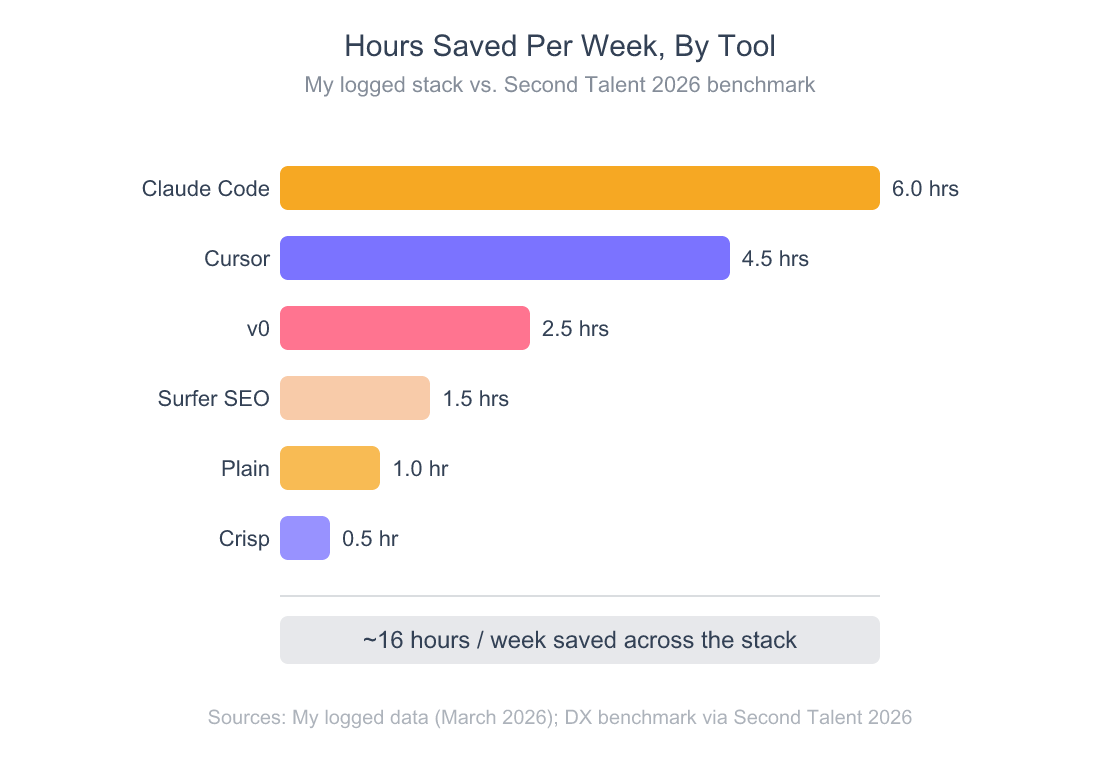
There’s a catch in the math, and I’d be dishonest not to flag it. The “$4,800 of retained time” only converts to real money if I’d actually bill those hours or use them for revenue-generating work. If I save four hours and spend them scrolling Twitter, the ROI is zero. The discipline isn’t in buying the tools: it’s in redirecting the saved hours into customer calls, content, and shipping.
For solo founders, that’s where most stacks fail. Not on the math. On the follow-through.
one-person billion-dollar company economics
Which 4 Tools Did I Drop in 2026 (And Why)?
I cut Pilot Core, Jasper Creator, Bolt.new Pro, and the Notion AI add-on between January and April 2026: total monthly savings of $573, or about $6,876/year. Each had a specific failure mode, not a vague “didn’t seem useful” feeling. Here’s exactly what broke for each one.
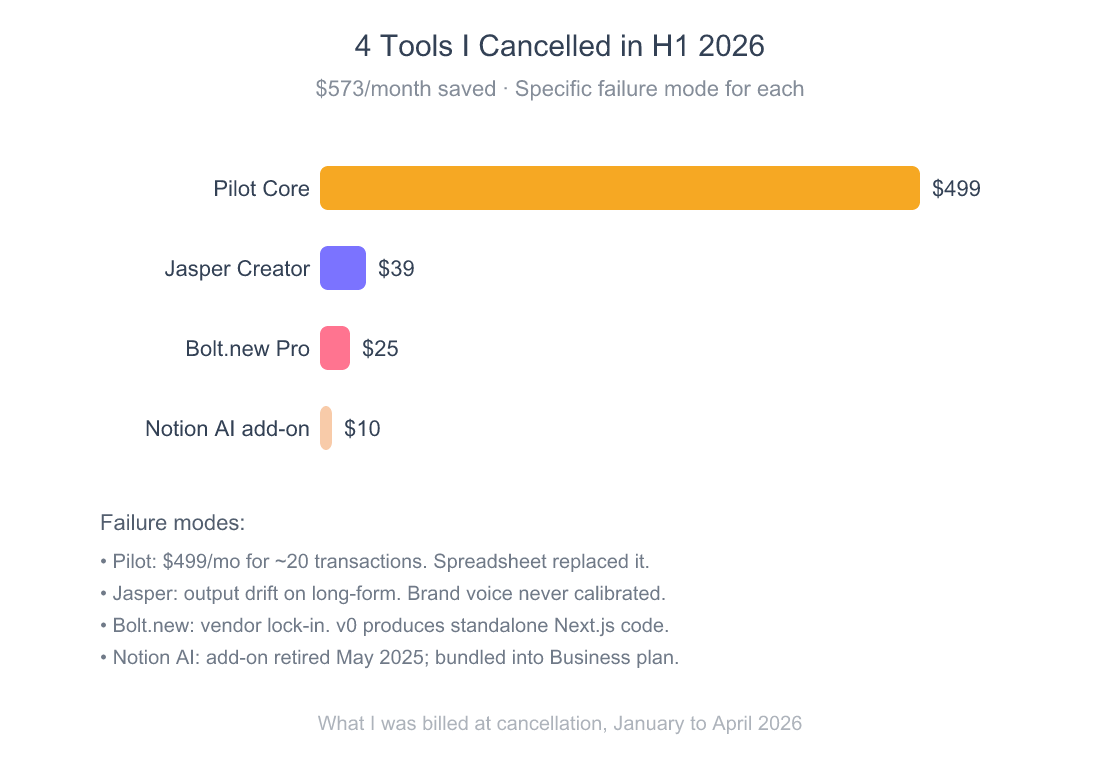
Pilot Core ($499/month). Cancelled February 2026. I signed up because I wanted “AI bookkeeping I don’t have to think about.” What I got was a human bookkeeper assigned to my account, asking me to categorize transactions Pilot’s AI couldn’t classify, while the bill came in regardless. At my volume (about 20 transactions a month) it was overkill in both directions: too expensive, and I was still doing the work. Replacement: a spreadsheet, monthly reconciliation, hourly CPA at year-end. Annual savings: $5,988.
Jasper Creator ($39/month). Cancelled March 2026. Output drift was the killer. The first 200 words of any draft were great. By word 800, the tone shifted, the brand voice setting decayed, and Jasper started inserting phrases like “in today’s competitive landscape” no matter how many times I trained it otherwise. The honest test: I started running the same prompt through Claude (which I already pay for) and got cleaner output. Replacement: Claude direct.
Bolt.new Pro ($25/month). Cancelled January 2026. The killer was vendor lock-in. Bolt’s environment is impressive at first, type a prompt, get a deployed app. But the code lives in Bolt’s hosted environment with their conventions and their deployment, and exporting to a real Next.js project I own meant rewriting half of it. I’d rather use v0, get standalone components I paste into my own repo, and keep ownership of the entire codebase from day one. Replacement: v0 (now on the $30 Plus plan).
Notion AI add-on ($10/month). Cancelled April 2026, embarrassingly late. Notion stopped selling the standalone AI add-on in May 2025, and full Notion AI now comes only with the $20/member Business plan (Notion, 2026). I’d been paying for a feature that no longer existed as a separate line item, because Notion grandfathered me onto a deprecated SKU. The only failure here was mine. I didn’t audit the bill quarterly. I do now.
What’s the Minimum Viable Solo Stack Under $100/Month?
The lean version of this stack runs $48/month and still ships product: Claude Pro ($20, Claude Code included) plus Cursor Pro ($20), with v0 Free, Figma Starter, Crisp Free, and Stripe Atlas amortized handling everything else. This is what I’d recommend to anyone pre-revenue, and what I ran myself for the first six months. GitHub’s data says nearly 80% of new developers use Copilot in their first week (GitHub Octoverse, 2025).
Here’s the minimum viable stack, by line item:
| Layer | Tool | Monthly | Why |
|---|---|---|---|
| Build (LLM) | Claude Pro | $20 | One subscription, includes Claude Code, enough for daily use |
| Build (IDE) | Cursor Pro | $20 | Tab autocomplete + agent mode for in-flow edits |
| Design | v0 Free | $0 | 7 messages a day, enough for MVP scaffolding |
| Design | Figma Starter | $0 | Unlimited drafts, fine for early mockups |
| Marketing | Claude Pro (reuse) | $0 | Same subscription, drafts and SEO briefs |
| Ops (support) | Crisp Free | $0 | Live chat for the marketing site |
| Ops (legal) | Stripe Atlas | ~$8/mo | $100/year registered agent after a one-time $500 setup (Stripe, 2026) |
| Total | $48/mo | Genuine MVP-grade stack |
When do you upgrade? Three trigger points worked for me:
Upgrade Claude Pro → Max 5x ($100/mo) when you start hitting the usage limits more than once a week. Max 20x ($200/mo) is the next step if 5x still isn’t enough. The signal is hitting “you’ve reached the limit” mid-task. That means you’re using it enough for the bigger plan to pay for itself.
Upgrade v0 Free → Plus ($30/mo) when the 7-message daily cap starts blocking you, or you’re shipping enough customer-facing UI that you need the $30 of monthly credits.
Upgrade Crisp Free → Mini ($45/mo) when you hit 30+ chat conversations a month and need triggers, sequences, or email integration.
I waited too long to upgrade Claude. I burned six weeks bumping into rate limits, telling myself the lean stack was fine because it was “free.” It wasn’t free. Each rate-limit interruption killed 20 minutes of context. The math worked the moment I crunched it: $80 extra a month bought me back probably 10 productive hours.
solo founder zero-to-1K MRR playbook
Frequently Asked Questions
Do I really need both Claude Code and Cursor?
If you’re pre-revenue, no. Cursor Pro alone is fine for the first three to six months. Claude Code is already included in Claude Pro at $20/month, so you can try it without committing. Once you’re shipping features under deadline pressure and want to delegate longer multi-file tasks while you do something else, Max 5x at $100 earns its keep. GitHub research showed AI-assisted developers complete tasks 55.8% faster (arxiv, 2023), and the gap widens for agentic workloads.
Why not use a cheaper AI writer like Copy.ai?
Because foundation models have commoditized basic AI writing. Copy.ai’s Chat plan ($29/month) is a wrapper over third-party LLMs, and Claude Pro ($20/month) gives you direct access to a frontier model. Unless an AI writer is doing real workflow integration, keyword research, SERP analysis, content scoring, you’re paying for a feature you already have. Surfer SEO ($99/month on Standard) is the exception because it does the workflow work, not just generation.
What about AI accounting tools like Puzzle?
Puzzle is good, but solo founders under $5K MRR rarely have enough transaction volume to justify even its $30/month Starter plan (Puzzle, 2026). A spreadsheet with monthly reconciliation works until you hit roughly 100+ transactions/month or your tax situation gets complicated enough to need real GAAP financials. Pilot’s bookkeeping starts at $99/month, and the higher tiers are built for funded startups, not bootstrappers.
How do I avoid the Notion AI mistake (paying for cancelled features)?
Audit your billing every quarter. Pull the last three months of credit card statements, list every recurring SaaS line, and ask: am I using this weekly? If no, cancel. Gartner expects 60% of AI projects without AI-ready data to be abandoned through 2026 (Gartner, 2025). Your stack is going to drift the same way unless you actively prune it.
What’s the single tool I should pay for first?
Claude Pro at $20/month. It covers code (Claude Code is included, and Cursor’s free Hobby tier works as your IDE), drafting, brainstorming, customer email replies, and most ad-hoc analysis. If you can only afford one tool, this is it. Add Cursor Pro at $20/month next, then graduate to the full $365 stack as revenue justifies it.
The Bottom Line
The “best AI stack” question is the wrong question. The right question is: which 5 to 7 tools deserve your attention this quarter, and which ones are leaking money on autopay? My answer in October 2026 is the seven tools above at $365/month, against 16 hours saved per week. Yours might be different. The framework (categories, line items, ruthless pruning) is the part that travels.
If you’re starting from scratch, run the lean $48/month version for three months. Track which tools you reach for daily. Upgrade only the ones that hit rate limits. And quarterly, audit the bill. That’s the whole game. The rest is tool tourism.