In May 2026, my Search Console dashboard told me that maketocreate.com had 108 impressions and zero clicks across 24 query rows. Useful? Slightly. What it didn’t tell me: which two posts had quick-wins waiting at positions 4-6, which one had a failing mobile LCP score, or which entities my top-3 competitors covered that I’d missed.
That gap is what this post is about. I spent 50 minutes wiring Google’s free APIs (PageSpeed Insights, CrUX, Search Console, Indexing, GA4, YouTube Data, Cloud Natural Language) directly into my blog publishing workflow. The payoff isn’t more data. It’s data you can actually act on.
Here’s what 50 minutes bought me, and what your GSC and GA4 dashboards have been quietly hiding.
TL;DR: Free Google APIs replace dashboard-clicking with automated joins. The setup takes 30-60 minutes including detours, costs $0 at normal blog scale, and opens up four categories of work the UIs can’t do: cross-source per-URL joins, bulk URL Inspection (2,000/day vs ~10 clicks), time-series stateful diffs, and AI Citation Readiness scoring for ChatGPT and Perplexity. The first quick-win you spot pays for the setup time twice over.
Why Do GA and GSC Dashboards Feel Like Magnifying Glasses?
Each Google dashboard shows one signal in isolation, and the signals never join across tabs. GSC shows search performance. GA4 shows traffic. PageSpeed Insights shows speed. None of them can answer the only question that actually matters per URL: “Across all four signals, what’s the full picture for this specific blog post?” That cross-source view is where every meaningful action sits.
I noticed this the hard way. When I was auditing my homepage, GSC told me one thing, GA4 told me another, and CrUX told me a third: but I had to manually piece them together in a spreadsheet to spot the actual problem (a post ranking position 6, getting 35 impressions, but bouncing 84% of users because of a slow LCP). Three browser tabs. Twenty minutes. One insight.
The dashboards aren’t broken. They’re built to surveil, not to act. They give you the “what” but never the “what’s connected to what.” If you publish more than once a month and care about ranking improvements rather than vanity metrics, that gap costs you real traffic.
why most solo founders confuse data viewing with data work
Citation Capsule: Google Search Console, GA4, and PageSpeed Insights are designed as monitoring tools, not analytical workbenches. Cross-tab joins must be performed manually, which is why most bloggers stop at “look at today’s numbers” rather than running URL-level intelligence, a workflow gap the Google APIs explicitly address.
What Are the 4 Tiers of Google API Setup?
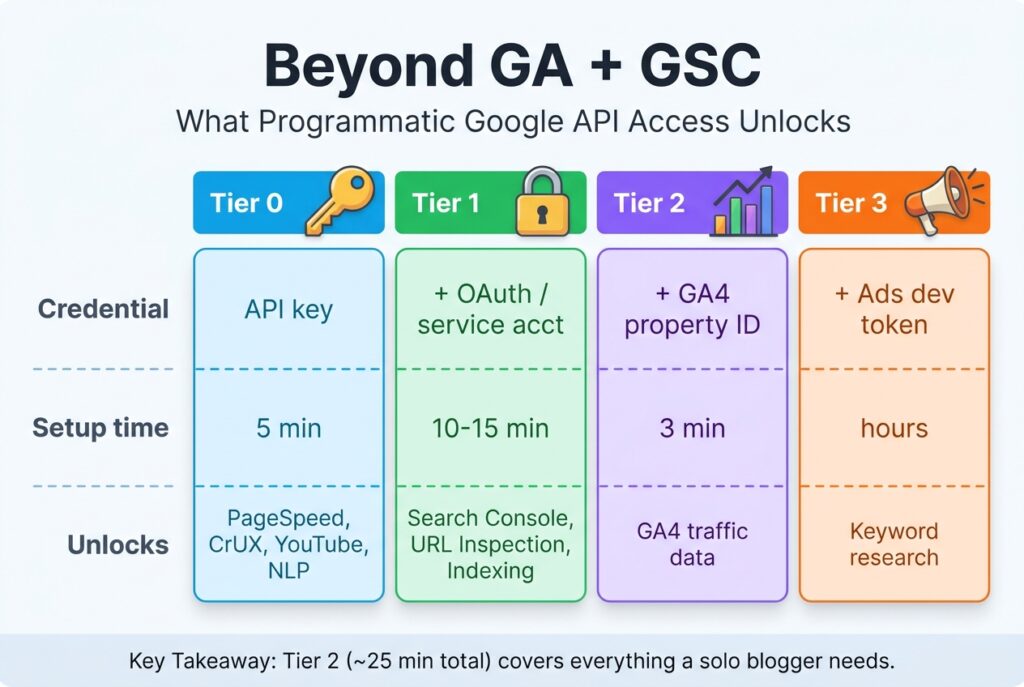
Google’s free APIs cluster into four credential tiers, each opening up different capabilities. Tier 0 needs only an API key (5 minutes) and covers PageSpeed Insights, CrUX, CrUX History, YouTube Data, Knowledge Graph, and Cloud Natural Language. Tier 1 adds OAuth or service account credentials (10-15 minutes) and adds Search Console, URL Inspection, and the Indexing API. Tier 2 adds a GA4 property ID (3 minutes) and brings in the GA4 Data API, which gives a standard property 200,000 core tokens a day (Google Analytics). Tier 3 needs a Google Ads developer token and customer ID (hours of approval lag) for keyword research.
For a solo blogger, Tier 2 is the target. It covers everything you’d touch in a normal week: ranking analysis, traffic, indexation, speed, content research. Tier 3 is a separate journey only worth taking if you’re actively running paid campaigns.
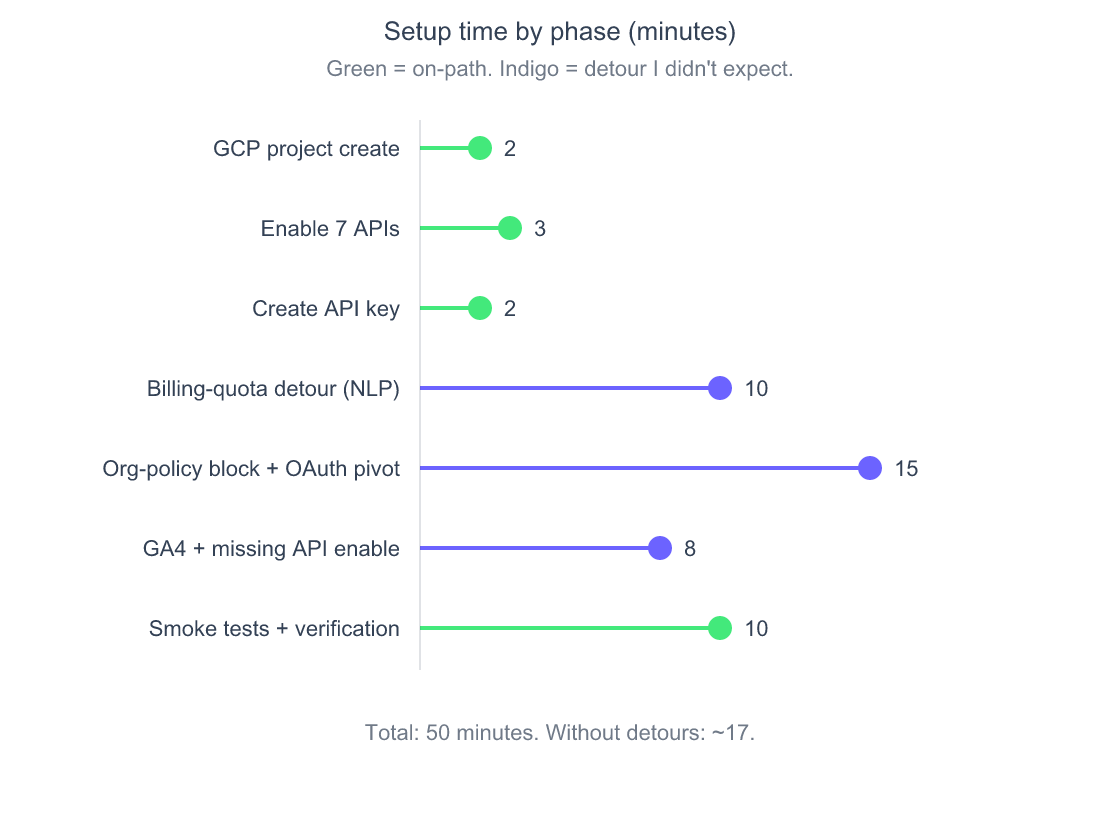
Source: First-hand setup session, May 2026
The chart above shows my actual phase-by-phase timing. Notice how the detours (indigo) accounted for 33 minutes of the 50, while the documented happy path (green) was 17. That’s the honest expectation to set: budget an hour, expect to hit 2-3 surprise blockers, and recognize the detours as one-time costs you’ll never pay again.
Citation Capsule: Google’s API tiers progress from Tier 0 (API key, 5 minutes) to Tier 2 (Tier 1 plus a GA4 property ID, ~25 minutes total) for everything a solo blogger needs. All APIs in Tiers 0-2 are free at normal blog usage levels per Google’s published quotas: Search Console’s Search Analytics allows 1,200 queries per minute per site and 30 million per day per project, and URL Inspection allows 2,000 per day per site (Google for Developers).
other zero-cost tools that pair with this setup
Which Obstacles Will Slow Down Your Setup?

Three friction points cost me 33 minutes that Google’s quickstart docs don’t mention. The biggest was an Organization Policy named iam.disableServiceAccountKeyCreation, a default for many newer GCP organizations that blocks downloadable service account JSON keys entirely. The standard “create a service account, download the key” tutorial that’s been the default for years just doesn’t work on a fresh org anymore.
The fix changed my whole setup approach. Instead of a service account, I switched to OAuth client credentials with an interactive browser flow. The OAuth path is actually cleaner for single-user blog setups because the OAuth user inherits whatever GSC and GA4 access you already have, no separate “add the service account email as a Viewer” grant step required. What looked like a blocker turned into a simplification.
The second obstacle: a billing-project quota cap. New Google Cloud accounts can only attach billing to a small number of projects. Since the Cloud Natural Language API requires billing even though its free tier covers 5,000 units a month (one unit is 1,000 characters) (Google Cloud), I had to first unlink billing from two dummy projects before I could enable NLP on the project I cared about. The error message, “Unable to enable billing, limit of projects on which you can enable billing”, gives no hint that the fix is “unlink one of your other projects.”
The third was subtler: when I followed Google’s documentation for which APIs to enable, the list missed Google Analytics Data API. I noticed only when GA4 calls returned a generic “permission denied” that masked the real underlying error (SERVICE_DISABLED). The fix took 30 seconds; finding it took 5 minutes.
The lesson: budget an hour, not fifteen minutes. Setup obstacles aren’t a sign you’re doing it wrong. They’re a sign Google’s “Secure by Default” policies have moved faster than the public tutorials.
Citation Capsule: Newer Google Cloud organizations enforce
iam.disableServiceAccountKeyCreationby default, blocking the standard “service account JSON key” path that most quickstart tutorials still recommend. The cleaner workaround for single-user blog setups is OAuth client credentials with a desktop-app flow, which inherits the user’s existing GSC and GA4 permissions automatically.
How Do APIs Change What You Actually Look At?
The biggest shift isn’t more data. It’s that I stopped scanning today’s dashboard and started running joins per URL. The first useful query I ran went something like: for every URL in my sitemap, return ranking position from GSC, organic sessions from GA4, CWV pass/fail from CrUX, and a top-10 entity list from NLP. That single output produces an actionable rewrite queue. The dashboard equivalent is impossible, there’s no single screen that shows all four signals side-by-side, and there never will be.
To make this concrete: my smoke tests on maketocreate.com pulled 24 query rows from GSC (108 impressions over 28 days), 9 organic sessions and 7 users from GA4, and 283 entities from a single homepage NLP analysis. Three different APIs, three different data shapes, but all keyed on the same URL, which means I can answer “for this post, which entities am I missing relative to what’s actually getting impressions?” in one query.
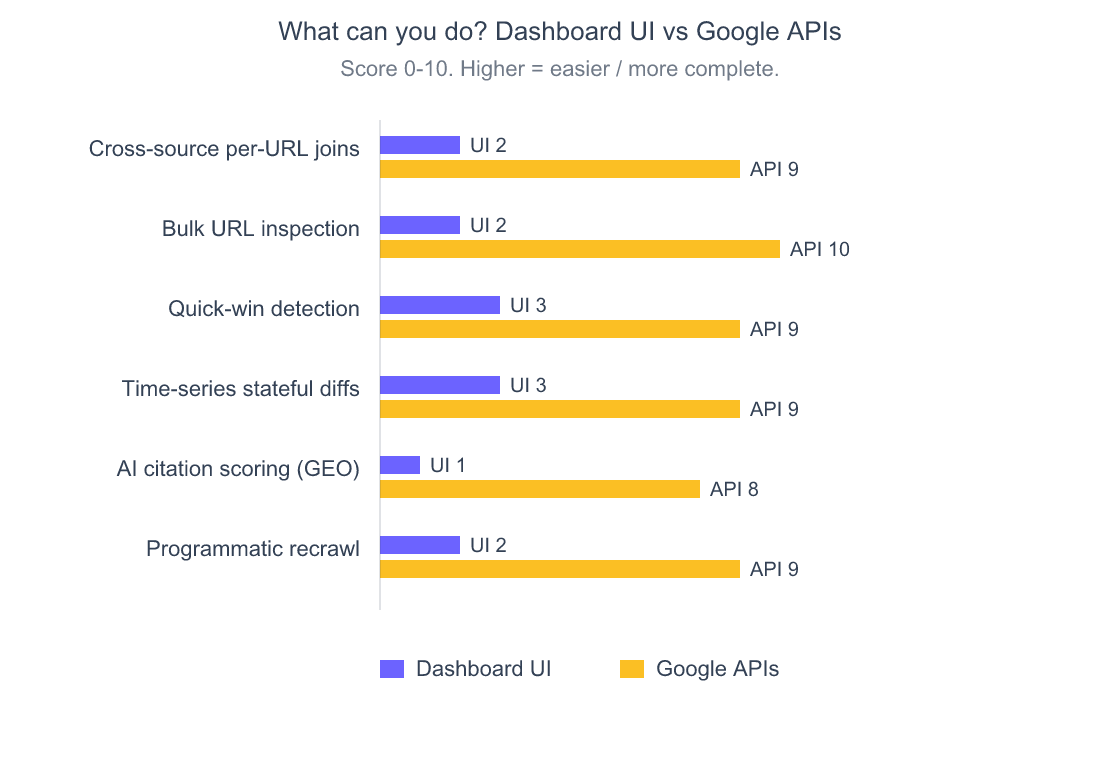
Source: First-hand evaluation across 6 typical blogger workflows, May 2026
The chart above shows the gap by category. Cross-source joining and bulk URL inspection are where the gulf is widest, and they’re also the two highest-leverage workflows for a publishing blogger. Quick-win detection is the surprise, it’s actually possible in the UI, just buried under so many filter clicks that almost nobody does it.
how I structure articles using cross-source data
Citation Capsule: A single API session can join 24 GSC query rows, 7 unique organic users from GA4, and 283 NLP entities from one URL, keyed together so a writer can ask “what entities am I missing relative to my actual ranking queries?” in one programmatic step. The dashboard equivalent requires three browser tabs and manual reconciliation.
What Can the API Detect That the UI Will Never Show You?
Three categories of work shift from “theoretically possible” to “trivially automated” once you’re on the API side.
Quick-win detection. The Search Console API returns position, impressions, clicks, and CTR for every query and page, so a ten-line filter can flag queries sitting at positions 4-10 with above-average impressions and below-average CTR. (The API doesn’t label them for you; my tooling computes the quick_wins list from the raw rows.) These are the queries where one small content tweak typically moves you onto page one. The dashboard makes you find them manually by filtering on position, then sorting by impressions, then eyeballing CTR, a process so tedious that most bloggers skip it entirely.
Bulk URL Inspection. The dashboard’s URL Inspection tool is one URL at a time, with a soft limit somewhere around ten before the experience gets painful. The URL Inspection API allows 2,000 inspections per day per site, at up to 600 per minute (Google for Developers). I can audit my entire sitemap in 30 seconds and learn which posts Google indexed, which it ignored, which had canonical issues, and which got soft-404’d. The chart below shows the scale gap.
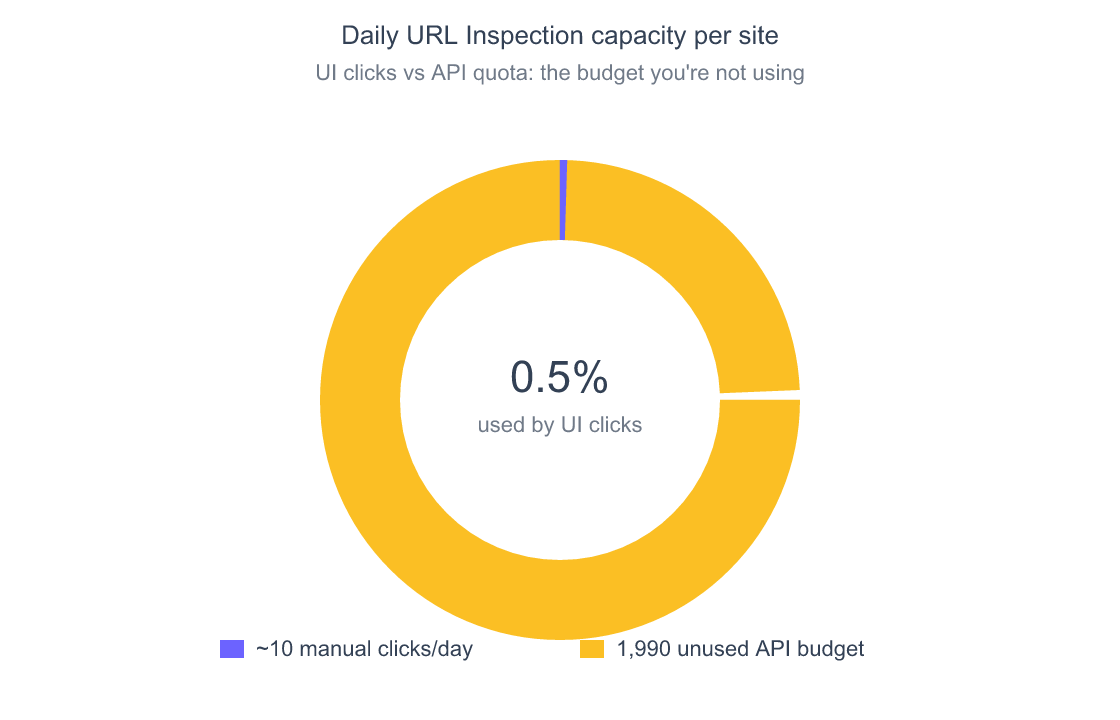
Source: Search Console API usage limits (developers.google.com, accessed October 2026); ~10 manual inspections a day is my own estimate
Time-series stateful diffs. The dashboard shows you “today” or “this week.” With the API plus a small JSON cache, you can ask “which 14 posts lost more than 20% impressions versus last month?” or “did this canonical fix actually move ranking positions?” CrUX History returns 25 weekly collection periods of Core Web Vitals by default and up to 40 weeks if you ask for them, free at 150 queries per minute per project (Chrome for Developers). Search Console returns 16 months of search performance data. The UI shows the data; only the API lets you compute the change.
The bloggers I’ve seen pull ahead in 2026 are the ones treating their SEO stack as a programmable system rather than a dashboard to admire. The dashboard-only crowd is essentially flying VFR, they see what’s directly in front of them. The API crowd has instruments.
Citation Capsule: The Google Search Console URL Inspection API allows 2,000 inspections per day per site (600 per minute) according to Google’s published usage limits, while the Search Console UI realistically supports about 10 manual inspections per day before the workflow becomes prohibitively slow, a 200x scale gap that’s invisible until you actually need to audit indexation across an entire sitemap.
How Do Google APIs Help With AI Citation Optimization?

AI Overviews, ChatGPT, Perplexity, and Claude now intercept queries before traffic ever reaches your site. Organic CTR on informational queries with AI Overviews fell 61%, from 1.76% in June 2024 to 0.61% in September 2025, in Seer Interactive’s study, meaning even page-one rankings now bleed clicks to summary boxes. Whether your content gets cited inside those summaries depends on signals only the API can audit at scale: entity clarity, passage formatting, schema markup, and AI crawler accessibility.
This is where the Cloud Natural Language API earns its setup time. Pulling 283 entities from a single homepage analysis, I could compare which entities my competitors covered (using NLP on their URLs too) and identify the gap. My homepage was missing six of the eleven entities the top three ranking pages covered for one of my target queries. That’s a measurable, actionable gap, not a vibe.
how AI marketing workflows depend on entity-level analysis
A 0-100 AI Citation Readiness score combines passage-level citability (are your H2s answer-first?), Q&A formatting density, entity coverage, schema validation, and crawler accessibility into one number per post. You cannot get this from any single dashboard product because it doesn’t exist as a single product anywhere, it’s an emergent capability of stitching the right APIs together.
Citation Capsule: Google’s Cloud Natural Language API extracts hundreds of entities per URL, 283 in my smoke test, enabling competitor entity-gap analysis that no dashboard product surfaces. Combined with passage formatting checks and schema validation, this produces a measurable AI Citation Readiness score for each blog post optimized for ChatGPT, Perplexity, and Google AI Overviews citation.
Is the Setup Actually Worth It for a Solo Blogger?
Short answer: yes if you publish more than once a month and care about ranking improvements. No if you only want a vanity check on traffic. The 50-minute setup pays back the first time you find one quick-win or fix one indexation gap that the dashboards would have hidden indefinitely.
The math is simple. One quick-win at position 6 that moves to position 3 earns several times the clicks, because CTR curves are steepest at the top of page one, and that gain compounds for the lifetime of the post. If your content earns even modest organic traffic, that single rewrite covers an hour of setup many times over. Multiply by the number of posts in your library and the return adds up fast.
Where it isn’t worth it: if you’re publishing one post a quarter and treating SEO as a “set it and forget it” thing, dashboards are fine. The API setup pays off in proportion to how much you use it. Light publishers won’t see the leverage. Active publishers will wonder how they ever worked without it.
What surprised me most wasn’t any single capability. It was how quickly the workflow shifted from “checking on the blog” to “running the blog as a system.” That mental model change might be the real payoff.
Frequently Asked Questions
Do I need to know how to code to use the Google APIs for my blog?
Light scripting helps but isn’t required. Many blog tooling kits (including the one I used) wrap the APIs in command-line scripts, you run /blog google gsc and get a formatted report, no Python knowledge needed. If you can edit a JSON config file with your API key and OAuth client path, you can run every query in this article. The 50-minute setup involves zero code.
Will using the Indexing API actually get my pages indexed faster?
Don’t count on it. Google restricts the Indexing API to pages with JobPosting structured data or a BroadcastEvent embedded in a VideoObject, so a normal blog post is outside its supported use. It’s free, with a default of 200 publish requests per day per project and 380 requests per minute across endpoints (Google for Developers). For blog content, rely on internal links, sitemaps, and URL Inspection’s “Request indexing” button in the Search Console UI instead.
Are these APIs really free?
At blog scale, yes. Search Console’s Search Analytics allows 1,200 queries per minute per site and 30 million a day per project, and URL Inspection allows 2,000 a day per site (Google for Developers). CrUX and CrUX History are free at 150 queries per minute per project. YouTube Data gives a default 10,000 units a day plus a separate allowance of 100 search calls (YouTube Data API). A standard GA4 property gets 200,000 Data API core tokens a day. PageSpeed Insights works with a free API key, which Google recommends for automated queries. Cloud Natural Language requires billing enabled, but its first 5,000 units a month are free, which is plenty for analyzing every post on a typical blog. Google Ads Keyword Planner is the one Tier 3 exception; it requires an active ad account.
How is this different from using Ahrefs or Semrush?
Different layer of the stack. Ahrefs and Semrush show you third-party estimates of your data plus competitor data. The Google APIs show you Google’s own first-party data about your own site, the canonical truth, not the estimate. Use Ahrefs for competitor research and backlink data; use Google APIs for your own performance, indexation, and AI citation work. They’re complements, not substitutes.
Can I use this with WordPress?
Yes, the APIs don’t care what your CMS is. WordPress users have an extra option: Google Site Kit already exposes some of this data inside the wp-admin dashboard, but at a much shallower layer than direct API access. If you’re running WordPress and want quick wins inside the dashboard, install Site Kit. If you want the full programmatic toolkit, set up the APIs directly as described here. Both can coexist.
other free tools that pair with this Google API setup
The Setup Is the Smallest Investment, the Highest Leverage
Dashboards are surveillance tools. The API is a workbench. After 50 minutes of setup, including 33 minutes of detours nobody warned me about, I can now ask questions about my blog that GSC and GA4 structurally cannot answer. Cross-source joins per URL. Bulk indexation audits. AI citation readiness scoring. Programmatic quick-win detection. Time-series diffs that flag regressions before they cost a month of traffic.
If you publish regularly and care about real ranking outcomes, this is the highest-leverage SEO move I’ve made this quarter. Not a tool I bought. Not a course I took. A configuration file with an API key and an OAuth client path.
my full article writing workflow that uses this API setup
The first quick-win you find pays the setup back twice. The second one is profit.