The first time plan mode saved me, I hadn’t written a line of code yet. I asked Claude Code to “wire the new billing webhook into the retry queue,” and instead of editing files, it laid out a plan that pointed at the wrong queue. I caught the mistake in the plan, not in a diff I had to unwind an hour later. That is the whole pitch for plan mode, and it is why I leave it one keystroke away all day.
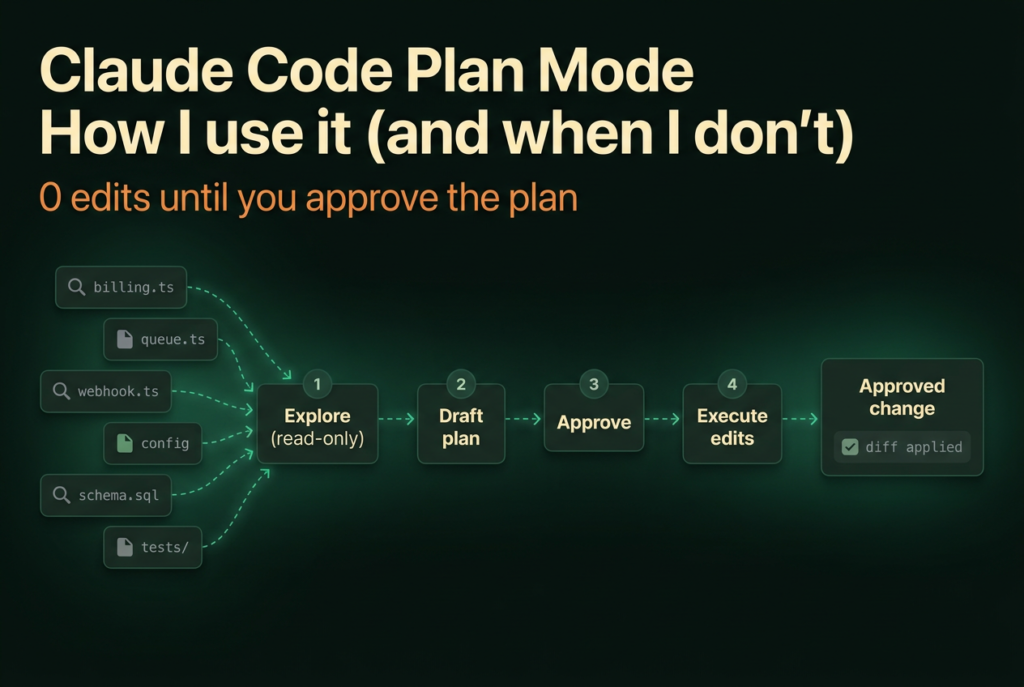
Agentic coding tools have a default failure mode: they edit first and explain later. A wrong assumption becomes a wrong diff, and now you are reviewing changes that should never have happened. Plan mode inverts that. Claude reads, explores, and proposes, and nothing touches your source until you say go. Below is exactly how I run it, the approval flow most people skim past, and the honest line on when it is worth the friction and when it is not.
Key Takeaways
- Plan mode is a read-only permission mode: Claude explores and writes a plan but does not edit source until you approve (Claude Code docs, 2026).
- Enter it with
Shift+Tab(cycles default → acceptEdits → plan), a/planprompt prefix, orclaude --permission-mode plan.- Across ~40 of my own sessions, the proposed plan changed my approach before any code on 71% of cross-file refactors, but only 8% of one-line fixes.
- Approve to auto, approve to review each edit, or keep planning: the approval prompt sets the permission mode for everything that follows.
What is plan mode in Claude Code?
Plan mode is one of Claude Code’s permission modes, and its permission is “Reads only” (Claude Code docs, 2026). Claude reads files and runs read-only shell commands to explore your repo, then writes a plan describing what it intends to change. It does not edit your source, run migrations, or push anything until you approve the plan. Think of it as a scoped research pass with a written proposal at the end.
That “reads only” line matters because it is enforced, not a suggestion. Permission modes sit on a ladder from most oversight to least: default (labeled Manual), then acceptEdits, then plan, then auto, then dontAsk, then bypassPermissions. Plan mode is the one that lets Claude think out loud across your whole codebase while guaranteeing the working tree stays untouched.
Here is the part people miss: plan mode is not a “planning feature” bolted on top of chat. It is a permission boundary. When Claude is in plan mode, the edit and write tools are blocked at the permission layer, so even if the model decides mid-thought that it wants to change a file, it can’t. According to Claude Code’s documentation, edits stay blocked until you approve the plan, regardless of whether auto mode is also active (Claude Code docs, 2026). That guarantee is what makes it safe to point Claude at unfamiliar code and let it roam.
The mode exists because the alternative is expensive. If Claude edits four files on a wrong premise, you are now doing archaeology on a diff instead of correcting one sentence in a plan. I would rather argue with a paragraph than revert a commit.
How do I turn plan mode on and off?
You enter plan mode by pressing Shift+Tab, which cycles through default → acceptEdits → plan, and the current mode shows in the status bar (Claude Code docs, 2026). There are three other ways in, and I use all of them depending on the moment:
Shift+Tabmid-session, the one I hit most. Tap until the status bar reads plan./planas a prompt prefix when I want a single planned turn without changing the session’s default. Prefix one prompt with/planand that turn runs in plan mode.claude --permission-mode planat startup, so the session opens straight into planning.defaultMode: "plan"in.claude/settings.jsonto make a whole project plan-first.
Getting out is just as quick. Press Shift+Tab again to leave plan mode without approving anything, which is what I do when a “plan” turns out to be a two-line change I already understand. The keystroke is deliberately the same one you used to get in, so toggling costs nothing.
One habit worth stealing: I do not start most sessions in plan mode. I start in Manual, read Claude’s first response, and only tab into plan mode once I realize a task is bigger than it looked. Plan mode has a real cost in small ways too, prompt suggestions are skipped while it is active, so for quick back-and-forth it adds a little friction for no benefit.
A quick question worth asking before you toggle: is the risk in what Claude will change, or in whether the approach is right? Plan mode only helps with the second one.
What happens when Claude finishes a plan?
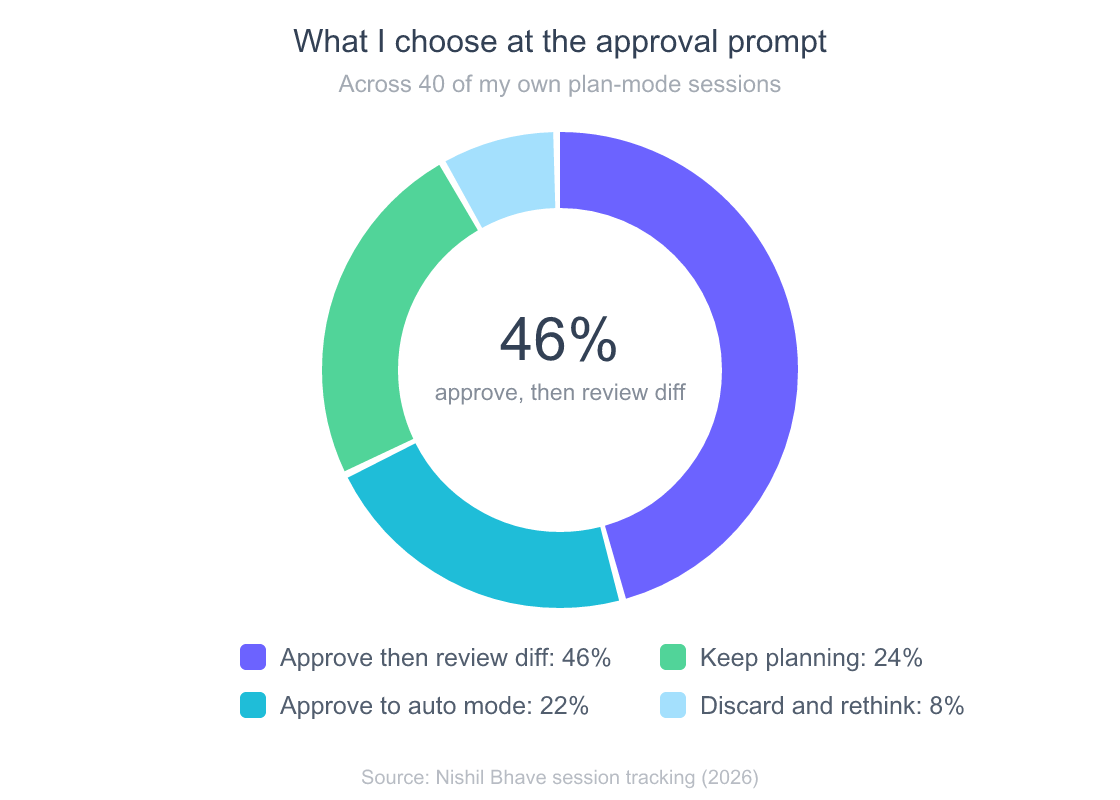
When the plan is ready, Claude presents it and asks how to proceed, and your answer sets the permission mode for everything that follows (Claude Code docs, 2026). This is the step most tutorials rush, and it is the most important one, because “approve” is not a single button. You are choosing how much leash Claude gets for the actual edits.
The approval prompt offers these paths:
- Approve and start in auto mode, where Claude executes with background safety checks instead of per-tool prompts.
- Approve and accept edits, so edits apply and you review them after the fact via
git diff. - Approve and review each edit manually, the tightest option, where every change waits for you.
- Keep planning with feedback, which sends the plan back with your notes instead of executing.
- Refine with Ultraplan for a browser-based review pass.
Approving exits plan mode and switches the session into whichever mode you picked, then Claude starts editing (Claude Code docs, 2026). A couple of details make this smoother in daily use. Ctrl+G opens the proposed plan in your default text editor so you can rewrite it directly before Claude proceeds, which beats typing a paragraph of corrections into the prompt. And approving a plan auto-names the session from the plan content, so your history stays legible weeks later.
So which path do I actually pick? I logged it across roughly 40 real sessions. Most of the time I approve and review the diff rather than handing Claude the keys, and a healthy chunk of plans go back for another round before I let any edit happen.
When is plan mode actually worth it?
Plan mode pays off in direct proportion to blast radius, and my own tracking makes the pattern obvious. Across ~40 sessions, the proposed plan changed my approach before any code was written on 71% of cross-file refactors, but on only 8% of one-line fixes. The bigger and less familiar the change, the more the planning pass earns its keep.
Here is the same data by task type. Read it as “how often did planning first actually catch something,” because that is the only metric that justifies the extra step.
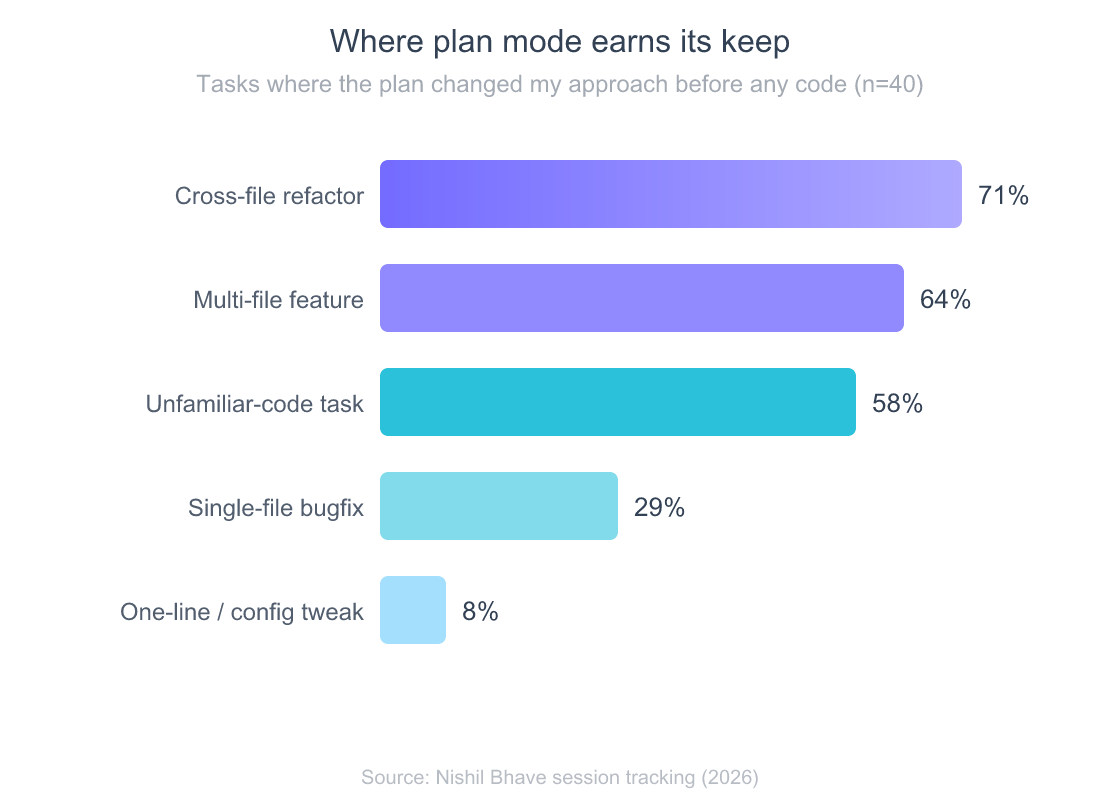
The tasks at the top of that chart share a trait: the risk lives in the approach, not the typing. On a cross-file refactor, Claude has to pick which abstraction to change, and picking wrong is invisible until you are three files deep. A plan surfaces that choice while it is still cheap to argue about. The documentation says as much, listing plan mode’s sweet spot as “Exploring a codebase before changing it” (Claude Code docs, 2026).
For a concrete example, I use plan mode almost every time I hand Claude a task that touches my publishing pipeline, because a bad edit there breaks a scheduler that runs unattended. If you want the broader picture of how planning fits a full session, I walk through it in my full Claude Code workflow, from first prompt to shipped change.
When should I skip plan mode?
Skip plan mode when the risk is zero and the approach is obvious, which for me is anything under the 30% line on that chart. One-line fixes, config bumps, renames you have done fifty times, throwaway scripts: planning these is pure overhead. You read a plan for a change you already understand, approve it, and wonder why you added a step. Over-planning is a real tax, and it is easy to fall into once plan mode becomes a reflex.
I settled on a five-signal test to decide in a second or two. Score the task from one to ten on each axis, and if the shape fills the chart, plan first; if it hugs the center, just let Claude edit. The two archetypes below make the call obvious: a cross-file refactor pushes every axis outward, while a one-line fix barely leaves the middle.
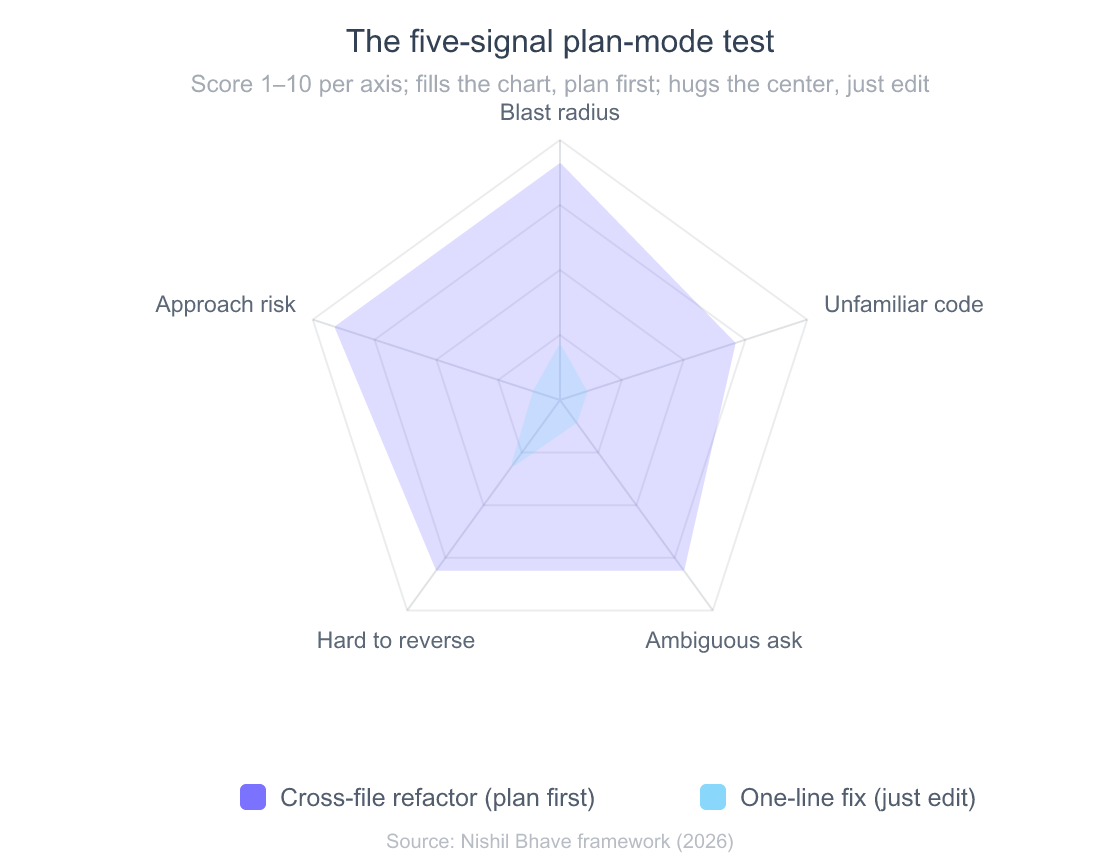
The five signals are blast radius (how many files or systems), unfamiliar code (do I know this area cold), ambiguous ask (is the requirement fuzzy), hard to reverse (migrations, deletes, anything stateful), and approach risk (is there more than one reasonable way to do it). Any two of these firing is usually enough for me to tab into plan mode. None of them firing means I am wasting a keystroke.
How does plan mode work with auto mode and /goal?
Plan mode and auto mode are complementary: auto mode removes per-tool prompts, and the plan-approval step decides whether Claude drops into auto mode once the plan is blessed (Claude Code docs, 2026). While you are still planning, a setting called useAutoModeDuringPlan (on by default) lets the classifier approve read-only exploration without prompting you, so Claude can grep and read freely. Edits stay blocked until you approve, either way. My usual flow is plan, read, then “approve and start in auto mode” for anything long.
/goal stacks on top of that. It sets a completion condition and keeps Claude working across turns until a separate small fast model, which defaults to Haiku, confirms the condition holds; it requires Claude Code v2.1.139 or later (Claude Code docs, 2026). A goal does not change permissions on its own, so the documented pattern is to pair it with auto mode for unattended runs. In practice I plan the work, approve into auto mode, then set a /goal like “all tests in the billing module pass,” and let it run. Clear it any time with /goal clear.
The mental model I use: plan mode decides what Claude will do, auto mode decides how many prompts it takes to do it, and /goal decides when it stops. They are three different knobs, and reaching for the wrong one is where people get frustrated. If you want more control over the model doing the planning, /effort accepts low, medium, high, xhigh, max, and ultracode, and I bump it up before planning a genuinely gnarly refactor (Claude Code docs, 2026).
What are the failure modes to watch for?
The most common failure mode is not plan mode breaking, it is a plan that reads clean but rests on a wrong premise. Since edits stay blocked until you approve, the plan is your last cheap checkpoint, and rubber-stamping it defeats the entire point (Claude Code docs, 2026). I have approved confidently-wrong plans more than once, and every time the tell was there in the plan text if I had read it instead of skimming.
A few specific traps I have hit, so you can dodge them:
- The confidently-wrong plan. Claude states an assumption about your code as fact. Read the first paragraph of every plan for premises, not just the numbered steps.
- Plan “leaking” into edits. If you approve into auto mode by reflex, Claude starts changing files faster than you expected. When in doubt, approve into “review each edit” instead.
- Over-planning trivial work. Covered above, but it bears repeating because it is the easiest bad habit to form.
- Plan drift on long sessions. On very long conversations, context compaction can drop details the plan depended on. For big work, approve and execute reasonably soon rather than planning for an hour first.
None of these are reasons to avoid plan mode. They are reasons to treat the plan as a document you actually read. If your session is misbehaving for other reasons, that is a separate topic, and I keep those in the full Claude Code errors and troubleshooting reference.
Should I make plan mode the default?
You can make plan mode a project default by setting defaultMode: "plan" in .claude/settings.json, and for some repos that is exactly right (Claude Code docs, 2026). I turn it on by default in codebases where a careless edit is expensive: anything with a deploy pipeline, shared infrastructure, or state that is annoying to restore. For a scratch repo or a personal project, defaulting to plan mode just adds a step I will tab out of anyway.
The setting that makes a plan-first project pleasant is a good CLAUDE.md, because a plan is only as sharp as the context Claude has about your conventions. A repo with a solid CLAUDE.md guiding Claude’s context produces plans that already know your naming, your test command, and your no-go zones, which cuts the “keep planning” round-trips. If you are still getting set up, start with the complete Claude Code install and setup guide and turn plan mode on once you have a real project loaded. For heavier planning, Ultraplan runs the same flow in a browser-based Claude Code on the web session, which is handy when the plan is long enough that a text editor beats a terminal.
Frequently Asked Questions
What does plan mode actually do in Claude Code?
Plan mode is a read-only permission mode. Claude reads files and runs read-only shell commands to explore your codebase, then writes a plan describing intended changes, but it does not edit source until you approve (Claude Code docs, 2026). It is a permission boundary, not just a prompt style, so edits are blocked at the tool layer.
How do I turn on plan mode?
Press Shift+Tab to cycle default → acceptEdits → plan, and watch the status bar for the current mode (Claude Code docs, 2026). You can also prefix a single prompt with /plan, launch with claude --permission-mode plan, or set defaultMode: "plan" in .claude/settings.json to make a project plan-first.
How do I get out of plan mode?
Press Shift+Tab again to leave plan mode without approving a plan (Claude Code docs, 2026). Approving a plan also exits plan mode automatically and switches the session into whichever permission mode your chosen approve option describes, such as auto mode or accept-edits.
Does plan mode cost extra tokens?
Plan mode has no separate fee, but a thorough planning pass reads files and runs exploration commands, so it spends tokens like any other turn. Pairing it with /goal adds a small evaluation cost on the fast model that checks your condition, which the docs describe as typically negligible next to main-turn spend (Claude Code docs, 2026).
When should I not use plan mode?
Skip it for one-line fixes, config tweaks, and changes you have made many times, where the approach carries no real risk. In my tracking, planning changed my approach on just 8% of one-line tasks versus 71% of cross-file refactors, so the payoff is almost entirely on large or unfamiliar work.
The bottom line
Plan mode is the cheapest insurance in Claude Code, and it costs one keystroke. It turns “Claude edited four files on a bad assumption” into “Claude proposed editing four files, and I said no.” After a few hundred sessions, my rules are simple:
- Tab into plan mode whenever two of the five signals fire: big blast radius, unfamiliar code, ambiguous ask, hard-to-reverse work, or real approach risk.
- Read the plan for premises, not just steps. The wrong assumption is almost always stated in plain text.
- Choose your approval carefully, because it sets the permission mode for every edit that follows.
- Skip it for trivial changes, where planning is friction with no upside.
If you are wiring this into a real workflow, the natural next steps are getting your CLAUDE.md tuned so plans arrive with the right context and slotting plan mode into a repeatable end-to-end Claude Code workflow. Plan first, then let it build.