On June 10, 2026, a prepay 429 took down our production AI. The same outage killed something smaller but just as annoying: the tool that renders this blog’s hero images, an MCP server wired to Gemini. Both drew on one Google AI Studio project, one prepay balance, one zero. For the billing post-mortem and the Vertex fix on the prod side, see how a depleted Gemini prepay balance 429’d our whole backend, and the Vertex AI plus ADC fix.
The image tool was the part I rebuilt first, and my first instinct was the wrong one. I wanted to build our own Vertex-native Gemini MCP, point it at our own Google Cloud project, and maybe even ship it as a product. I didn’t. Google already shipped one. It’s called mcp-genmedia, it lives in the vertex-ai-creative-studio repo, and it’s Vertex and Application Default Credentials native out of the box. MCP itself crossed 97 million monthly SDK downloads and roughly 9,650 registered servers by 2026 (Digital Applied citing Anthropic, 2026), so the odds that nobody had solved this were always low.
So this is the spoke I wish I’d read before starting: how to give Claude and Cursor a Gemini image tool that bills to GCP credits you already control, the actual tool schema I probed by hand, and an honest account of what I validated versus what I just installed.
Key Takeaways
- The same prepay outage that downed our backend killed our image MCP; both shared one AI Studio billing pool, so they went dark together.
- Don’t build your own. Google’s first-party
mcp-genmediasuite is Vertex and ADC native, billed to your GCP account instead of a separate prepay wall (GoogleCloudPlatform, 2026).- The Nano Banana server is stateless and the canonical model ID is
gemini-3-pro-image, not the-previewstring. It auto-defaults its location toglobal.- “Free credits” is a one-time personal perk, not a moat. The durable win is no prepay wall plus billing you already manage.
- I validated the image server end to end. The other five (Veo, Chirp 3, Lyria, AVTool, Gemini) are installed but unproven, and I’ll say so.
Why give Claude and Cursor a Gemini image tool at all?
Because image generation is a sense your coding assistant doesn’t have, and MCP is how you bolt one on. The protocol grew from roughly 2 million monthly SDK downloads at its November 2024 launch to 97 million by March 2026, a 4,750% climb in 16 months (Digital Applied citing Anthropic, 2026). Most of those servers wire in data and APIs. Far fewer give an agent the ability to make something visual.
Think about what Claude or Cursor can actually reach today. Files, a database, GitHub, the web. All text and structured data. Ask it to produce a hero image, an OG card, or a quick diagram mockup, and it has nothing to call. An image-generation MCP server closes that gap by exposing a generate_image tool the model can invoke mid-conversation, the same way it calls a filesystem read.
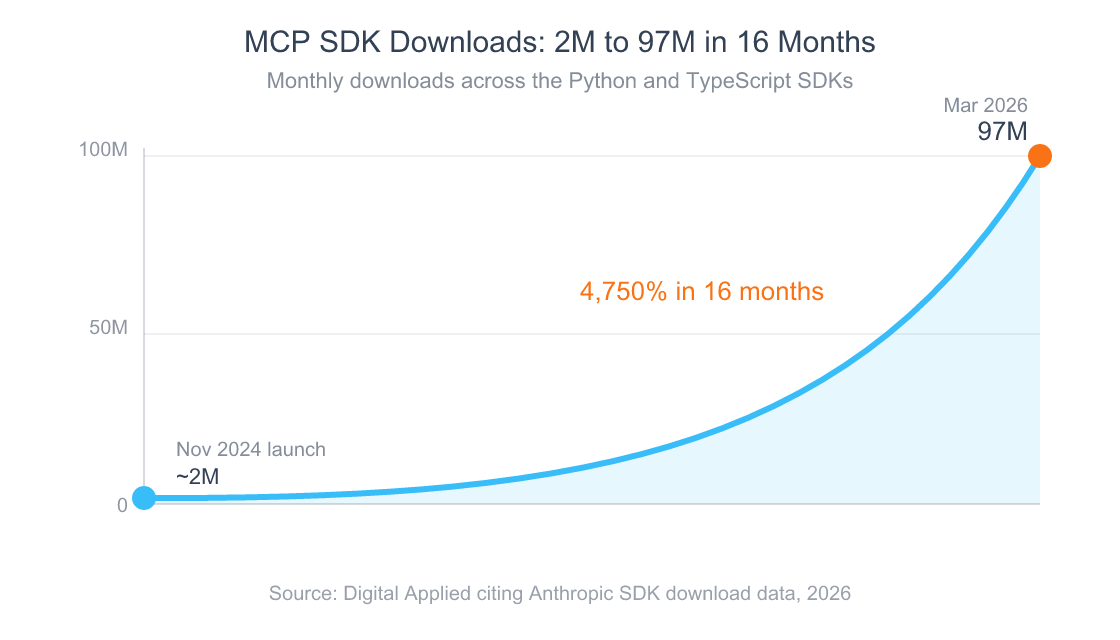
Source: Digital Applied, “MCP Hits 97M Downloads,” citing Anthropic, 2026
MCP became the standard way to do this because it’s client-agnostic. Write one server and it works in Claude Desktop, Claude Code, Cursor, and anything else that speaks the protocol. If you want the full ecosystem map, the complete guide to MCP servers in 2026, what to install and what to skip covers the 30 servers worth knowing. This post is about the one category that guide leaves as a footnote: generative media.
We almost built our own Gemini image MCP. Here’s why we didn’t.
We sketched a build, costed it, and killed it in an afternoon. The reasoning was simple once I stopped being precious about it: a first-party server from the vendor that owns the model beats a community fork in almost every case, because the vendor maintains it and ships the security fixes. The MCP pillar makes the same point with data, 52% of remote MCP endpoints were effectively dead by April 2026, mostly community wrappers (Rapid Claw, 2026). I didn’t want to become one of them.
The tool we were already running was @ycse/nanobanana-mcp, an npm server that hardcodes the AI Studio base URL and passes the key as a raw ?key= query parameter. There’s no Vertex toggle, so it stays behind the prepay wall by design. I looked at pixelforge-mcp next. Its core generate and edit tools are locked to an AI Studio key as well; Vertex only adds upscaling. So it doesn’t escape the wall either. Here’s the teardown I ran:
| Option | What it is | Where it bills | Why I passed or picked it |
|---|---|---|---|
@ycse/nanobanana-mcp |
npm MCP, AI Studio key, raw REST | AI Studio prepay balance | The tool we were already on. Hardcoded to generativelanguage.googleapis.com with ?key=; no Vertex toggle. Stays behind the prepay wall. |
pixelforge-mcp |
Community MCP, AI Studio key | AI Studio prepay balance | Core generate and edit are locked to an AI Studio key; Vertex only adds upscale. Rejected. |
Google mcp-genmedia |
First-party Go servers, Vertex + ADC | Your GCP billing account | Vertex and ADC native, no prepay wall, billed to credits I already control. Adopted. |
Then there was the “productize it” fantasy. I’ll be honest about why that died too, because it’s the more interesting lesson. The wedge I had in mind was “free Google Cloud credits.” Since March 2026, the $300 GCP welcome credit can’t pay for the AI Studio Gemini API, but it still applies to Vertex AI (Google Cloud, 2026). That’s real, and it’s why my own bill is near zero right now. But it’s a one-time trial of about 90 days, scoped to a personal account. It is not a durable moat for anyone, including me.
The durable win isn’t the free credits. It’s that Vertex bills through the Google Cloud account you already control, with budgets and quotas that actually apply, instead of a separate prepay balance that silently hits zero and takes everything down. Google already occupies that lane with a maintained first-party suite. Building a competitor to give myself a 90-day credit perk would have been the dictionary definition of a weekend hack pretending to be infrastructure.
What’s actually in Google’s mcp-genmedia suite?
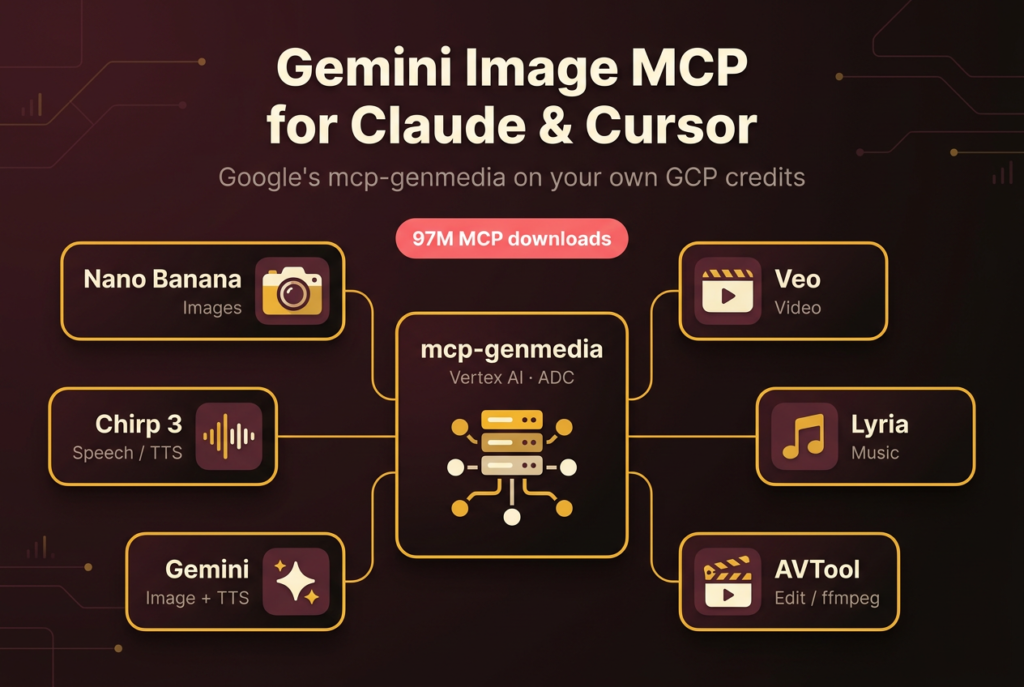
It’s a set of small Go MCP servers inside Google’s vertex-ai-creative-studio repo, each wrapping one Vertex AI generative-media API, all authenticating through ADC (GoogleCloudPlatform, 2026). You enable the ones you want and ignore the rest. There’s no monolith to install and no AI Studio key anywhere in the flow.
The suite is image-heavy, which suited me fine because images were the whole point. Three of the seven servers generate images, one does video, one speech, one music, and one wraps ffmpeg for stitching the outputs together.
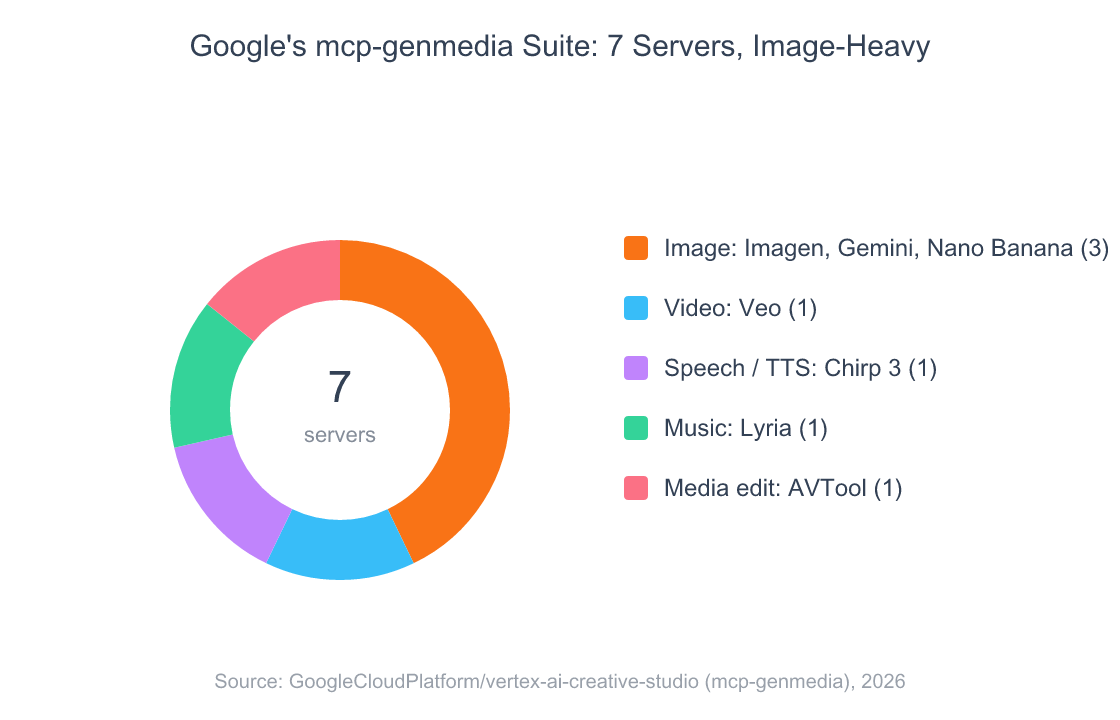
Source: GoogleCloudPlatform/vertex-ai-creative-studio, mcp-genmedia-go, 2026
A small caveat on counting: the Gemini server is multimodal, so it shows up under images but also does TTS. And the repo ships an Imagen server, but it wasn’t in the release binary I installed, so I’m treating it as documented-not-tested. Google’s own framing is that these are servers for “generating media,” and every one of them runs against Vertex with GOOGLE_CLOUD_PROJECT required and GOOGLE_CLOUD_LOCATION defaulting to a region (GoogleCloudPlatform, 2026).
How the Nano Banana server actually works (the schema I probed)
The image server, mcp-nanobanana-go, exposes one tool, nanobanana_image_generation, and it’s stateless. There’s no set_aspect_ratio or set_model to call first; every control is an argument on the generate call itself. I confirmed this by probing the server over a raw MCP handshake rather than trusting the README. The arguments are prompt, model, aspect_ratio, output_directory, an images array for reference inputs, and a gcs_bucket_uri for cloud output.
Three things I learned the hard way, because the docs are thin:
The canonical model ID is gemini-3-pro-image, not the -preview string. Nano Banana Pro went GA in June 2026 and renders 2K and 4K output on both AI Studio and Vertex AI (Google DeepMind, 2026). If you copy a -preview ID from an old snippet, you’ll either 404 or silently fall back. Pass the clean ID.
The server auto-defaults its location to global. That matters because the gemini-3 image models return 404 on regional endpoints like us-central1, the global-versus-regional trap I lay out in full in the companion migration post. The nanobanana server handles this for you. Several other clients don’t.
gemini-3-pro-image is a reasoning model, so it emits multiple image parts. One call can drop several files named gemini_<timestamp>_<part>.png into your output directory, where the lower-index parts are intermediate “thinking” frames and the highest part is the final render. Take the highest part and delete the rest. I got bitten by this generating the very hero on this page, which arrived as parts 2 and 5; part 5 was the keeper.
A representative call, with the controls as arguments rather than prior state:
{
  "tool": "nanobanana_image_generation",
  "arguments": {
    "prompt": "Editorial hero, flat illustration, central hub labeled mcp-genmedia",
    "model": "gemini-3-pro-image",
    "aspect_ratio": "3:2",
    "output_directory": "/path/to/your/images"
  }
}
How to add the Gemini image MCP to Claude and Cursor
Three steps: install the binaries, register one as an MCP server pointed at your GCP project, and set up ADC. Because these are standard stdio servers, the same registration works in Claude Desktop, Claude Code, or Cursor. I run mine in Claude.
First, run the suite’s install script, which drops mcp-*-go binaries into ~/.local/bin. Then register the image server in your client’s MCP config with your project ID. The only required environment variable is GOOGLE_CLOUD_PROJECT:
{
  "mcpServers": {
    "genmedia-nanobanana": {
      "command": "/Users/you/.local/bin/mcp-nanobanana-go",
      "env": {
        "GOOGLE_CLOUD_PROJECT": "your-gcp-project-id"
      }
    }
  }
}
Then give the binary credentials. On a local machine that’s one command, gcloud auth application-default login, which writes Application Default Credentials the server picks up automatically. Restart the client so it loads the new server, and Claude or Cursor now has a nanobanana_image_generation tool it can call. If MCP config in your client is new to you, the guide to configuring MCP servers in Claude Code, scope rules, and the debugging loop is the path to follow for the mechanics.
One trap to skip: don’t try to authenticate with the Vertex “express” API key, the one that starts with AQ. in the console. It 403s on the AI Studio endpoint and isn’t the auth path these servers use. ADC is. I lost an hour to that exact mistake, documented in the companion post on the express-key 403 trap and the full Vertex plus ADC billing setup, so you don’t have to. The whole reason this is worth doing is that once you’re on ADC, image generation bills to your Google Cloud account, not a prepay balance you have to babysit.
What’s verified, and what’s still unproven
I want to be precise, because it’s easy to oversell a suite you installed an hour ago. As of June 10, 2026, I’ve validated exactly one server end to end. The Nano Banana server generated a 3:2 image in about 20 seconds, billed to Vertex free credits, with no 429 in sight. That’s the proof point this whole migration rested on, and it held.
The other five are installed and registered, but I have not run them yet. So I’m not going to tell you Veo renders clean video or that Chirp 3 sounds good, because I genuinely don’t know. Here’s the honest state, server by server:
| Server | Tool | Modality | My validation |
|---|---|---|---|
mcp-nanobanana-go |
nanobanana_image_generation |
Image (Nano Banana Pro) | Validated end to end, 3:2, no 429 |
mcp-gemini-go |
gemini_image_generation, gemini_audio_tts |
Image + TTS | Installed, not yet validated |
mcp-imagen-go |
imagen_t2i |
Image (Imagen) | Not in my release build |
mcp-veo-go |
veo_t2v, veo_i2v |
Video | Installed, not yet validated |
mcp-chirp3-go |
chirp_tts |
Speech / TTS | Installed, not yet validated |
mcp-lyria-go |
lyria_generate_music |
Music | Installed, not yet validated |
mcp-avtool-go |
ffmpeg compositing | Media edit | Installed, not yet validated |
There’s also a real gap worth naming. Every server here generates; none of them understand. The Gemini server does image generation and TTS, but nothing in Google’s first-party suite reads an existing image or watches a video you hand it. So if you want to give your agent eyes, the ability to summarize a YouTube clip on its own GCP credits, this suite won’t do it yet. That’s the next thing I want to build or find. For now, generation is what’s shipping, and generation is what I tested.
Frequently Asked Questions
Does mcp-genmedia work in Cursor, or only Claude?
It’s a standard stdio MCP server, so it drops into any MCP client: Claude Desktop, Claude Code, or Cursor. I run it in Claude. The protocol crossed roughly 9,650 registered servers by 2026 precisely because of this client-agnostic design (Digital Applied, 2026), so one server works everywhere.
Do I need a Gemini API key for mcp-genmedia?
No. The Go servers authenticate through Application Default Credentials against Vertex AI, not an AI Studio key. You set GOOGLE_CLOUD_PROJECT and run gcloud auth application-default login; the spend lands on your Google Cloud billing account (GoogleCloudPlatform, 2026), which is the entire point of switching.
Is image generation through mcp-genmedia free?
Only if you have Google Cloud credits. Since March 2026 the $300 welcome credit can’t pay for the AI Studio Gemini API, but it does apply to Vertex AI (Google Cloud, 2026). That trial is one-time and about 90 days. After it, you pay standard Vertex per-image rates, the same as the AI Studio path.
Which model does the Nano Banana server use?
The canonical model ID is gemini-3-pro-image (Nano Banana Pro), not the -preview string. It went GA in June 2026 and renders 2K and 4K output on Vertex AI (Google DeepMind, 2026). The server auto-defaults its location to global, which avoids the regional 404.
Can mcp-genmedia read an existing image or video?
No. The genmedia servers are generation only. The Gemini server does image generation and TTS, and none of the seven analyze a video or image you give them. That understanding gap is still unfilled in Google’s first-party suite (GoogleCloudPlatform, 2026), so plan to pair it with something else if you need vision.
The takeaway
Giving Claude and Cursor a Gemini image tool turned out to be a buy, not a build. Google’s mcp-genmedia suite is Vertex and ADC native, it bills to the Google Cloud account you already run, and the Nano Banana server worked end to end on the first real test. The free credits are a nice personal kicker, but the lasting reason to do this is that you stop babysitting a prepay balance that can take your whole stack down at zero. I validated the image path, I installed the rest, and I’ll update this when I’ve actually run Veo and the others. If you’re new to the broader protocol, start with the complete MCP servers guide and pick the six that belong in your config.