Gemini API “Prepayment Credits Depleted”: The Vertex AI Fix
Short answer: A Gemini 429 RESOURCE_EXHAUSTED: "prepayment credits are depleted" is a billing state, not a code bug. Your prepay balance hit $0, so every key on that billing account stops at once. Top up to recover instantly, then migrate to Vertex AI with ADC to bill through Google Cloud and leave the prepay wall behind.
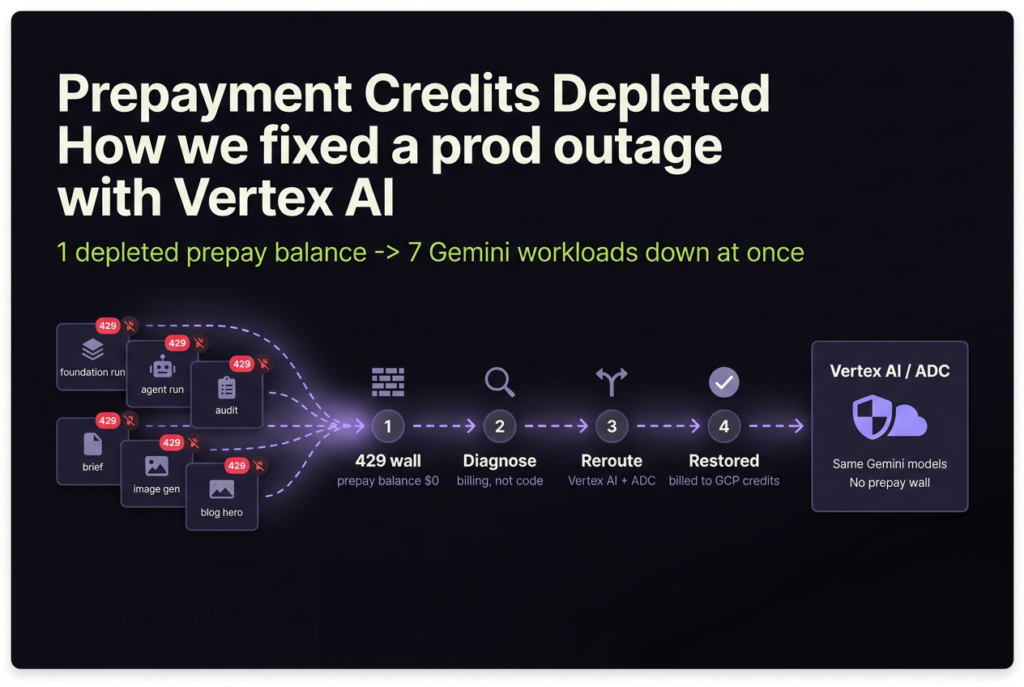
On June 10, 2026, every Gemini call in our production backend started failing at once. Same minute, the tool that generates this blog’s hero images died too. The error was identical everywhere: 429 RESOURCE_EXHAUSTED: "Your prepayment credits are depleted." Nothing in our code had changed. Google had quietly moved the project onto prepaid billing, the balance hit zero, and there’s no graceful degradation. When a prepay balance hits $0, every API key on that billing account stops working simultaneously (Google AI for Developers, 2026).
If you’re staring at that error right now, this post walks through how I diagnosed it, the fast stopgap I used to get prod breathing again, the one trap that cost me an hour, and the real fix: moving off the AI Studio API key and onto Vertex AI with Application Default Credentials.
For the broader stack this runs on, see my opinionated GCP production setup, from project to live SaaS.
Key Takeaways
429 RESOURCE_EXHAUSTED: "prepayment credits are depleted"is a billing state, not a code bug. Prepay and Postpay plans took effect March 23, 2026 (Google AI for Developers, 2026).- When the prepay balance hits $0, every API key on that billing account stops at once. One shared project meant prod and our blog tool went dark together.
- Topping up prepay credits restores service instantly, with no redeploy, but it’s a band-aid: silent, shared, and easy to hit again.
- The durable fix is Vertex AI with ADC. Same models, same per-token price, but billed through your Google Cloud account instead of a separate prepay wall.
location="global"is mandatory: the gemini-3.x image models return 404 onus-central1.
What does the Gemini “429 RESOURCE_EXHAUSTED: prepayment credits are depleted” error mean?
It means your Gemini API project ran out of prepaid credit, and Google halts every request against that billing account until you top up. Google’s own docs are blunt about the blast radius: “When your Prepay credit balance on the billing account hits $0, all API keys in all projects linked to that billing account will stop working simultaneously” (Google AI for Developers, 2026).
That sentence explains why my outage felt so total. Our production backend and the blog image tool both drew on a single Google AI Studio project. One depleted balance, seven workloads down: the foundation runs, the agent runs, audits, briefs, the pulse job, prod image generation, and the blog hero skill. All of them returned the same 429 in the same minute.
The timing wasn’t a coincidence. Google rolled out Prepay and Postpay billing plans for the Gemini API on March 23, 2026, and accounts predating the change were evaluated and assigned a plan (Google AI for Developers, 2026). In Prepay, you buy credits in advance and usage deducts in near real time. When the balance reads zero, the service simply stops.
I’m not the only one who got surprised by this. In June 2026 the Google AI Developers Forum filled up with the exact same complaint, including threads titled “Tier 1 Postpay silently switched to Prepay; prepayment credits depleted 429, never opted in” (Google AI Developers Forum, 2026). If your billing plan changed without you touching it, you’re in good company.
How do you confirm it’s billing, not a broken API key?
The fastest way to separate a billing problem from a code problem is one curl call. A 429 with a prepay message means billing; a 400 or 401 means your key or request is wrong. I ran the simplest possible request straight at the AI Studio endpoint:
curl -s "https://generativelanguage.googleapis.com/v1beta/models/gemini-3.5-flash:generateContent?key=$GOOGLE_API_KEY" \
  -H 'Content-Type: application/json' \
  -d '{"contents":[{"parts":[{"text":"ping"}]}]}'
The response came back 429 RESOURCE_EXHAUSTED with “Your prepayment credits are depleted.” That single line ruled out the usual suspects. The MCP server was fine. The API key was valid. The model IDs were correct. The only fault was a balance reading $0.
Why does this matter? Because a 429 normally screams “rate limit,” and engineers waste hours adding retries and backoff. Gemini’s 429 is overloaded: it covers live rate limits, daily quota exhaustion, bursty traffic, and billing state, all under one code (Google AI for Developers, 2026). The message body is what tells you which one. “Prepayment credits are depleted” is not a quota you can wait out. No amount of backoff brings it back.
If you run agents in production, this is exactly why request-level tracing earns its keep. I could see the failure fan out across every Gemini span at the same timestamp, which pointed straight at a shared dependency rather than any single service. For how I trace those calls without leaking prompt content, see tracing GenAI agents with OpenTelemetry without leaking PII.
The fast stopgap: top up prepay credits, and why I didn’t stop there
The quickest recovery is to top up the prepay balance. The instant credits return, the same key works again, and no redeploy is needed. Prepay top-ups start at a $10 minimum and credits expire after 12 months (Google AI for Developers, 2026). For an active outage, that’s the right first move: pay, refresh, breathe.
But a top-up fixes the symptom, not the disease. Three things still bothered me after the dust settled.
First, the failure is silent. There’s no graceful degradation and no warning before $0; prod AI just goes dark. Second, the billing account is shared, so a blog experiment burning image credits can drain the same pool that prod depends on. Third, prepay means I’m now babysitting a balance forever, hoping the auto-reload fires before traffic spikes.
So the top-up bought me time, not a fix. The real question was how to get off the prepay wall entirely, ideally onto billing I already control. That’s where Vertex AI comes in.
Why move to Vertex AI instead of staying on the Gemini API key?
Because Vertex AI bills through your normal Google Cloud account, not a separate prepay balance. Same Gemini models, the same per-token price, but the spend flows through standard GCP billing, budgets, and credits (Google Cloud, 2026). There’s no isolated wallet to hit zero and silently kill prod.
The credits angle is the part most people miss. Since March 2026, the $300 Google Cloud welcome credit can no longer pay for Gemini API or AI Studio usage, but it still applies to other Google Cloud products, and Vertex AI is one of them (Google Cloud, 2026). So the same dollars that are walled off from the AI Studio API are spendable on the exact same models through Vertex.
Per-token pricing is identical on both platforms, so cost is never the reason to stay on the prepay wall: the same model bills at the same rate whether you call it through an AI Studio key or Vertex. What differs is how you pay and how you authenticate, not what you get. This table is the comparison I wish I’d had before the outage:
| Google AI Studio (Gemini API key) | Vertex AI (ADC) | |
|---|---|---|
| Auth | API key (GOOGLE_API_KEY) |
ADC / service account IAM |
| Billing source | Separate prepay or postpay balance | Your Google Cloud billing account |
| GCP welcome credits | Excluded since March 2026 | Eligible (standard GCP product) |
| Failure mode at $0 | All keys on the account 429 at once | Normal GCP budget and quota controls |
| Setup cost | Lowest (one key) | One IAM role + enable the API |
When billing centralizes like this, a thin gateway in front of your models is the natural place to handle failover, key rotation, and spend caps. If you’re building one, see the seven cross-cutting concerns every AI gateway has to solve.
Why does the Vertex express key return 403 on the AI Studio endpoint?
Don’t try to fix this by swapping in the Vertex “express” API key. The express key (the one that starts with AQ. in the console) returns 403 on the AI Studio endpoint, because it only authenticates against Vertex endpoints, not generativelanguage.googleapis.com (Google Cloud, 2026). I burned real time here before the penny dropped.
The trap is subtle. Many MCP servers and SDK wrappers hardcode the AI Studio base URL and pass the key as a raw ?key= query parameter. Drop a Vertex express key into that flow and it 403s every time, which looks like a broken key. It isn’t. The endpoint and the key type simply don’t match.
The lesson: moving to Vertex is not a key swap. It’s a client-mode change. You switch the SDK from API-key mode to Vertex mode, which changes both the endpoint and the auth method to Application Default Credentials. That’s the actual migration, and it’s smaller than it sounds.
How do you migrate the Gemini API to Vertex AI with ADC?
The migration is four steps:
- Switch the client constructor from API-key mode to Vertex mode.
- Set
location="global", not a region. - Grant the runtime service account one IAM role (
roles/aiplatform.user). - Deploy behind a flag, keeping the old API key mounted for instant rollback.
In the google-genai SDK, the entire code change routes through a single factory. I made it flag-gated so a rollback is one config flip, not a revert:
def get_gemini_client():
    if settings.GOOGLE_GENAI_USE_VERTEXAI:
        # Vertex AI via ADC: billed to your GCP account, no prepay wall
        return genai.Client(
            vertexai=True,
            project=settings.GOOGLE_CLOUD_PROJECT,
            location=settings.VERTEX_LOCATION,  # "global"
        )
    # Fallback: AI Studio API key (kept for instant rollback)
    return genai.Client(api_key=settings.GOOGLE_API_KEY)
Set location="global", not a region. This one bit me in testing. Text and gemini-2.5-flash-image work on both regional and global endpoints, but the gemini-3.x image models return 404 on us-central1. They only resolve on global. Here’s the availability matrix I validated by hand:
| Model | AI Studio (api key) | Vertex us-central1 |
Vertex global |
|---|---|---|---|
| Text (3.5 Flash, 3.1 Pro) | Works (prepay) | Works | Works |
gemini-2.5-flash-image |
Works (prepay) | Works | Works |
gemini-3.1-flash-image-preview |
Works (prepay) | 404 | Works |
gemini-3-pro-image-preview |
Works (prepay) | 404 | Works |
If you only ever generate text, regional works fine. The moment you touch a gemini-3 image model, pin to global or you’ll chase phantom 404s.
Grant the runtime one IAM role. ADC means the workload authenticates as its service account, so that account needs Vertex permission and the API has to be on:
gcloud services enable aiplatform.googleapis.com --project="$PROJECT_ID"

gcloud projects add-iam-policy-binding "$PROJECT_ID" \
  --member="serviceAccount:backend-runtime@${PROJECT_ID}.iam.gserviceaccount.com" \
  --role="roles/aiplatform.user"
On Cloud Run, that’s the whole auth story. The service runs as that account and gets ADC automatically, so there’s no key file and no auth script in prod. Use the AQ. express key or setup_adc.sh only on a local dev machine; never ship them.
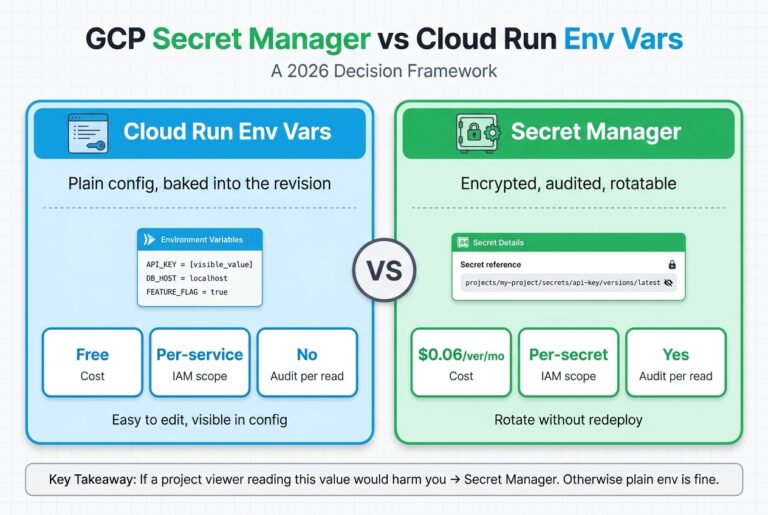
Deploy behind the flag, and keep the old key mounted. I set GOOGLE_GENAI_USE_VERTEXAI=true and VERTEX_LOCATION=global in the prod environment, but I left GOOGLE_API_KEY mounted from Secret Manager. If Vertex misbehaves, flipping the flag back is a one-deploy rollback to the old path. For why the key belongs in Secret Manager and not an env var, see Secret Manager vs Cloud Run env vars, and when each one wins.
One more reason this migration is low-risk: it doesn’t touch your per-token cost at all, only your billing source. Your model choice still drives the bill exactly as before; the migration just moves where that bill lands.
What’s verified, and what’s still rolling out
I want to be precise here, because it’s easy to oversell a migration. As of June 10, 2026, the Vertex path is validated end to end but not yet flipped in production. I tested it via local ADC against the prod project, and text, grounding with the GoogleSearch tool, image generation on global, and usage-metadata parsing all came back green. The IAM role is bound and the API is enabled. Local dev is fully on Vertex already. The backend test suite is green at 1,396 passing tests. The code is committed and flag-gated, with the old API key still mounted for rollback.
What’s left is the single prod deploy that flips the flag. So I’m not going to claim a measured cost saving or a “zero outages since” number yet, because that would be fiction until prod runs on Vertex for real. I’ll add a results update once it’s flipped and I have data.
One related piece is already done. The blog image tool that renders this site’s hero images shares the same project, so it died in the same outage; I moved it onto Google’s first-party mcp-genmedia suite, which is Vertex and ADC native. The full walkthrough is its own post: moving blog image generation off the AI Studio prepay wall to Vertex with Google’s mcp-genmedia.
If you’re running Gemini in production today on an API key, do the cheap insurance now: add a billing budget alert, and prototype the Vertex client behind a flag before you need it. The outage gives you no warning, so the time to build the off-ramp is before the balance hits zero.
Frequently Asked Questions
Why did topping up prepay credits not stop the 429 from coming back?
A top-up restores service immediately, but it doesn’t change the failure mode. The balance is still a single shared pool with no graceful degradation, so it can hit $0 again silently (Google AI for Developers, 2026). Moving to Vertex AI billing removes the separate prepay wall entirely.
Will moving to Vertex AI mean rewriting my Gemini code?
No. In the google-genai SDK it’s a one-line client change: set vertexai=True with a project and location instead of passing api_key. The model IDs, request shapes, and response parsing stay the same (Google Cloud, 2026). I gated mine behind a flag so rollback is one config flip.
Do Google Cloud free credits work on the Gemini API?
Not on the AI Studio Gemini API. Since March 2026, the $300 welcome credit can’t pay for Gemini API or AI Studio usage, but it still applies to other Google Cloud products, including Vertex AI (Google Cloud, 2026). That’s a real reason to route Gemini through Vertex.
Why do the gemini-3 image models return 404 on us-central1?
The gemini-3.x image preview models are only served on the global endpoint, not regional ones like us-central1, so a regional call returns 404. Text models and gemini-2.5-flash-image work on both. Set VERTEX_LOCATION="global" to avoid it (Google Cloud, 2026).
Is Vertex AI more expensive than the Gemini API?
No, the per-token price is the same. Gemini 3.5 Flash is $1.50 input and $9.00 output per 1M tokens, and 3.1 Pro is $2.00 and $12.00 for prompts up to 200K, whether you call AI Studio or Vertex (Google AI for Developers, 2026; Google Cloud, 2026). Vertex changes your billing source, not your rate card.
The takeaway
A Gemini “prepayment credits depleted” 429 is a billing event wearing a rate-limit costume. Read the message body, confirm with one curl call, and don’t waste time on retries. Top up to stop the bleeding, then get off the prepay model for good. Vertex AI with ADC gives you the same models at the same price, billed through the Google Cloud account you already control, with budgets and credits that actually apply. It’s a one-line client change and one IAM role, and it’s the difference between babysitting a balance and never seeing this error again.
If you’re setting up the surrounding infrastructure from scratch, start with the eight-phase GCP production setup that everything here plugs into.