The Model Context Protocol SDK hit 97 million monthly downloads in March 2026, up from ~2 million at launch in November 2024: a 4,750% climb in 16 months (Digital Applied citing Anthropic data, 2026). ChatGPT itself is past 800 million weekly users (CNBC, 2025). And yet most ChatGPT Plus and Pro users I talk to still treat it like it’s 2023: typing into the box, copy-pasting answers, never connecting it to anything real.
Since OpenAI flipped on full MCP support in ChatGPT Developer Mode around late 2025 (InfoQ, 2025), the catalog of servers you can point ChatGPT at has gone from “a handful” to the same 9,400+ servers Claude users have been bragging about (Digital Applied MCP Adoption Statistics 2026, 2026). The hard part is no longer access. It’s picking. For the wider map of the ecosystem, what MCP is, the transport shake-up, and the 30 servers worth knowing across clients, start with the complete 2026 guide to MCP servers.
I’ve been running a working set of remote MCP servers inside ChatGPT for six months, across Plus and a Business workspace. This isn’t a registry dump. It’s the 12 I keep coming back to, the categories that matter, the ones that sound great in a blog post and quietly disappoint, and the security caveat that didn’t get airtime until an April 2026 CVE forced the conversation (OX Security, 2026).
Key Takeaways
- ChatGPT only speaks remote MCP. Plus/Pro/Business/Enterprise/Edu accounts get Developer Mode in beta; Team is currently excluded (OpenAI Developer Mode docs, 2026). Local stdio servers (including Figma Dev Mode and the Filesystem reference) won’t load.
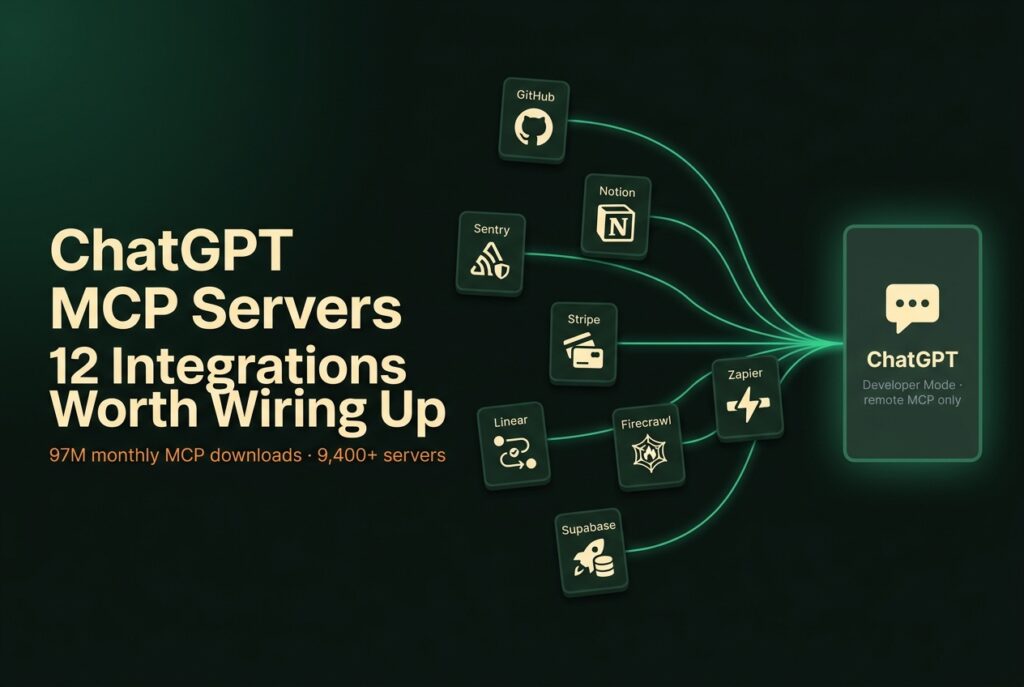
- The 12 picks worth your time today: GitHub, Sentry, Linear, Notion, Asana, Supabase, Firecrawl, Tavily, Context7, Stripe, mem0, Zapier. Range covers dev, observability, PM, data, web, knowledge, finance, memory, and a catch-all.
- Stars are not the same as fitness. modelcontextprotocol/servers has 85.7k stars but most of its reference servers were archived in mid-2025 (modelcontextprotocol/servers-archived). Always check the maintainer and the last commit date.
- Skip the deprecated
@modelcontextprotocol/server-postgres. It still pulls ~21,000 weekly npm downloads despite an unpatched SQL injection that bypasses its own read-only guard (Datadog Security Labs, 2026).- Treat MCP like a permission boundary, not a feature checklist. Every server you add widens the blast radius if your OpenAI account is ever compromised. Add three. Use them. Then decide whether you need a fourth.
Table of Contents
- What ChatGPT’s MCP support actually looks like in May 2026
- How I picked these twelve (and what I cut)
- 1. GitHub MCP, repo intelligence without the tab-switching
- 2. Sentry MCP, talking to your error tracker like a human
- 3. Linear MCP, issues that move themselves
- 4. Notion MCP, the one that finally beat copy-paste
- 5. Asana MCP v2, for teams that didn’t pick Linear
- 6. Supabase MCP, natural-language Postgres without the footguns
- 7. Firecrawl MCP: scrape, crawl, deep research in one place
- 8. Tavily MCP, the search server agents actually like
- 9. Context7, version-correct library docs on demand
- 10. Stripe MCP, payment ops that don’t need the dashboard
- 11. mem0 / OpenMemory, the memory layer ChatGPT doesn’t ship with
- 12. Zapier MCP, the catch-all for everything else
- Skip these (or at least know what you’re getting into)
- How to actually wire one up in ChatGPT
- The security caveat nobody puts in the marketing pages
- FAQ
What ChatGPT’s MCP support actually looks like in May 2026
ChatGPT supports remote MCP servers via two surfaces: Apps (curated catalogue, light read-only access, most paid plans) and Developer Mode (full MCP client with read + write, beta on Plus/Pro/Business/Enterprise/Edu) (OpenAI Developer Mode docs, 2026). Team plan is conspicuously missing from the current eligibility list, which has confused people who picked Team for the shared workspace. Free accounts get nothing.
The timeline got messy fast. Sam Altman committed to MCP support on March 26, 2025, “people love MCP and we are excited to add support across our products” (TechCrunch, 2025). Remote MCP landed in the Responses API in May 2025. The Apps SDK preview shipped in October 2025 with partners like Zillow, Canva, Spotify, Booking, and Coursera (OpenAI, 2025). Full read-plus-write MCP in Developer Mode followed in beta the same window (InfoQ, 2025). In December 2025, OpenAI renamed “connectors” to “apps”, just to keep things interesting.
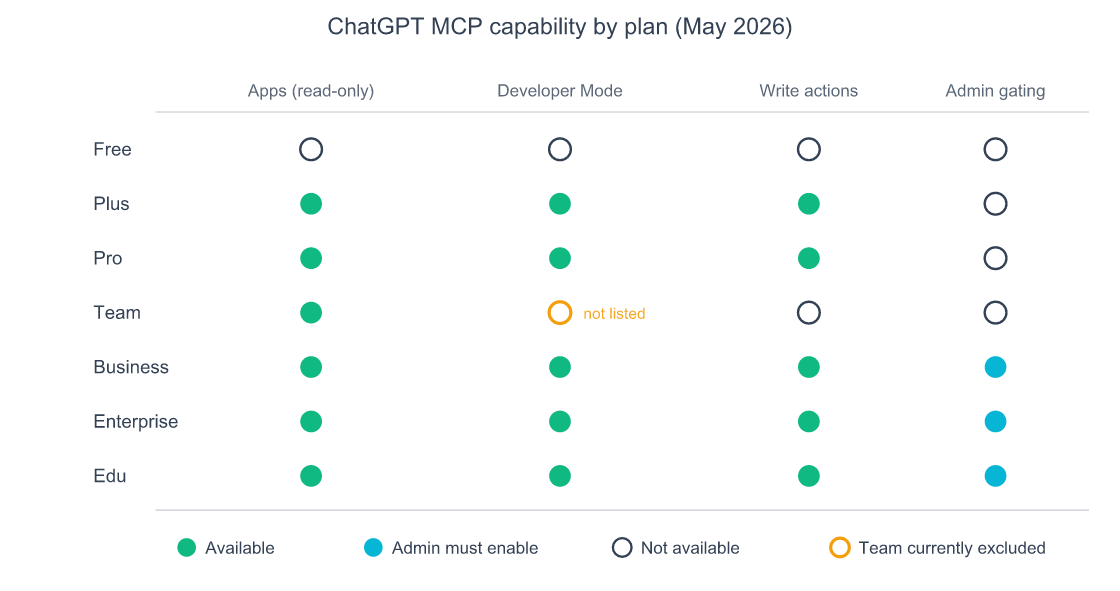
Source: OpenAI Developer Mode documentation, May 2026
The thing worth getting straight up front: ChatGPT doesn’t speak stdio. The MCP spec defines three transports, stdio (local subprocess), Streamable HTTP, and the older SSE, and ChatGPT only supports the latter two (OpenAI MCP docs, 2026). Roughly half the popular MCP servers in the wild were written stdio-first and have no hosted endpoint. The Filesystem reference server, the Figma Dev Mode server, the local Stripe @stripe/mcp package, none of these will load in ChatGPT. You need a server with a public HTTPS URL.
That single choice (remote-only) quietly reshapes the catalogue of “ChatGPT MCP servers” into a different list from the Claude Code one. Most vendor-hosted servers (Notion, Linear, Sentry, Stripe, Asana) work fine. Most indie stdio packages from a “top 50 MCP servers” Twitter thread don’t. If you’ve wondered why a server “exists” but won’t appear in ChatGPT’s connector dialog, that’s usually why.
How I picked these twelve (and what I cut)
My filter killed about two-thirds of candidates. A server made the cut only if (1) it has a publicly hosted remote endpoint ChatGPT can talk to, (2) it’s maintained by the vendor itself or a team with real release cadence, (3) I’ve used it for at least a month in a real workflow, and (4) it solves a problem worth solving versus “this exists.” Star count was a tiebreaker, not a qualifier.
Categories I aimed for: dev tools, observability, project management (two picks: Linear and Asana solve different problems), database, web scraping, search, library documentation, finance, memory, and one general-purpose escape hatch. Design didn’t make it, because Figma’s Dev Mode MCP is stdio-only and Canva’s ChatGPT integration is a curated App rather than a connector you can wire up freely. I’d rather be honest about the gap than pad the list.
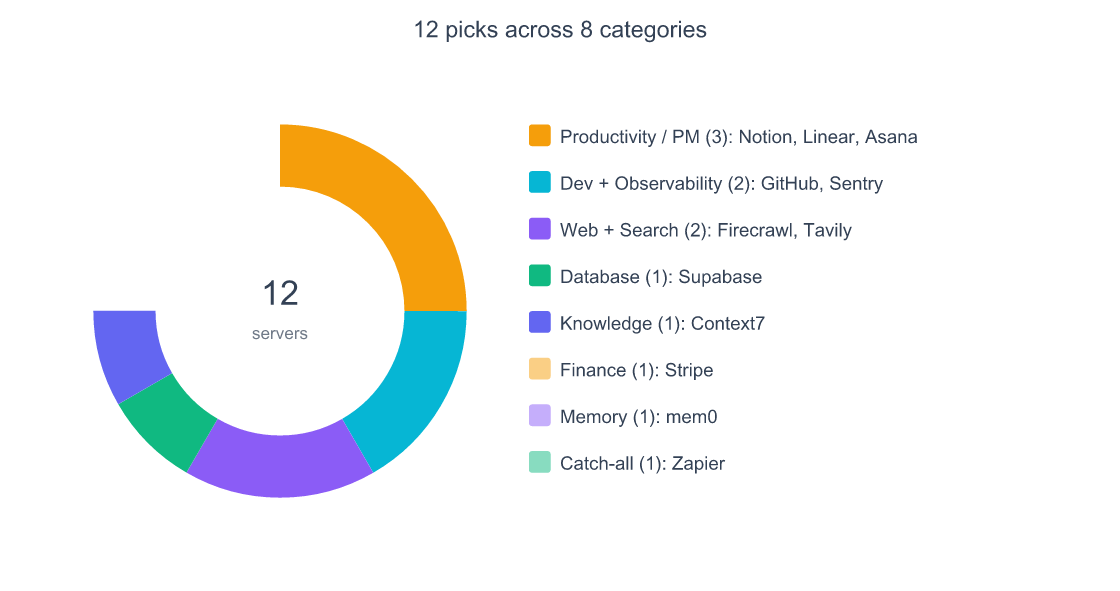
Categories chosen for spread, not symmetry. Design is intentionally absent because no Figma- or Canva-style remote MCP works cleanly inside ChatGPT in May 2026.

1. GitHub MCP, repo intelligence without the tab-switching
Endpoint: https://api.githubcopilot.com/mcp/ · Auth: PAT or OAuth · Maintainer: GitHub (official) · Stars: 29.8k, 4.2k forks (github/github-mcp-server) · Setup difficulty: 2/5
Full GitHub API surface, issues, PRs, file reads, code search, branch ops, security alerts, exposed as MCP tools. The most-installed dev MCP server in any client I’ve measured.
My use case: I keep a Plus account hooked up with a fine-scoped PAT (read on most repos, write only on my blog repo). “Find the open PRs in nishilbhave/blogs that touched articles/ai-agentic/ this week” is a three-second query I run daily. The other I rely on: “summarise the diff for PR 143 and call out anything that touches the publisher pipeline.” It reads the diff. It summarises it.
Gotcha: the remote endpoint only works with github.com. GitHub Enterprise Server users still need the local stdio variant, effectively unavailable inside ChatGPT for GHES (github/github-mcp-server README, 2026). For the auth-method rate-limit math, the toolset-trimming trick, and the 7 use cases worth the setup, see the GitHub MCP server complete setup, use cases, and limits guide.
My take: The one server I’d install first, every time. Modest token cost, clean OAuth, pays for itself in a day even at read-only.
2. Sentry MCP, talking to your error tracker like a human
Endpoint: https://mcp.sentry.dev/mcp · Auth: OAuth · Maintainer: Sentry (official) · Repo: getsentry/sentry-mcp · Setup difficulty: 1/5
Sentry’s MCP exposes issues, events, projects, and the Seer analysis layer (its own AI debugger) as tools. Adoption has been wild: the server crossed 30 million requests per month soon after launch (Sentry Blog, 2026).
My use case: post-deploy triage. “Any new error groups in production since 9am?”: the model calls Sentry, gets the list, and I can ask it to summarise stack traces and propose a fix. The Seer integration is where it earns its keep. I read the AI debugger’s output inside the same chat where I’m drafting the fix, instead of switching to Sentry’s UI.
Gotcha: read-only by default, which is correct. Turning on write access lets you resolve issues from chat. That has bitten me twice. I keep it read-only and flip writes on only for cleanup sessions.
My take: Smoothest OAuth flow on this list. If you use Sentry at all, the value-to-effort ratio is unreasonable.
3. Linear MCP, issues that move themselves
Endpoint: https://mcp.linear.app/mcp · Auth: OAuth 2.1 · Maintainer: Linear (official) · Setup difficulty: 1/5
Linear’s MCP can find, create, update, and comment on issues, projects, milestones, and initiatives. The OAuth flow is the cleanest I’ve seen: click a button, pick a workspace, done.
My use case: planning sessions. I paste a doc and ask “break this into Linear issues under the Blog project, with the Article label, linking each to the source section.” It writes them with reasonable titles, sets priority, and skips duplicates. The “skips duplicates” part needed a prompt nudge, out of the box it’ll happily create the same issue twice.
Gotcha: write actions trigger a confirmation modal every time, correct behaviour but slow for batch operations. The per-tool “remember this choice” toggle helps once you trust the workflow.
My take: Indispensable if you live in Linear. OAuth scoping is per-workspace, so you can give ChatGPT access to side projects without touching the work one.
4. Notion MCP, the one that finally beat copy-paste
Endpoint: https://mcp.notion.com/mcp · Auth: OAuth · Maintainer: Notion (official) · Setup difficulty: 2/5
Notion ships an official hosted MCP that reads and writes pages, databases, and comments. They’re sunsetting the self-hosted variant, go hosted from day one (Notion docs, 2026).
My use case: this is the server that ended manual copy-paste between ChatGPT and Notion. I draft in chat, ask the model to “append this as a new section to the page titled ‘Q2 Content Plan’ in the Marketing workspace,” and it appends: formatting, headings, the right block types. Reverse works too: “pull the ‘Editorial Calendar’ database and tell me which posts are still in Draft.”
Gotcha: tool coverage is still expanding. Synced blocks don’t round-trip cleanly. Tables convert to text. If your workspace leans on those, expect rough edges.
My take: If half your knowledge lives in Notion, this is the highest-leverage server on the list. The first time you say “summarise everything I wrote this month, turn it into a status update” and it actually does it, you stop using two tabs.
5. Asana MCP v2, for teams that didn’t pick Linear
Endpoint: https://mcp.asana.com/v2/mcp · Auth: OAuth · Maintainer: Asana (official) · Setup difficulty: 2/5
Asana’s official MCP exposes tasks, projects, workspaces, and comments. Important wrinkle: the v1 beta server shut down on May 11, 2026, four days before this post went up. If your Asana MCP suddenly stopped working, that’s why (Asana developer docs, 2026). The migration is a one-line URL change.
My use case: same shape as Linear, turn a meeting transcript into tasks, assigned to the right people in the right project. Asana’s data model is denser (custom fields, sections, dependencies), so tool descriptions are longer and token overhead per call is slightly higher.
Gotcha: the OAuth flow takes a resource parameter to scope which workspace you’re attaching to. If your account is in multiple orgs, ChatGPT will pick one and you’ll be quietly editing the wrong one. Check the workspace name in the connector dialog.
My take: Worth it if your team is already on Asana. Worth zero if you have a choice (Linear’s MCP is cleaner). That’s a religious argument, not a technical one.

6. Supabase MCP, natural-language Postgres without the footguns
Endpoint: Supabase-managed remote (per-project URL) · Auth: access token · Maintainer: Supabase community (org-blessed) · Repo: supabase-community/supabase-mcp · Setup difficulty: 3/5
Supabase’s MCP lets ChatGPT query your Postgres database, inspect schema, manage edge functions, and run migrations. The natural-language-to-SQL piece is genuinely good, it reads your actual schema before answering instead of guessing.
My use case: schema exploration on side projects. “What tables in the blogs database have a published_at column?” comes back with the right list, types, and an example query. Asking it to write a migration is risky; asking it to propose one and running the SQL myself works fine.
Gotcha: read/write by default. The Supabase team recommend --read-only for any production database. I’d go further: connect ChatGPT to a dev copy first, get comfortable, then graduate to production with read-only locked on.
My take: Use it on dev branches. Be careful in production. Never connect it to a customer-data database without an explicit read-only token.
7. Firecrawl MCP: scrape, crawl, deep research in one place
Endpoint: Firecrawl-hosted · Auth: API key · Maintainer: Firecrawl (official) · Repo: firecrawl/firecrawl-mcp-server (~5.2k stars on the MCP repo) · Setup difficulty: 2/5
Firecrawl’s MCP ships thirteen tools spanning single-page scrape (renders JavaScript, returns clean markdown), full-site crawl, search, interactive form filling, and a “deep research” tool that chains lookups. Most useful single web server I’ve tried.
My use case: competitive content research. “Find the top three results for ‘mcp server chatgpt’ and pull their headings into a markdown outline”, a five-second query that used to take me twenty minutes of tab-switching. The markdown is clean enough to paste straight into a planning doc.
Gotcha: tokens. Deep crawl returns a lot of text and ChatGPT ingests all of it. A single “crawl this docs site” call can burn a meaningful chunk of context. I limit crawl depth aggressively now.
My take: Worth a paid plan for any research-driven work. The free tier is a tasting menu, not a meal.
8. Tavily MCP, the search server agents actually like
Endpoint: https://mcp.tavily.com/mcp/ · Auth: API key · Maintainer: Tavily (official) · Repo: tavily-ai/tavily-mcp · Setup difficulty: 1/5
Tavily was built as an AI-first search API and the MCP reflects that. Three tools, search, extract, crawl, tuned for what an agent wants: short answer, source URLs, optional raw content. The search server I’d pick over Brave or any Google-API wrapper if I only got one.
My use case: real-time fact-checking inside chat. “What did OpenAI announce at DevDay 2025?” returns a clean answer with three or four primary-source links. “Extract the full text of the openai.com announcement” pulls the page and I’ve got the source pasted into context.
Gotcha: free-tier credit cap is hard. I burned through it in three days. Paid tier is reasonable, but plan for it.
My take: Pair Tavily with Firecrawl. Tavily for “what exists,” Firecrawl for “give me everything on this page.” Complementary, not redundant.

9. Context7, version-correct library docs on demand
Endpoint: Upstash-hosted HTTPS · Auth: API key (optional for public docs) · Maintainer: Upstash · Repo: upstash/context7 (~52k stars) · Setup difficulty: 1/5
Context7 fixes a real ChatGPT problem: it doesn’t always know the current version of a library. Two tools (resolve-library-id and query-docs) inject version-specific official docs into the prompt. Ask about React, get React 19. Ask about Next.js, get the latest stable.
My use case: any time I’m working with a fast-moving library. “How do I write a Server Action in Next.js 16?” returns code that compiles against Next 16, not a hallucinated mix of 13 and 14 patterns. The single biggest accuracy improvement on any technical question.
Gotcha: the indexed library registry is open, anyone can submit a doc set. A few entries are stale or wrong. Sanity-check critical answers against the library’s own docs.
My take: Free, lightweight, almost-zero risk. Install day one and forget it exists.
10. Stripe MCP, payment ops that don’t need the dashboard
Endpoint: https://mcp.stripe.com · Auth: OAuth (remote) or API key (local) · Maintainer: Stripe (official) · Repo: stripe/agent-toolkit · Setup difficulty: 2/5
Stripe’s MCP can create customers, prices, products, payment links, refunds, and invoices, basically the whole “manage your Stripe account” surface, exposed to chat.
My use case: refund triage. “Find the customer with email X, list their last three invoices, refund the most recent with reason ‘duplicate.'” Without the MCP that’s six clicks in the dashboard. With it, it’s a sentence, and the model reads back the refund ID, which I paste into the support ticket. I also use it to spin up payment links for one-off consulting invoices.
Gotcha: write actions on a live key are real money. Always test against test mode first. The OpenAI confirmation modal helps but isn’t a substitute for restricted keys with scope limits.
My take: Set it up with a restricted key that can only do what you need. The first time you accidentally refund someone’s $400 invoice, you’ll wish you had.
11. mem0 / OpenMemory, the memory layer ChatGPT doesn’t ship with
Endpoint: mem0 cloud-hosted MCP · Auth: API key · Maintainer: Mem0.ai (official) · Repo: mem0ai/mem0 (~53.5k stars) · Setup difficulty: 3/5
ChatGPT’s built-in memory is fine for “remember my name” but useless for “remember the architectural decisions we made six months ago.” mem0 fills the gap with persistent semantic memory you can read and write from any MCP-compatible client.
My use case: cross-tool continuity. Claude, ChatGPT, and Cursor are all wired into the same mem0 instance. A decision made in one, “we’re standardising on Vitest, not Jest, on this project”, surfaces in every other client’s next session. It’s the connective tissue behind my multi-model workflow across Claude, ChatGPT, Gemini, and Grok. It kills the “I told you this last week” frustration that used to make me distrust AI tools for long projects.
Gotcha: cloud means your memory leaves your machine. For sensitive data the local OpenMemory variant is right, but local doesn’t work in ChatGPT (stdio). If you can’t tolerate cloud, you can’t use mem0 from ChatGPT.
My take: Strange how quickly this becomes load-bearing. Set it up second, after GitHub.
12. Zapier MCP, the catch-all for everything else
Endpoint: Zapier-hosted per-account URL · Auth: Zapier OAuth · Maintainer: Zapier (official) · Setup difficulty: 2/5
Zapier’s MCP is the escape hatch. It exposes 9,000+ apps and 30,000+ actions through one connector, anything from “post to Slack” to “add a row to the Airtable I forgot existed” (Zapier MCP guide, 2026). Slower than a native MCP because you’re going through Zapier’s layer, but the breadth is right for “I need ChatGPT to touch that one weird tool twice a month.”
My use case: pushing tasks into Google Calendar without setting up the full Google Workspace OAuth dance. One Zap, one MCP tool, done. Same story for any niche SaaS that doesn’t ship its own MCP yet.
Gotcha: token-heavy. Zapier exposes every action as a separate tool and descriptions add up fast. I scope mine to ten actions max, not the full library.
My take: Don’t install it first, not the cleanest experience. But once the big ones are in place and you need a 13th, this is almost always the answer.
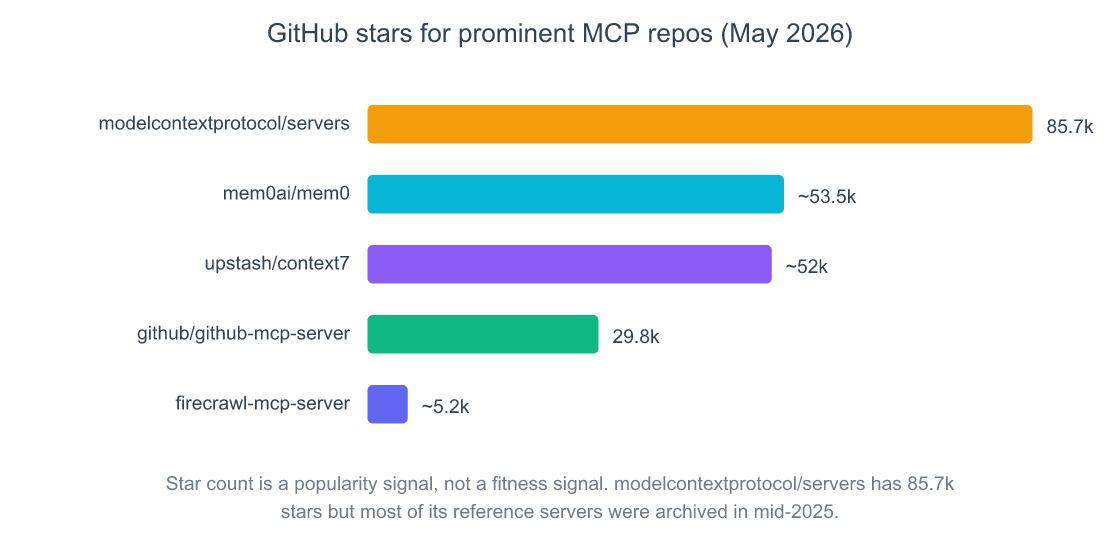
Source: GitHub, May 2026. modelcontextprotocol/servers numbers from direct repo fetch; mem0 and Context7 counts are from each project’s published figures.
Skip these (or at least know what you’re getting into)
Not every server with a star count and a README deserves a spot in your config. Here’s what I cut, and why.
@modelcontextprotocol/server-postgres (deprecated). The original Anthropic reference Postgres server. Archived May 2025, deprecated July 2025, and Datadog Security Labs disclosed a SQL injection that bypasses the read-only guard (Datadog, 2026). It still pulls ~21,000 weekly npm downloads from people copy-pasting outdated tutorials. Use Supabase MCP or the community-maintained crystaldba/postgres-mcp instead, the Postgres MCP server setup and security guide walks through the role hardening and read-only trade-offs that matter before you wire any database into an agent.
Brave Search MCP (free tier). Brave’s official server is fine in theory and rate-limited to oblivion in practice, one query per second on free tier, and even the code that enforces the limit was at one point commented out upstream per DeepWiki. You’ll hit 429s within minutes of real use. I’d switch to Tavily or Firecrawl.
Figma Dev Mode MCP. Stdio-only. Works beautifully in Cursor or Claude Code. Will not load in ChatGPT. If you saw a “Figma MCP for ChatGPT” guide, it was either out of date or talking about the Figma App in the ChatGPT Apps catalog, which is a different thing.
Slack (non-Marketplace MCP servers). Slack tightened rate limits in May 2025, non-Marketplace apps are capped at 1 request per minute and 15 objects per response on key endpoints (Slack changelog, 2025). Most community Slack MCPs were built before the change and now hit the wall fast.
Hashnode MCPs. Hashnode moved its GraphQL API to a paid allow-list in May 2026. Community MCP servers like rawveg/hashnode-mcp and sbmagar13/hashnode-mcp-server fail by default for non-allowlisted accounts. Unless your Hashnode account is on the list, these are bricked.
Anything with “MCP” in the name and fewer than 1,000 stars from a single-author account. Not because the code is bad (some indie servers are excellent) but because the OX Security disclosure in April 2026 (~200,000 vulnerable instances across a STDIO command-injection design flaw) made me much more conservative about which servers I trust enough to authenticate against (OX Security, 2026). Stick to vendor-hosted or org-maintained for anything touching real credentials.
What I learned the hard way: I installed a community “PDF MCP” early in 2026, granted it filesystem access through a wrapper, and discovered three weeks later that it was making network calls I hadn’t approved to a domain that no longer resolved. The code wasn’t malicious, just under-thought, but the lesson stuck. If I can’t tell who maintains it, I don’t install it.
How to actually wire one up in ChatGPT
The fast path inside the ChatGPT web app, May 2026:
- Settings → Connectors → Advanced settings → Developer mode, flip it on. You’ll see a beta warning. Read it.
- Back on the Connectors page, click Add a custom connector.
- Paste the server URL (e.g.
https://mcp.linear.app/mcp). - Pick the auth method: OAuth or API key. Most official servers will pop a one-click OAuth flow.
- Approve scopes. Read scopes only if you’re trying a server for the first time.
Once it’s connected, the server’s tools become available in any new ChatGPT conversation. Write actions trigger a confirmation modal per call, you can choose “always allow for this conversation” per tool, but I’d resist that habit. The confirmation is annoying and also the thing standing between you and an accidental refund.
For setup walkthroughs of specific servers (Notion’s OAuth flow, Supabase’s connection-string trap, the Linear workspace picker) I’m linking out to deeper guides rather than turning this into a 12-walkthrough monster.
The security caveat nobody puts in the marketing pages
In mid-April 2026, OX Security disclosed a design-level vulnerability in the MCP STDIO transport that affected an estimated 200,000 publicly exposed servers (OX Security, 2026). ChatGPT users were largely insulated because ChatGPT doesn’t speak stdio, but the disclosure did force a wider reckoning about how trusting the MCP ecosystem had become.
The mitigation, if you only do one thing: pin the server source. For OAuth servers, that’s the official vendor URL. For self-hosted, that’s a specific commit hash, not npx -y pkg@latest. The supply chain is the gap, latest is a rug-pull waiting to happen. The OpenAI Developer Mode docs themselves describe MCP as “powerful but dangerous” and warn that “write actions by default require confirmation” for exactly this reason (OpenAI Developer Mode docs, 2026).
The other thing worth saying out loud: every server you add widens the access boundary of your ChatGPT account. If your OpenAI account is ever compromised, the attacker inherits every OAuth token you’ve granted. Add servers conservatively. Audit your connector list once a month. Revoke anything you haven’t used.
Frequently Asked Questions
Does ChatGPT Free support MCP servers?
No. As of May 2026, MCP support is restricted to paid plans. The full Developer Mode with read + write access is in beta on Plus, Pro, Business, Enterprise, and Education (OpenAI Developer Mode docs, 2026). Team plan is currently excluded from Developer Mode but does get the curated Apps catalogue. Free accounts get neither.
What’s the difference between Apps and Developer Mode in ChatGPT?
Apps are the curated, OpenAI-reviewed catalogue: partners like Zillow, Canva, Spotify, Booking (OpenAI Apps announcement, 2025). Developer Mode lets you connect any compliant remote MCP server by URL, with full read + write tool support. Apps are read-leaning and locked-down; Developer Mode is the raw protocol, with all the upside and risk that implies.
Can I run a local MCP server in ChatGPT?
No. ChatGPT supports the SSE and Streamable HTTP transports but not stdio (OpenAI MCP docs, 2026). That rules out the Filesystem reference server, Figma Dev Mode MCP, and any package designed to be launched via npx. You need a publicly hosted HTTPS endpoint, which is why the picks above are all vendor-hosted.
How do I know an MCP server is safe to add?
Stick to servers maintained by the vendor whose data they expose (Linear’s, Notion’s, Stripe’s own MCPs), or by orgs with real release cadence and security teams. The April 2026 OX Security disclosure showed how broad the supply-chain risk is for unmaintained or single-author servers (OX Security, 2026). Avoid latest tags. Scope OAuth tightly. Audit your connector list monthly.
Is ChatGPT MCP support better than Claude’s?
Different, not better. Claude Code supports stdio so it can run local servers like Filesystem natively, which ChatGPT can’t. ChatGPT has a slicker connector UI and the curated Apps catalogue, which Claude doesn’t. For pure tool count and remote-only work, they’re roughly equivalent in May 2026. The deciding factor is usually which client you already prefer for chat. If you’re wiring MCP into Claude Code instead, the Claude Code MCP configuration guide covers the stdio setup ChatGPT can’t touch.
What to do next
If you’re starting from zero, here’s the order I’d install in:
- GitHub MCP, biggest immediate value for technical readers, lowest setup cost.
- Notion or Linear, pick the one you already live in. The first time it writes a doc or files an issue for you, you’ll stop typing into ChatGPT and start using it.
- Tavily or Firecrawl, real-time web access is the single biggest accuracy upgrade.
- Sentry, Stripe, Supabase, domain-specific. Add when you have a real problem they solve.
- mem0, once you’re running three or more clients, the cross-tool memory pays for itself.
- Zapier, last, when you find yourself wanting something none of the above can do.
The dirty secret of MCP in 2026 is that most people overconfigure. Three good servers beat twelve mediocre ones, because every tool added is a few hundred tokens of overhead on every single message. Pick the three that fit your week. Run them for a month. Then come back and decide whether you need a fourth.
The 9,400-server registry will still be there.