Claude Skill for YouTube: Free Watch-or-Skip Verdicts
YouTube uploads more than 500 hours of video every minute and viewers collectively burn through over a billion hours of it daily (Global Media Insight, 2026). Most of those hours pay off poorly. The average video keeps just 23.7% of its viewers, and 55% bail within the first 60 seconds (YTShark, 2026).
I’d been losing 30–40 minutes a day to videos that turned out to be a thin idea wrapped in a long pitch. So I built a Claude Code skill that watches them for me first: reads the transcript, scores the substance, and tells me WATCH or SKIP before I press play. It’s free, open source, and installs in one command.
This post is the honest review.
building a personal AI agent stack on a single-person budget
Key Takeaways
youtube-verdictis a free, open-source Claude Code skill that returns a WATCH or SKIP verdict plus a 0–10 score on any YouTube URL, every flag cites a verbatim transcript quote with timestamp.- Install once with
npx skills add nishilbhave/youtube-inspector(Python 3.13+ for the transcript fetcher). No API key, no vendor lock-in, uses your existing Claude subscription.- 80% of knowledge workers report information overload and toggle apps 1,200+ times daily (Speakwise, 2026). Pre-watch triage is becoming a standard developer skill.
Why Does YouTube Triage Need a Dedicated Skill in 2026?
Eighty percent of knowledge workers now report being overloaded with information, and the average one toggles between apps and tabs more than 1,200 times every working day (Speakwise, 2026). YouTube has quietly become one of the worst offenders. It’s the fastest single source of expert-looking, low-substance content you can subject yourself to.
Long-form videos retain 35–50% of their viewers on average, meaning more than half the people who clicked already regretted it before the midpoint (Sendible, 2026). Short-form sits higher at 60–90%, but the format is built to pull you into the next clip, not to deliver a finished idea.
The economic cost of all this overload (across video, email, chat, and tab-switching) adds up to roughly $1 trillion in lost annual productivity globally (Speakwise, 2026). My share of that is small but felt. Yours probably is too.
What pushed me to build this: I tracked one week of YouTube watches and found I was abandoning roughly 6 in 10 within the first 90 seconds. The other 4 averaged 11 minutes of watch time for maybe 90 seconds of useful content. The math kept getting worse the more I tried to learn from videos.
A pre-watch verdict isn’t about being snobby. It’s about turning a passive medium into a queryable one, like having a research assistant skim a book before you commit to reading it. That’s exactly what youtube-verdict does, and it’s the use case Anthropic’s Skills feature was built for when they shipped it in October 2026.
why agent-mediated workflows are eating traditional UI patterns
What Exactly Is the YouTube Verdict Skill?
youtube-verdict is one of four agent skills bundled in the open-source youtube-inspector package. You give it a YouTube URL. It returns a 0–10 score with a WATCH or SKIP verdict (scores 5 and 6 are disallowed: the tool has to commit), a best-minutes range telling you which segment is actually worth watching, a substance density breakdown (concrete claims vs vague claims vs evidence shown vs pitches), and a who-should-watch / who-should-skip split.
Every flag in the report cites a verbatim transcript quote with a timestamp. If the model can’t quote it, it can’t write it. That single rule, no hallucinated criticism, was the design constraint that shaped the rest of the architecture.

Three things make the skill different from a generic “summarize this YouTube video” prompt:
- It judges, not just summarizes. A summary leaves you to decide. A verdict tells you WATCH or SKIP and shows its work. Decision fatigue is the actual problem; a structured recommendation is the actual fix.
- Every claim is traceable to a timestamp. Pass 2 of the pipeline inventories concrete claims, vague claims, evidence shown, and pitches, each one quoted verbatim and tied to a transcript second. You can jump to any flag in the original video and verify it in 10 seconds.
- No vendor lock-in, no API key. It uses your existing Claude subscription’s auth. There’s no
ANTHROPIC_API_KEYto set, no usage meter to babysit. The same skill runs on Cursor, Antigravity, and Codex too.
Anthropic’s Claude reached 11.3 million daily active users by March 2026 (a 183% jump in three months) and now serves 70% of the Fortune 100 (Demandsage, 2026). The infrastructure to run skills like this is already in front of most knowledge workers. The bottleneck isn’t access. It’s having the right skills installed.
One Claude Code skill can replace 15 minutes of video skimming with a 30-second structured verdict. With Claude itself growing 183% in daily active users in three months (Demandsage, 2026), the question isn’t whether agentic triage scales, it’s whether your personal toolkit keeps up.
another single-purpose Claude skill for codebase auditing
How Does the Verdict Pipeline Actually Work?
The skill runs a three-pass pipeline over the video transcript, with deterministic caching between passes so a re-run on the same video skips every step that hasn’t changed. None of the passes need an API key, your host agent’s existing model does the LLM work.
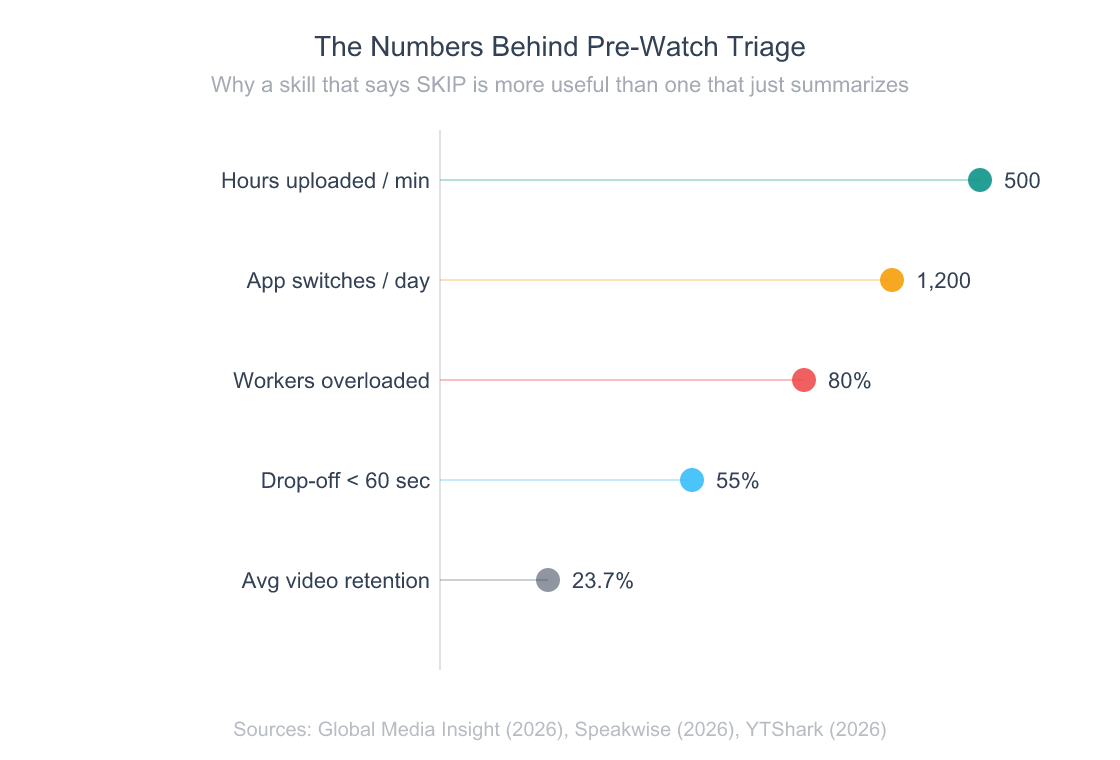
Five metrics that explain why pre-watch triage is more useful than another video summarizer.
Pass 1: Structure extraction. A bundled Python script (fetch.py) pulls the transcript and metadata via yt-dlp and youtube-transcript-api, then your Claude session segments the transcript into hook, content, pitch, and outro sections with timestamps. Output gets cached to ~/youtube-reports/.cache/{video_id}-pass1.json.
Pass 2: Claim & evidence inventory. This is where the skill earns its keep.It walks each Pass 1 section one at a time (so a 75-minute video doesn’t try to fit 120K tokens into one prompt) and inventories every concrete claim, vague claim, piece of evidence shown, and pitch, each one quoted verbatim and timestamped. A separate verifier script substring-checks every quote against the original transcript, so model drift can’t sneak in a fake citation.
Pass 3 (Synthesis). The verdict prompt takes Pass 1 + Pass 2 + a small metadata bundle and produces the final report.It never reloads the transcript, every flag it cites is already substring-matched. The output is the markdown report you see in ~/youtube-reports/{date}-{slug}-{video_id}.md.
The whole thing finishes in roughly 60–90 seconds for a 15-minute video on a warm cache. The first run is slower because the transcript fetch and three LLM passes all run fresh; subsequent passes on the same video are essentially free thanks to the SHA-256-keyed cache.
Design decision worth defending: the per-section processing in Pass 2. My first version dumped the whole transcript into one prompt. It worked for 10-minute videos and quietly fell apart on anything longer. Slicing by section dropped average context by 80% and let the same logic work on 90-minute conference talks without a rewrite.
why context windows are the real bottleneck for agentic skills
How Do You Install and Run It?
Anthropic’s revenue jumped roughly 14x to a $14B annualized run-rate between late 2026 and early 2026, and Claude Code itself grew 10x in three months after launch (Business of Apps, 2026). Installing a Claude skill in 2026 should be as boring as installing an npm package, and with npx skills add, it is.

One command to install
# 1. Install the Python deps once (add --break-system-packages on macOS Homebrew Python)
pip3 install --user yt-dlp youtube-transcript-api

# 2. Install all four youtube-inspector skills at once
npx skills add nishilbhave/youtube-inspector
That’s it. Same command on macOS, Linux, and Windows. The npx skills add step drops youtube-verdict, youtube-summary, youtube-extract, and youtube-claims into ~/.claude/skills/ (or your host agent’s equivalent). No API keys. No .env files. No vendor SDK installed anywhere, your Claude session does every LLM call.
The Python dependencies handle the YouTube transcript fetch only. If they’re missing, the skill’s bundled doctor.py runs as Step 1.5 of every invocation and prints the exact pip3 install line for your environment (PEP 668-aware, so macOS Homebrew Python users get the right --break-system-packages flag). No mid-run ModuleNotFoundError surprises.
Running it
In Claude Code, paste a YouTube URL with any of the trigger phrases the skill recognizes:
Should I watch this? https://www.youtube.com/watch?v=n0phBDPz8z0
Other phrases that route to the skill: “is this worth watching”, “watch or skip”, “give me a verdict on this video”, “is this YouTube video any good”. The skill prints a one-glance dashboard inline and saves the full report to ~/youtube-reports/. Here’s what the dashboard actually looks like:
━━━━━━━━━━━━━━━━━━━━━━━━━━━━━━━━━━━━━━━━━━━━━━━━━━━━━━
  🚫  SKIP  ·  3/10  ·  Gap HIGH
━━━━━━━━━━━━━━━━━━━━━━━━━━━━━━━━━━━━━━━━━━━━━━━━━━━━━━

  ⏩ Mostly a pitch wrapped around three unverified revenue numbers
     and a vague stack reveal. The actual workflow is deferred to
     upcoming videos: skip unless the [1:10–2:25] reveal is enough.

  The Lazy Way I Make Money With AI (2026)
  Travis Nicholson  ·  3:48

  🎯 Best minutes   [1:10–2:25] - Stack reveal and revenue progression
  📊 Substance      29 concrete · 11 vague · 4 evidence
  👥 Watch if       Beginners curious about Canva + ChatGPT + Gumroad
  👥 Skip if        Viewers wanting an actual step-by-step workflow

  🚩 Flags (6)
     [0:02] "I've made over $26,000…"          - Headline revenue, no proof
     [0:04] "I work maybe 1 hour per week…"    - "Lazy" claim asserted only
You scan the dashboard, decide in 5 seconds, and only open the saved markdown if you want the full claim breakdown.
Anthropic launched Skills as an open standard in October 2026 and expanded enterprise adoption through 2026 (VentureBeat, 2026). The skills.sh convention means
youtube-verdictruns identically on Claude Code, Cursor, Antigravity, and Codex, install once, use everywhere your agent lives.
another one-command Claude skill that ships with parallel sub-agents
What Makes This Different From Other YouTube Summarizers?
JetBrains’ 2025 State of Developer Ecosystem survey found that nearly 90% of developers using AI coding tools save at least one hour per week, and one in five save 8+ hours (JetBrains, 2025). The category most ChatGPT-style “summarize this video” tools target, passive consumers, is already crowded. The category developers actually need (pre-watch decision tools that show their work) barely exists.
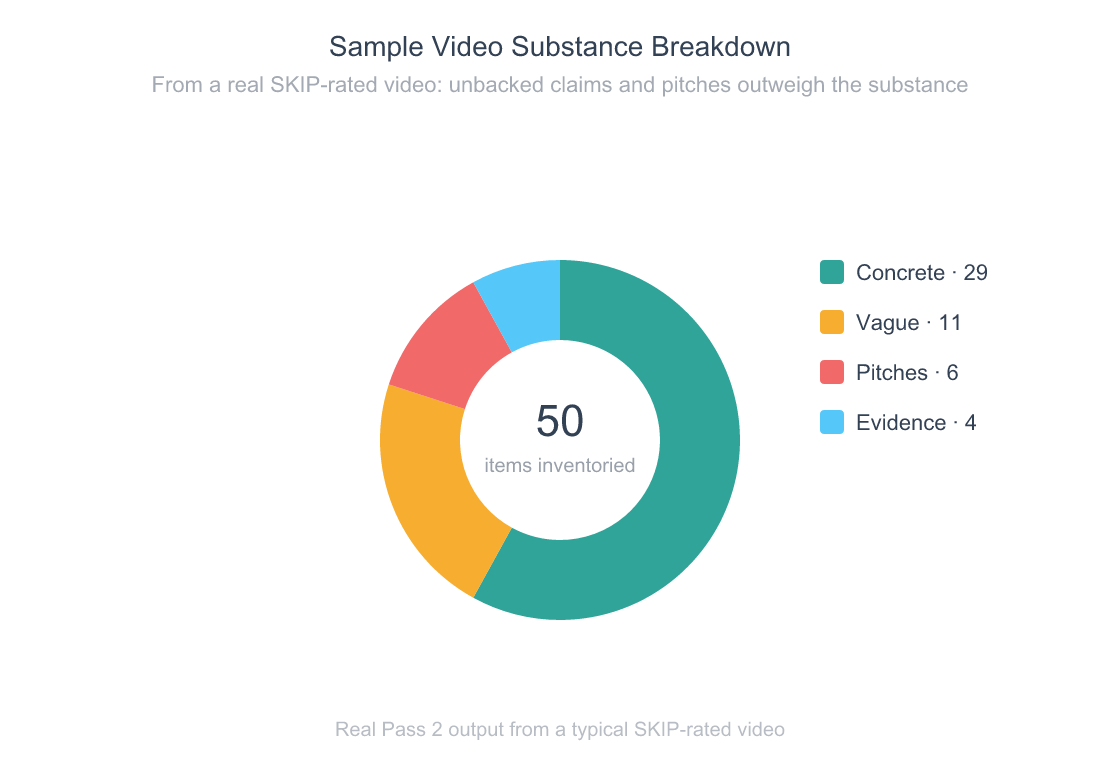
Every video gets sliced into four buckets so the verdict is a math problem, not a vibe.
Most YouTube summarizer tools, browser extensions, ChatGPT prompts, paid SaaS like Eightify or Glasp, do one thing: they paraphrase the transcript into bullets. That’s useful if you’ve already decided to invest the time. It does nothing for the actual question you had before clicking, which was should I invest the time at all?
youtube-verdict answers the prior question. Three concrete differences:
- Verdict, not paragraph. A binary WATCH or SKIP plus a 0–10 score and a Best-Minutes range tells you what to do. A paragraph summary makes you read 200 words to figure out what you already wanted to know.
- Substance density, not vibes. Pass 2 separates concrete claims (numbers, dates, named entities) from vague claims (assertions without backing) and counts pitches separately. The ratio drives the verdict. You can argue with the math; you can’t argue with a vibes-based summarizer.
- Verbatim citations, no hallucinated criticism. Every flag in the report is a substring-matched quote tied to a transcript second. The skill literally cannot make up a criticism, if the model can’t quote it, the prompt rejects the flag. Most AI tools that “review” content can and do invent flaws that aren’t there.
The vendor-neutrality matters more than it sounds. Browser extensions die when Chrome’s policy shifts. Paid SaaS dies when the company pivots or raises prices. A skill that uses your existing Claude subscription has roughly the same lifespan as Claude itself, and Anthropic just hit $14B in annualized revenue (Business of Apps, 2026). That’s not going anywhere soon.
What surprised me: the substring-match constraint on quotes is the single most important piece of the design. The first version let the model paraphrase quotes, and roughly 1 in 8 paraphrases drifted enough that I couldn’t find them in the source. Locking quotes to verbatim transcript text fixed it overnight. The lesson generalizes, when you give an LLM a constraint a script can verify, you get reliability for free.
why verifier scripts matter more than clever prompts
Who Should Use It (and Who Shouldn’t)?
DX’s research across 135,000+ developers found AI coding tools save an average of 3.6 hours per week per developer (DX, 2026). A YouTube triage skill targets a different chunk of your week (the research and learning slack between coding sessions) but the math is similar. Save 5 minutes per video on three videos a day, that’s roughly 90 minutes a week back. It compounds.

Use it if you:
- Add YouTube videos to a “watch later” pile that you never actually clear
- Routinely abandon videos in the first two minutes and wish you’d seen the verdict first
- Use Claude Code, Cursor, Codex, or any other agent that follows the skills.sh convention
- Care more about whether a video has substance than whether you can quote it back at a meeting
Skip it if you:
- Watch YouTube purely for entertainment, a verdict skill is overkill for vlogs and music
- Don’t use Claude or any other agentic shell (the skill needs an LLM session to run; it’s not a standalone CLI)
- Need transcript translation across languages. V1 is English-only and rejects non-English videos at fetch time
- Want a polished GUI, this is a CLI-first tool that prints to your terminal, not a hosted web app
The skill is also a poor fit if you trust YouTube creators by default. The whole design assumes a baseline skepticism, that the typical YouTube video over-promises and under-delivers, and that a skill counting claims will catch the gap. If your watch list is mostly trusted creators you already vet, the verdict will mostly say WATCH and you’ll wonder why you installed it.
The skill targets the time between “I should learn about X” and “I just spent 18 minutes watching someone build up to one tip.” For developers who lose 30+ minutes a day to that gap, a 60-second pre-watch verdict is a clean trade.
other one-person AI tooling that compounds time savings
Frequently Asked Questions
Is youtube-verdict actually free?
Yes, fully free and MIT licensed. There’s no paid tier, no usage cap, no telemetry, no API key. The only cost is the LLM tokens your existing Claude subscription burns to run the three passes (typically 8–20K tokens per video). Source code lives at github.com/nishilbhave/youtube-inspector. Install with npx skills add nishilbhave/youtube-inspector.
What other Claude skills for YouTube does the package include?
Four skills ship together: youtube-verdict (this one), youtube-summary (neutral TL;DR with no judgment), youtube-extract (categorized list of links, code, books, tools, and people mentioned), and youtube-claims (research-grade chronological inventory of every claim). All four share the same transcript cache, so running multiple skills on one video only fetches the transcript once.
Does it work outside Claude Code?
Yes. The skill follows the open skills.sh convention and runs identically on Claude Code, Cursor, Antigravity, and Codex. Anthropic launched Skills as an open standard in October 2026 (VentureBeat, 2026), and any agent that follows the convention can load ~/.claude/skills/youtube-verdict/SKILL.md and dispatch it.
What videos does it reject?
Six documented rejection codes: INVALID_URL, PLAYLIST (pass a single video instead), LIVE_STREAM, TOO_SHORT (under 180 seconds), NO_TRANSCRIPT, and NON_ENGLISH. The fetcher exits with code 2 and a JSON error message, the skill surfaces it verbatim, and your session stops cleanly. There’s no silent degradation into a hallucinated verdict on a video the skill couldn’t actually parse.
Can it be wrong about a video?
Of course. The verdict is a function of substance density and transcript clarity, both can mislead. A video full of demonstrations rather than spoken claims will look low-substance even if it’s excellent. A clickbait title with surprisingly good content will sometimes get a SKIP it didn’t deserve. The fix is the saved markdown report: every flag is a verbatim quote you can verify in 10 seconds. Treat the verdict as a 90% filter, not a 100% oracle.
Conclusion
500 hours of video upload to YouTube every minute. The average viewer keeps less than a quarter of any given one. We’re past the point where casual triage works.
Here’s what to take away:
- Pre-watch verdict beats post-watch summary. The decision happens before you click. A skill that returns a binary WATCH or SKIP solves the actual problem; a paraphrasing summary solves a problem you only have if you’ve already committed.
- Verbatim citations make the difference. Substring-matched quotes mean the skill literally cannot hallucinate criticism. That’s the constraint that turns “AI review of a video” from a vibes exercise into a reliable tool.
- One-command install closes the loop.
npx skills add nishilbhave/youtube-inspectorpluspip3 install --user yt-dlp youtube-transcript-apiand you’re done. No API key. No vendor lock-in. Same skill across Claude Code, Cursor, Antigravity, and Codex.
Install it on the next video you’re tempted to half-watch. The repo is at github.com/nishilbhave/youtube-inspector. I’d bet the first verdict you run gives you back at least 12 minutes you would’ve spent watching the wrong video.
another single-command Claude skill in the same toolkit
CodeProbe: 9 specialized AI agents that audit your codebase
why agent-native tools beat browser extensions for the long haul
what agentic AI actually means and why skills are eating workflows