Claude Skills Marketplace: skills.sh, Discovery, and Shipping Your Own Skill
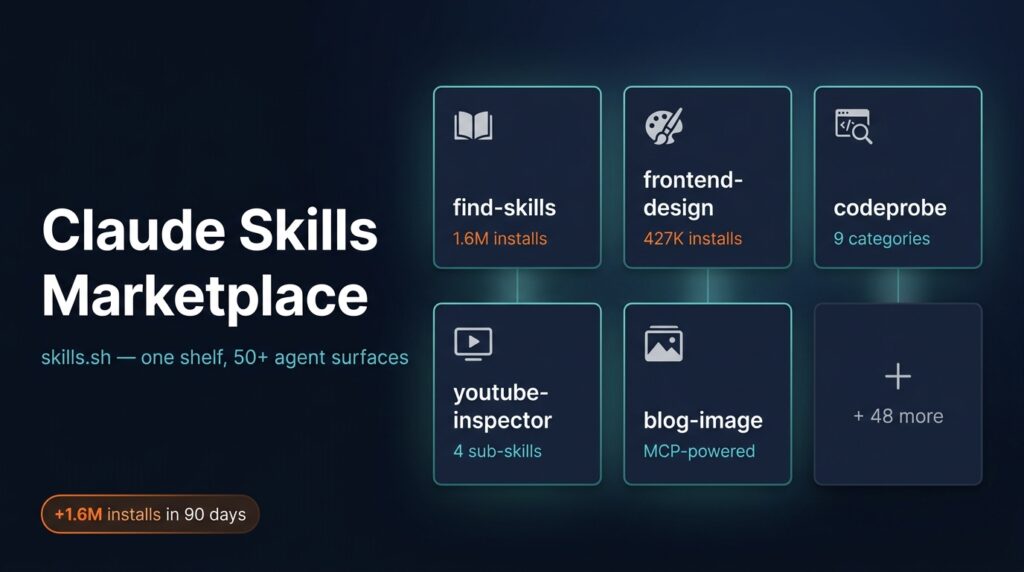
The Anthropic SKILL.md spec landed publicly in late 2026; Vercel Labs opened skills.sh in February 2026 (InfoQ, 2026). Inside ninety days, the meta-discovery skill find-skills had crossed 1.6 million installs and Vercel’s own frontend-design skill sat around 427,000 (skills.sh, 2026). That curve isn’t normal for a 2026-launched developer ecosystem, and most Claude Code users I talk to don’t know it exists.
I’ve shipped two skills to the marketplace in the last sixty days: codeprobe, a 9-category code reviewer, and youtube-inspector, a 4-skill toolkit for pre-watching videos. This Claude skills marketplace guide is the version I wish I’d had on day one: what a skill actually is, where the marketplace lives, the SKILL.md anatomy that ships, the case studies I have first-hand, and the distribution patterns that earn installs. For the deeper trade-off question (Skills versus MCP servers, when to use which) keep the full Skills vs MCP decision guide open in the next tab.
Key Takeaways
- Claude Skills are filesystem-based capability modules (a SKILL.md plus optional
scripts/andreferences/folders) that load on demand via progressive disclosure: roughly 100 tokens of catalog overhead per installed skill versus 5,000+ for an equivalent MCP server (Anthropic, 2026).- skills.sh is the install channel. Vercel Labs launched it February 2026;
npx skills add <owner>/<repo>works for Claude Code, Cursor, Cline, GitHub Copilot, Gemini CLI, and roughly 48 other agent surfaces, every runtime that reads the SKILL.md format pulls from the same shelf.- Three other directories exist (ClaudeSkills.io, claudemarketplaces.com, SkillsMP) but treat them as discovery surfaces, not install paths. Every confirmed install still flows through the skills.sh CLI.
- The shipping bar is low: a SKILL.md with
name,description, and a 10-line instruction block is publishable. The hard part is writing the description well enough that the model picks the right skill for the job.

What Is a Claude Skill, Actually?
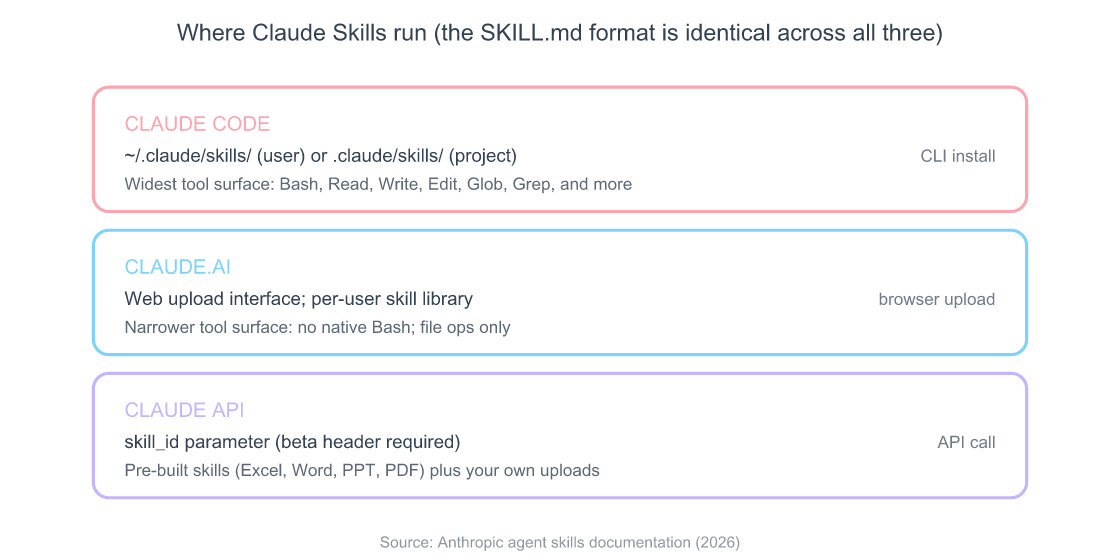
A Claude Skill is a folder with a SKILL.md file at the root: a YAML frontmatter block (name, description, allowed-tools) plus a body of instructions written for Claude to read on demand. Anthropic shipped the format publicly in late 2026, and it now runs identically across Claude.ai, Claude Code, and the Claude API via the skill_id parameter (Anthropic Engineering, 2026). The whole spec fits on a page.
The mental model that finally clicked for me: a skill is a recipe, an MCP server is a pantry. The pantry, your MCP servers, is open all the time, and the model pays the schema cost on every turn even when nothing is touched. A skill sits on the shelf until the model decides it’s needed, at which point the runtime loads only the SKILL.md body for that turn. That’s the progressive-disclosure pattern, and it’s the entire reason skills exist as a category separate from MCP.
Source: Anthropic agent skills documentation, 2026
Skills can carry scripts/ (any executable Claude has permission to run: Python, shell, Node), references/ (long-form markdown docs the model pulls only when relevant), and even nested skills if the directory grows. But the minimum viable skill is a single SKILL.md with three frontmatter fields. Anthropic’s 32-page playbook covers progressive disclosure in depth (Anthropic playbook, 2026), but you don’t need to read it to ship something useful.
Where they run matters because the runtime conventions differ. Claude.ai loads user skills from the upload UI; Claude Code reads from ~/.claude/skills/ (user) and .claude/skills/ (project); the API accepts skills via skill_id behind a beta header. The SKILL.md format itself is identical, port a skill from Code to .ai by copy-paste, then trim anything that needs a tool the destination doesn’t expose. For the longer comparison against MCP servers (token costs, statefulness, when each primitive earns its slot) see the full Skills vs MCP decision guide.
How Does the Skills Marketplace Look in 2026?
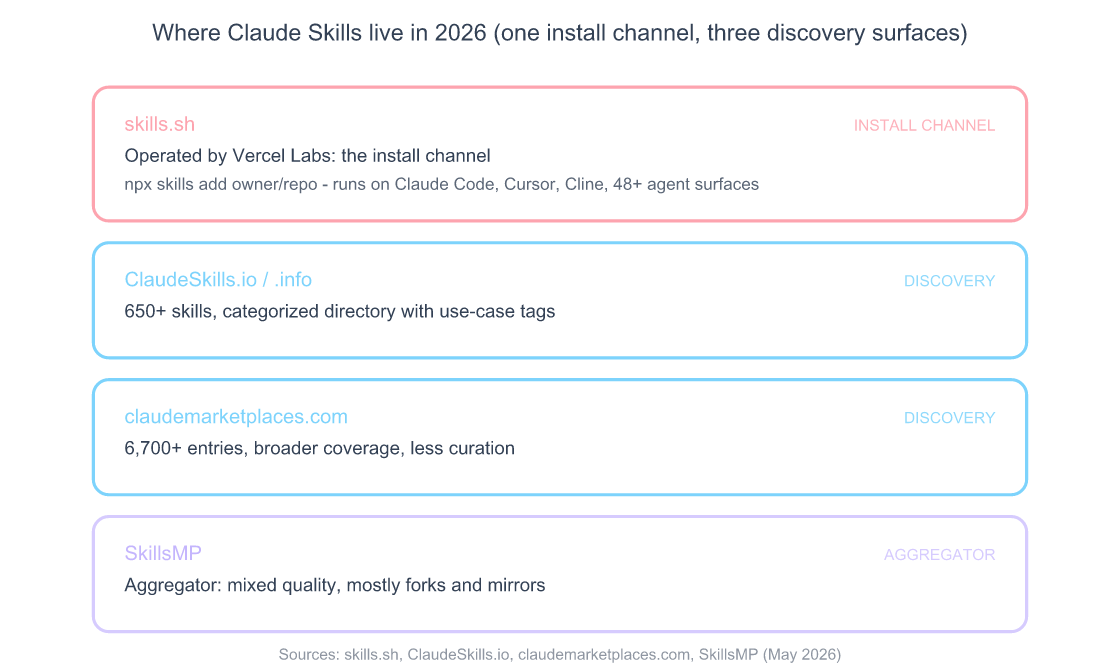
The Claude Skills marketplace in 2026 is concentrated in one channel that handles installs and three aggregators that mostly handle discovery. skills.sh, operated by Vercel Labs, is the install channel. It launched February 2026 and works as a thin npm-style installer: npx skills add <owner>/<repo> pulls the skill from its GitHub source and lands the files in your local skills directory (skills.sh, 2026). The same command works for Claude Code, Cursor, Cline, GitHub Copilot, Windsurf, Gemini CLI, and roughly 48 other agent surfaces, every runtime that understands SKILL.md reads from the same shelf.
Source: skills.sh, ClaudeSkills.io, claudemarketplaces.com, SkillsMP (May 2026)
The skills.sh leaderboard surfaces what the ecosystem actually uses. find-skills (a meta-skill that searches the directory from inside any agent) has crossed 1.6 million all-time installs; Vercel’s frontend-design skill sits around 427,000 (skills.sh, 2026). The long tail looks healthy: Vercel Labs, Microsoft Azure, Anthropic, Firebase, and a growing list of individual developers are all publishing. The installer infrastructure is open-source at github.com/vercel-labs/skills if you want to read how the CLI resolves a repo to a local install.
The three aggregators are useful for discovery but don’t change how you install. ClaudeSkills.io (and its .info sibling) is a categorized directory of 650+ skills with descriptions and use-case tags. claudemarketplaces.com lists roughly 6,700 entries pulled from various sources, broader coverage, less curation. SkillsMP bills itself as a cross-platform aggregator, mostly forks and mirrors. None run their own install commands. Click “install” on any of them and you’ll either get redirected to the skills.sh installer or handed the GitHub URL to clone manually. Treat them as search engines, not registries.
The practical implication: if you want a skill discovered, ship it on GitHub, submit it to skills.sh, and let the aggregators scrape it later. Skipping skills.sh and listing only on an aggregator means none of your installs flow through a counted leaderboard, currently the only authority signal the marketplace has.
One caveat worth flagging: install counts on skills.sh are aggregate across every agent surface, not just Claude. A skill that’s popular with Cursor users inflates the same number a Claude-only user sees, which makes the leaderboard a noisier authority signal than it looks. Useful for ranking, less useful for “is this skill any good for Claude Code specifically.”
How Do You Use a Skill From the Marketplace?
The install path is two commands once npx is available. First, find a skill, either by browsing skills.sh in a tab or by running the meta-skill find-skills from inside any agent. Second, install it:
# Install a skill (works from Claude Code, Cursor, Cline, etc.)
npx skills add nishilbhave/codeprobe

# Or install the meta-discovery skill first
npx skills add anthropics/find-skills

# Pin to a specific commit or tag for reproducibility
npx skills add nishilbhave/[email protected]
That’s the whole install. The CLI clones the skill’s GitHub repo into your local skills directory, ~/.claude/skills/<skill-name>/ for Claude Code’s user scope, .claude/skills/<skill-name>/ if you’re inside a project, and registers it with the runtime. On Claude.ai, skills are uploaded via the web UI rather than the CLI; on the Claude API, you pass the skill via skill_id with the right beta header (Anthropic, 2026).
How a skill activates is the part that trips most people on first install. Skills don’t run on every turn, they load only when Claude decides the user’s request matches the skill’s frontmatter description. A skill named git-cherry-pick-helper with the description “use when reviewing branch divergence or staging cherry-picks” fires only when the conversation actually mentions one of those things. If your skill never seems to load, the fix is almost always rewriting the description, not the body.
Inspecting and removing skills works the same way on every runtime. Run ls ~/.claude/skills/ to see what’s installed. Run npx skills list to see what’s registered. Run npx skills remove <name> to uninstall, or just delete the directory if you prefer. Skills don’t persist state outside their own folder, so there’s nothing to garbage-collect.
A few practical patterns worth memorizing:
Pin to a SHA when reproducibility matters. npx skills add owner/repo@<sha> installs a specific commit. The default install pulls main, which can change under you. If you’re shipping skills to a team config, pin them, the same supply-chain hygiene argument that applies to MCP servers in the Claude Code MCP server configuration guide applies here too.
User scope by default; project scope when team-shared. Personal skills go in ~/.claude/skills/. Team-shared skills go in .claude/skills/ at the repo root and commit cleanly. Narrower scope wins on a name collision, same precedence rule MCP servers follow.
Don’t install more than you need. Each registered skill costs roughly 100 tokens of catalog overhead on every turn: small per skill, but a hundred installed skills is 10,000 tokens of overhead before the model loads any actual SKILL.md body. The leaderboard rewards installs; your context window rewards restraint.
For Claude Code specifically, the version that matters is 2.x, earlier versions used a different registry path and an older SKILL.md schema. Run claude --version to confirm; if you’re on 1.x, the install path above won’t work until you update via the Claude Code install guide.
What Goes Inside a SKILL.md File?
The minimum viable SKILL.md is fifteen lines. The frontmatter declares three things: what the skill is called, when to use it, and what tools it’s allowed to call. The body is the actual instructions. Here’s the smallest publishable example:
---
name: commit-message-pro
description: |
  Use when the user asks to write a git commit message, draft a commit, or
  improve an existing message. Generates conventional commits with scope, type,
  and a clear subject line under 72 characters.
allowed-tools: ["Bash", "Read"]
---

# Commit Message Pro

When invoked:

1. Run `git diff --staged` to see what's actually being committed.
2. Detect the package or module changed from the file paths.
3. Choose a type from: feat, fix, refactor, docs, test, chore, perf.
4. Write a subject line under 72 characters, present tense ("add" not "added").
5. If the diff is non-trivial, add a body paragraph explaining the *why*.

Never include the words "various", "miscellaneous", or "updates": they hide intent.
That’s a complete skill. Drop it into ~/.claude/skills/commit-message-pro/SKILL.md, restart your session, ask Claude to write a commit, and the skill will load on demand. The body becomes part of the prompt only for that turn.
Frontmatter fields that matter. name is the directory name and the registry slug, kebab-case, no spaces. description is the single most important field in the whole file. Claude reads only the descriptions of installed skills on every turn (this is the progressive-disclosure shortcut) and decides which body to load based on that text alone. Write it as a when-to-use sentence, not a what-it-does one, “Use when the user is reviewing a pull request” beats “PR review helper” by a wide margin in practice. allowed-tools is an array of tool names the skill is permitted to invoke; ["Read", "Write", "Bash"] covers most needs.
Body structure. The body is just markdown for Claude to read. Two conventions earn their keep:
- Open with “When invoked:” and a numbered list. It puts the model on rails. Claude reads top-to-bottom, and an explicit ordered procedure beats prose 9 times out of 10.
- Separate when-to-use from how-to-execute. The frontmatter description tells Claude when to load the skill; the body tells Claude how to run it. Mixing them is the most common cause of a skill that loads at the wrong time or doesn’t load when it should.
The scripts/ folder is where you put any code the skill needs to execute: Python, shell, whatever Claude can run with the tools you allowed. The skill body invokes them as needed (run scripts/extract.py). The references/ folder is for long-form documentation Claude pulls when relevant: API specs, style guides, glossaries. Reference files don’t load by default; the body has to point to them.
Progressive disclosure is the architectural rule that makes this work. The catalog (every installed skill’s name + description) is always in context, around 100 tokens per skill. The body of a specific skill loads only when Claude picks it. The scripts and references load only when the body asks for them. This is why a developer can install thirty skills without blowing their context window, versus an MCP setup where every connected server’s full tool schema sits in context on every turn (Anthropic playbook, 2026).
The thing the playbook doesn’t tell you: write the description three times before you ship. The first draft is always too vague. The second is too verbose. The third (usually after watching your skill not load on a request it obviously should have handled) is the one that actually works.
What I Learned Shipping codeprobe to skills.sh
I shipped codeprobe to skills.sh in April 2026 (github.com/nishilbhave/codeprobe). It’s a 9-category code reviewer covering security, SOLID principles, architecture, error handling, performance, testing, code smells, design patterns, and framework best practices. Install path: npx skills add nishilbhave/codeprobe. Invocation: /codeprobe audit . from inside a project root. The skill scores each category 0–100 and emits findings as copy-pasteable fix prompts.
The original version was an MCP server. I rewrote it as a skill in a weekend and the result was both faster and easier to maintain. The reason maps directly to what skills are good at.
Why a skill and not an MCP server. A code review pass is a workflow recipe: read the diff, apply nine evaluation lenses, score per category, emit findings. There’s no external API, no persistent state, no live data the server needs to broker. Every input it needs comes from the file system Claude already has access to. The MCP version ran a full JSON-RPC server, registered twelve tool schemas on every turn, and consumed roughly 9,000 tokens of overhead before I’d reviewed a single file. The skill version costs about 120 tokens until it activates, and it activates only when I actually ask for a review.
SKILL.md structure. The skill is one parent SKILL.md plus nine child references in references/security.md, references/solid.md, and so on. The parent body is short: five steps that read the project, auto-detect the stack (Python, TypeScript, React, PHP/Laravel, SQL), pick which of the nine categories actually apply, then pull the relevant reference files only for those categories. That’s progressive disclosure two levels deep: the catalog points to the skill, the skill body points to the references, and each reference loads only when needed.
The auto-detect step matters. On a TypeScript-only repo, the SOLID and patterns references load but the PHP framework reference stays on disk. On a SQL-heavy backend, the security reference loads early and gets weighted higher in the final score. The whole engine works because Claude can read the file system before the skill commits to which lenses to apply.
Read-only is a feature, not a limitation. codeprobe never modifies user code. Every finding emits a separate fix prompt the user can copy-paste back to Claude for the actual change. I made this explicit in the frontmatter, allowed-tools: ["Read", "Glob", "Grep"], no Write, no Edit, so the model can’t accidentally edit. The result is something teams will run on production code without a sandbox.
What I’d do differently. Two things. First, my initial description was “9-category code reviewer for security, SOLID, architecture, and more.” It loaded inconsistently. Rewriting it as “Use when the user asks for a code review, security audit, architecture check, or wants to find code smells” (a when-to-use sentence rather than a what-it-does one) roughly doubled the activation rate within a day. Second, I shipped without the auto-detect logic in v0. Users on PHP projects got JavaScript-flavored feedback. I added auto-detect in v0.2 and the GitHub issues stopped. The lesson: skills run in whatever repo the user happens to be in. The skill has to inspect first, opine second.
The codeprobe skill works across 45+ agent surfaces, Claude Code, Cursor, Cline, GitHub Copilot, Windsurf, because they all read the same SKILL.md format. I didn’t write any agent-specific code. That portability is the second-order reason skills are interesting: ship once, run everywhere.
How I Packaged youtube-inspector as Four Skills
The second skill (youtube-inspector (github.com/nishilbhave/youtube-inspector)) is a counterexample to “one skill per repo.” It’s actually four skills shipped together in a single repo:
- Watch-or-skip verdict: analyzes a YouTube URL, returns a 0–10 score with a gap-analysis paragraph, recommends watch or skip
- Section summaries, bulleted summary per ten-minute segment, flags skippable sections
- Artifact extraction: pulls links, code snippets, tools mentioned, people referenced, timestamps
- Claim inventory, verbatim transcript quotes for any substantive claim made
Install path: npx skills add nishilbhave/youtube-inspector. The four skills install together as a single bundle. Requirements: Python 3.13+, yt-dlp, youtube-transcript-api. MIT licensed.
Why four skills and not one mega-skill. The temptation when shipping something with multiple capabilities is to wrap them in one big SKILL.md and let the body decide which mode to run. I tried that first. The result was a description so vague, “use when analyzing YouTube videos”, that it loaded for queries it had no business loading for, and didn’t load for queries it should have matched. Splitting into four narrower skills with sharp when-to-use descriptions fixed the activation problem. The user types “is this video worth watching?” and only the watch-or-skip skill fires. They type “extract the tools mentioned in this video” and only artifact extraction fires.
The shared infrastructure pattern. All four skills depend on the same Python scripts in scripts/: download_transcript.py, parse_video.py, extract_artifacts.py. Rather than copy them four times, the parent directory holds the shared code and each child SKILL.md path-references it. The cost is one indirection in the body; the benefit is one place to update yt-dlp when YouTube changes its API again.
A real-world flag the skill caught. On a recent “$5,219 first month with this AI side hustle” video, the watch-or-skip skill returned a 3/10 with this note: “specific revenue claim is unsubstantiated; transcript shows no breakdown of store name, product spend, or refund rate; the thumbnail’s $5,219 figure isn’t corroborated by any screenshot in the video.” I would have spent fifteen minutes watching before reaching the same conclusion manually. The skill reached it from the transcript in about twelve seconds. That’s the kind of speed-up skills make easy that MCP servers don’t.
What multi-skill packaging taught me. The directory model rewards sharp focus. If you find yourself writing a description with “or” in it (“use when the user wants X or Y”), split the skill. The catalog overhead of a second skill is around 100 tokens; the cost of a poorly-targeted skill that loads at the wrong time is unbounded. For the longer write-up on watch-or-skip specifically (what makes the scoring system non-trivial, why clickbait detection needs vision in addition to transcript) see my youtube-verdict skill walkthrough.
How Do You Get Your Skill Discovered?
Shipping a skill and getting it installed are two different problems, and most authors solve the first and ignore the second. The skills.sh install leaderboard is the only authority signal the marketplace currently has, and the way it ranks skills favors a small set of distribution patterns.
Source: Anthropic agent skills documentation, 2026
README first, SKILL.md second. The skills.sh listing pulls metadata from your GitHub README, not from the SKILL.md. A repo with a one-paragraph README will sit unnoticed even when the underlying skill is excellent. Lead the README with one line that finishes the sentence “Use this skill when…”, same shape as the SKILL.md description, but written for a human browser. Add one screenshot or terminal capture, an install command, and a usage example. That’s it.
Submission flow. Open a PR to the vercel-labs/skills registry repo with your skill name, GitHub URL, category, and a one-line description. The Vercel Labs team has been merging within days through May 2026; once merged, your skill is installable via npx skills add owner/repo within hours.
Naming earns installs. Generic names (pr-helper, code-utils) lose discoverability fights to specific ones (pr-review-pro, git-cherry-pick-helper). The leaderboard ranks roughly by install velocity, and install velocity correlates with people typing the skill’s domain into search. Pick a name a user would type if they didn’t know the skill existed.
Cross-post deliberately. A skill listed only on skills.sh is missing the discovery layer. Submit to ClaudeSkills.io and let claudemarketplaces.com scrape it, both are free, and each adds a different inbound search surface. SkillsMP is optional; the inbound traffic is real but the listing quality is uneven.
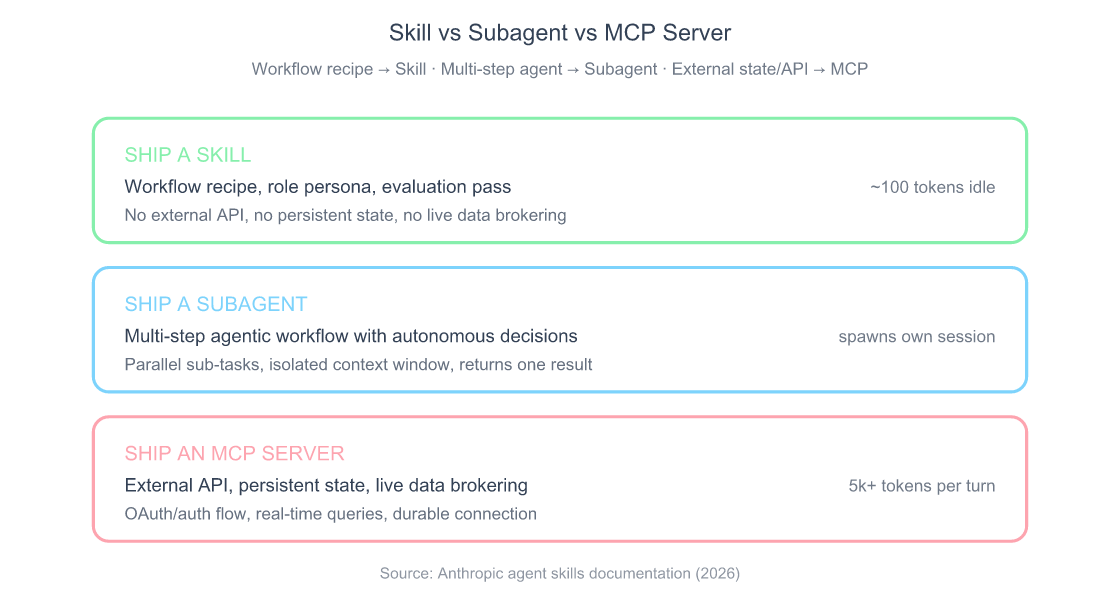
The decision before you publish. Not everything that looks like a skill should ship as a skill. The cleanest test is the three-card decision above. If the answer is external API or persistent state, ship an MCP server. If the answer is multi-step agent workflow with parallel sub-tasks, ship a subagent. Skills are for the middle: domain expertise, workflow recipes, role personas, repeatable evaluation passes. For the full five-axis framework Anthropic recommends when choosing between primitives, see the full Skills vs MCP decision guide.
Frequently Asked Questions
Are Claude Skills free to install and ship?
Yes on both ends. Installing skills from skills.sh is free and unmetered; shipping your own skill requires a public GitHub repo and a PR to the registry, also free. The runtime cost is whatever your normal Claude usage bill is, which goes up only marginally because skills load on demand. Anthropic’s pricing applies to the model tokens you’d consume anyway; skills don’t add a per-install or per-invocation fee. Claude Code pricing and token limits covers the full pricing model.
What’s the security model when I install a skill from skills.sh?
A skill is a folder of files Claude can read and a list of tools it’s allowed to call. Whatever permissions your agent grants the skill, the skill has, including Bash if you allow it. The runtime doesn’t sandbox skill execution beyond the existing tool-permission system. Install rule: read the SKILL.md and any scripts/ before installing. Anthropic’s MCP guidance, “only install servers you trust”, applies identically here. A malicious skill can do anything your agent itself can do.
Do Claude Code skills work on Claude.ai too?
The SKILL.md format is the same across runtimes, so yes, with a caveat. Claude Code loads skills from ~/.claude/skills/ or .claude/skills/; Claude.ai loads them via the web upload interface. Claude.ai supports a narrower tool surface than Claude Code (no native Bash, for example), so a skill that depends on shell execution will run in Code but not Claude.ai. Skills that read files, write text, or invoke pre-allowed APIs port cleanly (Anthropic, 2026).
How do I version a skill so users can pin to a specific release?
The install path supports @<sha> and @<tag> suffixes, npx skills add owner/[email protected] pins to a release tag. Tag your releases in git the same way you would for an npm package; the registry resolves the suffix to a git ref at install time. For breaking changes, bump the major in the tag and document the migration in the README. The skills.sh leaderboard counts cumulative installs across versions; the upgrade path is the user re-running npx skills add with a new tag.
Can I monetize a Claude skill on skills.sh?
Not directly through skills.sh in May 2026. The registry has no payment integration and no paid-tier listings. What works in practice: ship the skill free, document a paid companion service or API the skill calls into, and gate that service yourself. A handful of skills on the leaderboard already follow this model: the skill is open-source, the underlying service it queries (transcription, image generation, specialized analysis) bills the user separately. Whether Anthropic or Vercel Labs will add native monetization is an open question.
The Bottom Line
Claude Skills are the lightest distribution primitive Anthropic has shipped: a folder, a SKILL.md, and a registry entry is the whole pipeline. The marketplace consolidated faster than most 2026 ecosystems: skills.sh is the install channel, three aggregators handle discovery, and the leaderboard rewards specific names and sharp descriptions over generic catch-all skills.
If you do nothing else after reading this:
- Install
find-skillsfirst so future skill discovery happens from inside the agent, not from a browser tab - Ship one small skill (even a 15-line SKILL.md) to feel the publishing flow end-to-end
- Pin every installed skill to a SHA in shared team configs so a maintainer change can’t ship into your next session
- Write the description three times: too vague, too verbose, then the version that actually loads
The format is small enough that the right comparison isn’t npm packages, it’s shell aliases. Most of the value comes from a handful of skills that genuinely save five minutes a day. The next time someone asks how Claude is suddenly “so much better at one specific thing,” you’ll know the answer is probably a skill they shipped last week.