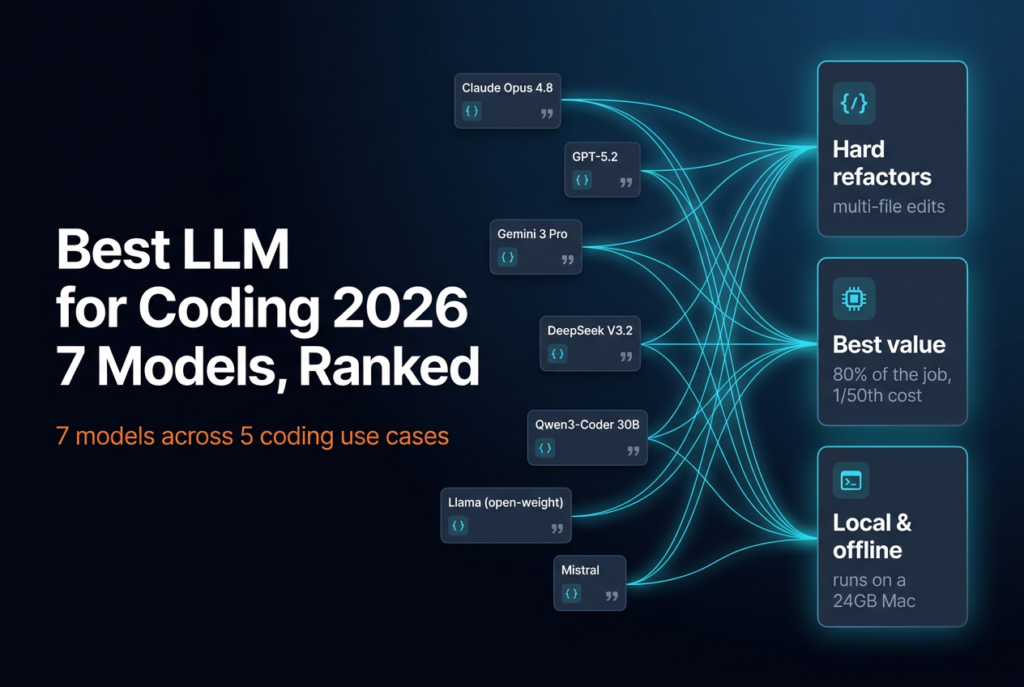
Most “best LLM for coding” lists rank models by a benchmark that OpenAI itself stopped trusting in February 2026. That’s the real problem with picking a model right now. Developers reach for AI on nearly everything (84% use or plan to use AI tools, up from 76% a year earlier), yet only 33% trust its accuracy (Stack Overflow, 2025). So “which model is best?” stopped being a leaderboard question. It’s a fit question now: best at what, for what budget, on whose hardware. This guide ranks the models, not the editors and agents that wrap them.
Key Takeaways
- There’s no single best coding LLM. Claude’s Opus line (Opus 5.5 as of October 2026) is my pick for hard multi-file work, but DeepSeek V4 does 80% of the job for a fraction of the price.
- SWE-bench Verified is contaminated. OpenAI deprecated it on 23 February 2026 after models reproduced answers verbatim (OpenAI, 2026).
- For local and open-source coding, Qwen3-Coder 30B runs on a 24GB Mac and is the strongest open-weight coder you can self-host on a laptop.
- Pick by workload: complex refactors, daily coding, budget, huge context, and offline privacy each have a different winner.
October 2026 update: I’ve refreshed the picks for the current lineup: Claude Opus 5.5 and Sonnet 5.5 (September 2026), OpenAI’s GPT-6.1 Sol, Google’s Gemini 3.1 Pro (still in preview), and DeepSeek’s V4.1-Flash pricing. The benchmark scores quoted below were measured on earlier versions (Opus 4.5, Opus 4.8, Gemini 3.1 Pro) and are labelled that way. I haven’t found sourced SWE-bench Pro scores for the September models yet, so I’m not quoting any.
Why “best LLM for coding” is a moving target in 2026
The answer changed on 23 February 2026. OpenAI deprecated SWE-bench Verified, the benchmark nearly every vendor quoted, after its own evals team found models could reproduce the test’s gold-patch answers verbatim from a task ID alone (OpenAI, 2026). The 500 Python problems had leaked into training data. The leaderboard was measuring memory, not skill.
How badly does that distort the rankings? When the same models run against SWE-bench Pro, a private, contamination-resistant set, the scores fall off a cliff. Claude Opus 4.5 drops from 80.9% to 45.9%. Gemini 3.1 Pro drops from 80.6% to 46.1%. That’s a 35-point collapse on a test the headline numbers said these models had basically solved.

Source: SWE-bench Pro leaderboard (Scale SEAL) and OpenAI, 2026.
Here’s the practical takeaway most roundups skip: read a coding benchmark as a ceiling, not a ranking. A 90% score doesn’t mean the model fixes 9 of your 10 tickets. It means that under ideal scaffolding, on problems it may have seen, it got close. Treat any score above 80% as “good enough to try,” then judge the model on your own repository. That single reframe will save you from picking a model off a chart and being disappointed in week two.
For the methodology behind these scores and how the leaderboards are actually built, see our guide to picking the best open-source LLM, including how model rankings and benchmarks work.
How I rank coding models (the rubric that survived contact with real work)
After running the major models across daily work for months, I stopped trusting any single number and started scoring on five things that actually predict whether a model ships code. The Stack Overflow survey backs this up: the number-one developer frustration in 2025, cited by 66% of respondents, was “AI solutions that are almost right, but not quite” (Stack Overflow, 2025). Almost-right is the enemy. It’s slower to fix than wrong.
My rubric weighs multi-file edits (does it hold context across a real change?), instruction-following (does it do what I asked, not what it assumed?), tool use and agentic reliability (does it run tests and recover from a failed step?), cost per finished task, and latency. In my own setup I route different jobs to different models for exactly this reason, which is the whole point of this article. One model rarely wins on all five.
That gap between adoption and trust is the headline tension of 2026. Developers use AI constantly, yet most don’t trust its output. More actively distrust its accuracy (46%) than trust it (33%) (Stack Overflow, 2025). The model you pick should narrow that gap for your specific work, not win a benchmark you’ll never run.

Source: Stack Overflow 2025 Developer Survey.
One boundary before the rankings. This is about models, the raw LLMs you call through an API or a chat window. It is not about the editors and agents built on top of them. If you’re comparing Cursor, Copilot, Windsurf, or autonomous coding agents, that’s a different decision with different trade-offs, and we cover it in our breakdown of AI coding agents by category and how to pick one. Here, we’re ranking the engines, not the cars.
The 7 best LLMs for coding in 2026, ranked
The best coding LLM for most professional work is Claude Opus 5.5, the current version of the Opus line that has led on hard multi-file engineering all year, but it’s also the most expensive option on this list at $4 and $20 per million input and output tokens (Claude pricing, 2026). The real winner depends on the job. Here’s how the field stacks up, from frontier hosted models down to what you can run on your own machine.
1. Claude Opus 5.5: best for complex, multi-file engineering
Anthropic shipped Opus 5.5 on 22 September 2026 with a 1M-token context window, and it’s available on every paid Claude plan and in Claude Code (Anthropic, 2026). The benchmark trail comes from its predecessor: Opus 4.8 shipped on 28 May 2026 with a reported 88.6% on SWE-bench Verified (Anthropic, 2026) and 69.2% on the harder SWE-bench Pro (MacRumors, 2026). What that translates to in practice: the Opus line is what I trust on a large refactor that touches a dozen files, where losing the thread halfway through is worse than being slow. It plans, edits across files, and recovers from failed test runs more reliably than anything else I’ve used.
The catch is price. At $20 per million output tokens, a chatty agent loop gets expensive fast. Use Opus for the genuinely hard tasks, not for renaming variables. Above it sits Fable 5.1 at $10 / $50, which only makes sense for the hardest jobs; I cover when it’s worth it in my guide to running Fable in Claude Code. For the full head-to-head against OpenAI’s flagship, see our detailed Claude Opus versus GPT-5 coding comparison.
2. Claude Sonnet 5.5: best daily driver for price and speed
Sonnet 5.5, released 28 September 2026 at $2 and $10 per million input and output tokens, replaced Sonnet 4.6 in this slot (Anthropic, 2026). The current Sonnet is the model most working developers should default to. It’s fast, cheap relative to Opus, and strong enough that you’ll only reach for Opus when a task genuinely stalls. In day-to-day coding, write a feature, fix a bug, add a test, the quality gap between Sonnet and Opus is small, and the cost and latency gap is large. That trade lands in Sonnet’s favor for maybe 80% of my work.
3. GPT-6.1 Sol: best all-rounder for reasoning-heavy problems
OpenAI’s GPT line is the one to reach for when the problem is as much about reasoning as it is about code: tricky algorithms, ambiguous specs, debugging a system you barely understand. The current pick is GPT-6.1 Sol, released 29 September 2026 at $2 and $10 per million input and output tokens with a 1.05M context, and it’s now the default model in the Codex CLI (OpenAI, 2026). When I first ranked this slot in June it held GPT-5.2 at roughly $1.75 and $14 (Evolink, 2026). In my testing of the GPT-5 line it was a touch behind Claude on pure agentic multi-file edits, but ahead on explaining its own reasoning, which matters when you’re learning a codebase rather than just patching it.
4. Gemini 3.1 Pro: best for huge-context and monorepo work
Need a model to reason over an entire monorepo or a 200-page spec in one shot? Gemini 3.1 Pro is the pick, thanks to its very large context window and competitive pricing of $2 and $12 per million input and output tokens for prompts up to 200K, rising to $4 and $18 above that (Google, 2026). It’s still a preview model (gemini-3.1-pro-preview) as of October 2026, so pin the version if you build on it. Where Claude and GPT lead on focused agentic edits, Gemini’s strength is breadth: dumping a whole service into context and asking it to trace a bug end to end. It’s also genuinely strong at front-end work and quick HTML and CSS scaffolding.
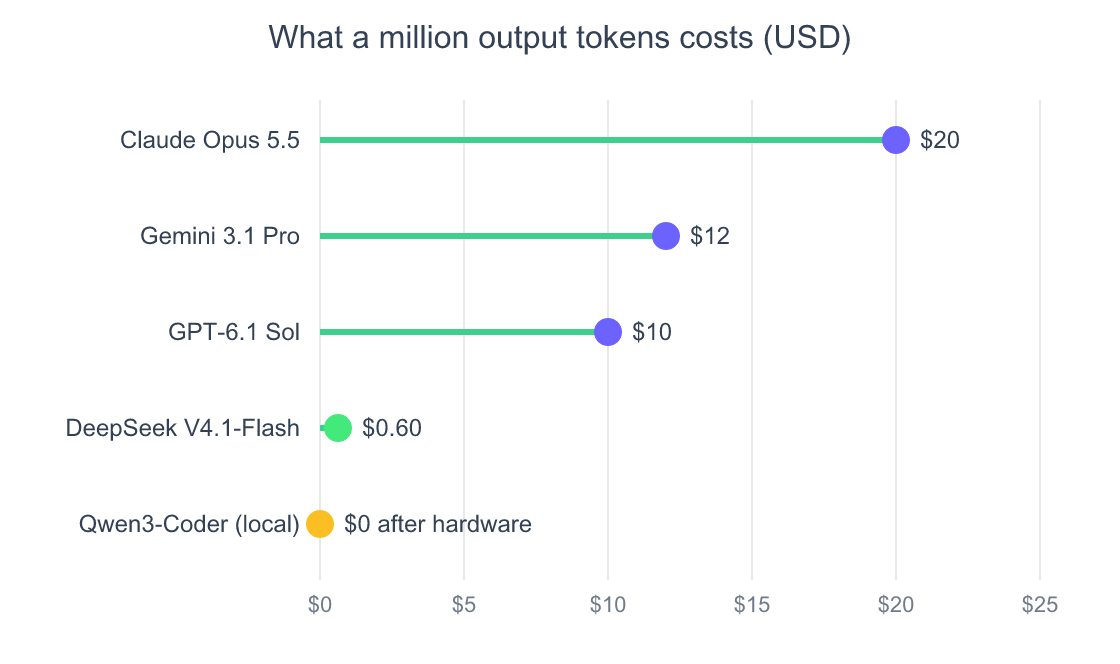
Source: vendor pricing pages (Anthropic, OpenAI, Google, DeepSeek), October 2026. DeepSeek shown at off-peak rates. Local cost excludes hardware and electricity.
5. DeepSeek V4: best value, and it’s not close
If cost matters at all, DeepSeek V4 is the most interesting model on this list. Its Flash tier (now V4.1-Flash) prices at $0.15 and $0.60 per million input and output tokens off-peak, doubling to $0.30 and $1.20 at weekday peak hours (DeepSeek, 2026). That’s roughly 17 to 33 times cheaper on output than Claude Opus 5.5, and the larger V4-Pro tier ($0.66 and $1.98 off-peak) is a frontier-class open-weight model in its own right. Neither will match Opus on the very hardest agentic tasks, but for high-volume coding, generating boilerplate, writing tests, churning through a backlog of small fixes, the value is hard to argue with. For how it holds up in real coding sessions and against Claude on cost, see our hands-on guide to coding with DeepSeek and where it beats Claude on cost, and for the version question, DeepSeek R1 versus V3 compared.
6. Qwen3-Coder: best open-weight model you can actually run
Qwen3-Coder is the strongest open-weight coding model for most people, and the headline reason is that you can run a capable version on your own laptop. The flagship Qwen3-Coder-Next leads the self-hostable open-weight coders on SWE-bench Pro at 44.3% (SoftwareSeni, 2026), and the 30B variant is small enough to fit in 24GB of unified memory. More on the local setup below.
7. GLM-4.7: the open-weight alternative for agentic work
GLM-4.7 rounds out the field as a credible open-weight option, scoring 40.6% on SWE-bench Pro, just behind Qwen3-Coder-Next’s 44.3% (SoftwareSeni, 2026). It’s worth a look if you want a self-hostable model tuned for longer agentic runs and you’d rather not depend on a single vendor. For most people, though, Qwen3-Coder is the easier first choice.
What’s the best local LLM for coding you can run yourself?
The best local LLM for coding in 2026 is Qwen3-Coder 30B-A3B, a mixture-of-experts model with 30B total parameters but only about 3.3B active at a time (Ollama, 2026). That design is exactly why it’s fast enough to be practical on a laptop instead of a server: it fits in 24GB of unified memory, and in my testing it runs at a usable 30 to 35 tokens per second on an M4 Pro MacBook.
Pulling it is one command: ollama pull qwen3-coder:30b. That’s the whole appeal of local. No API bill, no rate limits, no code leaving your machine, and it keeps working on a plane. For privacy-sensitive codebases, that last point alone is the decision.
My take: local models are a real tool, not a toy, but be honest about the gap. A 30B model on your laptop is closer to “competent junior” than “frontier Opus.” It’s excellent for autocomplete, small functions, and tests. For a gnarly cross-service refactor, I still reach for a frontier model.
If you want the best open source coding LLM purely on capability and you have the hardware, larger Qwen3-Coder and DeepSeek V4 weights pull ahead, but they need far more memory than a laptop has. The realistic ranking for self-hosting splits cleanly: Qwen3-Coder for laptops, the bigger DeepSeek and GLM weights for a workstation or a rented GPU. Two newer open-weight releases are worth watching but I haven’t put them through my coding tests yet: Alibaba’s Qwen3.8 generation (Qwen3.8-27B, August 2026) and Meta’s Muse Glimmer 30B, an Apache-2.0 model aimed at local agentic use (Hugging Face, 2026). For the full runtime story, hardware requirements, and how to choose between Ollama, LM Studio, and the rest, see our complete guide to running LLMs locally, and for the specific question of the best Ollama model for coding, our Ollama guide covering the best coding models and setup.
Which coding model should you actually pick?
There’s no single best AI model for coding, so the useful answer is a decision by workload, not a winner. Remember the headline complaint: “almost right, but not quite” is the single biggest frustration developers report with AI (Stack Overflow, 2025). Matching the model to the job is how you stay on the right side of that. Here’s how I’d route it.
- Complex, multi-file refactors and hard agentic work: Claude Opus 5.5. Pay for it where it earns its keep.
- Daily coding for most developers: Claude Sonnet 5.5. The default that handles the bulk of real work.
- High volume on a budget: DeepSeek V4. Roughly 80% of the result at a fraction of the cost.
- Reasoning-heavy or unfamiliar code: GPT-6.1 Sol. The GPT line is best at explaining what it’s doing and why.
- Huge context, monorepos, and front-end scaffolding: Gemini 3.1 Pro. Also a strong pick for quick HTML and CSS.
- Privacy, offline, or zero API cost: Qwen3-Coder on Ollama. Free after hardware, never leaves your machine.
Notice that none of these picks is a tool. If your real question is which editor or autonomous agent to adopt, the model is only one input, and the agent’s scaffolding often matters more than the underlying LLM. That comparison lives in our guide to AI coding agents and how to pick by workflow. And if you’d rather see how I combine several of these models in one daily workflow, I broke that down in my multi-model AI workflow across Claude, ChatGPT, and Gemini.
Frequently asked questions
What is the best LLM for coding in 2026?
For complex, professional engineering, Claude Opus 5.5 is my pick as of October 2026. Its predecessor Opus 4.8 posted a reported 88.6% on SWE-bench Verified and 69.2% on SWE-bench Pro (Anthropic, 2026). But “best” depends on the job. Sonnet 5.5 is the better daily driver, and DeepSeek V4 wins on value. Match the model to the workload.
What LLM is best for coding on a budget?
DeepSeek V4 is the standout budget pick. Its V4.1-Flash tier is priced at $0.15 and $0.60 per million input and output tokens off-peak (DeepSeek, 2026), roughly 33 times cheaper on output than Claude Opus 5.5 while handling most everyday coding tasks well, especially boilerplate, tests, and small fixes.
What is the best local LLM for coding?
Qwen3-Coder 30B-A3B is the best local LLM for coding on consumer hardware. It fits in 24GB of unified memory and runs at 30 to 35 tokens per second on an M4 Pro (Ollama, 2026). Install it with ollama pull qwen3-coder:30b. It’s strong for autocomplete and small tasks, weaker on large refactors.
What is the best open source coding LLM?
Among models you can realistically self-host, Qwen3-Coder-Next leads on SWE-bench Pro at 44.3%, ahead of GLM-4.7 (40.6%) (SoftwareSeni, 2026). DeepSeek’s much larger V4 weights score higher but need a server, not a laptop. For self-hosting on a laptop, the smaller Qwen3-Coder weights are the practical winner.
Is one model best for everything?
No, and treating it that way is the mistake. With 66% of developers citing “almost-right” output as their top AI frustration (Stack Overflow, 2025), the gains come from routing. Use a frontier model for hard work, a cheap one for volume, and a local one for privacy.
Are these models good for HTML and CSS coding?
Yes. Front-end scaffolding is one of the easier tasks for all the frontier models, and even Sonnet 5.5 or a local Qwen3-Coder model handles HTML and CSS well. Gemini 3.1 Pro is especially quick at generating clean markup and styles from a description, and it’s free to try in the Gemini app.
The verdict
The “best LLM for coding” in 2026 isn’t a single name, it’s a routing decision. As of October 2026, Claude Opus 5.5 owns the hard problems, Sonnet 5.5 owns your day, DeepSeek V4 owns the budget, Gemini 3.1 Pro owns big context, and Qwen3-Coder owns your laptop. The contamination story behind the benchmarks is the real lesson: stop picking models off a leaderboard and start testing two or three on your own repository for a week. The model that fits your work beats the one that tops a chart you’ll never run.
Start by deciding whether you even need a hosted model. If privacy or cost is the priority, run one yourself first, with our complete guide to running LLMs locally. Then layer a frontier model on top only for the tasks that genuinely need it.