Claude Code Installation Guide: Every Platform, Every Gotcha (2026)
I’ve installed Claude Code on six machines in the last year. Three Macs (Intel, M1, M3), two Windows laptops, one Ubuntu box, plus the VS Code extension and the JetBrains plugin on top of those. Each install taught me a different lesson the docs don’t quite spell out.
The official setup page is good. It’s also exhaustive, dry, and structured for the docs team, not for the developer who just wants the right command for their machine and a heads-up on what’s going to break. So here’s the whole map: every install method, every supported platform, every IDE, the auth flow, the update story, and the clean uninstall paths. With the annotations you’d get from a friend who’s done it more times than is healthy.
if you haven’t picked a plan yet, start with the cost breakdown
Key Takeaways
- Native installer is the recommended path on every OS as of 2026; the npm route still works but moved to “advanced” status in the official docs (code.claude.com, 2026).
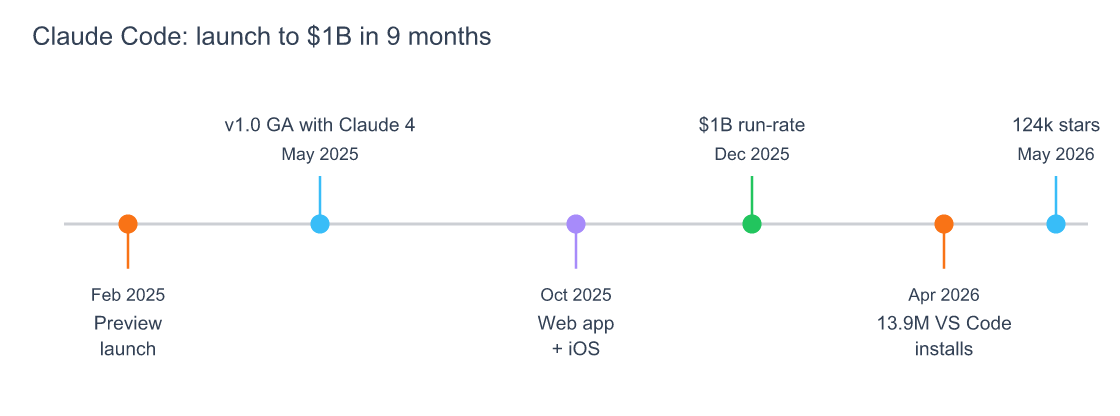
- Claude Code reached a $1B run-rate inside 9 months of GA, and the VS Code extension passed 13.97M installs by April 2026 (Anthropic, 2025).
- Uninstalling the CLI alone won’t clean your machine; VS Code, JetBrains, and Desktop all write to
~/.claude/and will recreate it.
Which Claude Code Install Method Should I Pick in 2026?
The native installer is the right answer for ~95% of developers in 2026, per the official setup page (code.claude.com, 2026). It ships a standalone binary, handles its own auto-updates, doesn’t need Node.js, and works the same on macOS, Linux, Windows, and WSL. Pick another method only when you have a specific reason.
The other methods exist for specific use cases:
- Homebrew: you already live in
brew, want everything in one upgrade queue, and don’t mind runningbrew upgradeyourself. - WinGet: same logic on Windows. Centralised app management beats auto-updates.
- apt / dnf / apk: Linux servers and CI runners where a signed package repo is non-negotiable.
- npm
-g: JavaScript shops standardising tooling throughpackage.json, monorepos, or Dockerfiles. Functional, just no longer the default path.
Source: Stack Overflow Developer Survey 2025
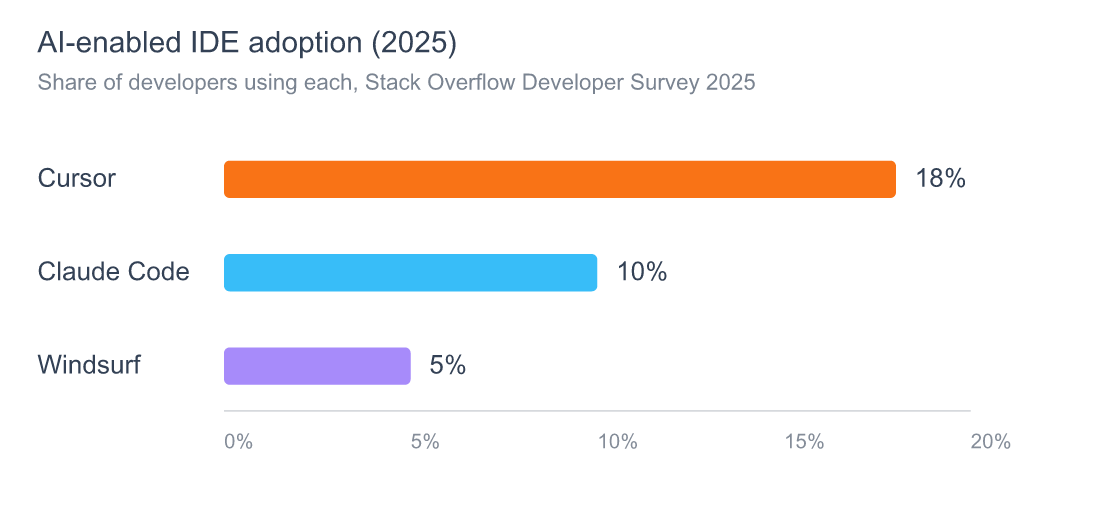
Claude Code hit 10% adoption among developers in the 2025 Stack Overflow survey, behind Cursor at 18% but ahead of Windsurf at 5% (Stack Overflow, 2025). That number is from before the October 2025 web launch and the desktop app push. The real install base is materially higher now. The point: which method you pick matters because there’s a lot of tooling layered on top of the CLI.
Here’s the platform-support matrix I wish someone had handed me on day one:
| Method | macOS | Linux | Windows | WSL | Auto-updates | Needs Node.js |
|---|---|---|---|---|---|---|
| Native installer | Yes | Yes | Yes | Yes | Yes | No |
| Homebrew cask | Yes | Yes | No | No | No (manual) | No |
| WinGet | No | No | Yes | No | No (manual) | No |
| apt / dnf / apk | No | Yes | No | No | No (system update) | No |
npm -g |
Yes | Yes | Yes | Yes | No (manual) | Yes (18+) |
What I learned the hard way: I started on npm because I was already in Node land and
npm i -g @anthropic-ai/claude-codefelt like the obvious move. Three months later I migrated everything to the native installer because the npm path doesn’t auto-update and I kept landing on old versions when a new model dropped. Pick the path that updates itself unless you have a reason not to.
how Claude Code stacks up against Codex CLI on install and developer experience
How Do I Install Claude Code on macOS?
The fastest macOS install in 2026 is a single line: curl -fsSL https://claude.ai/install.sh | bash (code.claude.com, 2026). It drops a signed binary into ~/.local/bin/claude, registers an auto-updater, and asks you to log in on first run. No Node, no Homebrew, no sudo. macOS 13.0 or newer is the minimum.
The Homebrew route is for the brew-curious:
# Stable channel (about a week behind latest)
brew install --cask claude-code

# Rolling channel (latest builds)
brew install --cask claude-code@latest
The catch: Homebrew doesn’t trigger Claude Code’s built-in auto-updater. You’ll need brew upgrade claude-code (or claude-code@latest) on your usual upgrade cadence. If you forget for a month, you’ll get version skew complaints when a new model lands.
Verify the install with claude --version and then claude doctor. The doctor command was the most useful thing I learned to run after a fresh setup. It catches PATH issues, broken auth tokens, and missing shell completions in one shot.

On Apple Silicon, the native installer ships a universal binary. You don’t need a Rosetta install just because you’re on an M-series chip. I’ve seen at least four developers on Reddit chase a Rosetta dependency that was never there. The binary is already universal, and the install script picks the right slice. If you’re on an Intel Mac running macOS 13+, the same install works without modification.
Citation capsule: According to Anthropic’s official setup documentation, the native installer supports macOS 13.0+, Ubuntu 20.04+, Debian 10+, Alpine 3.19+, and Windows 10 1809+ (code.claude.com, 2026). All install methods produce the same claude binary; only update behaviour and package management differ.
How Do I Install Claude Code on Windows?
Windows developers have three real options in 2026, and the right one depends on which shell you actually live in. The PowerShell native installer is fastest: irm https://claude.ai/install.ps1 | iex from any PowerShell terminal (code.claude.com, 2026). Windows 10 build 1809 or later is the floor; earlier builds aren’t supported.
CMD users get the same path with a slightly different invocation:
curl -fsSL https://claude.ai/install.cmd -o install.cmd && install.cmd && del install.cmd
WinGet works if you’re already standardised on the Windows package manager:
winget install Anthropic.ClaudeCode
The thing nobody tells Windows users: Claude Code has historically expected a Unix-like shell environment for some operations, which is why Git Bash matters here. If you installed Git for Windows, set CLAUDE_CODE_GIT_BASH_PATH in your environment so Claude can call into Bash for shell-aware commands. Without it, you’ll get cryptic errors on tools that shell out internally. The setting lives in %USERPROFILE%\.claude\settings.json or as an env var.
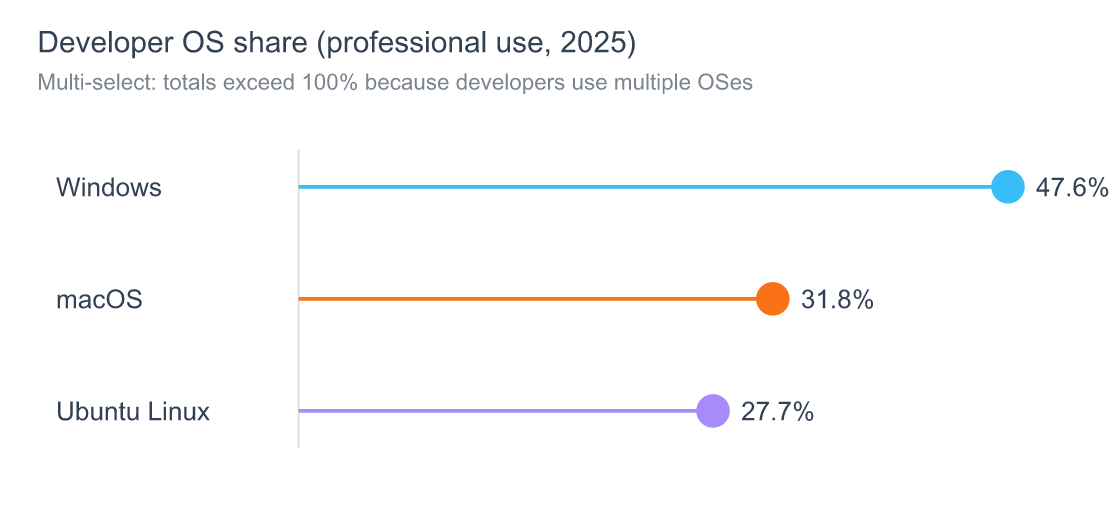
Stack Overflow’s 2025 data puts Windows at 47.6% of professional developer environments, well ahead of macOS at 31.8% and Linux at 27.7% (Stack Overflow, 2025). That’s the audience whose Claude Code experience tends to get the least testing love, so plan to have claude doctor open in another window.
the full Claude Code errors and troubleshooting reference if your Windows install misbehaves
Source: Stack Overflow Developer Survey 2025 – Technology
How Do I Install Claude Code on Linux?
Linux gets the deepest install support of any platform, with four official paths: native installer, apt repo, dnf repo, and apk repo, all signed with the same Anthropic GPG key (code.claude.com, 2026). Use curl -fsSL https://claude.ai/install.sh | bash if you want auto-updates. Use the package manager if you want your config management tool to own upgrades.
For Debian and Ubuntu:
curl -fsSL https://downloads.claude.ai/claude-code/apt/stable/pubkey.asc \
  | sudo tee /etc/apt/keyrings/claude-code.asc > /dev/null
echo "deb [signed-by=/etc/apt/keyrings/claude-code.asc] \
  https://downloads.claude.ai/claude-code/apt stable main" \
  | sudo tee /etc/apt/sources.list.d/claude-code.list
sudo apt update && sudo apt install claude-code
For Fedora and Rocky, use the dnf repo with the same key. For Alpine, swap to apk. The GPG fingerprint to verify against is 31DD DE24 DDFA B679 F42D 7BD2 BAA9 29FF 1A7E CACE (code.claude.com, 2026). If you’re putting Claude Code into a CI runner or a security-conscious environment, this is the path that survives an audit.

The setting nobody mentions on Linux: env.USE_BUILTIN_RIPGREP in settings.json. Claude Code searches your codebase with ripgrep. On Linux it tries the system rg first, which is the right default, but on a clean Debian box, ripgrep may not be installed at all, and the failure mode is silent. Set "env": { "USE_BUILTIN_RIPGREP": "1" } in your ~/.claude/settings.json and you get the bundled binary unconditionally. I lost twenty minutes to this on a fresh DigitalOcean droplet before I figured it out.
Citation capsule: Anthropic signs all Linux packages with GPG fingerprint 31DD DE24 DDFA B679 F42D 7BD2 BAA9 29FF 1A7E CACE and serves them from downloads.claude.ai/claude-code/{apt,rpm,apk} (code.claude.com, 2026). Verifying the fingerprint before adding the repo is the single defence against a supply-chain swap on the package source.
When Should You Use npm to Install Claude Code?
Use npm when Claude Code is one of many JavaScript tools you’re version-pinning across a team, or when your Dockerfile already runs npm ci and adding a curl-pipe-bash step feels wrong. Otherwise, the official docs now call it the “advanced” option, and the GitHub README is even blunter: it labels the npm path as deprecated for typical use (anthropics/claude-code, 2026).
The command itself:
npm install -g @anthropic-ai/claude-code
Three things to know:
- Don’t use
sudo.sudo npm install -gwrites to root-owned paths and creates permission headaches every time the package updates. Fix your npm global prefix instead:npm config set prefix ~/.npm-globaland add~/.npm-global/binto yourPATH. - Node 18 or later. The npm install is the only path with a Node version requirement, because the package downloads platform-specific binaries via optional dependencies. The native installer doesn’t need Node at all.
- Updates are manual.
npm install -g @anthropic-ai/claude-code@latestis the upgrade command.npm update -gwon’t always pull the newest version because of how npm resolves the@latesttag. I learned this when I noticed three of my machines were a major version behind.
GitHub Octoverse 2025 counted over 1.1 million public repos using an LLM SDK, with 693,867 created in the last 12 months alone, a 178% year-over-year jump (GitHub, 2025). The npm path makes Claude Code easy to pin alongside those SDKs in a Node project, which is the strongest reason it sticks around in the toolbox.
How Do I Install the Claude Code VS Code Extension?
Open VS Code, hit the Extensions panel, search for “Claude Code,” and install the one published by Anthropic (the publisher field matters; there are unofficial forks). The Marketplace listing shows 13,974,890 installs and a 4.0-star rating across 678 reviews as of late April 2026 (Visual Studio Marketplace, 2026). That’s by far the largest extension in the AI-coding category.
The extension is not a standalone product; it’s a UI on top of the CLI. If you haven’t installed the claude binary first, the extension will prompt you to. The cleanest order is:
- Install the CLI (native installer).
- Run
claudeonce and log in. - Then install the VS Code extension.
- Open the Claude panel; it picks up your existing auth.
If you reverse step 1 and step 3, the extension will trigger its own CLI bootstrap, which works but tends to install into a different path than you’d pick by hand. I’ve cleaned this up on three machines, and it’s never been pleasant.
the subagent patterns I use inside the VS Code extension to parallelize work
The auth gotcha: the first time I installed the extension on a second machine, I got an auth loop because the OAuth callback tried to bind to a port that was already in use by my Next.js dev server. The fix was to close the dev server, run
claude /loginin the terminal first, then open VS Code. The extension reuses the same token. If the extension still misbehaves, delete~/.claude/credentials.json(the file is auto-recreated on next login) and try again. That path is documented in the troubleshooting docs but not surfaced in the extension UI.
Citation capsule: The Claude Code VS Code extension passed 13.97M installs on the Visual Studio Marketplace by April 2026, making it the highest-installed AI coding assistant from any major vendor in the extension catalog (Marketplace, 2026). The extension depends on the CLI binary being installed and authenticated, not as a standalone product.
Sources: Anthropic news posts, GitHub repo, Visual Studio Marketplace
How Do I Install the Claude Code JetBrains Plugin?
The JetBrains plugin lives at marketplace plugin ID 27310 (“Claude Code [Beta]”), published by Anthropic, and works across IntelliJ IDEA, PyCharm, WebStorm, RubyMine, GoLand, PhpStorm, Rider, and Android Studio (JetBrains Marketplace, 2026). It’s still labelled Beta as of May 2026, which is worth knowing before you wire it into a daily workflow.
Install from inside your JetBrains IDE: Settings → Plugins → Marketplace → search “Claude Code”. Install, restart the IDE, and a Claude Code tool window appears in the sidebar. Same dependency rule as VS Code: the plugin calls into the CLI binary, so install the CLI first.
JetBrains’ own State of Developer Ecosystem 2025 surveyed 24,534 developers across 194 countries between April and June 2025, the broadest dataset on IDE usage that exists (JetBrains, 2025). It also tracked the rise of Cursor (mentions jumped from 135 in 2024 to over 2,300 in 2025) and Claude Code right alongside it (The Register, 2025). If you’re a JetBrains shop wondering whether the plugin is mature enough, the answer in mid-2026 is “yes for daily use, no for unattended automation.” Beta means breaking changes are still acceptable.
The auth quirk on JetBrains: the plugin tries to find your claude binary via PATH, and on macOS it sometimes can’t see PATH entries you set in .zshrc because IDEs launched from Spotlight inherit a stripped environment. If the plugin can’t find Claude, open the IDE from a terminal with open -a "IntelliJ IDEA" or set the binary path explicitly in plugin settings. This is the single most common JetBrains setup issue I’ve seen reported on the Anthropic forums.
the hook patterns that let me automate Claude Code workflows across JetBrains and the CLI
Is There a Claude Code Desktop App?
Yes, Anthropic shipped a graphical desktop app for users who’d rather not live in a terminal (code.claude.com, 2026).macOS users grab the .dmg from claude.ai/api/desktop/darwin/universal/dmg/latest; Windows users get the installer through claude.com/download. Linux desktop isn’t listed in the official setup docs as of May 2026, so Linux users stick with the CLI or the IDE plugins for now.
The desktop app and the CLI share the same ~/.claude/ config directory, the same auth token, the same sessions. Whichever you log into first, the other picks up. That’s why “uninstall the CLI” without uninstalling the desktop app doesn’t really uninstall anything; the desktop app recreates the config files the moment you launch it.
Anthropic also launched Claude Code on the web on October 20, 2025, plus an iOS app the same day (Anthropic, 2025). The web version doesn’t need any install at all. The iOS app is a companion, not a replacement: useful for reviewing sessions on the go, less useful for serious coding.

Citation capsule: Anthropic launched Claude Code’s web interface and iOS app on October 20, 2025, expanding the product from a CLI-first tool to a multi-surface platform across terminal, IDE plugins, desktop, web, and mobile (Anthropic, 2025). All surfaces share the same authentication and configuration, which simplifies setup but complicates clean uninstalls.
How Do I Log Into Claude Code After Install?
Run claude in your terminal once and the auth flow opens a browser window for OAuth against your Claude.com account (code.claude.com, 2026). Pro, Max, Team, Enterprise, and Console accounts all work. The free Claude.com tier does not include Claude Code access, which is the most common “why isn’t this working” question on the forums.
There are three login paths, depending on how you bill:
- Claude.com subscription: Pro, Max, Team, or Enterprise. OAuth flow, no API key needed, usage counts against your subscription’s rate limits.
- Anthropic Console API key: for pay-as-you-go billing. Set
ANTHROPIC_API_KEYin your environment or runclaude /loginand pick “API key.” - Cloud provider keys: Amazon Bedrock, Google Vertex AI, or Microsoft Foundry. Same
claudebinary, different backend. Useful when your company has its own contract with the cloud provider.
The /login slash command works inside an active session if you need to switch accounts mid-flight. The first launch handles login automatically, so most users never type /login at all.
GitHub Copilot crossed 4.7M paid subscribers by January 2026, with 80% of new GitHub developers using it in their first week (GitHub Octoverse, 2025). That’s the comparison number to keep in mind: AI coding tools are now table stakes for new developers, and Claude Code’s auth flow is intentionally designed for fast on-ramp from a Claude.com account most users already have.
the router pattern for swapping backends without changing your auth flow
How Do I Update Claude Code Without Losing My Config?
Native installs auto-update by default in 2026, with two channels exposed via the autoUpdatesChannel setting in ~/.claude/settings.json: latest (rolling) or stable (about a week behind, recommended for teams) (code.claude.com, 2026). Manual updates are a one-liner: claude update. Your config, sessions, and auth tokens survive every update; Anthropic versions the config schema separately from the binary.
Per install method:
# Native (auto-updates by default; manual trigger)
claude update

# Homebrew
brew upgrade claude-code         # or claude-code@latest

# WinGet
winget upgrade Anthropic.ClaudeCode

# Linux package managers
sudo apt update && sudo apt upgrade claude-code
sudo dnf upgrade claude-code
sudo apk update && sudo apk upgrade claude-code

# npm
npm install -g @anthropic-ai/claude-code@latest
Two settings nobody surfaces enough:
"minimumVersion": "1.2.3"insettings.jsonblocks the binary from launching if it’s older than the value you set. Useful for teams pinning a feature floor."env": { "DISABLE_AUTOUPDATER": "1" }shuts off the background updater entirely. Useful in CI where you want reproducible builds.
The biggest config-preservation win on a multi-machine setup: log into your Anthropic account on each machine, and the model preferences, MCP server configs, and slash commands all sync through the account, not the local file. The local ~/.claude/ directory is more of a cache than a source of truth. Move it freely between machines, or don’t; the next login fills it in.
how to preserve session history before a clean reinstall or migration
How Do I Cleanly Uninstall Claude Code from Every Platform?
The full uninstall has three layers: the binary, the config, and the IDE integrations. Skipping any of them leaves Claude Code partly resident on your machine. Here’s the complete map by platform, taken from the official setup docs and the actual file paths the installer touches (code.claude.com, 2026).
Binary, by install method:
# Native (macOS / Linux)
rm -f ~/.local/bin/claude
rm -rf ~/.local/share/claude

# Native (Windows PowerShell)
Remove-Item "$env:USERPROFILE\.local\bin\claude.exe" -Force
Remove-Item "$env:USERPROFILE\.local\share\claude" -Recurse -Force

# Homebrew
brew uninstall --cask claude-code     # or claude-code@latest

# WinGet
winget uninstall Anthropic.ClaudeCode

# apt
sudo apt remove claude-code
sudo rm /etc/apt/sources.list.d/claude-code.list /etc/apt/keyrings/claude-code.asc

# dnf
sudo dnf remove claude-code
sudo rm /etc/yum.repos.d/claude-code.repo

# apk
sudo apk del claude-code

# npm
npm uninstall -g @anthropic-ai/claude-code
Config cleanup (do this after removing IDE plugins, see next paragraph):
rm -rf ~/.claude
rm -f ~/.claude.json
# plus any project-local .claude and .mcp.json files
IDE integration gotcha (this is the one that catches people): the VS Code extension, the JetBrains plugin, and the desktop app all write to ~/.claude/. If you remove the CLI and then later open VS Code with the extension still installed, the extension will recreate ~/.claude/ and reinstall the CLI behind the scenes (code.claude.com, 2026). To actually be Claude-free, uninstall in this order: IDE plugins first, desktop app second, CLI binary third, config last.
The hour I lost: I uninstalled the CLI on a work laptop before handing it back to IT, ran
rm -rf ~/.claude, and felt good about it. Opened VS Code one last time to grab a setting I forgot, and the Claude extension cheerfully reinstalled everything: binary, config, the lot. The right order is plugin uninstalls first. Otherwise you’re playing whack-a-mole with auto-reinstall.
Citation capsule: Anthropic documents three uninstall layers for Claude Code: the binary (per install method), the config files at ~/.claude/ and ~/.claude.json, and the IDE integrations (VS Code, JetBrains, Desktop) (code.claude.com, 2026). Removing only the CLI leaves the IDE plugins in place, and they will auto-reinstall Claude Code on next IDE launch.
Frequently Asked Questions
What Node.js version does Claude Code require?
Only the npm install path needs Node.js 18 or later. The native installer, Homebrew cask, WinGet, and Linux package managers ship a standalone binary that does not call Node at runtime; they install platform-specific binaries directly (code.claude.com, 2026). If you don’t use npm, you can have no Node installed and Claude Code works fine.
Can I install Claude Code on multiple machines with the same account?
Yes. A single Claude.com Pro, Max, Team, or Enterprise account works across unlimited machines, with usage pooled against the same rate limit. Max $200 covers roughly 240-480 Sonnet hours plus 24-40 Opus hours per week (TechCrunch, 2025). Install on each machine, run claude /login once per machine, and you’re done.
Is the npm install of Claude Code deprecated?
The official setup docs call it the “advanced” install path, and the GitHub README is sharper, labeling the npm route as deprecated for typical users (anthropics/claude-code, 2026). It still works and still receives updates. Most new installs in 2026 should default to the native installer; npm remains the right call for monorepo and Dockerfile use cases.
Does Claude Code work on Windows without WSL?
Yes. The PowerShell installer and the WinGet path both produce a native Windows binary that runs without WSL (code.claude.com, 2026). WSL is useful if you want a Unix-like shell environment, but it isn’t required. Set CLAUDE_CODE_GIT_BASH_PATH if you have Git for Windows installed and Claude misbehaves on shell-heavy commands.
How do I check what version of Claude Code I’m running?
Run claude --version for the version number, then claude doctor for a full health report covering PATH, auth state, MCP servers, shell completion, and updater status. Anthropic’s GitHub repo passed 124,000 stars by May 2026 (GitHub, 2026), and the doctor command is the single most-mentioned setup diagnostic across those issues.
What to Install After Claude Code Is Running
Claude Code on a fresh machine is the base layer. The interesting workflow happens once you start layering on subagents, hooks, MCP servers, and custom slash commands, the things that turn a CLI into a development environment that fits your specific brain. Pick one of the four guides below depending on what you want to build first.
- start here if you want to parallelize complex tasks
- start here if you want to enforce policies and automate decisions
- start here if you’re deciding between Skills and MCP for tooling
- keep this open in another tab; you’ll need it
If something in this guide broke for you in a way I didn’t anticipate, that’s the bit I want to hear about. Tooling docs get better when readers tell writers what they actually hit. Until then, may your installs be reproducible and your claude doctor reports be empty.