AI Browsers Comparison 2026: 20 Runs, Post-Atlas Verdict
Four AI browsers shipped to consumers within about a year, and the marketing for each one promised roughly the same thing: stop browsing, start delegating. ChatGPT Atlas launched for macOS on October 21, 2025 (OpenAI, 2025). Perplexity Comet went free worldwide on October 2, 2025 after launching in July as a perk of the $200/month Max plan (CNBC, 2025). Dia opened as an invite-only beta on June 11, 2025 (TechCrunch, 2025), and Atlassian bought its parent, The Browser Company, for $610M in cash later that year. Claude’s computer use went from a developer-only API in October 2024 (Anthropic, 2024) to a Chrome extension that reached general availability in December 2025 (Claude, 2025).
I tested all four. Same task. Same prompt. Same SaaS company. The differences in what each one actually delivered, and where each one quietly broke, were larger than any feature comparison page suggests.
One of them no longer exists. OpenAI deprecated Atlas on July 9, 2026 and it stopped working on August 9, 2026 (PiunikaWeb, 2026). I’ve kept its results because they’re still the best evidence of what OpenAI’s browser agent did well, and its features now live inside the ChatGPT desktop app.
Key Takeaways
- My test runs date from spring 2026. ChatGPT Atlas finished the full task most reliably (5/5), but it was macOS-only and OpenAI shut it down in August 2026. Its agent now lives in the ChatGPT desktop app’s built-in browser, which I haven’t re-benchmarked.
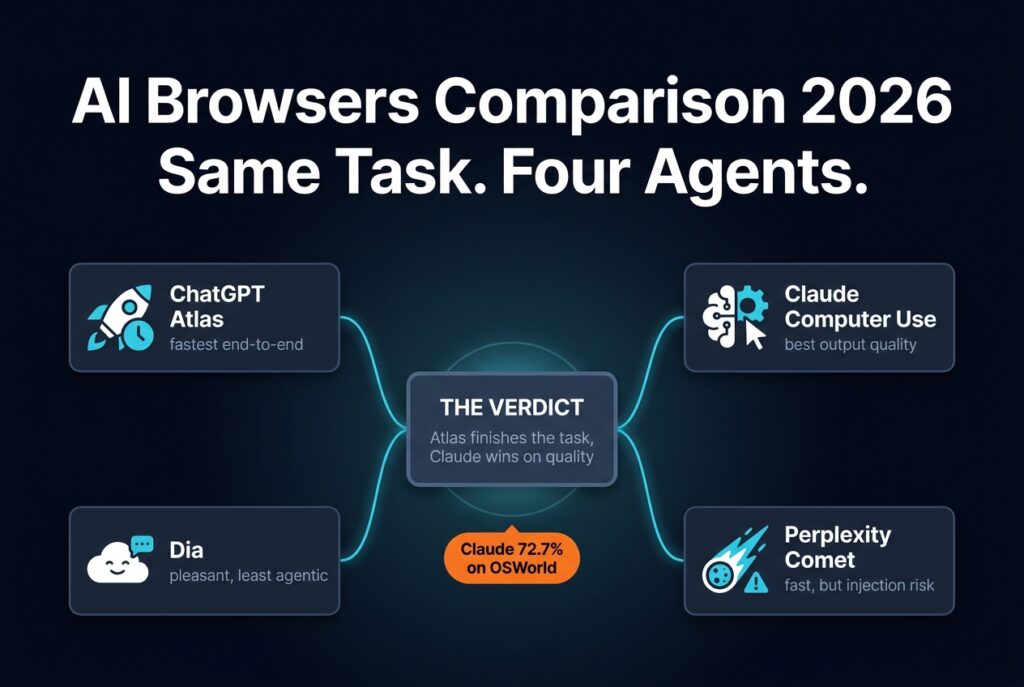
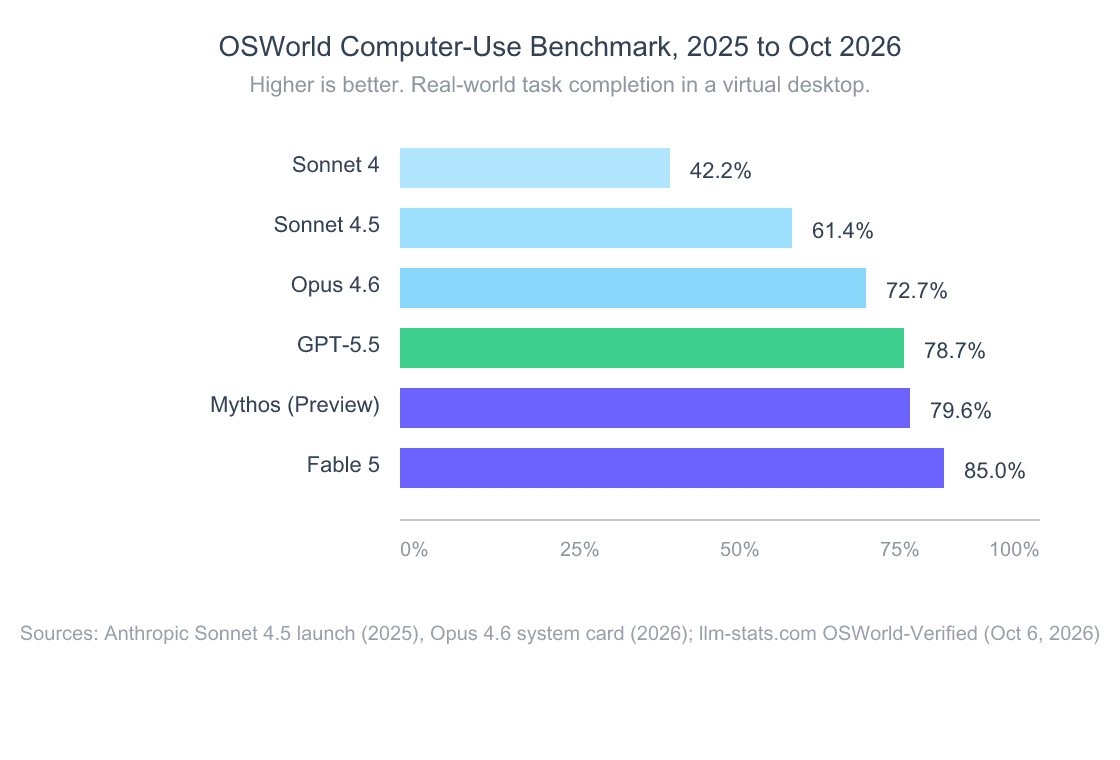
- Claude (computer use plus the Claude in Chrome extension) produced the best outreach email and cleanest summary. Opus 4.6 scored 72.7% on OSWorld-Verified when I tested (Anthropic, 2026); Claude Fable 5 now sits at 85.0% (llm-stats.com, 2026).
- Perplexity Comet was the fastest researcher, but its documented prompt-injection history (Brave, 2025) makes it a liability for anything touching authenticated accounts.
- Dia is the most pleasant daily browser but the least agentic. It summarizes pages well, but it won’t autonomously do the multi-step work the others attempt, and it still runs only on Apple-Silicon Macs.
- October 2026 pick: Claude in Chrome for delegated multi-step work, Comet for free research on any platform, Dia as a Mac daily driver.
Why Does This Comparison Matter in 2026?
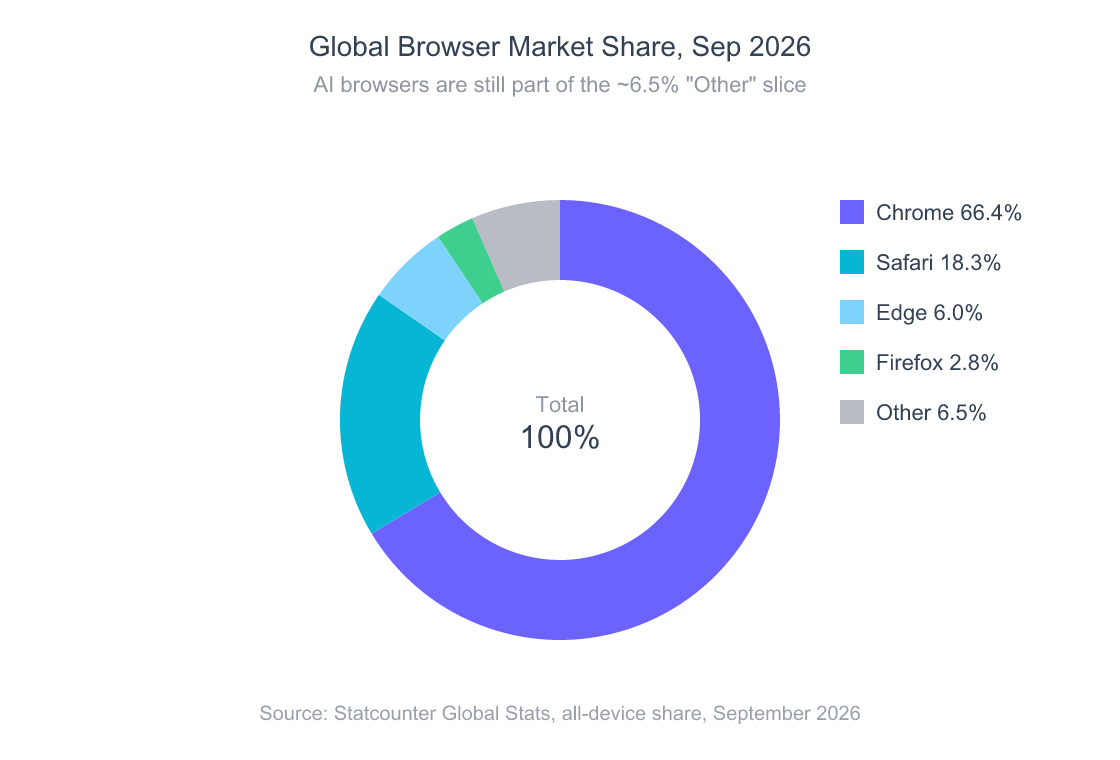
Chrome still held 66.4% of global browser share in September 2026, with Safari at 18.3% and Edge at 6.0% (Statcounter, 2026). AI browsers are a rounding error in those numbers. So why care?
Because the traffic patterns underneath the chart are mutating fast. In June 2025, AI platforms sent more than 1.13 billion referrals to the top 1,000 websites, up 357% year-over-year, and ChatGPT accounted for more than 80% of them (Similarweb via TechCrunch, 2025). Pew’s 2025 study found that when Google shows an AI summary, users click a traditional result on 8% of visits versus 15% without one, and they end their browsing session 26% of the time versus 16% (Pew Research, 2025). The browser tab is no longer the only place people read the web. The AI assistant is catching up. Atlas, Comet, Dia, and Claude in Chrome are four different bets on what comes after that shift.
ChatGPT crossed 800 million weekly active users in October 2025 (TechCrunch, 2025). That’s the audience OpenAI shipped Atlas into, which makes its shutdown less than a year later more telling, not less. A huge installed base didn’t save a standalone browser. OpenAI folded the agent back into the app people already open every day. Whatever surface wins, your readers and customers increasingly arrive through an assistant, and that changes what “good content” and “useful product surfaces” mean.
What Was the Benchmark Task?
The brief I gave each browser was deliberately mundane: the kind of work a founder, BD lead, or solo operator does ten times a week. Research a SaaS competitor → summarize the findings → draft a personalized outreach email. Specifically:
“Research Linear (the project management SaaS at linear.app). Find their current pricing tiers, three notable product updates from the last six months, and the name of one person on their growth or marketing team. Summarize what you find in 200 words. Then draft a 150-word cold outreach email to that person on behalf of a hypothetical competing tool, suggesting a partnership conversation. Make it specific to their recent work.”
The task is multi-step on purpose. It requires the browser to navigate at least four distinct pages (pricing, product updates, blog or changelog, and a team or LinkedIn lookup), synthesize across them, and then produce two artifacts of different lengths and tones. That’s the agentic AI promise compressed into one workflow.
I ran it five times per tool in spring 2026 to control for variance, on the same machine (M2 MacBook Air, 16GB RAM, 1Gbps fiber, Cloudflare WARP off), at the same time of day, with the same paid plans where applicable. I scored each run on five axes: completion (did it finish without me intervening?), accuracy (were the facts right?), depth (did the summary cover what I asked?), email quality (was the draft something I’d actually send?), and time-to-result.
How Did Each AI Browser Actually Perform?
The summary view of all twenty runs is below. These are my spring 2026 results; Atlas has since been shut down, and the Claude, Comet and Dia apps have all shipped updates, so treat this as a dated snapshot. Detailed teardowns follow.
| Browser | Task Completion | Accuracy | Email Quality | Avg. Time | Cost (Test Plan) |
|---|---|---|---|---|---|
| ChatGPT Atlas (Agent Mode, discontinued Aug 2026) | 5/5 | 4/5 | 3.5/5 | 5m 12s | ChatGPT Plus $20/mo |
| Claude Computer Use (via Claude in Chrome extension) | 4/5 | 5/5 | 4.5/5 | 8m 47s | Claude Pro $20/mo + API metering |
| Perplexity Comet (Assistant + Agent) | 3/5 (research only); 5/5 if email is manual | 4/5 | 2.5/5 | 3m 28s (research) | Free tier sufficient |
| Dia | 1/5 fully agentic; 5/5 as a co-pilot | 4/5 | 3/5 | ~9m (mostly user-driven) | Free tier sufficient |
Numbers are means across five runs. Atlas and Claude completed the workflow with the user mostly idle. Comet finished the research portion autonomously but punted on the email step about half the time. Dia, by design, is not trying to do this kind of work autonomously, it’s trying to be the best browser you’ve ever used while a model sits in the sidebar. Different bet, different result.
companion piece on how AI-native software is reshaping product surfaces beyond the browser
ChatGPT Atlas: What It Got Right Before OpenAI Shut It Down
ChatGPT Atlas in Agent Mode finished the full task in every single run, which on its own is a bigger deal than it sounds. According to OpenAI’s launch documentation, Atlas was a Chromium-based browser with a sidecar agent that could take over the active tab, navigate, fill forms, and read content as needed (OpenAI, 2025). When I tested it, Agent Mode was gated to Plus, Pro, and Business tiers and still labeled a preview.
What Atlas got right: it found Linear’s pricing page, parsed the four tiers (Free, Standard, Plus, Enterprise) without confusion, and pulled the changelog updates with dates. It also correctly identified a marketing team member by following a public team page link, which not every tool managed.
Where Atlas broke: the emails were workmanlike but rarely personal. Two out of five runs produced openings nearly identical to “I noticed Linear recently shipped X and thought you’d be the right person to talk to…”, fine, but the kind of cold outreach a recipient unsubscribes from on instinct. Atlas also stops and asks for permission whenever it encounters a login wall or a payment surface, which is the right safety behavior but interrupts the “set it and forget it” promise. And it was macOS-only. It never shipped for Windows, Android, or iPhone, which limited how seriously a Linux or Windows team could plan around it.
That platform gap turned out to be the story. OpenAI deprecated Atlas on July 9, 2026 and switched it off on August 9, 2026. Its browsing tools moved into a built-in browser inside the ChatGPT desktop app for Mac and Windows, plus a deeper ChatGPT browser extension for Chrome (PiunikaWeb, 2026). My read: a competent agent didn’t need its own browser to be useful. It needed to live where ChatGPT subscribers already were. If you relied on Atlas, the desktop app is the migration path, but I haven’t rerun this benchmark on it, so I won’t claim it matches Atlas’s 5/5.

Claude Computer Use: The Quality Leader, the Speed Loser
Claude Computer Use is the odd one out in this lineup because it’s not technically a consumer browser, it’s a capability. Anthropic shipped the original computer-use API in October 2024 (Anthropic, 2024) and piloted the Chrome extension with 1,000 Max subscribers on August 25, 2025. It opened to all Max users in November and reached Pro, Team, and Enterprise plans on December 18, 2025 (Claude, 2025). As of October 2026, Claude in Chrome is generally available on every paid plan, and its side panel runs a full Claude Cowork session with your skills and connectors (Claude, 2026).
what Claude Cowork is and how its sessions, skills and connectors work
The underlying models have moved fast. Claude Sonnet 4.5 hit 61.4% on OSWorld in 2025, up from 42.2% for Sonnet 4 (Anthropic, 2025). Opus 4.6, the model behind my test runs, scored 72.7% on OSWorld-Verified (Anthropic system card, 2026). By October 2026 the leaderboard has moved again: Claude Fable 5 scores 85.0% and Sonnet 5 81.2%, with Alibaba’s Qwen3.8 Max on top at 86.1% (llm-stats.com, 2026). The gains I saw in my runs were real, and the models available today are a clear step past the ones I tested.
Claude produced the best outputs across the board. The summaries were tighter and more honest about what wasn’t on Linear’s public pages (“their growth team isn’t separately listed; the closest match is X who works on Y”). The outreach emails were the only ones I would have actually sent without rewriting: specific references to recent shipped features, a coherent reason to talk, no boilerplate. That tracks with my broader experience that Anthropic’s models lead on writing quality, especially on B2B and technical communication.
What broke: speed and cost. Claude was the slowest of the four, averaging nearly nine minutes end-to-end, partly because the Chrome extension takes screenshots and sends them to the API on each step. Claude also failed one run outright, it got into a loop on a cookie banner it couldn’t dismiss, and eventually I stopped it. And because I also drove the Computer Use API directly, those runs metered at API rates, and doing this task five times a day adds up fast. (Today the extension alone is covered by a paid plan, from Pro at $20/month, but heavy agentic use still burns through plan limits.) For accuracy-critical research, Claude was the best of the four. For “I do this twenty times a week,” the bill becomes the constraint.
Perplexity Comet: Fastest, but Watch the Security Story
Comet was the fastest of the four on the research subtask, finishing in roughly three and a half minutes on average. Perplexity built it as a research-first browser, and that DNA shows: summaries are citation-heavy by default, and the assistant pulled changelog updates with source links inline. After a $200/month launch in July 2025, Perplexity made Comet free worldwide on October 2, 2025 (CNBC, 2025). It now runs on Windows, macOS, Android, and, since March 2026, iOS (Wikipedia, 2026). The business behind it is growing fast: Sacra estimates Perplexity ended 2025 at $232M in annual recurring revenue and hit $750M annualized by August 2026 (Sacra, 2026).
What Comet got right: research depth. The summary in three of five runs included contextual notes the others missed, like the relationship between recent product updates and broader funding or hiring announcements. Citations were robust enough that I could verify claims directly without round-tripping to Google.
What Comet got wrong, and what should give every team pause: the email drafts were thin and generic, and the Comet agent silently stopped before generating one in two runs. More importantly, Comet has a documented security story that I cannot ignore. On August 20, 2025, Brave’s security team publicly disclosed an indirect prompt-injection vulnerability in Comet, where instructions hidden in fetched web content could cause the AI agent to take actions with the user’s full privileges, including accessing other tabs (Brave, 2025). Brave’s own timeline shows it reported the flaw on July 25, 2025, and that Perplexity’s first fix was incomplete when retested. On October 21, 2025, Brave disclosed a second class of “unseeable” screenshot-based prompt injections affecting Comet and other AI browsers, including Fellou and Opera Neon (Brave, 2025). Perplexity has shipped patches and published mitigation posts, but the architectural problem is hard. Any time you let an AI execute browser actions based on the contents of a page, you have a class of attack that Same-Origin Policy was never designed to stop.
For research where you control the input URL, Comet is excellent. For agentic workflows over authenticated surfaces (your email, your bank, your CRM) I would not point Comet at them in 2026 without a hard isolation boundary.
Dia: The Browser You Want, Not the Agent You Asked For
Dia is the most pleasant tool to use day-to-day, and the least suited to the benchmark I designed. The Browser Company shipped Dia as an invite-only beta in June 2025, days after telling Arc members it was no longer actively developing Arc’s core product (Letter to Arc Members, The Browser Company, 2025). Atlassian bought the company for $610M in cash, a deal that closed in late 2025 (Wikipedia: The Browser Company, 2026). Dia Pro costs $20/month, and as of mid-2026 Dia still runs only on Apple-Silicon Macs, with Windows stuck on a waitlist (SupaSidebar Dia status tracker, 2026).
Dia’s design philosophy is explicit: the browser is the surface, and the AI sits in a sidebar (Cmd+E) where you can ask questions about the current page, multiple tabs, or your tab history. It excels at “summarize what I’m looking at,” “compare these three tabs,” and “draft a reply using this thread as context.” It does not autonomously navigate four pages and synthesize a research report.
In my benchmark runs, I had to drive Dia myself: open the pricing page, ask Dia to summarize, open the changelog, ask Dia to extract recent updates, find the team page manually, then paste everything into the sidebar and ask for an outreach email. The output was decent, more personal than Atlas, less specific than Claude, but the user-driven time was almost as long as Claude’s autonomous time, because I was doing the navigation. As a browser, Dia is gorgeous, fast, and genuinely improves the experience of reading the web. As an agent, it’s not really competing in the same category as the other three.
If your job is reading and writing on the web all day, Dia is the upgrade I’d recommend most often. If your job is delegating multi-step web work, you want something else.

What About the Prompt Injection Problem?
Every AI browser ships with the same fundamental risk, and most reviews skip past it. When an AI agent reads the contents of a webpage and that page contains text instructing the agent to do something (exfiltrate data, click a link, send an email) the model has no reliable way to distinguish “the page is asking me to do this” from “the user is asking me to do this.” Brave’s August 2025 disclosure on Comet was a textbook example, but the issue is not Perplexity-specific (Brave, 2025).
Atlas added permission prompts before sensitive actions while it was alive. Anthropic was unusually candid: in its own red-teaming of 123 attack cases across 29 attack types, prompt injection succeeded 23.6% of the time against the unprotected Chrome extension, and new defenses cut that to 11.2% (Claude, 2025). That’s why the first rollout was limited to 1,000 testers. Read the number the other way round, though: even with mitigations, roughly one targeted attack in nine still landed in Anthropic’s own testing. Perplexity has shipped multiple mitigations for Comet. Dia’s smaller agentic footprint mostly sidesteps the problem, since Dia rarely takes actions on your behalf without explicit confirmation.
My take: Use AI browsers for tasks that don’t touch your sensitive accounts. Never log into your primary email, bank, or admin tooling in the same browser instance you’re letting an agent drive. Run agentic tasks in a separate profile or a guest browser session. The convenience of “the agent already knows my context” is also the convenience an attacker exploits if they get one prompt-injection payload onto a page you visit.
This isn’t theoretical paranoia. The combined disclosures from Brave’s security team across August and October 2025 represent the first round of a multi-year game between AI browser vendors and adversarial researchers. The vendors will get better. The attackers will too. Treat your AI browser like you’d treat a remote-control session: useful, powerful, and never to be left unattended on surfaces where the cost of a mistake is high.
Which AI Browser Should You Actually Use in 2026?
My verdict by use case, as of October 2026, based on the spring benchmark, months of daily use, and what has shipped or shut down since:
- Best for end-to-end “do this whole task” workflows: Claude in Chrome. Atlas won this slot in my runs, but it no longer exists. Claude finished 4/5 runs with the best output, it’s now GA on every paid plan starting at Claude Pro ($20/month), and it runs anywhere Chrome does. Expect it to be slower than Atlas was.
- If you live in ChatGPT: the ChatGPT desktop app’s built-in browser. It’s where Atlas’s agent went. I haven’t benchmarked it, so treat it as the likely successor, not a proven one.
- Best for accuracy-critical research and high-quality writing: Claude. When the output matters more than the speed, Claude is the one. Slowest of the four in my test, and produces the artifacts you’d actually ship.
- Best for fast, citation-rich research (where you control inputs): Perplexity Comet. Excellent at the research half of any workflow, free, and now on every major platform including iOS. I would not point it at authenticated workflows given the documented prompt-injection history.
- Best daily browser with AI as a co-pilot, not an agent: Dia. Most pleasant to live in. Worst at autonomous multi-step work. If you’re on an Apple-Silicon Mac and mostly want a sidebar that summarizes what you’re already looking at, this is the one.
If I had to set up a small team today, I’d run Dia (on Macs) or Comet as the daily driver and keep Claude in Chrome in a separate, sandboxed Chrome profile for agentic tasks. Atlas’s shutdown is also a reminder not to build a workflow around any single AI browser: the best performer in my test was switched off about three months after I ran it.
Frequently Asked Questions
Are AI browsers actually replacing Chrome in 2026?
No. Chrome held 66.4% of global browser share in September 2026, with Safari at 18.3% and Edge at 6.0% (Statcounter, 2026). All AI browsers combined sit inside the roughly 6.5% left for everything else, alongside Samsung Internet and Opera. The shift is happening in usage patterns and traffic referrals, not in installed base, and OpenAI shutting down Atlas suggests the assistant app, not a new browser, may end up as the main surface.
Is Claude Computer Use a browser or an API?
Both. The original Computer Use capability is an API for Claude models that lets the model see screenshots and emit mouse/keyboard actions (Anthropic, 2024). Claude in Chrome is the consumer-facing wrapper. It started as a 1,000-user pilot in August 2025, reached general availability in December 2025, and is now included on every paid Claude plan (Claude, 2026).
Why is Perplexity Comet free now?
Perplexity launched Comet on July 9, 2025 as a $200/month perk for Max subscribers and went fully free worldwide on October 2, 2025 (CNBC, 2025). The strategic rationale is distribution: Perplexity wants to be your default search and answer engine, and a free browser is a more direct route than fighting Google for the address bar.
What happened to Arc, and is Dia the same thing?
In late May 2025, The Browser Company told Arc members it was no longer actively developing Arc’s core product, while keeping security and Chromium updates going, so it could focus on Dia (The Browser Company, 2025). Atlassian bought the company for $610M and Dia continues to ship, though only for Apple-Silicon Macs so far. Dia is a different product from Arc, though it has gradually been adding “Arc’s greatest hits” features through late 2025 and 2026.
What happened to ChatGPT Atlas?
OpenAI deprecated Atlas on July 9, 2026 and it stopped working on August 9, 2026. It had launched for Mac in October 2025 and never reached Windows or mobile. Its browsing features moved into a built-in browser in the ChatGPT desktop app for Mac and Windows, plus a ChatGPT extension for Chrome (PiunikaWeb, 2026).
Is it safe to log into my email or bank in an AI browser?
Use caution. Both Brave and independent researchers have documented prompt-injection vulnerabilities in agentic browsers in 2025 (Brave, 2025). My recommendation: keep agentic browsing and authenticated browsing in separate browser profiles, and never grant an AI agent autonomous access to your primary email or financial accounts.
how Anthropic scopes permissions and data access when Claude acts on your behalf
What Comes Next
Four AI browsers, one benchmark task, twenty runs, and one product that didn’t survive the summer. The lesson isn’t that one of them won. It’s that “AI browser” is already too vague a category to be useful. Atlas was a delegation tool, and OpenAI decided that tool belonged inside ChatGPT rather than in a separate browser. Claude is an accuracy specialist. Comet is a research engine. Dia is a better browser with a smart sidebar.
If your job involves doing the same web research five times a day, one of these four will pay for itself in a week. If your job involves trusting that work touching sensitive accounts, the right answer in October 2026 is still “with caution, in a sandboxed profile, and never unattended.” That will probably be the right answer in 2027 too.
The browser was never going to stay the same once 800 million people started using ChatGPT every week (TechCrunch, 2025). What it’s becoming is still being negotiated, one Chromium fork at a time.