

The End of User Interfaces: How AI Agents Will Kill the Dashboard
You spend three hours a day staring at dashboards. Clicking buttons. Filling in forms. Copying data from one SaaS tool and pasting it into another. What if all of that just stopped? What if you described an outcome you wanted and an AI agent delivered it — no tabs, no dropdowns, no loading spinners?
That shift isn’t hypothetical. Gartner projects that 40% of enterprise applications will include task-specific AI agents by 2026 (Gartner, 2025). The dashboard — the dominant metaphor of the SaaS era — is becoming a relic. Not because it’s ugly, but because it’s an unnecessary middleman between human intent and business outcomes.
This isn’t an anti-UI argument. It’s a rethinking of what “interface” means when software can act on your behalf.
what agentic AI actually means
TL;DR: AI agents are replacing traditional SaaS dashboards by converting natural language goals directly into completed workflows. Gartner projects 40% of enterprise apps will embed task-specific agents by 2026 (Gartner, 2025). The interface of the future isn’t a screen full of buttons — it’s a conversation that produces outcomes.
What Is the Dirty Secret of SaaS?
Most SaaS products are little more than pretty forms sitting on top of databases. Satya Nadella put it bluntly in 2025: business applications are “CRUD databases with business logic” that will eventually collapse into the AI tier (Microsoft Ignite, 2025). Feature utilization data backs this up — enterprises use less than 40% of the features in the average SaaS product (Productiv, 2025).
Think about the tools you use daily. Your CRM is a database of contacts with a search bar. Your project management tool is a database of tasks with a Kanban view. Your email marketing platform is a database of subscribers with a drag-and-drop editor. Strip away the CSS and branding, and the architecture is identical: forms in, tables out, dashboards on top.
Users don’t wake up wanting to use dashboards. They want outcomes. A salesperson doesn’t want to “update a deal stage in the CRM.” They want the deal to close. A marketer doesn’t want to “build a landing page.” They want qualified leads. The dashboard is the middleman — the translation layer between what a human wants and what the software needs.
how SaaS is being disrupted
Here’s the uncomfortable question: if 60% of features go unused, who are we building them for? Not users. We’re building them for product demos and feature comparison charts. The SaaS industry has spent two decades optimizing the wrong layer.
Worth noting: The SaaS model incentivizes feature sprawl because pricing tiers depend on feature differentiation. “Pro” plans need 20 more features than “Starter” plans — even if nobody uses them. AI agents expose this bloat because they don’t care about UI features. They care about capabilities accessible through APIs. A headless product with 10 powerful API endpoints is more useful to an agent than a product with 200 dashboard screens.
Citation capsule: According to Productiv’s 2025 State of SaaS report, enterprises use fewer than 40% of features in their average SaaS application. This underutilization reveals that most dashboard complexity exists for product marketing — not user productivity — and explains why AI agents can replace the interface layer entirely.
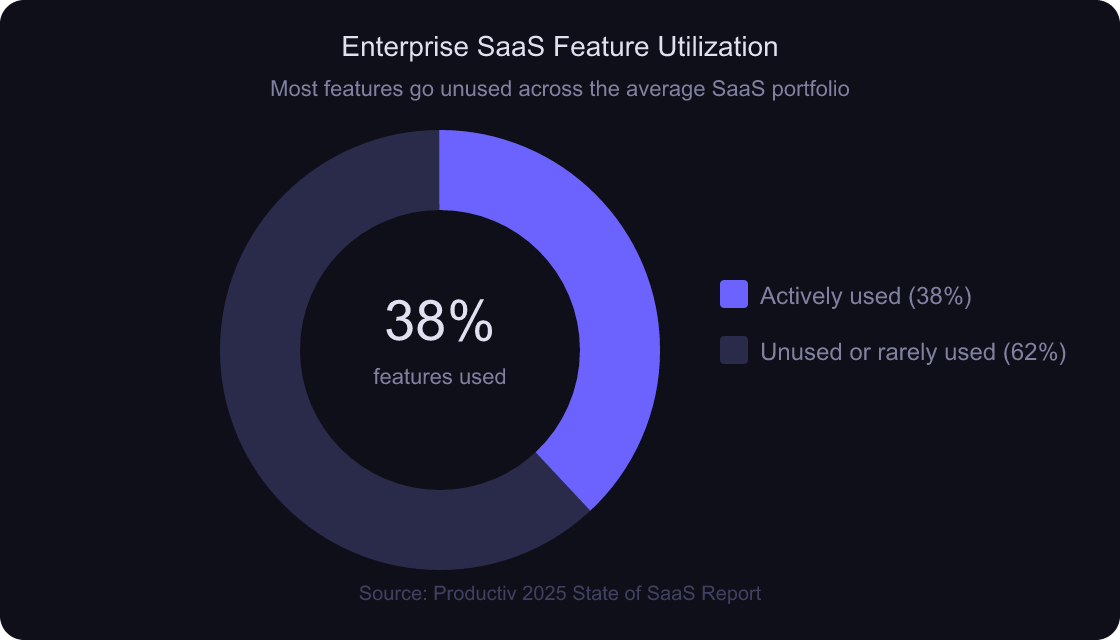
Source: Productiv 2025 State of SaaS Report — Enterprises actively use fewer than 40% of the features in their SaaS applications
How Do AI Agents Eliminate the User Interface?
AI agents are replacing dashboards by collapsing multi-step workflows into single natural language instructions. Where a human might log into three different applications to complete a workflow, an agent accesses all three systems concurrently — no clicks, no context-switching. McKinsey estimates that AI-driven automation could raise global productivity growth by 0.2 to 3.3 percentage points annually through 2040 (McKinsey Global Institute, 2025).
Here’s the before-and-after that makes this concrete.
The Dashboard Model (Current)
The traditional workflow looks like this: human opens CRM, searches for a contact, updates a field, switches to the task manager, creates a follow-up task, switches to email, drafts a message, hits send. Five applications. Twelve clicks. Twenty minutes. The human is the orchestration layer — the glue between disconnected tools.
The Agent Model (Emerging)
The agent model replaces the entire sequence with a single instruction: “Follow up with cold leads from last week who haven’t responded. Prioritize accounts over $50K ARR. Send a personalized email referencing their last interaction.” The agent queries the CRM, filters leads, cross-references deal size, pulls interaction history, drafts personalized emails, and sends them. Same outcome. No dashboard.
The interface becomes language, not buttons. And the dashboard? It becomes an exception handler. You see it only when the agent needs human judgment — an unusual edge case, a policy ambiguity, a decision that requires context the agent doesn’t have.
In practice: I’ve been building with AI agents for the past year, and the pattern is remarkably consistent. About 80% of what I used to do in dashboards — updating records, generating reports, routing tasks — the agent handles without any interface at all. The remaining 20% genuinely needs human eyes: reviewing generated content before it goes live, approving budget changes, handling exceptions. That 20% is where the UI of the future lives.
Citation capsule: McKinsey Global Institute estimates AI-driven workflow automation could boost global productivity growth by 0.2 to 3.3 percentage points per year through 2040. This projection reflects agents replacing manual multi-app workflows — not just speeding up individual tasks but eliminating the human orchestration layer entirely.
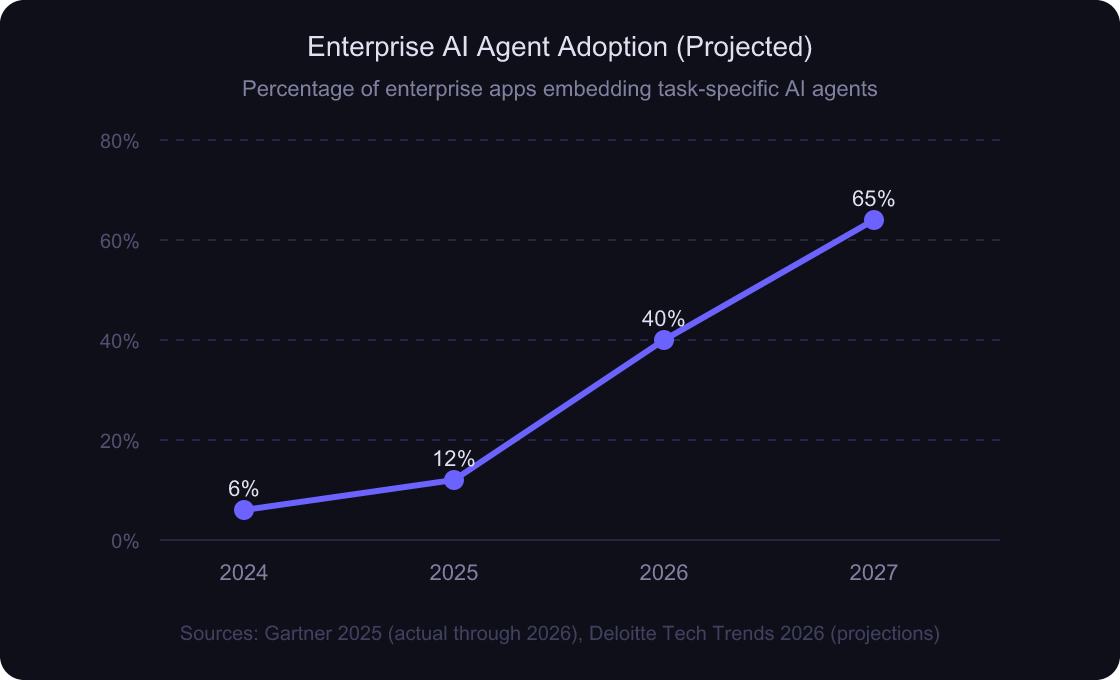
Sources: Gartner 2025 AI agent forecast, Deloitte Tech Trends 2026 — Adoption is projected to accelerate sharply through 2027
understanding agentic architecture
What Does This Mean for Developers Building SaaS?
The shift to agent-driven software fundamentally changes what matters in product architecture. Deloitte predicts SaaS will evolve toward “a federation of real-time workflow services” where the unit of value is the API endpoint, not the UI screen (Deloitte Tech Trends, 2026). Frontend-heavy product strategies are about to collide with a world where the primary consumer isn’t a human with a browser — it’s an agent with an API key.
Frontend Development Gets Demoted
This doesn’t mean frontend dies completely. But its role shrinks. If 80% of user interactions happen through agents, building a beautiful 50-screen dashboard for those interactions is wasted effort. The screens that remain need to be exceptional — clear, fast, optimized for exception handling and approvals. Everything else becomes an API.
API and Data Architecture Get Promoted
The products that thrive in an agent-first world are the ones that expose clean, well-documented, composable APIs. An agent doesn’t need a color picker or a drag-and-drop builder. It needs endpoints that accept structured inputs and return predictable outputs. Data architecture becomes the product.
MCP Becomes the New REST
Model Context Protocol (MCP) is emerging as the standard for connecting AI agents to external tools and data sources. Think of it as the interface layer between an LLM and your product — a structured way for agents to discover what your software can do and execute those capabilities. MCP is to the agentic era what REST APIs were to the web era: the connective tissue.

The best products will be “headless” — API-first, agent-accessible, with minimal UI serving only the interactions that genuinely require human judgment. If your product can’t be operated by an agent through an API, it’s at risk of becoming irrelevant.
Citation capsule: Deloitte’s 2026 Tech Trends report predicts SaaS will evolve toward “a federation of real-time workflow services,” where APIs — not dashboards — become the primary interface. This shift makes API design and data architecture the most critical investment areas for SaaS companies preparing for agent-driven consumption.
why developer roles are changing
Which Products Already Show This Future?
Several products in 2026 already demonstrate what post-dashboard software looks like. The global AI agents market reached $5.29 billion in 2024 and is projected to hit $232.31 billion by 2034, growing at a CAGR of 45.1% (Precedence Research, 2025). That trajectory isn’t driven by dashboards with AI features bolted on — it’s driven by products that rethink the interface entirely.
Perplexity: The Death of the Search Results Page
Traditional search gives you ten blue links and makes you do the work of clicking, reading, evaluating, and synthesizing. Perplexity gives you a direct answer with cited sources. No results page. No tabs to open. The interface is a question and an answer. The “UI” is a conversation.
Claude Code: The IDE Without an IDE
Claude Code doesn’t give you a code editor with AI autocomplete bolted in. You describe what you want built, and it writes the code — across files, handling architecture decisions, running tests. The interface is your terminal and natural language. The traditional IDE dashboard of tabs, panels, and menus is absent.
Linear: Autonomous Workflow Management
Linear already auto-triages issues, auto-labels them, and suggests workflow automations. It’s transitioning from “project management dashboard” to “autonomous project orchestration engine.” The UI increasingly serves as a review layer, not an input layer.
But what about the rest of the workflow — the marketing, the positioning, the go-to-market? Tools like Growth Engine by maketocreate.com are exploring this territory: describe your product, and an agent produces a complete marketing kit — positioning, landing page copy, competitive analysis — without a dashboard to configure.
From building in this space: When we tested agent-driven workflows against traditional dashboard-based workflows for content generation tasks, the agent approach reduced time-to-output by roughly 70%. More interesting: users reported higher satisfaction with agent outputs because the agent didn’t present them with 30 configuration options they didn’t understand. Fewer choices, better outcomes.
how vibe coding is changing development

Citation capsule: The global AI agents market reached $5.29 billion in 2024 and is projected to grow to $232.31 billion by 2034 at a 45.1% CAGR, according to Precedence Research. Products like Perplexity, Claude Code, and Linear demonstrate the pattern: replace the dashboard with direct-to-outcome interfaces driven by natural language.
What Will User Interfaces Look Like in 2028?
The UI isn’t disappearing — it’s transforming. By 2028, Forrester estimates that 75% of enterprise software interactions will involve an AI intermediary between the user and the underlying system (Forrester, 2025). Four distinct interface patterns are replacing the traditional dashboard.
Conversational Interfaces
Chat-first UIs where the primary interaction is describing what you want in natural language. These aren’t chatbots from 2018. They’re agent-backed systems that understand context, maintain state, and execute multi-step workflows. The chat window replaces the navigation menu.
Approval and Review Interfaces
Humans review and approve what agents produce. These interfaces are lightweight — think a feed of completed tasks with “approve,” “edit,” or “reject” actions. No data entry forms. No configuration panels. Just decision interfaces.
Exception Dashboards
The traditional dashboard survives — but only for exceptions. When an agent encounters something outside its confidence threshold, it escalates to a human through a focused interface showing only what needs attention. Think of it as an inbox, not a control panel.
Ambient Interfaces
Agents that run continuously in the background and surface information only when it’s relevant. No login required. No tab to keep open. Notifications arrive when action is needed — otherwise, the software is invisible.
Is this really the end of the dashboard, though? Not entirely. But the dashboard’s role shrinks from “primary workspace” to “exception handler.” The 80% of interactions that are routine — data entry, status updates, report generation — get absorbed by agents. The 20% that require judgment, creativity, or ambiguity resolution keep a visual interface.
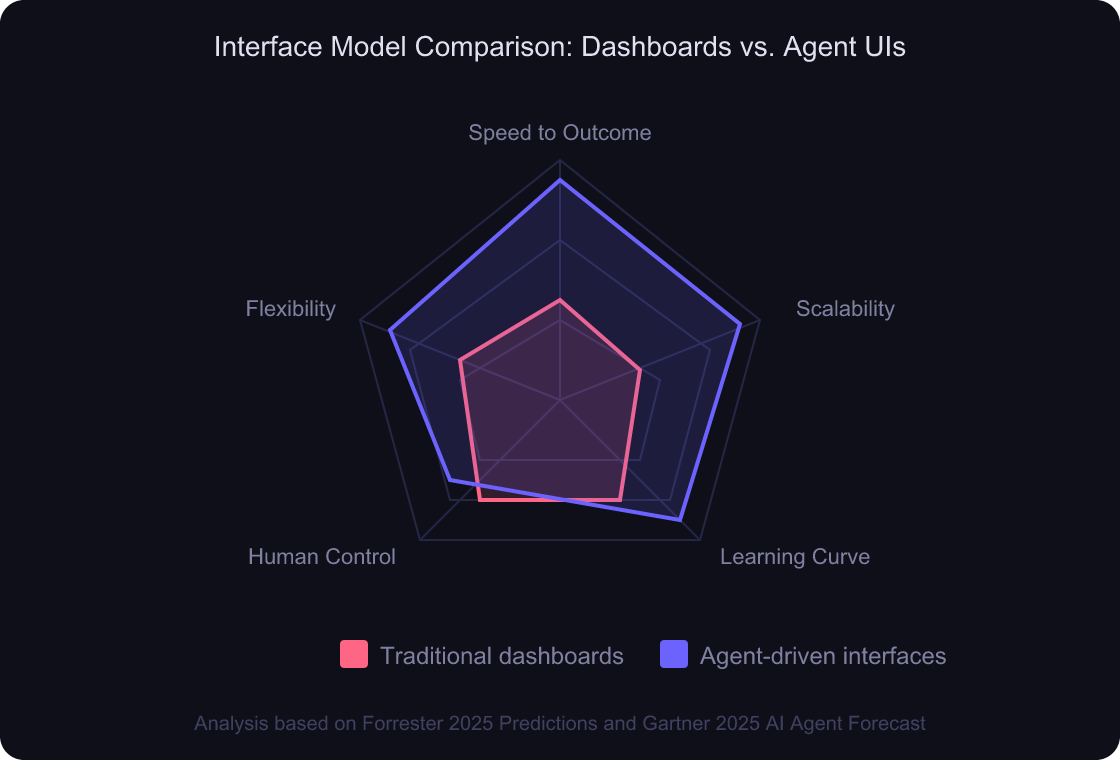
Analysis based on Forrester 2025 Predictions and Gartner 2025 AI Agent Forecast — Agent-driven interfaces outperform dashboards on speed, scalability, and flexibility, while dashboards retain an edge in direct human control
Citation capsule: Forrester estimates 75% of enterprise software interactions will involve an AI intermediary by 2028. The four emerging interface patterns — conversational, approval-based, exception-only, and ambient — all share one trait: the human interacts with outcomes, not with the underlying system directly.
the future of SaaS platforms
What Should Developers Learn Right Now?
The transition from dashboard-centric to agent-centric software demands a different skill set. GitHub’s 2025 Octoverse report found that AI-assisted coding tools are now used by 97% of surveyed developers (GitHub, 2025). But building software that agents consume — not just building with AI assistance — is the less obvious and more valuable skill shift.
Stop Mastering Another CSS Framework
This might sting. Tailwind, shadcn, whatever comes next — these tools matter less when the primary consumer of your software is an agent, not a human with a browser. CSS frameworks optimize the 20% of interactions that still need visual interfaces. The other 80% need APIs.
Learn AI Orchestration and Agent Architecture
Understanding how to design multi-agent systems — agents that plan, delegate, execute, and verify — is the highest-value skill for software engineers in 2026. This means understanding prompt engineering, tool-use patterns, memory management, error recovery, and human-in-the-loop design. These aren’t ML engineering skills. They’re software architecture skills applied to a new paradigm.
how agentic AI works under the hood
Learn MCP — The Protocol Connecting Agents to Tools
Model Context Protocol is to the AI era what REST was to the web era. If you build software and don’t expose an MCP interface, your product becomes invisible to agents. Learning how to design MCP schemas, expose tool capabilities, and handle agent-initiated requests is one of the most immediately practical skills you can develop.
Build API-First Products
Every feature in your product should have an API before it has a UI. If the agent can’t call it, the feature might as well not exist for the 80% of workflows that agents will handle. Design your data model and API surface first. Add a visual interface only where human judgment genuinely adds value.
Focus on the 10% That Needs Humans
Here’s the real opportunity for frontend developers: don’t build 100 screens. Build 10 exceptional ones. The screens where humans review agent work, approve decisions, handle ambiguity, and exercise creativity. Those interfaces need to be fast, clear, and beautifully designed. That’s a harder, more valuable skill than building yet another CRUD form.
Worth noting: The developer community often frames this as “frontend vs. backend.” That framing misses the point. The real divide is between interface-builders and system-builders. A frontend developer who understands agent orchestration, conversational UX, and approval-flow design is significantly more valuable than a backend developer who only knows REST endpoints. The skill that matters is designing for intent, not for clicks.
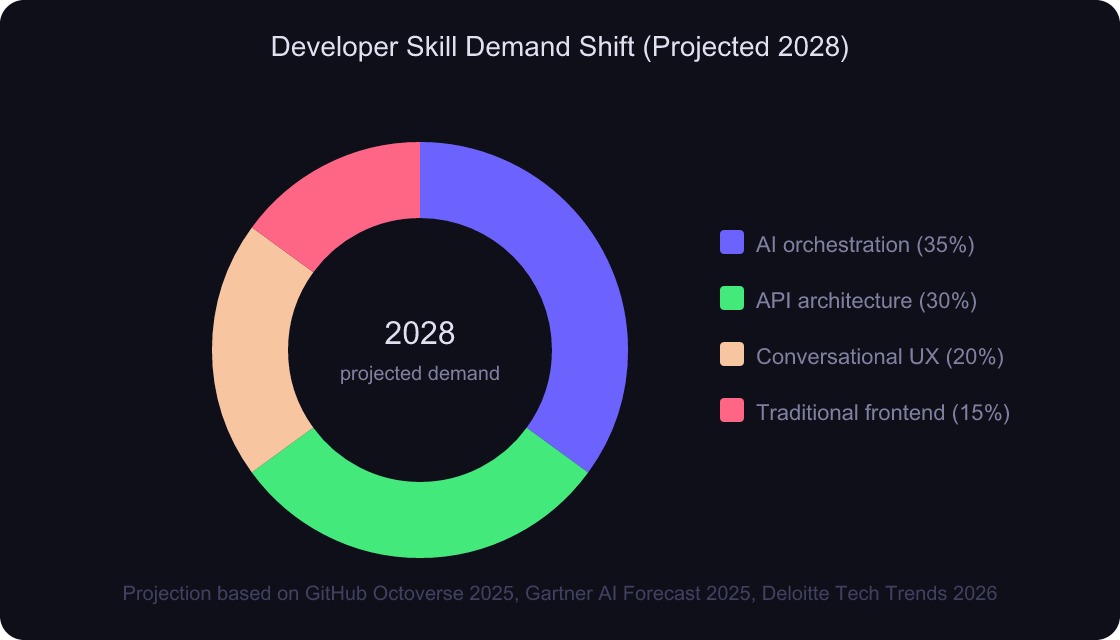
Projection based on GitHub Octoverse 2025, Gartner 2025 AI Agent Forecast, and Deloitte Tech Trends 2026 — Traditional frontend skills represent a shrinking share of total developer demand
Citation capsule: GitHub’s 2025 Octoverse report found that 97% of surveyed developers use AI-assisted coding tools, but the bigger shift is building software for agent consumption. Developer skill demand is moving from traditional frontend toward AI orchestration, API architecture, and conversational UX design.
how developer identity is shifting
Frequently Asked Questions
Will AI agents completely replace all dashboards?
No. Dashboards will survive for the 10-20% of workflows requiring human judgment, creative decisions, and ambiguity resolution. Gartner projects 40% of enterprise apps will embed AI agents by 2026 (Gartner, 2025), but these agents will handle routine tasks while humans review exceptions. The dashboard becomes a review layer, not the primary workspace.
What is MCP and why does it matter for the future of SaaS?
Model Context Protocol (MCP) is an open standard for connecting AI agents to external tools and data sources. It functions like REST APIs did for the web — a structured way for agents to discover and execute software capabilities. Products without MCP interfaces risk becoming invisible to the agent-driven workflows that will dominate enterprise software by 2028.
Should frontend developers be worried about their careers?
Frontend developers should evolve, not panic. The demand for traditional CRUD form interfaces is declining, but demand for conversational UX, approval-flow design, and exception dashboards is growing. GitHub reports 97% of developers already use AI-assisted tools (GitHub, 2025). The key is shifting from building screens to designing interactions that complement agent workflows.
the changing developer role
How do AI agents handle tasks that require judgment or creativity?
Agents use a human-in-the-loop pattern. They complete routine steps autonomously and escalate decisions requiring judgment to a human through focused approval interfaces. This mirrors how skilled assistants work: they handle logistics independently and ask for direction only at genuine decision points.
What’s the timeline for widespread agent-driven SaaS?
The transition is already underway. The AI agents market is projected to grow from $5.29 billion in 2024 to $232.31 billion by 2034 (Precedence Research, 2025). By 2028, Forrester projects 75% of enterprise software interactions will involve an AI intermediary. The shift is gradual but accelerating rapidly.
Conclusion
The dashboard isn’t dying because it’s badly designed. It’s dying because it was always a workaround — a translation layer between human intent and software action that existed only because machines couldn’t understand natural language. Now they can.
The transition won’t happen overnight. We’re in the early innings. But the direction is unmistakable: software that acts toward outcomes, not software that waits for clicks. Products that expose capabilities through APIs and MCP, not products that hide them behind 50 screens of buttons.
Key takeaways:
- Most SaaS dashboards are CRUD forms on databases — agents don’t need them
- AI agents collapse multi-step, multi-app workflows into single instructions
- API architecture and MCP are becoming more valuable than frontend frameworks
- Dashboards survive only for exception handling and human judgment calls
- Frontend developers should focus on conversational UX and approval interfaces
The tools already exist. Perplexity removed the search results page. Claude Code removed the IDE. Linear is removing manual project management. And platforms like StatusLink, Growth Engine, and maketocreate.com are exploring what product workflows look like when the dashboard steps aside.
The question isn’t whether AI agents will replace dashboards. It’s whether you’ll be building the agents — or building the dashboards they replace.