How Long Does a GCP Production Setup Actually Take?
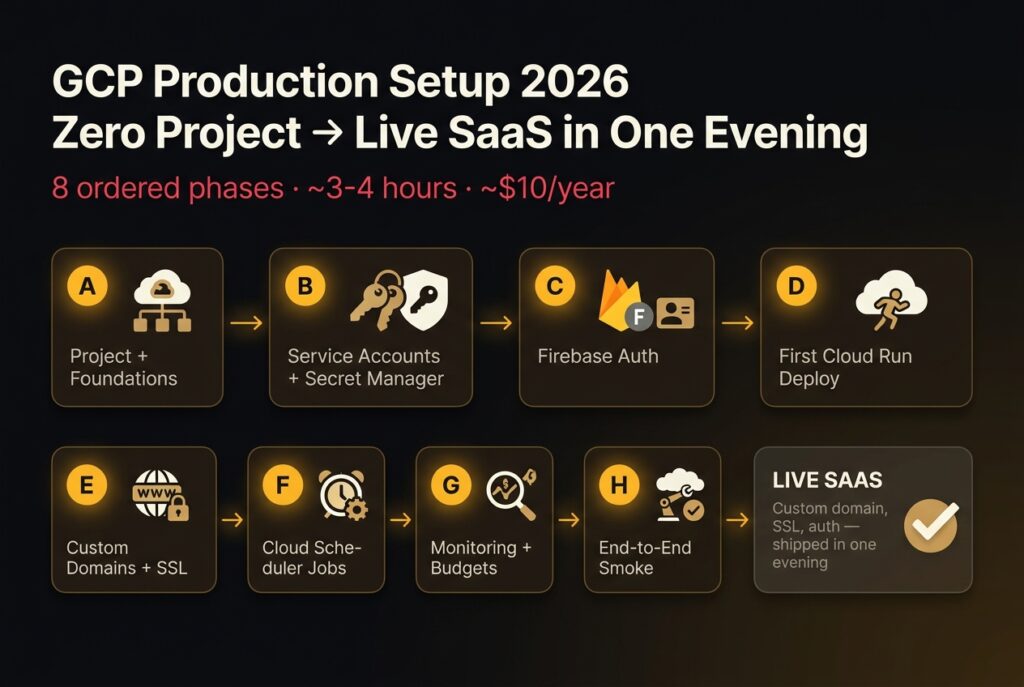
You can take a brand-new GCP project to a live SaaS on a custom domain in one evening (about three to four hours of focused work) if you do the phases in the right order. Most tutorials get the order wrong. They throw you straight into gcloud run deploy, then six hours later you’re untangling IAM roles and a stuck SSL cert because nobody told you Phase B existed.
This is the eight-phase checklist I wish I’d had when I shipped sivonhq.com on Google Cloud in 2026. It’s the order. It’s the gcloud commands that actually work. It’s the five gotchas that aren’t in any official doc. And it’s the cost breakdown nobody publishes because it’s boring (until you get the bill).
Key Takeaways
- The order is A→H. Phases A–C (project, service accounts + Secret Manager, Firebase Auth) can run before your domain is even bought. Domain purchase is the only external blocker.
- Cloud Run domain mappings are still a Preview feature, so Google’s own docs drive them with
gcloud beta run domain-mappings. Google also says they’re “not recommended for production services” (Google Cloud, 2026), so know the tradeoff before you lean on them.- SSL cert provisioning normally takes “about 15 minutes” but can stretch to 24 hours (Google Cloud, 2026). It gets stuck if DNS is wrong, the Cloudflare proxy is on, or the mapping was created before DNS propagated.
- Use Secret Manager for anything that would embarrass you if a project Viewer read it; env vars are fine for everything else. The free tier is 6 active versions and 10,000 access operations a month (Google Cloud, 2026).
- Cloudflare Registrar sells domains at cost (Cloudflare, 2026), which works out to $10.46/year for a .com right now. Over five years that beats promo-pricing registrars whose renewals jump to ~$20.
For the broader cost-of-running picture once you’re live, see my B2B SaaS 2026 guide on infrastructure economics for solo founders. If you’re going to wire up Cloud Scheduler in Phase F, also pre-read the idempotency key guide before you let Scheduler retry anything destructive.
The 8-Phase GCP Production Setup, In Order
The phases are not arbitrary. Each one unblocks the next. Skipping ahead is exactly how you end up with a service running but no way to securely give it credentials, or a domain mapped but Firebase Auth refusing to sign anyone in.
Phase A: Project + Foundations
Create the project, link a billing account, enable the APIs you’ll actually need, and pick a single default region. Don’t enable APIs reactively, you’ll waste twenty minutes per iteration as Cloud Run rejects deploys with “API not enabled” errors. Turn them all on now.
gcloud projects create sivonhq-prod --name="Sivon Production"
gcloud config set project sivonhq-prod
gcloud billing projects link sivonhq-prod --billing-account=XXXXXX-XXXXXX-XXXXXX
gcloud config set run/region us-central1

gcloud services enable \
  run.googleapis.com \
  secretmanager.googleapis.com \
  cloudscheduler.googleapis.com \
  cloudbuild.googleapis.com \
  artifactregistry.googleapis.com \
  iam.googleapis.com \
  monitoring.googleapis.com \
  logging.googleapis.com \
  identitytoolkit.googleapis.com
Pick us-central1 unless you have a specific reason not to. Cloud Run’s free-tier numbers are quoted at us-central1 pricing (Google Cloud, 2026), and it’s one of only ten regions where Cloud Run domain mapping works at all. Pick a region outside that list and Phase E needs a load balancer instead.
Phase B: Service Accounts + Secret Manager
This is the phase tutorials skip. Then six hours later you’re staring at Permission denied: caller does not have permission and have no idea why. Create one service account per service (not the default compute SA: that one has too much), grant it only what it needs, and stage your secrets before Phase D so the first deploy can mount them.
gcloud iam service-accounts create sivon-app \
  --display-name="Sivon App Runtime"

# minimal roles for a typical SaaS service
gcloud projects add-iam-policy-binding sivonhq-prod \
  --member="serviceAccount:[email protected]" \
  --role="roles/secretmanager.secretAccessor"

# create a secret
echo -n "$STRIPE_SECRET_KEY" | gcloud secrets create stripe-secret-key --data-file=-
gcloud secrets add-iam-policy-binding stripe-secret-key \
  --member="serviceAccount:[email protected]" \
  --role="roles/secretmanager.secretAccessor"
Name secrets after their purpose, not their value (stripe-secret-key, not sk-live-xxx). You’ll thank yourself in six months.
Phase C: Firebase Auth
Set up Firebase before Cloud Run, not after. Create the Firebase project (link it to the existing GCP project: don’t make a new one), enable the auth providers you’ll use (email, Google, GitHub), and configure your authorized domains list. The authorized domains list is the part everyone forgets, and it’s an exact-match check, which is gotcha #5 below.
The console URL is faster than gcloud here: console.firebase.google.com → Authentication → Settings → Authorized domains. Add localhost, your Firebase Hosting domain (auto-added), and every domain that will eventually run your auth UI.
Phase D: First Cloud Run Deploy
With Phase B done, the first deploy is one command. Service account, secrets, and a min-instance count if you want to dodge cold starts.
gcloud run deploy sivon-app \
  --source . \
  --region us-central1 \
  [email protected] \
  --set-secrets="STRIPE_SECRET_KEY=stripe-secret-key:latest,DATABASE_URL=database-url:latest" \
  --set-env-vars="NODE_ENV=production,LOG_LEVEL=info" \
  --allow-unauthenticated \
  --min-instances=0 \
  --max-instances=10
Verify the *.run.app URL works end-to-end before you touch DNS. If your service is broken, custom domains won’t fix it, they’ll just hide it behind a longer URL.
Phase E: Custom Domains + SSL
Now the domain. Verify ownership in Search Console (Cloud Run uses the same verification (Google Cloud, 2026)), create the mapping, then add DNS. Order matters here for SSL, see gotcha #2.
# verify domain in Search Console first (browser flow)
# https://search.google.com/search-console

# create the mapping (note: gcloud BETA, see gotcha #1)
gcloud beta run domain-mappings create \
  --service=sivon-app \
  --domain=app.sivonhq.com \
  --region=us-central1

gcloud beta run domain-mappings describe \
  --domain=app.sivonhq.com \
  --region=us-central1
The describe command returns the DNS records you need. Add them in Cloudflare immediately. SSL provisioning starts the moment the records resolve, and Google’s docs say it “usually takes about 15 minutes but can take up to 24 hours” (Google Cloud, 2026).
One caveat I didn’t appreciate when I shipped sivon: domain mappings are a Preview feature. Google’s docs say plainly that “due to latency issues, they are not production-ready” and that the option “is not recommended for production services” (Google Cloud, 2026). They also can’t serve wildcard certs, can’t map a path like /app, and can’t turn off TLS 1.0/1.1. For a pre-revenue SaaS I’m fine with that trade. If you’re signing customers with an uptime SLA, Google’s recommended path is a global external Application Load Balancer in front of Cloud Run (or Firebase Hosting for a lighter setup). It costs more and takes longer to configure, but it’s GA.
Phase F: Cloud Scheduler Jobs
Cron lives in Cloud Scheduler. It hits Cloud Run via HTTPS with an OIDC token, which means you need a separate service account for Scheduler, not the runtime SA, so the principle of least privilege actually holds.
gcloud iam service-accounts create sivon-scheduler \
  --display-name="Sivon Scheduler"

gcloud run services add-iam-policy-binding sivon-app \
  --member="serviceAccount:[email protected]" \
  --role="roles/run.invoker" \
  --region=us-central1

gcloud scheduler jobs create http daily-cleanup \
  --schedule="0 3 * * *" \
  --uri="https://app.sivonhq.com/internal/cleanup" \
  --http-method=POST \
  --oidc-service-account-email=sivon-scheduler@sivonhq-prod.iam.gserviceaccount.com \
  --oidc-token-audience="https://app.sivonhq.com" \
  --location=us-central1
Scheduler will retry on failure. If your endpoint isn’t idempotent, you’ve just built a duplicate-charge generator. Read the idempotency key implementation guide before you point Scheduler at anything that mutates state.
Phase G: Monitoring + Budgets
Two things, both five-minute jobs, both the difference between “I noticed at 9am” and “I noticed when the bill arrived.” Set a billing budget at 50%, 90%, 100% of your monthly cap, and create a notification channel for outage alerts.
# create the email notification channel - see gotcha #4
gcloud beta monitoring channels create \
  --display-name="Pager email" \
  --type=email \
  [email protected]
Then build a Cloud Run uptime check pointing at https://app.sivonhq.com/healthz with an alert policy that pages the channel above. Console-driven is fine for this one. The budgets live under Billing → Budgets & alerts.
Phase H: End-to-End Smoke
The final phase is a real walkthrough. Hit the site as a logged-out user. Sign up. Trigger the paid flow. Make sure Scheduler ran overnight and didn’t silently fail. Confirm the alert pager actually pages by knocking the service offline for ninety seconds and watching the email arrive.
This phase exists because every prior phase had its own success criteria, and none of them prove the system works as a system. Smoke catches the integrations.
Where Should You Buy Your Domain? Cloudflare Registrar or Hostinger?
Cloudflare Registrar over Hostinger, every time, if you can. Cloudflare says it “does not mark up domain prices at all” and charges only what the registry and ICANN charge (Cloudflare, 2026). Hostinger uses promo pricing: a cheap first year, then a renewal that quietly resets to retail. Over five years, the gap compounds.
I bought sivonhq.com at Cloudflare specifically because I was tired of registrar lock-in tactics. The transfer-out experience at the cheap registrars is always slower than the transfer-in.
| Year | Cloudflare Registrar (.com) | Hostinger (.com, typical) |
|---|---|---|
| 1 | $10.46 | $9.99 (or $8.49 with a promo code) |
| 2 | $10.46 | $19.99 |
| 3 | $10.46 | $19.99 |
| 4 | $10.46 | $19.99 |
| 5 | $10.46 | $19.99 |
| 5-year total | $52.30 | $89.95 |
Prices are as tracked by DomainOffer on October 6, 2026 for Cloudflare and Hostinger. Hostinger is a few cents cheaper in year one, Cloudflare wins from year two, and by year five you’ve paid about $38 less. Promo cycles move the Hostinger first-year number around, so treat that column as directional; the $19.99 renewal is the part that sticks.
The Cloudflare-only catch: you must already use Cloudflare DNS to register a domain there. If you’re on a different DNS provider, transfer DNS first, then transfer the domain. The Cloudflare DNS UI is also genuinely better than Hostinger’s, especially for the apex A/AAAA mess in Phase E. If your existing site has ISP routing problems, Cloudflare also fixes those, see my Cloudflare ISP-block fix walkthrough for that scenario.
Should API Keys Live in Cloud Run Env Vars or Secret Manager?
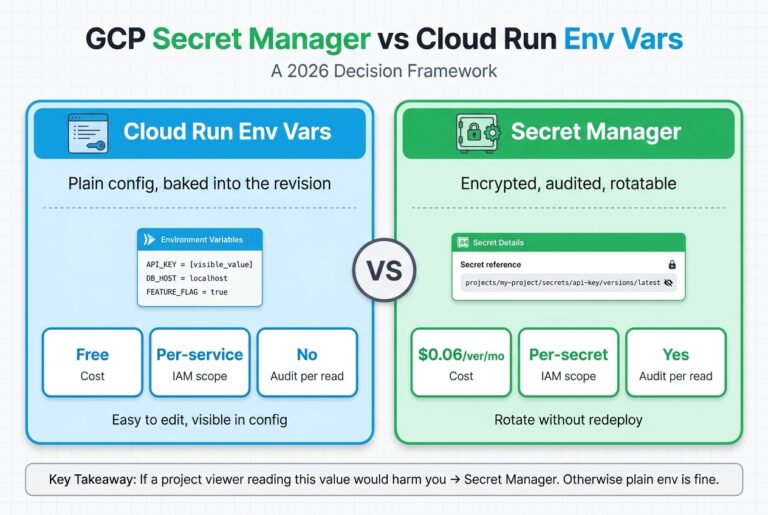
The rule: if a project Viewer reading this would matter to you, it’s a secret. Otherwise it’s an env var.
A Cloud Run env var is visible in the Cloud Console to anyone with run.services.get: that includes every Project Viewer, every Editor, every CI service account that has describe rights. Secret Manager values are gated behind secretmanager.versions.access, which Viewer doesn’t have by default. Same blast radius if compromised, very different default exposure.
| Value type | Env var | Secret Manager | Leak impact |
|---|---|---|---|
NODE_ENV=production |
Yes | No | None |
| Public API base URL | Yes | No | None |
| Feature flag literal | Yes | No | None |
| Sentry DSN (write-only) | Yes | No | Spam, no data exfil |
| Stripe publishable key | Yes | No | Public anyway |
| Stripe secret key | No | Yes | Charge customers, refund yourself |
| Database connection string | No | Yes | Full data read/write |
| OAuth client secret | No | Yes | Impersonate the app |
| Webhook signing secret | No | Yes | Forge inbound webhooks |
| Encryption keys (KMS optional) | No | Yes (or KMS) | Decrypt everything |
Mount Secret Manager values into Cloud Run with --set-secrets:
gcloud run deploy sivon-app \
  --set-secrets="STRIPE_SECRET_KEY=stripe-secret-key:latest,DATABASE_URL=database-url:latest"
The runtime sees them as env vars, but they’re fetched from Secret Manager at instance start. Pin to :latest for hot rotation, or to a specific version (:3) if you want explicit deploys to roll secrets.
Pricing isn’t the reason to choose env vars. Secret Manager’s free tier is 6 active versions and 10,000 access operations per billing account per month, with $0.06 per active version per location after that (Google Cloud, 2026). For a small SaaS, secrets are effectively free. I wrote up the full per-variable decision process, including rotation and IAM, in my GCP Secret Manager vs Cloud Run env vars framework.
Should the Apex and the Subdomain Both Map to One Cloud Run Service?
Yes, if your marketing site and app share a codebase. Map both sivonhq.com and app.sivonhq.com to the same Cloud Run service, then route inside the app. That’s what I did, and it works as long as you handle three things: Firebase Auth authorized domains (gotcha #5), CORS origins, and any cookie domain settings.
Redirect to a single canonical instead if you have separate marketing and app codebases, want different scaling profiles, or rely on cookie-based session sharing that breaks under exact-match origin checks. In that case, map sivonhq.com to a redirector (or to a static marketing site on Firebase Hosting) and app.sivonhq.com to the Cloud Run service.
The DNS shape is the same either way; the difference is what answers HTTP.
Five Gotchas No Tutorial Mentions
These are the ones that cost me real time. None are in Google’s official docs as warnings, most are passing references buried three pages deep, or community workarounds.
| # | Symptom | Cause | Fix |
|---|---|---|---|
| 1 | gcloud run domain-mappings create returns help text or an unhelpful error |
Domain mappings are Preview; Google’s docs only show the beta command for managed Cloud Run | Use gcloud beta run domain-mappings create ... |
| 2 | SSL cert stuck on “pending” for an hour, no error | DNS records were added after the mapping was created; provisioner cached the failure | Delete the mapping, add DNS first, recreate the mapping |
| 3 | SSL never provisions; curl returns Cloudflare cert, not Google’s |
Cloudflare’s orange-cloud proxy is intercepting validation | Set the record to “DNS only” (gray cloud) until cert provisions |
| 4 | Console alert policy says “channel unverified” but no email arrives | gcloud-created channels auto-verify silently; Console-created ones require email click-through | Recreate via gcloud, or check the verified-list in Console |
| 5 | Firebase Auth redirect fails with auth/unauthorized-domain on apex |
Authorized domains is exact-match per FQDN | Add both sivonhq.com and app.sivonhq.com |
Gotcha 1: gcloud beta vs gcloud run for Domain Mappings
A non-beta gcloud run domain-mappings group shows up in older docs and Stack Overflow answers, and that’s what most tutorials paste. But domain mapping is still a Preview feature, and every command in Google’s current custom-domain doc (create, describe, delete) uses gcloud beta run domain-mappings (Google Cloud, 2026). The help text doesn’t warn you about the difference. If your domain-mappings create fails with a vague error, swap in gcloud beta and try again before you debug anything else.
Gotcha 2: SSL Cert Stuck for an Hour After Late DNS Records
If you create the domain mapping before DNS resolves, Google’s provisioner attempts ACME validation, fails, and backs off. The official Cloud Run docs say cert provisioning “usually takes about 15 minutes but can take up to 24 hours” (Google Cloud, 2026), and that range is real, but it’s measured from “DNS is correct,” not “you ran the command.”
The fix is brutally simple and not in any doc I’ve found: delete the mapping, add DNS, wait for dig to confirm, then recreate the mapping.
gcloud beta run domain-mappings delete \
  --domain=app.sivonhq.com \
  --region=us-central1

dig app.sivonhq.com CNAME +short
# expect: ghs.googlehosted.com.

gcloud beta run domain-mappings create \
  --service=sivon-app \
  --domain=app.sivonhq.com \
  --region=us-central1
Provisioning then completes in the documented 15 minutes, not the stuck-forever state.
Gotcha 3: Cloudflare Proxy Breaks Cloud Run Auto-SSL
Cloud Run domain mappings get a Google-managed certificate that’s “automatically issued and renewed” (Google Cloud, 2026), and issuing it means Google has to reach your domain directly. Cloudflare’s orange-cloud proxy answers instead, with its own cert and its own IPs, and Google’s provisioner never completes. A March 2026 Google Developer Forum thread names the orange cloud as the root cause of exactly this stuck-cert state (Google Developer Forum, 2026), but the official doc doesn’t carry it as a top-line warning.
The fix is to set every Cloud Run record to “DNS only” (gray cloud) until the cert provisions, then optionally turn the proxy back on. Many people leave it gray-cloud permanently, the Cloudflare CDN benefit is small for a Cloud Run app since GCP serves global anycast already.
Gotcha 4: gcloud-Created Notification Channels Auto-Verified Silently
Create a notification channel through the Console and you’ll get an email asking you to click a link. Create the same channel through gcloud and it’s auto-verified server-side, no email at all. The Console UI then shows the channel as “Verified”, but if you trust the email step, you’ll wait forever for a message that never arrives. Watched a friend lose half a workday to this one.
The fix: trust the channel listing, not the email.
gcloud beta monitoring channels list \
  --filter="display_name='Pager email'" \
  --format="value(name,verificationStatus)"
# expect: ...    VERIFIED
Gotcha 5: Firebase Auth Authorized Domains Are Exact-Match
Firebase’s own help page says you “must whitelist the full domain names” of every host that signs users in (Firebase, 2026). It’s per-FQDN, not wildcard. If your marketing pages on sivonhq.com ever initiate a signup flow, the apex must be in the list, adding only app.sivonhq.com will fail OAuth redirects with auth/unauthorized-domain.
Add every FQDN that calls signInWith*. There’s no wildcard syntax, and missing one breaks production silently for users on that subdomain only.
Cloudflare DNS Records for an Apex + Subdomain Cloud Run Mapping
For sivonhq.com apex + app.sivonhq.com subdomain both pointing at one Cloud Run service, the DNS shape looks like this. The apex IPs and IPv6 addresses are Google’s published records for Cloud Run / Firebase Hosting, they’re stable.
| Type | Name | Value | Proxy |
|---|---|---|---|
| A | @ | 216.239.32.21 | DNS only |
| A | @ | 216.239.34.21 | DNS only |
| A | @ | 216.239.36.21 | DNS only |
| A | @ | 216.239.38.21 | DNS only |
| AAAA | @ | 2001:4860:4802:32::15 | DNS only |
| AAAA | @ | 2001:4860:4802:34::15 | DNS only |
| AAAA | @ | 2001:4860:4802:36::15 | DNS only |
| AAAA | @ | 2001:4860:4802:38::15 | DNS only |
| CNAME | app | ghs.googlehosted.com. | DNS only |
| CNAME | www | ghs.googlehosted.com. | DNS only |
Eight records for the apex (four A + four AAAA), one CNAME per subdomain. Keep proxy off until both certs show as CERT_STATE_ACTIVE in gcloud beta run domain-mappings describe. After that, you can flip the proxy on if you want, but read gotcha #3 first.
One-Evening Sequencing: What Blocks On What
The only real blocker is the domain. Phase A (project), Phase B (service accounts + Secret Manager), and Phase C (Firebase Auth) can all happen before you’ve even decided on a name. Phase D (first deploy) doesn’t need a custom domain, it can ship to *.run.app. Only Phase E (custom domains + SSL) gates on the registrar.
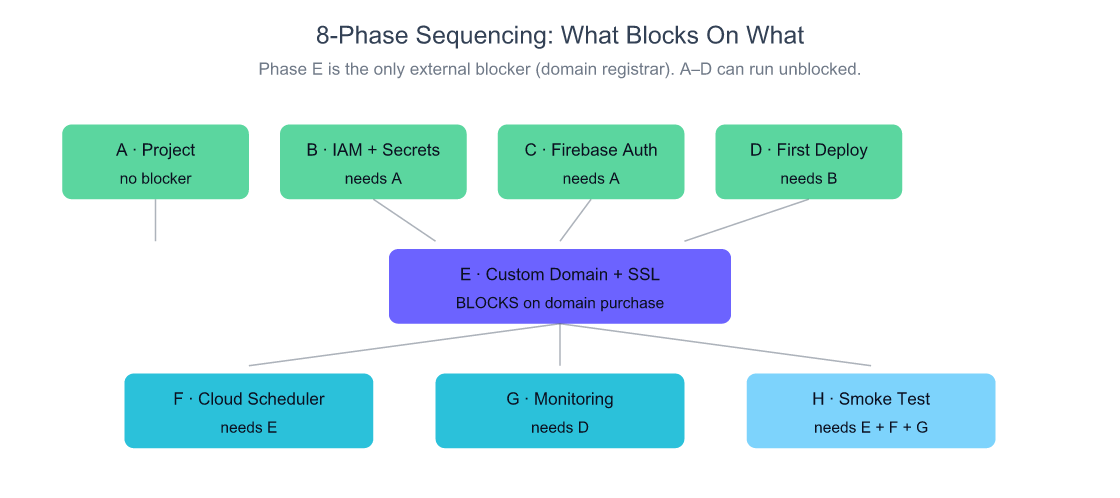
Source: distilled from this article’s 8-phase walkthrough.
If you start in the morning, Phases A–D land before lunch on the *.run.app URL. Domain registration, including Cloudflare’s DNS propagation and Google’s SSL provisioning, is the part that needs hours of clock time but minutes of attention. Kick off the domain step early, work on Phases F and G while it provisions, and circle back to E when DNS is live.
A successful end-state should look like this:
| Phase | Artifact | Verify with |
|---|---|---|
| A | Project, billing linked, APIs enabled | gcloud services list --enabled |
| B | Runtime SA + secrets created | gcloud secrets list |
| C | Firebase Auth + authorized domains | Firebase Console → Auth → Settings |
| D | Cloud Run service, secrets mounted | curl https://sivon-app-xxx.run.app/healthz |
| E | Domain mapping, SSL CERT_STATE_ACTIVE |
gcloud beta run domain-mappings describe ... |
| F | Scheduler job runs and gets 200 | gcloud scheduler jobs run daily-cleanup |
| G | Uptime check + alert policy live | Console → Monitoring → Alerting |
| H | Real signup + paid flow + alert page | manual walkthrough |
If any line in that table doesn’t pass, fix that one before moving on. Half-completed phases compound.
What I’d Do Differently Next Time
Two service accounts isn’t enough. I started with one runtime SA for everything and split it later. Splitting after the fact means rewriting deploy commands, re-mounting secrets, and re-issuing OIDC tokens. Next time I’ll create three from the start: app-runtime, scheduler-invoker, and ci-deployer. Five minutes up front saves an afternoon of refactoring.
Skip the apex-redirect cleverness if marketing and app share code. I tried serving both apex and subdomain from the same Cloud Run revision, then later wished I’d kept marketing as static Firebase Hosting and only put the app on Cloud Run. Cold-start cost is real on a marketing page that should serve in 50ms. If the codebase is already split, split the hosting too.
What This Actually Costs
For a side-project SaaS with maybe 1,000 monthly users, the real bill in the first year is small enough that the domain dominates.
| Item | Annual cost | Notes |
|---|---|---|
| Cloudflare Registrar (.com) | $10.46 | At cost, no markup |
| Cloud Run (typical use, < free tier) | $0 | 2M req/mo + 180K vCPU-sec free in us-central1 |
| Secret Manager (≤ 6 secrets, < 10K access/mo) | $0 | Within free tier |
| Cloud Scheduler (≤ 3 jobs) | $0 | First 3 jobs free |
| Cloud Build (≤ 2,500 build-minutes/mo) | $0 | Free per billing account (e2-standard-2 default pool) |
| Cloud Logging / Monitoring | $0 | First 50 GiB logs per project per month free |
| Firebase Auth (≤ 50K MAU) | $0 | No-cost up to 50K MAUs with Identity Platform |
| Year-1 minimum | $10.46 | Domain only |
Sources for free-tier figures: Cloud Run pricing (Google Cloud, 2026); Secret Manager pricing (Google Cloud, 2026); Cloud Scheduler gives each billing account 3 free jobs a month (Google Cloud, 2026); Cloud Build includes 2,500 free build-minutes per billing account per month (Google Cloud, 2026); Logging’s first 50 GiB per project per month is free (Google Cloud, 2026); Firebase Auth’s MAU allowance is on the Firebase pricing page.
What happens to the bill once you leave the free tier?
The free tier hides the most important cost lever, and Google’s own pricing page shows it if you look at the worked examples. Request-based Cloud Run bills $0.000024 per vCPU-second and $0.0000025 per GiB-second of active time, plus $0.40 per million requests past the first 2 million (Google Cloud, 2026). Those unit prices are tiny. What multiplies them is how many instances you need, and that’s set by concurrency.
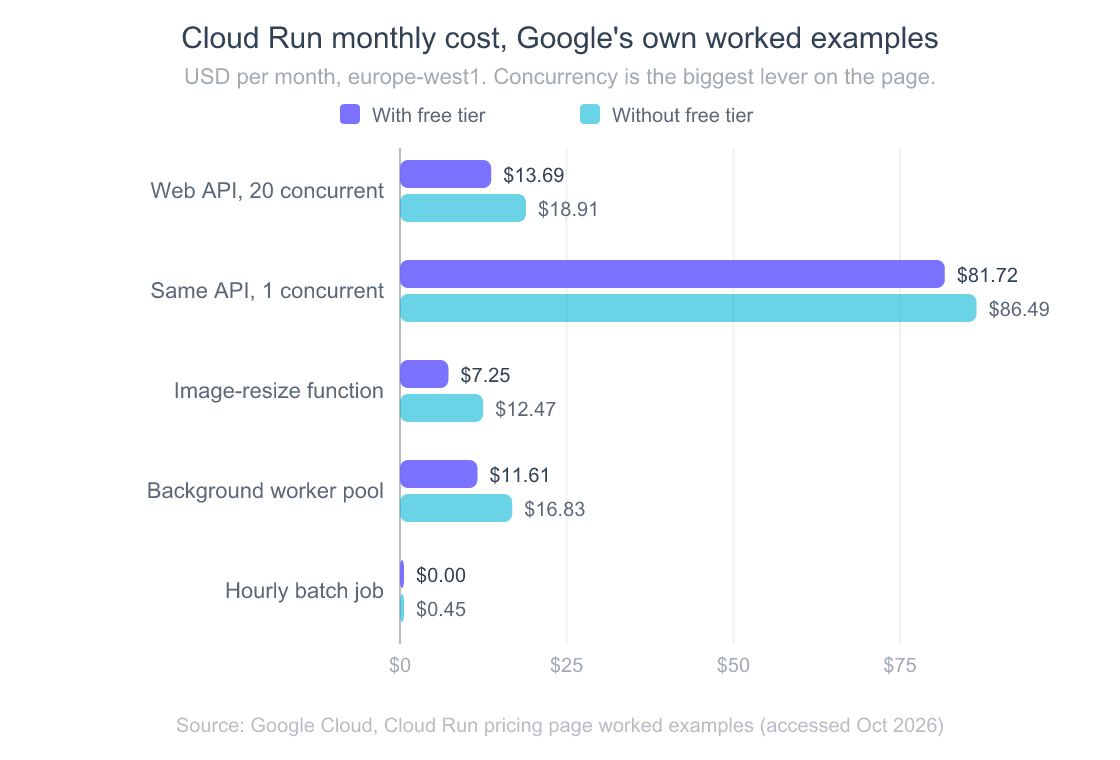
Same 10 million requests, same 400 ms latency, same 1 vCPU and 512 MiB. At 20 concurrent requests per instance, Google prices it at $13.69 a month. Force one request per instance (a non-thread-safe app, or a framework you’ve capped at 1) and it’s $81.72, roughly six times more. The free tier is worth about $5 a month on each of these workloads, which is nice but not the thing to optimize.
My takeaway for a first SaaS: leave Cloud Run’s default concurrency alone unless you have a real reason, and if your stack can’t handle concurrent requests, fix that before you scale traffic. It’s the one setting that moves the bill by multiples instead of dollars.
You’ll exit free tier when traffic grows or you start hammering Secret Manager from a hot path. Caching Secret Manager values for the lifetime of the Cloud Run instance is the single highest-leverage optimization. Google’s --set-secrets mount already does this for you, which is another reason to prefer it over manual secretmanager.access calls inside the app.
Frequently Asked Questions
Why is my Cloud Run SSL cert stuck on “pending”?
Three causes, in order of likelihood. First, your DNS records were added after the domain mapping was created: delete the mapping, add DNS, wait for dig to resolve, recreate the mapping. Second, Cloudflare’s orange-cloud proxy is intercepting Google’s certificate validation, so set the record to “DNS only” (gray cloud) until provisioning finishes. Third, you’re under the documented 15-minute window: Google says provisioning “usually takes about 15 minutes but can take up to 24 hours” (Google Cloud, 2026), so wait one cycle before assuming it’s stuck.
Should I put API keys in Cloud Run env vars or Secret Manager?
Secret Manager for anything sensitive: database URLs, payment provider secret keys, OAuth client secrets, webhook signing secrets, encryption keys. Env vars for non-sensitive config: NODE_ENV, region, log level, public API URLs, feature flags. The decision rule is “would I care if a project Viewer read this?” Env vars are visible to every Project Viewer; Secret Manager values aren’t. Use --set-secrets="VAR=secret-name:latest" to mount them, and Cloud Run will fetch them at instance start.
Is Cloudflare Registrar cheaper than Hostinger for a SaaS domain?
Over five years, yes. Cloudflare sells .com domains at cost (Cloudflare, 2026), which is $10.46/year as of October 2026, with no promo gimmicks. Hostinger charges $9.99 for the first year, then $19.99 on renewal (DomainOffer, 2026). By year two Cloudflare is already cheaper, and the gap widens. Five-year math: about $52 at Cloudflare vs about $90 at Hostinger. The catch is Cloudflare requires you to use their DNS, which you probably want anyway.
How long does Cloud Run domain mapping take?
The mapping itself is instant, the gcloud command returns in seconds. SSL cert provisioning is the slow part. Google’s official docs say “usually takes about 15 minutes but can take up to 24 hours” (Google Cloud, 2026). In practice 15 minutes is typical when DNS is correct and the Cloudflare proxy is off; longer than 30 minutes usually means something’s misconfigured (wrong DNS, proxy on, mapping created before DNS propagated) and the fix is to delete and recreate the mapping after fixing DNS.
Can I use Cloudflare’s proxy with Cloud Run?
Not until SSL has provisioned, and often not at all. Cloudflare’s orange-cloud proxy sits between Google and your domain during certificate validation, which can stop the Google-managed cert from ever issuing. Set every Cloud Run DNS record to “DNS only” (gray cloud) until gcloud beta run domain-mappings describe shows CERT_STATE_ACTIVE. After that, you can flip the proxy back on, but many people leave it off: Google already serves global anycast, so the CDN value-add is small, and the failure modes (proxy + Cloud Run) are real.
That’s the eight-phase setup. Run it once, write down the gotchas you hit specific to your stack (every codebase has a couple), and your second project on GCP will land in two hours instead of an evening.