Cloudflare for WordPress: My ISP Block Fixed in 15 Minutes
I noticed something weird on April 21, 2026. My WordPress blog loaded everywhere except on my home Wi-Fi. Mobile hotspot? Fine. Coffee shop? Fine. My ISP at home? Dead. That detail mattered more than any WordPress plugin, cache purge, or Hostinger setting, and it’s why Cloudflare for WordPress ended up being the fix, not anything inside the app.
If you’ve ever had a site “go down” for only one network, you know how disorienting it feels. You start blaming the app because that’s the thing you control. In my case, that instinct would’ve wasted hours. The problem wasn’t WordPress. It wasn’t Hostinger. It wasn’t my router. The path between my ISP and Hostinger’s IP range was broken.
For context, Cloudflare is already the dominant reverse proxy on the public web: W3Techs says it is used by 82.8% of websites whose reverse proxy service is known, equal to 22.3% of all websites (W3Techs, 2026). That scale is exactly why putting Cloudflare in front of a site can solve more than caching. It can change the path traffic takes to reach your origin.
For the broader workflow behind how I publish and maintain this site, see
how I built the Next.js publishing workflow behind this blog.
Key Takeaways
- My site was not globally down. It was unreachable only from my home ISP, which immediately pointed to a routing problem.
ping,curl, andtracerouteshowed the break was before traffic ever reached Hostinger.- Cloudflare fixed the issue because visitors started hitting Cloudflare IPs instead of the blocked Hostinger origin IP.
- W3Techs says Cloudflare powers 22.3% of all websites, which is why it is often the fastest practical fix for WordPress reachability issues (W3Techs, 2026).
- The setup was simple: import DNS, gray-cloud mail records, change nameservers, verify propagation, then tune SSL and cache rules.
What Actually Broke When My Site Stopped Loading?
The first concrete fact was simple: maketocreate.com worked on mobile data and failed on home Wi-Fi. That ruled out “the website is down” in under five minutes. It also told me the bug lived somewhere in the network path, not in WordPress itself.
I had the usual reflex first. Maybe a plugin update broke Apache. Maybe Hostinger was having an outage. Maybe I messed up DNS earlier in the day. But every quick sanity check pushed me away from the app layer and toward the route itself. That’s the moment this stopped being a WordPress problem and became a networking problem.
Here are the commands that mattered, trimmed to the lines that mattered:
$ ping 147.93.101.254
PING 147.93.101.254 (147.93.101.254): 56 data bytes
Request timeout for icmp_seq 0
Request timeout for icmp_seq 1
Request timeout for icmp_seq 2
--- 147.93.101.254 ping statistics ---
3 packets transmitted, 0 packets received, 100.0% packet loss
$ curl https://maketocreate.com
curl: (28) Failed to connect to maketocreate.com port 443 after 75002 ms: Couldn't connect to server
$ traceroute 147.93.101.254
traceroute to 147.93.101.254 (147.93.101.254), 64 hops max
 1  192.168.29.1  4.221 ms  3.884 ms  3.492 ms
 2  10.240.0.1    8.903 ms  8.115 ms  8.406 ms
 3  10.12.0.5     15.274 ms 14.991 ms 15.108 ms
 4  172.16.1.9    19.334 ms 18.842 ms 19.201 ms
 5  172.17.2.66   24.110 ms 24.008 ms 24.287 ms
 6  * * *
 7  * * *
Those outputs told a coherent story. Packets were dying before they ever reached the origin. curl timed out on 443. traceroute fell apart inside the ISP path. There was nothing for WordPress to fix because the request never arrived.
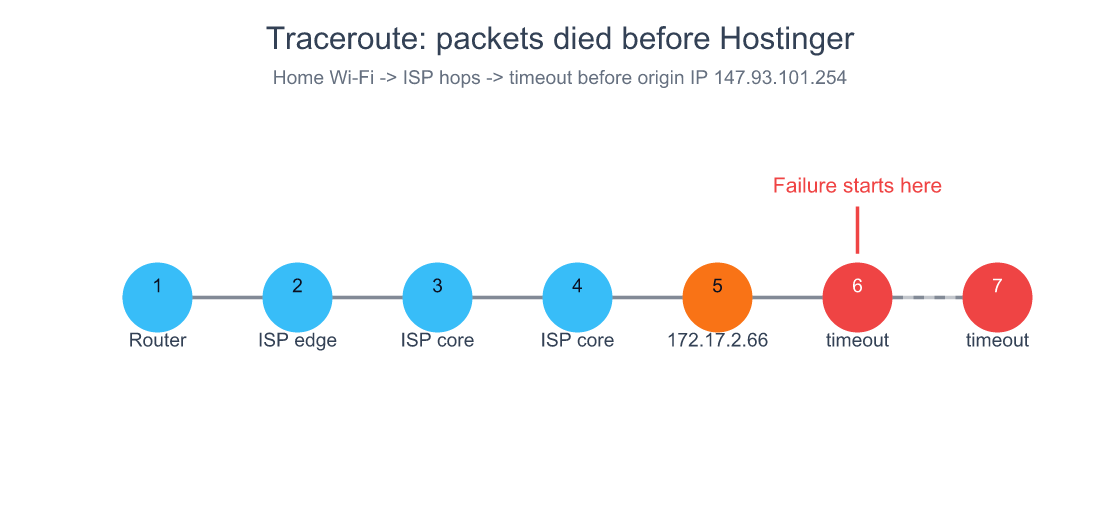
My traceroute died after an internal ISP hop, which is why no WordPress or Hostinger setting could have fixed the first problem.
How I Proved It Was My ISP and Not WordPress, Hostinger, or My Router
The strongest diagnostic signal was network asymmetry: one ISP failed, several others worked. When the same domain, same origin, and same browser behave differently by network, the application layer drops down the suspect list fast.
This is where most people lose time. We are trained to debug inside our stack. So we restart PHP, disable plugins, clear caches, and tail logs. But what happens if the request never reaches your host? All of that effort becomes theater.
My elimination flow was short:
- The site loaded on mobile hotspot.
- The site loaded from other locations.
- The site failed on home Wi-Fi.
- Direct traffic to the Hostinger origin IP showed 100% packet loss.
That combination narrowed the root cause to a broken route or active block inside the ISP’s network. Once I accepted that, the question changed from “How do I repair WordPress?” to “How do I stop sending users directly to the blocked origin IP?”
According to Cloudflare’s network page, its edge is interconnected with over 13,000 major service providers, cloud providers, and enterprise networks, and it processes traffic at the data center closest to the request source (Cloudflare, 2026). That mattered here because I did not need my ISP to repair its route to Hostinger immediately. I needed a different front door.
If you want another example of solving the real failure layer instead of the obvious one, see
why infrastructure problems are usually layered, not singular.
Why Cloudflare WARP Was a Useful Clue, but Not the Real Fix
WARP helped because it changed the path. The second I turned it on, the site loaded in my browser. That was useful evidence, not a permanent solution. It proved the origin was healthy and the broken piece was the route between my ISP and the server.
That distinction matters. WARP is a user-side workaround. Cloudflare as a reverse proxy is an origin-side fix. One helps a single client tunnel around the problem. The other changes what IP the whole world connects to.
This was the moment the mental model clicked for me: I did not need to “repair the destination.” I needed to change the public path to the destination. That is a much more useful way to think about CDNs than the usual “they cache images faster” explanation.
So yes, WARP was handy. It shortened diagnosis. It told me my host was fine. But it did not remove the underlying fragility. If I had stopped there, everyone on the same ISP would still have had a broken experience.
How I Set Up Cloudflare for WordPress in 15 Minutes
Cloudflare is used by 87.9% of WordPress sites whose reverse proxy service is known, according to W3Techs (W3Techs, 2026). That adoption does not prove it is always the right answer, but it does mean the setup path is mature, well-trodden, and easy to test quickly.
My setup looked like this:
- I signed up for the Cloudflare free plan and added
maketocreate.com. - Cloudflare imported the existing DNS zone automatically.
- I reviewed the imported records instead of blindly continuing.
- I kept mail-related records unproxied.
- I removed two stale A records for an unused subdomain.
- I switched nameservers at Hostinger to Cloudflare’s assigned pair.
Cloudflare imported:
- 3 A records
- 1 AAAA record
- 6 CNAME records
- 2 MX records
- 2 TXT records
That auto-import saves time, but it can also carry old mistakes forward. In my case, I found two conflicting A records for an unused blog subdomain and deleted them before they caused confusion later.
My assigned nameservers were:
lilith.ns.cloudflare.comtrey.ns.cloudflare.com
After I changed them at Hostinger, I verified propagation instead of trusting the UI:
$ dig +short maketocreate.com
172.67.183.129
104.21.80.138
Those Cloudflare IPs were the point. Visitors were no longer trying to reach Hostinger directly as their first hop. They were reaching Cloudflare first, and Cloudflare could talk to the origin over a path my home ISP was no longer responsible for serving directly.
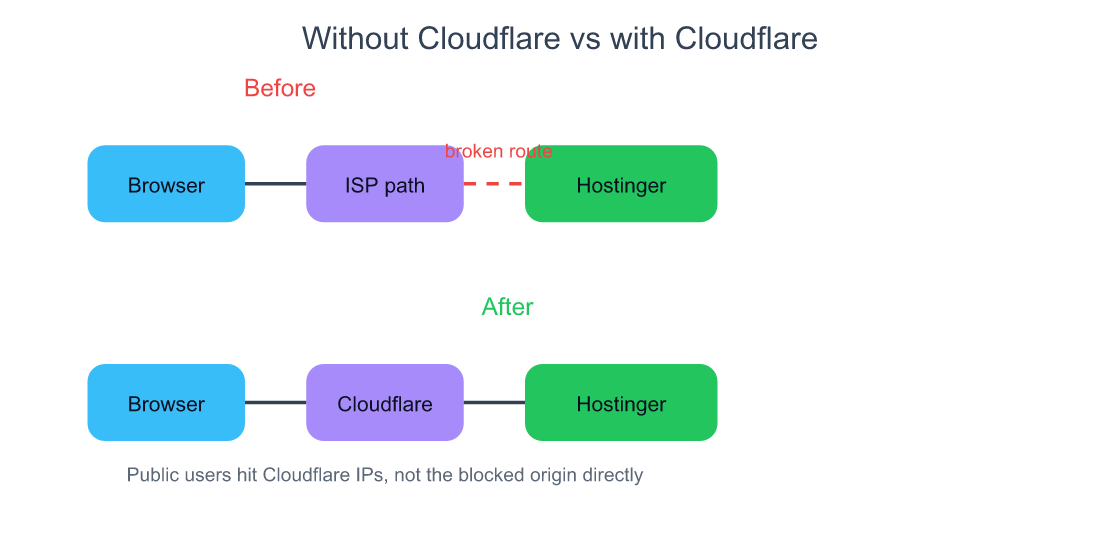
Cloudflare worked here because it changed the public entry point. The website did not stop living on Hostinger; it stopped exposing Hostinger’s IP as the first hop for every visitor.
What a CDN Actually Does, Beyond “It Caches Stuff”
Cloudflare’s network spans data centers in more than 120 countries and is interconnected with over 13,000 networks (Cloudflare, 2026). That scale is why a CDN can solve routing, TLS, and reachability problems in addition to static-asset caching.
Most explanations of CDNs are too shallow. They focus on “images load faster because the file is cached near the user.” That’s true, but incomplete. A modern service like Cloudflare also gives you:
- authoritative DNS
- reverse proxying
- SSL termination
- DDoS absorption
- route optimization
- caching rules at the edge
So what changed after I enabled Cloudflare? Not just cache. DNS now resolved to Cloudflare IPs. Incoming requests terminated at Cloudflare’s edge first. Cloudflare then fetched from Hostinger as the origin. That architectural shift is why the ISP-level break stopped mattering as much.

This is also why Cloudflare is a very different tool from a plugin that adds local page caching inside WordPress. One improves how WordPress serves content. The other changes how traffic reaches WordPress in the first place.
Why Cloudflare’s Free Plan Exists at All
Cloudflare’s edge already serves millions of Internet properties, and its WordPress plugin pitches APO on top of an edge network of 250+ data centers while the broader network page now lists presence across more than 120 countries (WordPress.org, 2026; Cloudflare, 2026). The economics make more sense once you see the network as a fixed-cost machine.
People ask this all the time: how can something this useful be free?
The answer is not charity. The network is already built for paying customers. Free users add marginal traffic, product familiarity, threat intelligence, and a future upgrade path. In other words, the free tier is both distribution and training data for the platform’s security intelligence.
If you run a solo site, this is the beautiful part: you get to borrow infrastructure economics that would be impossible to reproduce yourself. No indie developer is going to build a globally peered anycast network. You rent its shape by pointing nameservers at it.
Cloudflare’s DDoS data also shows what that scale buys. In 2025, the company says it mitigated 47.1 million DDoS attacks, averaging 5,376 attacks automatically mitigated every hour, and stopped a record 31.4 Tbps attack (Cloudflare, 2025). Even if your blog never sees anything that dramatic, you are still sitting behind infrastructure designed for that world.
Cloudflare vs CloudFront: Same Category, Different Product
AWS gives the first 1 TB of CloudFront data transfer out free each month, then charges $0.085 per GB in the United States, Mexico, and Canada for the next tier (AWS, 2026). Cloudflare’s free plan, by contrast, has no public egress-fee story for a basic WordPress site because the product is positioned very differently.
This is where a lot of developers get sloppy. They say “Cloudflare or CloudFront” as if these are interchangeable. They are not.
CloudFront is AWS’s CDN. It fits naturally when the rest of your stack lives inside AWS and you want tight integration with S3, ALB, Lambda@Edge, or other AWS primitives.
Cloudflare is an independent reverse proxy and application-services platform. It starts with DNS, proxying, SSL, and basic protection on a free plan, then layers paid products on top.
For my use case, the decision was easy. I needed a fast public front door for a WordPress site on Hostinger. I did not need to assemble an AWS distribution model around a non-AWS origin.
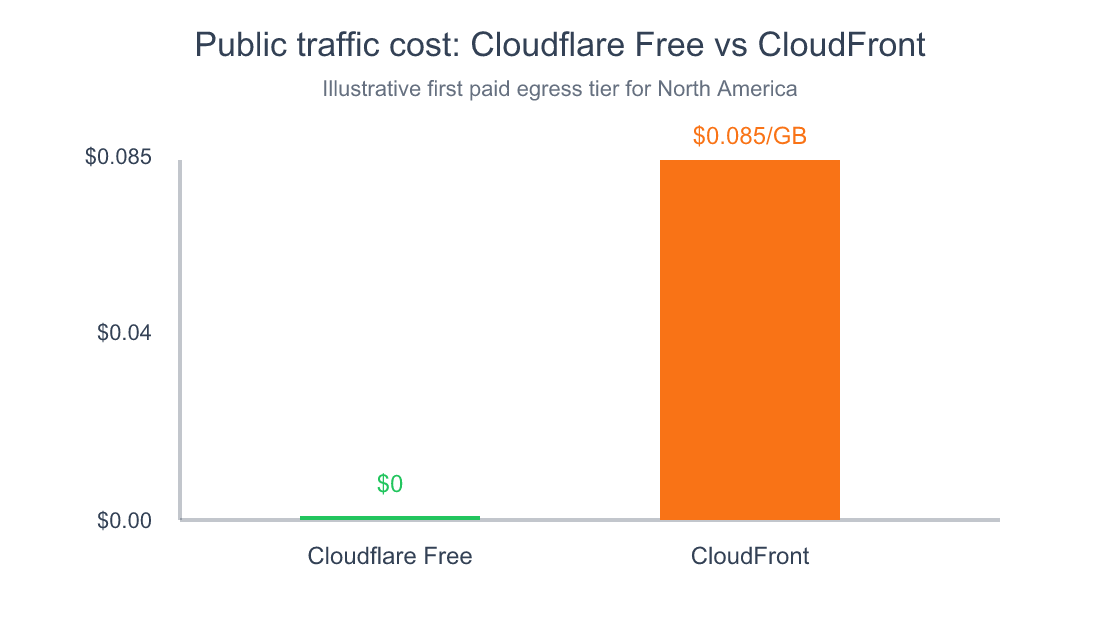
Source: Cloudflare Free plan positioning and AWS CloudFront public pricing for the first paid North America tier after 1 TB free.
If you are deciding between the two, start with this question: do you need a general-purpose front door for a public website, or do you need a CDN component inside an AWS-centric architecture? Those are not the same buying decisions.
For more solo-founder infrastructure trade-offs, see
how hosting choices change what kind of infrastructure glue you need later.
What Should Stay Gray-Clouded, and Why Email Keeps Working
Cloudflare proxies HTTP and HTTPS traffic, not mail transport. That is why MX records stay direct, and why related mail-discovery records often should stay gray-clouded too. If you orange-cloud the wrong records, you can create weird mail problems while celebrating a web fix.
This part is boring, which is exactly why it is dangerous.
In my zone, I unproxied five email-related CNAMEs:
autoconfigautodiscover- three
hostingermailrecords
I left those gray-clouded because they are part of the email path, not the web path. Cloudflare does not sit in front of SMTP the way it sits in front of HTTP(S). MX records can’t be proxied in the same sense, which is why email kept working while the website path changed.

If you are using Hostinger email alongside Hostinger hosting, double-check every mail-related record during import. The auto-import is good. It is not magic.
The 5-Minute Cloudflare for WordPress Tuning I Would Do on Any Site
Google says it strongly recommends site owners achieve good Core Web Vitals, and that those signals align with what its core ranking systems seek to reward (Google Search Central, 2026). Cloudflare does not guarantee ranking gains, but it gives you several easy wins around HTTPS, compression, and transport.
After the reachability issue was fixed, I spent another five minutes on sane defaults:
- SSL/TLS:
Full (strict) - Always Use HTTPS: on
- Automatic HTTPS Rewrites: on
- Minimum TLS: 1.2
- HSTS: enabled with a six-month max-age
- Auto Minify: HTML, CSS, JS
- Brotli: on
- HTTP/3: on
- Early Hints: on
Then I added two cache-bypass rules:
*maketocreate.com/wp-admin*-> Cache Level: Bypass*maketocreate.com/wp-json/*-> Cache Level: Bypass
Why bypass those? Because WordPress admin and the REST API are dynamic. They are exactly the places where aggressive caching creates ghost bugs. You do not want a faster dashboard if it is serving the wrong state.
The Cloudflare WordPress plugin also claims APO can speed up a WordPress site by up to 300% by serving HTML from the edge network (WordPress.org, 2026). I did not need APO to solve this outage, but it is worth knowing the product exists if your site has enough read-heavy traffic to justify it.
If you’re tuning the app side as well as the network side, see
where cache, proxy, and security layers fit together without stepping on each other.
Who Should Put Cloudflare in Front of a WordPress Site?
Cloudflare mitigated 47.1 million DDoS attacks in 2025 and is already the most common reverse proxy detected by W3Techs (Cloudflare, 2025; W3Techs, 2026). That does not mean every WordPress site needs it. It does mean the default case for at least trying it is much stronger than it used to be.
I would seriously consider it if:
- your site is intermittently unreachable from certain regions or ISPs
- you want free SSL without fiddly origin cert handling
- you care about global TTFB more than local-host simplicity
- you want a cheap first layer against DDoS noise
- you are on shared hosting and want a better front door than the host gives you
My biggest lesson from this incident was not “Cloudflare is amazing.” It was narrower than that. It was this: when the public path is the problem, changing the public path can be the cleanest fix. That sounds obvious after the fact. It did not feel obvious at 8 a.m. when my site was dead on one network and healthy on every other one.
If your site is small, that may be all the architecture you need. If your stack gets bigger later, Cloudflare can stay the edge while the origin changes behind it.
Frequently Asked Questions
Can Cloudflare really fix an ISP blocking or routing issue?
Sometimes, yes. In my case it did, because the website stopped exposing the Hostinger origin IP as the first public destination. Users started hitting Cloudflare IPs instead. Cloudflare’s network spans data centers in more than 120 countries and interconnects with over 13,000 networks, which gives requests many more viable paths than a single shared-hosting origin does (Cloudflare, 2026).
Does Cloudflare replace my web host?
No. Hostinger was still my origin after the fix. Cloudflare became the public front door: DNS, proxy, TLS, and caching at the edge. The content still lived on the host. Think of it as changing the reception desk, not moving the office. That distinction is why the migration took minutes instead of a full re-platform.
Is Cloudflare the same thing as CloudFront?
No. AWS says CloudFront gives you 1 TB of free data transfer out each month, then charges $0.085 per GB in North America for the next tier (AWS, 2026). CloudFront is AWS’s CDN product. Cloudflare is an independent reverse proxy and application-services platform with a very different default entry point for small public websites.
Will Cloudflare break my email setup on Hostinger?
Not if you review the DNS records carefully. MX records are not proxied the way web traffic is, and mail auto-discovery records often should stay gray-clouded too. In my zone I left autoconfig, autodiscover, and the hostingermail records unproxied. The web path changed; the mail path did not.
Is Cloudflare overkill for a small WordPress blog?
Usually not. W3Techs says Cloudflare powers 22.3% of all websites and 87.9% of WordPress sites whose reverse proxy is known (W3Techs, 2026). That level of adoption suggests the operational overhead is low enough for even small sites, especially if you want better DNS, HTTPS defaults, and a more resilient front door.
Should I turn on every performance feature immediately?
No. Start with the safe defaults: Full (strict), HTTPS enforcement, Brotli, HTTP/3, and sensible cache bypass rules for wp-admin and wp-json. Google recommends good Core Web Vitals, but it also says those signals are just part of what ranking systems reward (Google Search Central, 2026). Faster is good. Incorrectly cached is not.
Conclusion
My website was never truly “down.” It was unreachable from one network because that network had a broken path to my origin. Once I saw that clearly, the fix got simple: stop making the origin IP the public front door.
That is what Cloudflare did for me. Not with a dramatic migration. Not with a week-long infra project. Just with cleaner DNS, a globally peered edge, and a different route into the same WordPress site.
If your WordPress site on Hostinger suddenly works everywhere except one ISP, do not waste the first hour reinstalling plugins. Run ping. Run curl. Run traceroute. Ask whether the request is even reaching the host. Then, if the path is the bug, put a better path in front of it.
For the next useful rabbit hole after this one, read
how I automate the publishing side once the infrastructure is stable
or
how to think about infrastructure trade-offs before they become outages.