Which Belongs Where: Secret Manager or a Plain Env Var?
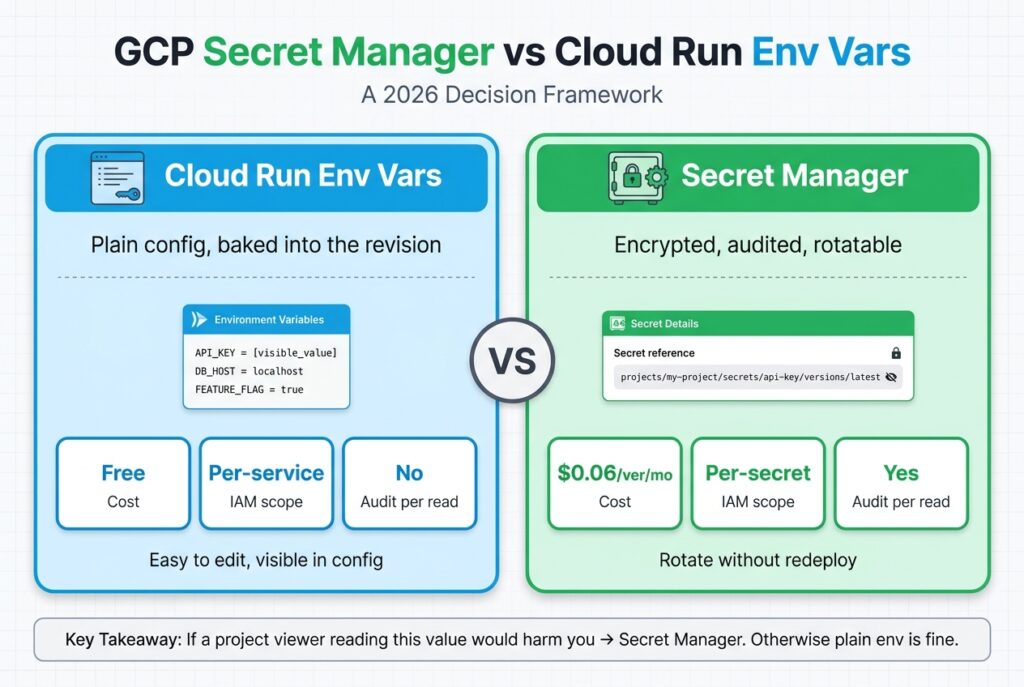
GCP Secret Manager vs Cloud Run env vars is a deliberate sensitivity-vs-convenience tradeoff, not a generic security best practice. Plain env vars are fast to read, fast to edit, and visible in gcloud run services describe. Secret Manager is harder to access, but it encrypts, audits, and version-controls every value behind per-secret IAM. Google’s own Cloud Run docs say they “don’t recommend” env vars as a way to store secrets such as database credentials or API keys (Google Cloud, 2026). The mistake teams make in 2026 is binary: everything in env, or everything in Secret Manager. Both extremes break.
The right decision is per-variable, and it takes one question to make.
Key Takeaways
- Decision rule: if a project viewer reading this value would harm you, store it in Secret Manager. Otherwise plain env is fine.
- Plain env vars in Cloud Run are visible to anyone with
run.services.getand frozen in revision history (up to 1,000 revisions per service before the oldest are deleted) (Google Cloud, 2026).- Secret Manager gives you per-secret IAM, audit logs on every read, independent versioning, rotation reminders, and CMEK, none of which env vars provide. Pin env-var secrets to a version number, as Google recommends; mount as a volume if you want hot rotation.
- Pricing is trivial: $0.06 per active secret version per month and $0.03 per 10,000 access operations, with 6 versions and 10,000 accesses free monthly (Google Cloud, 2026).
- For a typical 17-secret SaaS, monthly Secret Manager spend is under $1. What raises it is versions times locations, not reads.
If you handle webhook signatures or other request-authenticity work, the same sensitivity logic applies to webhook signing secrets: see idempotency keys, webhook signature verification, and where signing secrets belong.
The One Question to Ask Per Variable
The decision rule is a single sentence. If a project viewer read this value, would I care? Not “is it sensitive in the abstract.” Just: would a teammate (or attacker) gaining read access to this string cost you money, data, or trust?
Apply it to four examples and the rule sharpens:
GEMINI_API_KEY: leak burns billing under your quota. Yes. → Secret Manager.STRIPE_WEBHOOK_SECRET: leak lets an attacker forgecheckout.session.completedevents. Yes. → Secret Manager.GCS_BUCKET_NAME: bucket name without an IAM grant buys an attacker nothing. No. → Plain env.ALLOWED_ORIGINS: public by design; echoed in every CORS preflight. No. → Plain env.
I once set ALLOWED_ORIGINS as a plain env var. Fine. The same week I almost did the same with the Gemini key, that would have been a mistake I’d have paid for the first time the revision history got pasted in a debug thread.
The Leak-Impact Table
“API keys are sensitive” isn’t useful. Naming the actual outcome of a leak is, because that’s what calibrates the question against real risk.
| Variable type | Where to store | Risk if leaked |
|---|---|---|
GEMINI_API_KEY / OPENAI_API_KEY |
Secret Manager | Free LLM bill on your quota, four-figure spend overnight is realistic. |
| OAuth client secret | Secret Manager | Attacker impersonates your app, captures user tokens, completes account takeover. |
| Stripe / Lemon Squeezy webhook secret | Secret Manager | Forged webhook events flip orders to “paid” without payment. |
Stripe API key (sk_live_...) |
Secret Manager | Direct charges, refunds, customer PII access against your live account. |
| Firebase admin SDK JSON | Secret Manager | Full read/write/delete on Firestore and Auth, bypasses every security rule. |
| Service-key bearer token (Scheduler → backend) | Secret Manager | Anyone with the token hits your “internal” endpoints from anywhere. |
| Resend / Postmark API key | Secret Manager | Spam blast from your domain, sender reputation gone, deliverability tanks. |
| GA4 API secret (Measurement Protocol) | Secret Manager | Attacker writes garbage events into your analytics, polluting reports. |
GA4 measurement ID (G-XXXXXX) |
Plain env | Public, appears in every page’s HTML. |
GCS_BUCKET_NAME |
Plain env | Bucket name without an IAM grant is unusable. |
GCP_PROJECT_ID |
Plain env | Frequently public (URLs, error messages). |
ALLOWED_ORIGINS |
Plain env | Echoed in every CORS preflight response. |
Feature flags (ENABLE_BETA_FEATURE) |
Plain env | Reveals product roadmap at worst. |
The pattern: anything that grants access, signs a payload, or unlocks money goes to Secret Manager. Everything else stays in plain env, where it’s easy to edit and obvious in logs.
GCP Secret Manager vs Cloud Run Env Vars: The Structural Differences
Secret Manager isn’t “encrypted env vars.” It’s a separate service with a different IAM model and different operational primitives. The capabilities it adds are not stylistic preferences, each one corresponds to a specific failure mode plain env can’t handle.
| Capability | Plain Cloud Run env | Secret Manager |
|---|---|---|
| Encryption at rest | Implicit (Google managed) | Explicit, with optional CMEK keys you control |
| IAM granularity | Per-service (run.services.get) |
Per-secret (roles/secretmanager.secretAccessor) |
| Versioning | Tied to Cloud Run revision | Independent versions per secret |
| Rotation without redeploy | No (requires new revision) | Volume mounts: yes, each read fetches latest. Env-var mounts: resolved at instance start |
| Audit log per read | No | Yes, via Cloud Audit Logs Data Access logs |
| Cross-service reuse | Copy-paste | One secret, multiple consumers (Run, Functions, Cloud Build, GKE) |
| Cost | Free | $0.06/version/location/month, $0.03/10K accesses; 6 versions + 10K accesses free monthly |
Pricing is the part most posts hand-wave. For a typical 17-secret SaaS with one active version each on automatic replication, that’s 11 paid versions × $0.06 = $0.66/month, with access ops near zero because most apps stay inside the 10,000-call free tier (Google Cloud Secret Manager Pricing, 2026). Sub-dollar cost is not a reason to skip Secret Manager. It’s a reason to default to it.
How Values Actually Get Into the Container
Both mechanisms end up as process environment variables. The difference is what happens before the container starts.
Plain env: Cloud Run reads the env block from the revision config and sets each KEY=value pair in the container before your process runs. The values are stored verbatim in the service config and visible to any caller with run.services.get.
Secret Manager mount: the revision config stores a reference (projects/PROJECT/secrets/NAME/versions/latest), not the value. At container start, Cloud Run uses the revision’s runtime service account to call secretmanager.versions.access. That call requires roles/secretmanager.secretAccessor, returns the decrypted payload, and Cloud Run injects it as an env var. From the app’s perspective, process.env.GEMINI_API_KEY works identically, but the actual string never sits in the service config (Google Cloud Run Configure Secrets, 2026).
Secret Manager volume mount: the third option, and the one most tutorials skip. Cloud Run exposes the secret as a file (say /etc/secrets/gemini/key), and “when reading a volume, Cloud Run always fetches the secret value from the Secret Manager to use the value with the latest version” (Google Cloud, 2026). Your app reads a file instead of an env var, and in exchange a new version reaches running instances without a redeploy.
The timing difference matters more than people expect. For an env-var secret, Cloud Run fetches the value before the instance starts, and if that fetch fails, “the instance doesn’t start.” A volume mount skips that startup check, so a permission mistake shows up later as a failed file read instead. That’s also why Google recommends pinning env-var secrets “to a particular version instead of using latest” (Google Cloud, 2026): with :latest, two instances started an hour apart can quietly run different credentials.
Same end state in the container. Different blast radius if someone reads the service config.
Three Anti-Patterns to Avoid
-
“Plain env is fine for now, fix it later.” Cloud Run allows up to 1,000 revisions per service and only deletes older ones automatically once you exceed that (Google Cloud Run Revisions, 2026). A credential set as plain env in a revision shipped on Tuesday remains visible in that revision’s config until you delete the revision or 999 newer ones push it out. Rotating the key doesn’t help if the old key is still readable in a four-month-old revision. Plain env credentials are a permanent record of every credential you ever shipped that way.
-
“Use Secret Manager for everything.” Now adding a CORS domain to
ALLOWED_ORIGINSrequires a Secret Manager version bump plus a new Cloud Run revision. Feature flag flip? Same. Project ID change for staging? Same. The operational overhead is real, and the security benefit is zero, none of those values gain anything from encryption or audit logs. -
Hardcoding into the Docker image. Worst of all worlds: the credential ships to Artifact Registry inside the image layers, caches in CI runners, sits in any developer’s local
docker pull, and survives long after the Cloud Run revision is gone. Image registries are not secret stores.
Concrete How-To
Two examples against a Cloud Run service named api. If you’re still at the empty-project stage, the service-account and API setup these commands assume is Phase B of my 8-phase GCP production setup checklist.
Plain env var:
gcloud run services update api \
  --region=us-central1 \
  --update-env-vars="ALLOWED_ORIGINS=https://app.example.com,https://www.example.com"
Secret Manager-backed env var:
# 1. Create the secret and add the first version
echo -n "AIzaSyD...your-real-key..." | \
  gcloud secrets create gemini-api-key --data-file=-

# 2. Grant the runtime service account read access to this one secret
gcloud secrets add-iam-policy-binding gemini-api-key \
  --member="serviceAccount:api-runtime@PROJECT_ID.iam.gserviceaccount.com" \
  --role="roles/secretmanager.secretAccessor"

# 3. Mount it as an env var on the next Cloud Run revision,
#    pinned to version 1 (Google's recommendation for env-var secrets)
gcloud run services update api \
  --region=us-central1 \
  --update-secrets="GEMINI_API_KEY=gemini-api-key:1"
In gcloud run services describe api --format=yaml afterward:
env:
  - name: ALLOWED_ORIGINS
    value: 'https://app.example.com,https://www.example.com'
  - name: GEMINI_API_KEY
    valueFrom:
      secretKeyRef:
        name: gemini-api-key
        key: '1'
The plain var shows its value: in the clear. The secret-backed var shows only a reference. Anyone with run.services.get sees both rows, only the first leaks the credential.
If you’d rather have rotation land without a new revision, mount the same secret as a file instead:
gcloud run services update api \
  --region=us-central1 \
  --update-secrets="/etc/secrets/gemini/key=gemini-api-key:latest"
Your code then reads /etc/secrets/gemini/key when it needs the value. I use env-var mounts with pinned versions for anything read once at boot (database URLs, signing secrets) and file mounts for the rare value I want to rotate under a running service.
The Audit Story
If a Gemini API key sits in plain env and turns up in a public gist, the question “who read this from our infra?” has no answer. The Cloud Run service config has no read log.
Move the same key to Secret Manager with Data Access audit logs enabled, and every AccessSecretVersion call (a DATA_READ method in Google’s audit-log reference) lands in Cloud Logging under the secretmanager.googleapis.com service, with caller identity, source IP, and timestamp (Google Cloud Audit Logging for Secret Manager, 2026). Forensics goes from “we don’t know” to “we know exactly which service account, from which IP, read this version.” Data Access logs are off by default, enabling them is a one-time IAM policy change worth making before you ship.
What Stays in Plain Env
Reinforcing the rule by listing the appropriate uses of plain env, values where anyone with run.services.get who reads them gains nothing actionable:
GCP_PROJECT_ID,GCP_REGION,GCS_BUCKET_NAMEALLOWED_ORIGINSGEMINI_MODEL(e.g.,gemini-3.1-pro-preview)- Feature flags (
ENABLE_BETA_PIPELINE,MAINTENANCE_MODE) GA4_MEASUREMENT_ID(theG-XXXXone already in your HTML)- Public observability tags (
SERVICE_NAME,DEPLOY_ENV)
These change frequently. Operational simplicity beats theoretical security when there’s no security delta to capture.
What Does Secret Manager Cost Once You Have Dozens of Secrets?
The sub-dollar number above holds only while you keep one version per secret in one location. Two settings multiply the bill: how many versions you leave active, and how many locations each secret replicates to. Google’s own pricing page shows this with a worked example, and it’s the clearest picture I’ve found of where the money goes (Google Cloud, 2026).
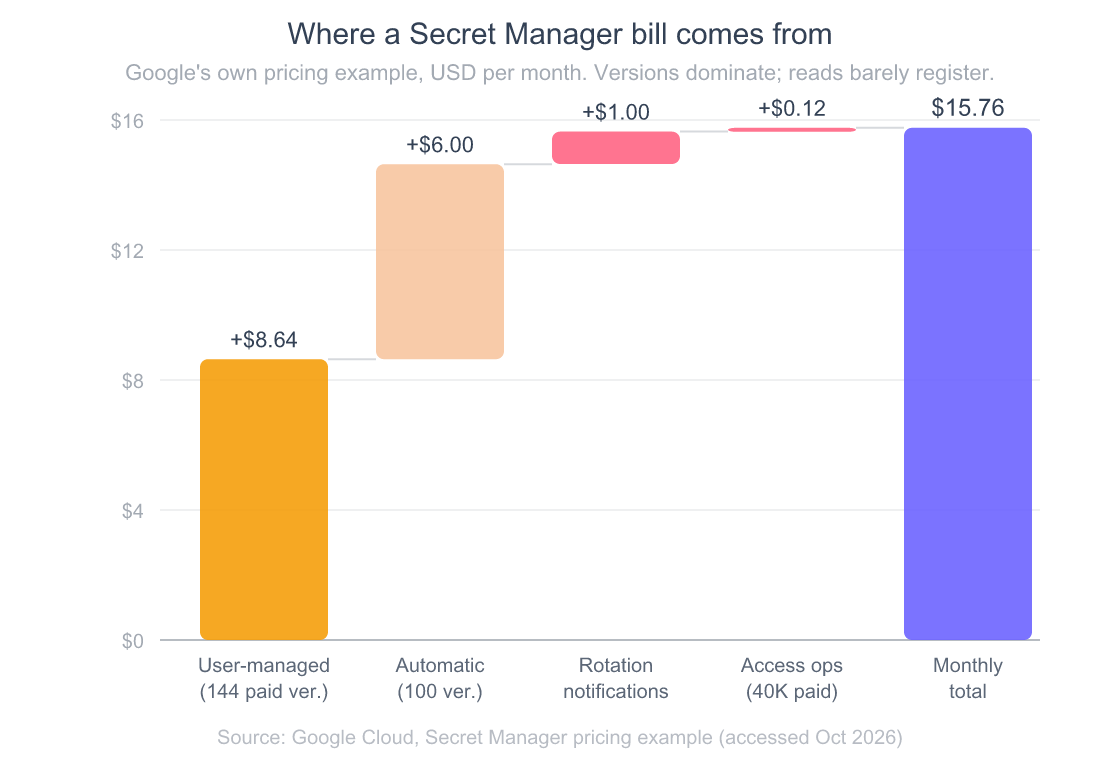
Read the bars left to right. Ten secrets replicated to three user-managed locations with five versions each is 150 billable versions, and that alone is $8.64 after the 6 free ones. Another ten secrets on automatic replication with ten versions each adds $6.00. Rotation notifications add $1.00. Fifty thousand reads add twelve cents. Reads are almost free; versions and locations are the bill.
Three details on that page change how I manage secrets:
- Billing is per version, per location. A secret on an automatic replication policy “is billed as a single location.” A user-managed policy across three regions bills three times for every version.
- Disabled still costs money. Destroyed doesn’t. Google counts a version as active when it’s enabled or disabled. Destroyed versions are free. So “disable the old key” is a safety step, not a cleanup step.
- Management calls are free. Creating secrets, destroying them, and changing version state aren’t billed. Only active versions, access operations, and rotation notifications are.
My practical rule: after a rotation settles, disable the old version for a few days in case something still reads it, then destroy it. Keep at most two live versions per secret. That keeps a 17-secret app inside a dollar a month even with replication.
What Are Secret Manager’s Quotas and Limits?
You’ll almost never hit Secret Manager’s read quota from Cloud Run, but the write limits are low enough to bite rotation scripts. The quotas page lists a 64 KiB payload cap per version, up to 50 aliases, and request quotas of 90,000 access calls, 600 reads, and 600 writes per minute per project (Google Cloud, 2026).
The 90,000-per-minute access quota sounds generous because it is. When you mount a secret as an env var, Cloud Run reads it once per instance start, not once per request. Even an aggressive autoscaler doesn’t come close. The trouble starts if your app calls the Secret Manager API on every request instead of using the mount, which is also the easiest way to turn twelve cents of access ops into real money.
The write side is tighter, and it depends on whether the secret is global or regional:
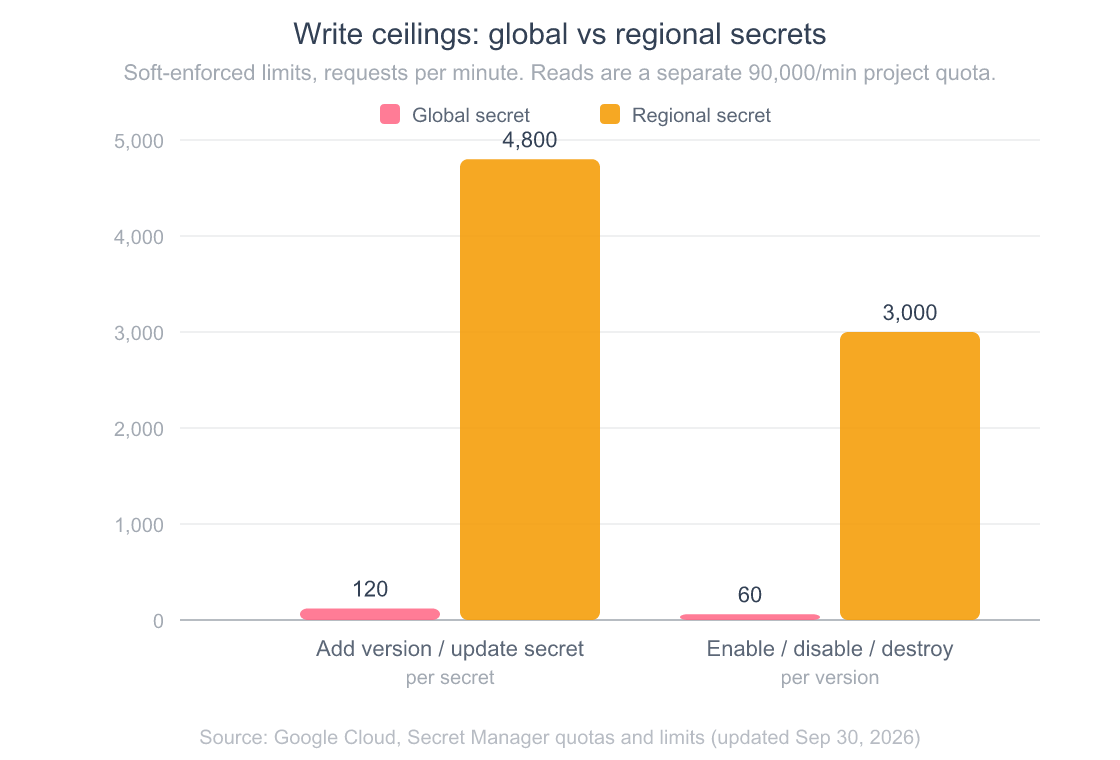
Global secrets accept 2 requests per second (120 per minute) per secret for adding versions or updating the secret, and just 1 per second per version for enable, disable, and destroy. Regional secrets get 80 and 50 per second respectively, which is 40 to 50 times more headroom. These are soft limits, so Google may serve beyond them if its backend can absorb the load, but I wouldn’t design around that.
Where this matters in practice: a rotation script that loops over every secret and adds, enables, and disables versions in a tight loop. On global secrets, pace it. If you also need data to stay in one geography for compliance, regional secrets solve both problems at once, since Google positions them specifically for data residency (Google Cloud, 2026).
How Does Secret Rotation Actually Work on GCP?
Here’s the part that surprised me the first time: Secret Manager doesn’t rotate anything. It schedules a reminder. You set a rotation_period (or an explicit next_rotation_time) on the secret, and at that moment Secret Manager publishes a SECRET_ROTATE message to the Pub/Sub topics you’ve attached. Then, per Google’s docs, “you must configure a Pub/Sub subscriber to receive and act on the SECRET_ROTATE messages” (Google Cloud, 2026). Generating the new Stripe key, OAuth secret, or database password is your code’s job.
The flow I’d build for a small SaaS looks like this:
- Schedule. Set a rotation period on each credential that supports programmatic rotation (database passwords, internal bearer tokens). Vendor keys you can only rotate in a dashboard get a calendar reminder instead.
- Rotate. A small Cloud Run function subscribed to the topic creates the new credential with the provider and calls
gcloud secrets versions add(or the API equivalent). - Roll out. Update the Cloud Run service to pin the new version number. That creates a new revision, so you get a normal, reversible rollout.
- Retire. Once traffic on the old revision is gone, disable the old version, watch for errors for a few days, then destroy it.
Rotation notifications are cheap but not free: 3 a month per billing account are included, then $0.05 each (Google Cloud, 2026). A monthly rotation on 17 secrets runs about 70 cents. That’s a fair price for never having a four-year-old database password in production.
Frequently Asked Questions
What’s the cost of Secret Manager on GCP?
Secret Manager bills $0.06 per active secret version per location per month (disabled versions count as active, destroyed ones don’t) and $0.03 per 10,000 access operations, with a free tier of 6 active versions, 10,000 access operations, and 3 rotation notifications each month (Google Cloud, 2026). Rotation notifications cost $0.05 each beyond the free tier. For a typical 17-secret SaaS, that works out to roughly $0.66/month for storage and effectively zero for access, under one dollar total. CMEK keys add a small KMS charge separately.
Can I see Secret Manager values in gcloud run services describe?
No. The output shows a valueFrom: secretKeyRef: block referencing the secret name and version, never the decrypted value. To see the actual payload you need a separate gcloud secrets versions access latest --secret=NAME call, which itself requires roles/secretmanager.secretAccessor and gets logged in Cloud Audit Logs if Data Access logs are enabled. Plain env vars, by contrast, show their value: field directly in describe output, which is precisely why they leak in pasted debug threads.
How do I rotate a secret without redeploying Cloud Run?
Mount it as a volume. Add the new version with echo -n "NEW_VALUE" | gcloud secrets versions add SECRET_NAME --data-file=-, and a secret mounted as a file at :latest serves it on the next read, because Cloud Run fetches the latest version every time the volume is read (Google Cloud, 2026). Env-var secrets are different: they’re resolved once at instance startup, so running instances keep the old value until they’re replaced. For env vars, Google recommends pinning a version number, which means rotation is a deliberate gcloud run services update --update-secrets=KEY=SECRET_NAME:8 that ships a new revision. I prefer that for most credentials because the rollout is visible and reversible.
Are Cloud Run env vars encrypted at rest?
Cloud Run service configurations, including environment variables, are encrypted at rest by Google’s default encryption, like all Google Cloud customer data. That’s not the relevant property, though. The risk model isn’t “an attacker stole Google’s disks.” It’s “a teammate or compromised IAM principal calls run.services.get and reads the values in cleartext from the API response.” Google’s docs explicitly warn against using env vars for credentials for exactly this reason (Google Cloud Run Environment Variables, 2026).
What IAM role does my service account need to read secrets?
Grant roles/secretmanager.secretAccessor at the secret level, not the project level. That role contains secretmanager.versions.access, which is the single permission Cloud Run needs to mount a secret as an env var. Granting at the secret level (rather than project-wide) is the whole point of Secret Manager’s IAM model: each service account can be scoped to exactly the secrets it needs, so a compromised runtime SA for service A cannot read service B’s credentials. Project-level grants throw that away.
The Default Rule
Default every credential to Secret Manager from day one. Revisit only when a real ops constraint argues otherwise: and “we want it in plain env so we can edit it faster” is not a real ops constraint when the alternative costs sub-dollar per month and buys you audit logs, versioning, and per-secret IAM. Plain env stays for project IDs, bucket names, regions, allowed origins, model names, and feature flags. Every API key, OAuth secret, webhook signing key, and service-account-derived bearer token goes to Secret Manager. The decision is per-variable, the question is one sentence, and the answer almost always points the same way.