
PHP 8.1 Enums: Backed Enums and Laravel Eloquent Casts
PHP enums landed in version 8.1, and they’ve quietly become one of the most adopted features across the ecosystem. With 85.9% of Packagist users now running PHP 8.x (Stitcher.io, June 2025), there’s little excuse to keep scattering magic strings and integer constants across your codebase. Enums give you type safety, autocompletion, and a single source of truth for fixed sets of values.
This tutorial walks through backed enums from scratch, then shows how Laravel’s Eloquent casting system turns database columns into enum instances automatically. You’ll get copy-pasteable code for every step. Even if PHP 8.1 reached end-of-life on December 31, 2026, the enum syntax carries forward unchanged into 8.2, 8.3, and 8.4 — so everything here applies regardless of your PHP version.
PHP version upgrade guide
TL;DR: PHP 8.1 enums replace scattered class constants with type-safe, autocompletable value objects. Backed enums map cases to string or int scalars, and Laravel Eloquent casts them automatically via the model’s
casts()method. With 85.9% of Packagist users on PHP 8.x (Stitcher.io, June 2025), enums are production-ready everywhere.
What Are PHP Enums?
PHP powers 72.0% of all websites with a known server-side language (W3Techs, February 2026), yet for decades it lacked a native way to represent a fixed set of values. Enums, introduced in PHP 8.1 via an RFC by Larry Garfield and Ilija Tovilo (PHP RFC, 2026), solve this by giving you first-class enumerated types with full IDE support.
The Problem Enums Solve
Before enums, developers relied on class constants or bare strings. Both approaches break silently.
// old-approach.php - The fragile way

class OrderStatus
{
    const PENDING = 'pending';
    const SHIPPED = 'shipped';
    const DELIVERED = 'delivered';
}

function updateStatus(string $status): void
{
    // Nothing stops you from passing 'banana' here
}

updateStatus('banana'); // No error. No warning. Just bugs.
That string type hint accepts any string. Typos slip through. Refactoring is risky because grep is your only safety net. And you can’t attach behavior to a plain constant.
PHP type safety
Pure Enum Syntax
A pure enum has no scalar backing value. It’s useful when you only need to distinguish between cases, not store them in a database.
// OrderStatus.php - Pure enum (no backing value)

enum OrderStatus
{
    case Pending;
    case Shipped;
    case Delivered;
}

function updateStatus(OrderStatus $status): void
{
    // Only accepts valid OrderStatus cases. Nothing else.
}

updateStatus(OrderStatus::Pending);  // Works
updateStatus('pending');             // TypeError: caught at compile time
Pure enums are objects. You can compare them with ===, use them in match expressions, and pass them as typed parameters. But they can’t be stored directly in a database column because they carry no scalar value.
That’s where backed enums come in.
How Do Backed Enums Work in PHP 8.1?
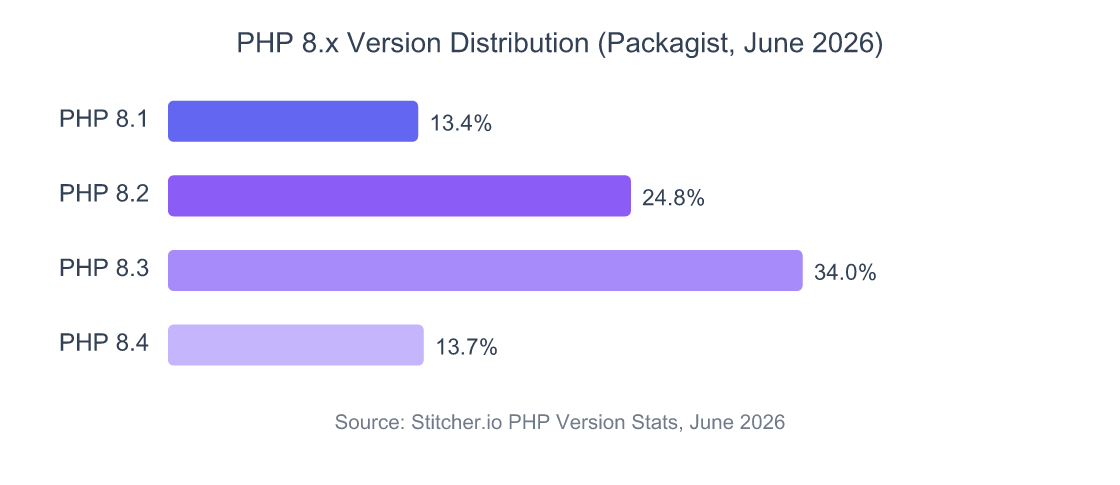
Backed enums map each case to a string or int value, making them perfect for database storage and API communication. Among Packagist users, PHP 8.3 leads adoption at 34.0%, followed by 8.2 at 24.8% and 8.4 at 13.7% (Stitcher.io, June 2025) — all versions that support the backed enum syntax introduced in 8.1.
String-Backed Enums
The most common pattern. You declare : string after the enum name, then assign a value to every case.
// OrderStatus.php - String-backed enum

enum OrderStatus: string
{
    case Pending = 'pending';
    case Processing = 'processing';
    case Shipped = 'shipped';
    case Delivered = 'delivered';
    case Cancelled = 'cancelled';
}

echo OrderStatus::Shipped->value; // "shipped"
echo OrderStatus::Shipped->name;  // "Shipped"
Every case must have a value. You can’t mix backed and unbacked cases — it’s all or nothing.
Int-Backed Enums
Same concept, but with integers. Useful for legacy databases or bitfield-style mappings.
// Priority.php - Int-backed enum

enum Priority: int
{
    case Low = 1;
    case Medium = 2;
    case High = 3;
    case Critical = 4;
}

echo Priority::High->value; // 3
from() vs tryFrom() — Choosing the Right Method
Backed enums automatically implement the BackedEnum interface, which provides two static methods for converting raw values back into enum instances. This is where things get practical.
// from-vs-tryfrom.php - Error handling comparison

// from() throws ValueError for invalid input
$status = OrderStatus::from('shipped');    // OrderStatus::Shipped
$status = OrderStatus::from('invalid');    // ValueError: "invalid" is not a valid backing value

// tryFrom() returns null for invalid input
$status = OrderStatus::tryFrom('shipped'); // OrderStatus::Shipped
$status = OrderStatus::tryFrom('invalid'); // null
When to use which? Use from() when an invalid value means something went wrong — corrupted data, a broken API contract. Use tryFrom() when the value comes from user input and you want to handle failure gracefully.
In practice, you’ll find tryFrom() paired with null coalescing is the most defensive pattern for processing API payloads:
// safe-parsing.php - Defensive enum parsing

$status = OrderStatus::tryFrom($request->input('status')) ?? OrderStatus::Pending;
One line. No exceptions. A sensible default. That’s the pattern I reach for in every controller.
PHP error handling
What Can You Do With Enum Methods and Interfaces?
PHP enums aren’t just value containers — they support methods, interfaces, and traits, making them surprisingly flexible. Since 61% of PHP developers use Laravel regularly (JetBrains, 2025), most teams encounter enums in a framework context where custom methods on enums reduce boilerplate significantly.
Adding Methods to Enums
You can define methods directly inside an enum. This keeps related logic co-located with the values it operates on.
// OrderStatus.php - Enum with methods

enum OrderStatus: string
{
    case Pending = 'pending';
    case Processing = 'processing';
    case Shipped = 'shipped';
    case Delivered = 'delivered';
    case Cancelled = 'cancelled';

    public function label(): string
    {
        return match ($this) {
            self::Pending => 'Awaiting Review',
            self::Processing => 'In Progress',
            self::Shipped => 'On Its Way',
            self::Delivered => 'Completed',
            self::Cancelled => 'Cancelled',
        };
    }

    public function color(): string
    {
        return match ($this) {
            self::Pending => 'yellow',
            self::Processing => 'blue',
            self::Shipped => 'indigo',
            self::Delivered => 'green',
            self::Cancelled => 'red',
        };
    }

    public function isFinal(): bool
    {
        return in_array($this, [self::Delivered, self::Cancelled]);
    }
}

// Usage
echo OrderStatus::Shipped->label(); // "On Its Way"
echo OrderStatus::Shipped->color(); // "indigo"
Implementing Interfaces
Enums can implement interfaces but cannot extend classes. This is a deliberate design choice — enums are closed sets, not inheritance hierarchies.
// HasLabel.php + OrderStatus.php - Interface implementation

interface HasLabel
{
    public function label(): string;
}

enum OrderStatus: string implements HasLabel
{
    case Pending = 'pending';
    case Shipped = 'shipped';

    public function label(): string
    {
        return match ($this) {
            self::Pending => 'Awaiting Review',
            self::Shipped => 'On Its Way',
        };
    }
}
The cases() Method
Every enum gets a static cases() method that returns an array of all cases. It’s invaluable for building dropdowns, seeders, and validation rules.
// cases-example.php - Listing all enum values

$allCases = OrderStatus::cases();
// [OrderStatus::Pending, OrderStatus::Processing, ...]

// Build a dropdown options array
$options = array_column(OrderStatus::cases(), 'value', 'name');
// ['Pending' => 'pending', 'Processing' => 'processing', ...]
PHP match expression
How Do You Cast Enums in Laravel Eloquent?
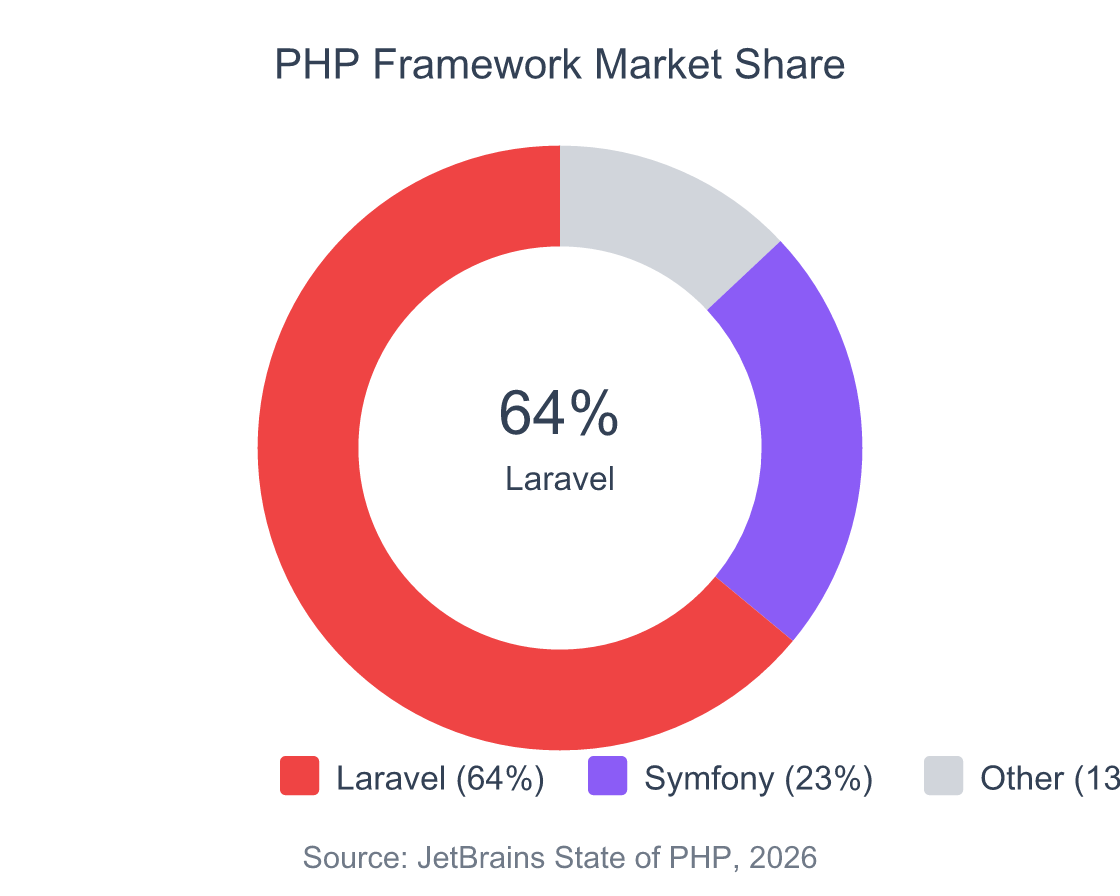
Laravel holds 64% market share among PHP frameworks (JetBrains, 2025), and its Eloquent ORM supports enum casting natively. You declare the cast once in your model, and Eloquent handles conversion between database strings and enum instances on every read and write.
Migration Setup
Your database column stores the raw scalar value. Use a string column for string-backed enums.
// database/migrations/2026_02_26_create_orders_table.php

use Illuminate\Database\Migrations\Migration;
use Illuminate\Database\Schema\Blueprint;
use Illuminate\Support\Facades\Schema;

return new class extends Migration
{
    public function up(): void
    {
        Schema::create('orders', function (Blueprint $table) {
            $table->id();
            $table->string('customer_name');
            $table->string('status')->default('pending');
            $table->integer('priority')->default(1);
            $table->timestamps();
        });
    }
};
Model Casts
Here’s where the magic happens. Add the enum class to your model’s casts() method, and Eloquent handles the rest.
// app/Models/Order.php

namespace App\Models;

use App\Enums\OrderStatus;
use App\Enums\Priority;
use Illuminate\Database\Eloquent\Model;

class Order extends Model
{
    protected $fillable = [
        'customer_name',
        'status',
        'priority',
    ];

    protected function casts(): array
    {
        return [
            'status' => OrderStatus::class,
            'priority' => Priority::class,
        ];
    }
}
Important: Eloquent enum casting requires backed enums. Pure enums have no scalar value to store in a database column, so they can’t be cast. You’ll get an error if you try.
Reading and Writing Enum Attributes
Once casting is set up, you work with enum instances directly. No manual conversion needed.
// reading-writing.php - Working with cast enum attributes

// Creating a new order
$order = Order::create([
    'customer_name' => 'Alice',
    'status' => OrderStatus::Pending,    // Stored as 'pending' in DB
    'priority' => Priority::High,         // Stored as 3 in DB
]);

// Reading: automatically returns enum instances
$order->status;            // OrderStatus::Pending (enum instance)
$order->status->value;     // 'pending' (string)
$order->status->label();   // 'Awaiting Review' (custom method)
$order->status->name;      // 'Pending'

// Updating
$order->status = OrderStatus::Shipped;
$order->save();

// Comparing
if ($order->status === OrderStatus::Delivered) {
    // Ship confirmation email
}
Querying With Enums
You can pass enum instances directly to Eloquent query methods. Laravel extracts the backing value automatically.
// queries.php - Enum-aware Eloquent queries

// Both of these work identically:
Order::where('status', OrderStatus::Shipped)->get();
Order::where('status', 'shipped')->get();

// Multiple values
Order::whereIn('status', [
    OrderStatus::Pending,
    OrderStatus::Processing,
])->get();

// Using enum methods in scopes
// app/Models/Order.php
public function scopeActive($query)
{
    return $query->whereNotIn('status', [
        OrderStatus::Delivered,
        OrderStatus::Cancelled,
    ]);
}

// Usage
Order::active()->get();
Eloquent query scopes
How Do You Validate Enum Values in Laravel?
Laravel ships with a built-in Enum validation rule since version 9, which covers the majority of use cases given that Laravel powers over 1.5 million websites globally. This rule rejects any value that doesn’t match a valid case in your enum, and it works with both string and integer backing types.
Basic Validation Rule
// app/Http/Requests/UpdateOrderRequest.php

namespace App\Http\Requests;

use App\Enums\OrderStatus;
use App\Enums\Priority;
use Illuminate\Foundation\Http\FormRequest;
use Illuminate\Validation\Rules\Enum;

class UpdateOrderRequest extends FormRequest
{
    public function rules(): array
    {
        return [
            'status' => ['required', new Enum(OrderStatus::class)],
            'priority' => ['sometimes', new Enum(Priority::class)],
        ];
    }
}
Controller Usage
Pair the form request with tryFrom() for safe conversion in your controller.
// app/Http/Controllers/OrderController.php

public function update(UpdateOrderRequest $request, Order $order)
{
    // Validation already passed, so from() is safe here
    $order->status = OrderStatus::from($request->validated('status'));
    $order->save();

    return response()->json([
        'status' => $order->status->value,
        'label' => $order->status->label(),
    ]);
}
Why use from() after validation instead of tryFrom()? Because the validation rule already guarantees the value is valid. Using from() makes your intent clear: this value must be valid, and if it isn’t, something is very wrong.
Laravel form requests
What Are Common Enum Patterns in Real Projects?
With 61% of PHP developers using Laravel regularly (JetBrains, 2025), certain enum patterns have emerged as community standards. These go beyond basic casting and solve real problems you’ll hit in production applications.
Most tutorials stop at basic enum casting. But the patterns below — especially AsEnumCollection and the dropdown helper — eliminate entire categories of boilerplate that teams write and rewrite across projects.
Pattern 1: AsEnumCollection for Array Columns
Sometimes a single database column stores multiple enum values (think: a user’s notification preferences as a JSON array). Laravel’s AsEnumCollection handles this cleanly.
// app/Models/User.php - Casting a JSON column to an enum collection

use App\Enums\NotificationChannel;
use Illuminate\Database\Eloquent\Casts\AsEnumCollection;

class User extends Model
{
    protected function casts(): array
    {
        return [
            'notification_channels' => AsEnumCollection::of(NotificationChannel::class),
        ];
    }
}

// app/Enums/NotificationChannel.php
enum NotificationChannel: string
{
    case Email = 'email';
    case Sms = 'sms';
    case Push = 'push';
    case Slack = 'slack';
}

// Usage
$user->notification_channels; // Collection of NotificationChannel enums
$user->notification_channels->contains(NotificationChannel::Email); // true/false
The database column stores ["email","push"] as JSON. Eloquent inflates it into a typed collection on read. Tidy.
Pattern 2: Enum in API Responses
Return human-readable labels alongside raw values in your API payloads.
// app/Http/Resources/OrderResource.php

namespace App\Http\Resources;

use Illuminate\Http\Request;
use Illuminate\Http\Resources\Json\JsonResource;

class OrderResource extends JsonResource
{
    public function toArray(Request $request): array
    {
        return [
            'id' => $this->id,
            'customer_name' => $this->customer_name,
            'status' => [
                'value' => $this->status->value,
                'label' => $this->status->label(),
                'color' => $this->status->color(),
                'is_final' => $this->status->isFinal(),
            ],
            'created_at' => $this->created_at->toISOString(),
        ];
    }
}

// Response output:
// {
//   "id": 1,
//   "customer_name": "Alice",
//   "status": {
//     "value": "shipped",
//     "label": "On Its Way",
//     "color": "indigo",
//     "is_final": false
//   }
// }
Pattern 3: Blade Rendering
Use the enum’s methods directly in your templates. No conditional logic in views.
{{-- resources/views/orders/show.blade.php --}}

<span class="badge badge-{{ $order->status->color() }}">
    {{ $order->status->label() }}
</span>

@if($order->status->isFinal())
    <p>This order is complete. No further changes allowed.</p>
@endif
Pattern 4: Dropdown Options Helper
Add a static method to your enum that generates select options. Call it from controllers or Blade components.
// OrderStatus.php - Dropdown helper method

enum OrderStatus: string
{
    // ... cases ...

    /**
     * Returns an array suitable for HTML <select> elements.
     */
    public static function options(): array
    {
        return array_map(
            fn (self $case) => [
                'value' => $case->value,
                'label' => $case->label(),
            ],
            self::cases()
        );
    }
}

// In a controller
return view('orders.create', [
    'statusOptions' => OrderStatus::options(),
]);
I’ve started adding an options() method to every backed enum by default. It takes 30 seconds to write and saves minutes every time a frontend needs a dropdown populated. Worth it every time.
Laravel Blade components
When Not to Use Enums
Enums aren’t the right tool for every situation. They work best when the set of values is fixed and known at compile time. If users can create custom categories, statuses, or tags through an admin panel, store those in a database table instead. Enums are baked into code — adding a new case requires a deployment.
Similarly, avoid enums for large sets of values. A list of 200 country codes technically works as an enum, but it becomes unwieldy. A database table with a lookup query is more maintainable for anything beyond 10-15 cases.
One more edge case: if you need your values to carry complex metadata (descriptions, icons, permissions, translations in multiple languages), an enum with a dozen methods gets bloated fast. At that point, consider a dedicated value object class or a database-backed configuration table. Enums should describe what something is, not carry an entire domain model.
FAQ and Troubleshooting
Common Issues
Even straightforward features have sharp edges. Here are the issues that trip people up most often with PHP enums and Laravel casting.
| Symptom | Cause | Fix |
|---|---|---|
TypeError: cannot assign string to enum property |
Assigning a raw string instead of an enum instance to a cast attribute | Use OrderStatus::from('shipped') or pass the enum case directly: OrderStatus::Shipped |
ValueError: "X" is not a valid backing value |
Calling from() with a value that doesn’t match any case |
Switch to tryFrom() and handle the null return, or validate input first |
Enum casting requires a backed enum error |
Using a pure enum (no : string or : int) in Eloquent casts |
Add a backing type to your enum declaration |
| Enum values not persisting to database | Forgetting to call $model->save() after assignment |
Always call save(), or use update() for inline persistence |
match expression doesn’t cover all cases |
Adding a new enum case without updating match blocks |
Use an IDE that warns about non-exhaustive match expressions, or add a default arm |
| JSON column returns strings instead of enum instances | Missing AsEnumCollection::of() cast for array columns |
Add the AsEnumCollection cast to your model’s casts() method |
| Enum comparison returns false unexpectedly | Using == instead of ===, or comparing enum to string |
Always compare enums with === and compare enum-to-enum, not enum-to-string |
The TypeError on assignment is the most frequent issue for teams migrating from string columns. The fix is straightforward: wherever you previously assigned $order->status = 'shipped', change it to $order->status = OrderStatus::Shipped. A project-wide search-and-replace usually handles this in under an hour.
PHP debugging
Frequently Asked Questions
Can I use PHP enums without Laravel?
Yes. PHP enums are a language-level feature, not a framework feature. They work in any PHP 8.1+ project — Symfony, WordPress plugins, vanilla PHP scripts. Laravel just adds convenience through Eloquent casting. The enum syntax itself is identical regardless of framework.
Symfony enum integration
Are PHP enums faster than class constants?
Performance differences are negligible for almost all applications. Enums carry a tiny memory overhead since each case is an object instance, but PHP interns them as singletons. You’ll never notice the difference. The real benefit is type safety and reduced bugs, not speed. Choose enums for correctness, not performance.
Can backed enums use types other than string and int?
No. PHP 8.1 enums support only string and int backing types. You can’t back an enum with float, array, or another object. This is a deliberate constraint — enums need to map cleanly to database columns and serialization formats. If you need complex backing values, consider using a method on the enum instead.
How do I add a new case to an existing enum in production?
Add the new case to your enum file, then run a migration to update any relevant database constraints (if you used an ENUM column type in MySQL). If you’re using a VARCHAR or STRING column — which you should be — no migration is needed. Just deploy the updated enum file. Existing rows with old values continue to work.
Do enums work with PHP’s json_encode()?
Backed enums serialize to their backing value automatically when passed to json_encode(). Pure enums throw a TypeError. For custom JSON serialization, implement the JsonSerializable interface on your enum and define the jsonSerialize() method.
// json-example.php

echo json_encode(OrderStatus::Shipped);
// Output: "shipped"

echo json_encode(OrderStatus::cases());
// Output: ["pending","processing","shipped","delivered","cancelled"]
Complete Source Code
Click to expand the full working example
// app/Enums/OrderStatus.php

namespace App\Enums;

enum OrderStatus: string
{
    case Pending = 'pending';
    case Processing = 'processing';
    case Shipped = 'shipped';
    case Delivered = 'delivered';
    case Cancelled = 'cancelled';

    public function label(): string
    {
        return match ($this) {
            self::Pending => 'Awaiting Review',
            self::Processing => 'In Progress',
            self::Shipped => 'On Its Way',
            self::Delivered => 'Completed',
            self::Cancelled => 'Cancelled',
        };
    }

    public function color(): string
    {
        return match ($this) {
            self::Pending => 'yellow',
            self::Processing => 'blue',
            self::Shipped => 'indigo',
            self::Delivered => 'green',
            self::Cancelled => 'red',
        };
    }

    public function isFinal(): bool
    {
        return in_array($this, [self::Delivered, self::Cancelled]);
    }

    public static function options(): array
    {
        return array_map(
            fn (self $case) => [
                'value' => $case->value,
                'label' => $case->label(),
            ],
            self::cases()
        );
    }
}
// app/Enums/Priority.php

namespace App\Enums;

enum Priority: int
{
    case Low = 1;
    case Medium = 2;
    case High = 3;
    case Critical = 4;

    public function label(): string
    {
        return match ($this) {
            self::Low => 'Low Priority',
            self::Medium => 'Medium Priority',
            self::High => 'High Priority',
            self::Critical => 'Critical',
        };
    }
}
// app/Enums/NotificationChannel.php

namespace App\Enums;

enum NotificationChannel: string
{
    case Email = 'email';
    case Sms = 'sms';
    case Push = 'push';
    case Slack = 'slack';
}
// app/Models/Order.php

namespace App\Models;

use App\Enums\OrderStatus;
use App\Enums\Priority;
use Illuminate\Database\Eloquent\Model;

class Order extends Model
{
    protected $fillable = [
        'customer_name',
        'status',
        'priority',
    ];

    protected function casts(): array
    {
        return [
            'status' => OrderStatus::class,
            'priority' => Priority::class,
        ];
    }

    public function scopeActive($query)
    {
        return $query->whereNotIn('status', [
            OrderStatus::Delivered,
            OrderStatus::Cancelled,
        ]);
    }
}
// app/Http/Requests/UpdateOrderRequest.php

namespace App\Http\Requests;

use App\Enums\OrderStatus;
use App\Enums\Priority;
use Illuminate\Foundation\Http\FormRequest;
use Illuminate\Validation\Rules\Enum;

class UpdateOrderRequest extends FormRequest
{
    public function authorize(): bool
    {
        return true;
    }

    public function rules(): array
    {
        return [
            'status' => ['required', new Enum(OrderStatus::class)],
            'priority' => ['sometimes', new Enum(Priority::class)],
        ];
    }
}
// app/Http/Controllers/OrderController.php

namespace App\Http\Controllers;

use App\Enums\OrderStatus;
use App\Http\Requests\UpdateOrderRequest;
use App\Http\Resources\OrderResource;
use App\Models\Order;

class OrderController extends Controller
{
    public function index()
    {
        $orders = Order::active()->latest()->paginate(20);
        return OrderResource::collection($orders);
    }

    public function store(UpdateOrderRequest $request)
    {
        $order = Order::create([
            'customer_name' => $request->validated('customer_name'),
            'status' => OrderStatus::Pending,
            'priority' => $request->validated('priority'),
        ]);

        return new OrderResource($order);
    }

    public function update(UpdateOrderRequest $request, Order $order)
    {
        $order->status = OrderStatus::from($request->validated('status'));
        $order->save();

        return new OrderResource($order);
    }
}
// app/Http/Resources/OrderResource.php

namespace App\Http\Resources;

use Illuminate\Http\Request;
use Illuminate\Http\Resources\Json\JsonResource;

class OrderResource extends JsonResource
{
    public function toArray(Request $request): array
    {
        return [
            'id' => $this->id,
            'customer_name' => $this->customer_name,
            'status' => [
                'value' => $this->status->value,
                'label' => $this->status->label(),
                'color' => $this->status->color(),
                'is_final' => $this->status->isFinal(),
            ],
            'priority' => [
                'value' => $this->priority->value,
                'label' => $this->priority->label(),
            ],
            'created_at' => $this->created_at->toISOString(),
            'updated_at' => $this->updated_at->toISOString(),
        ];
    }
}
// database/migrations/2026_02_26_000000_create_orders_table.php

use Illuminate\Database\Migrations\Migration;
use Illuminate\Database\Schema\Blueprint;
use Illuminate\Support\Facades\Schema;

return new class extends Migration
{
    public function up(): void
    {
        Schema::create('orders', function (Blueprint $table) {
            $table->id();
            $table->string('customer_name');
            $table->string('status')->default('pending');
            $table->integer('priority')->default(1);
            $table->timestamps();
        });
    }

    public function down(): void
    {
        Schema::dropIfExists('orders');
    }
};
Conclusion
PHP enums transform scattered constants and magic strings into type-safe, self-documenting value objects. Backed enums give you from() and tryFrom() for controlled conversion, methods and interfaces for behavior, and a cases() method for iteration. Laravel’s Eloquent casting ties it all together by converting database values to enum instances automatically.
The key takeaways: always use backed enums when you need database storage. Prefer tryFrom() for user input and from() for trusted data. Add label() and options() methods to every backed enum — the small upfront cost pays off repeatedly. And don’t forget AsEnumCollection for JSON columns holding multiple values.
With PHP 8.x running on 85.9% of Packagist installations (Stitcher.io, June 2025), enums aren’t a future consideration. They’re a today tool.
Quick migration checklist for converting existing class constants:
- Identify all class constant groups that represent a fixed set (statuses, types, roles, priorities)
- Create a backed enum file for each group with
stringorintbacking - Add
label()andoptions()methods to each enum - Update your Eloquent models to cast the relevant columns
- Replace all raw string comparisons with enum instance comparisons
- Add
new Enum(YourEnum::class)to your validation rules
Start with one model. Once you see how clean the code becomes, the rest of the migration sells itself.
PHP 8.x new features
Static vs Instance Methods in PHP: When Should You Use Each?
PHP Traits vs Abstract Classes vs Interfaces: When to Use Each
How Do You Write an Article? A 7-Step Guide Backed by Data From 912 Million Posts


