PHP finally has an AI agent story
For two years, every AI agent tutorial assumed you wrote Python. LangChain, LlamaIndex, CrewAI, Agno, all Python. If you’ve been shipping Laravel for a decade, you probably felt the same thing I did: a quiet suspicion that you’d been left behind, and a louder suspicion that nobody was going to write the PHP version of any of this.
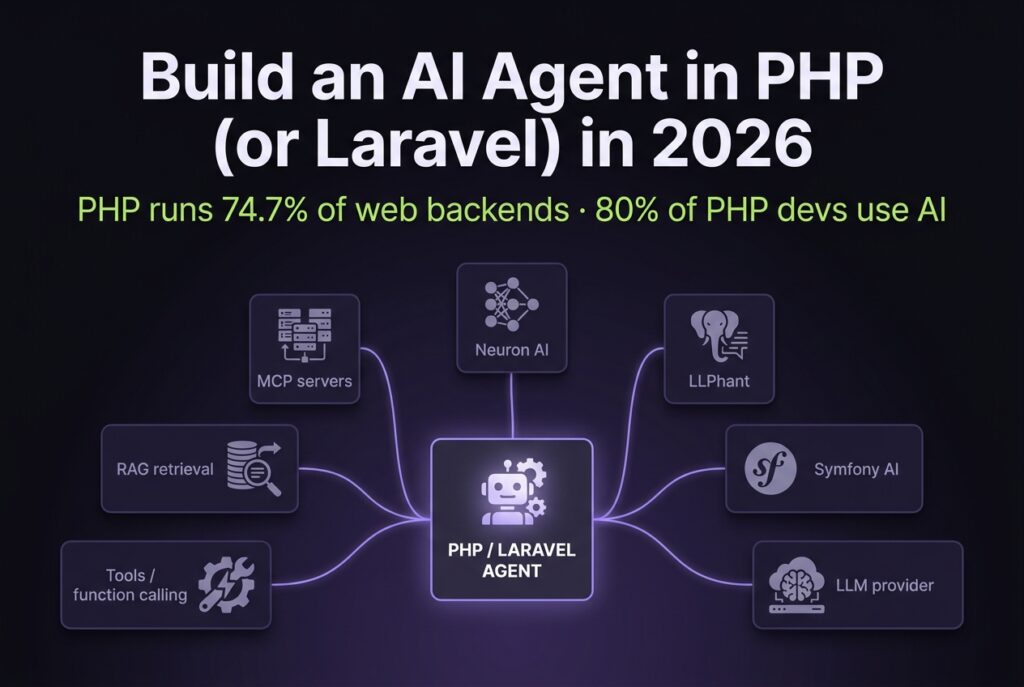
That’s no longer true. As of October 2026, PHP has five credible ways to build an AI agent: Neuron AI, Prism, LLPhant, Symfony AI, and Laravel’s own AI SDK, which reached v1.0 in September 2026. I’ve built agents in three of them. This is the practical tour: what works, what trips you up, and which one you should actually start with.
TL;DR: PHP can ship real AI agents in 2026 without a Python rewrite. Neuron AI is the easiest agent-first fit for Laravel, the Laravel AI SDK is now the first-party default to evaluate, Prism is the fluent Laravel-native option, LLPhant suits framework-agnostic and RAG-heavy projects, and Symfony AI is the official path for Symfony teams. The appetite is there: 80% of PHP developers already use AI tools regularly (JetBrains State of PHP 2025). The hard parts aren’t the LLM call. They’re tokenizer support and keeping long-running agent loops healthy outside PHP-FPM.
Why are PHP developers actually positioned for AI agents in 2026?
PHP devs are not behind on AI tooling. In the 2025 survey, 95% of PHP developers had tried AI tools and 80% used them regularly, according to JetBrains’ State of PHP 2025 (October 2025). That’s roughly level with the 85% of all developers who regularly use AI in JetBrains’ Developer Ecosystem 2025 survey. The “AI agents are for Python people” narrative is a lagging indicator, not a current one.
Citation Capsule: In 2025, 95% of PHP developers had tried AI tools and 80% used them regularly (JetBrains State of PHP 2025, October 2025), close to the 85% all-developer baseline. PHP is also still the dominant server-side language, used by 69.8% of websites whose backend language is known (W3Techs, October 2026). The audience exists and the appetite is real. The missing piece was production-ready agent libraries, which 2025 and 2026 finally delivered.
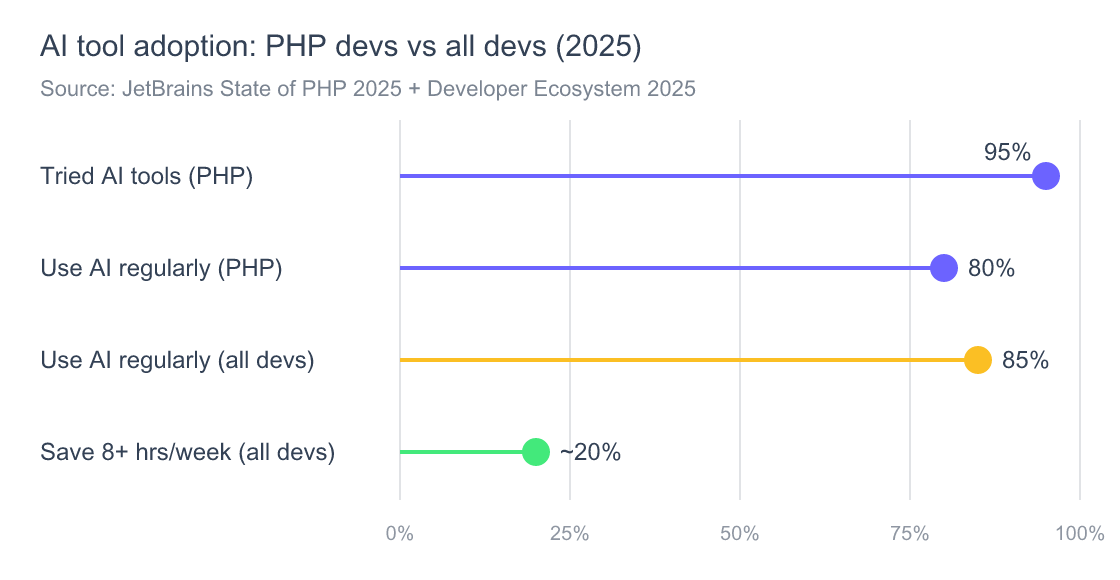
Source: JetBrains State of PHP 2025; JetBrains Developer Ecosystem 2025 (“one in five” save 8+ hours a week).
What changed isn’t appetite. It’s the runtime. 89% of PHP developers run PHP 8.x in production (JetBrains, 2025), which gives you readonly properties, enums, fibers for async, a JIT, and good JSON throughput. That’s a different language from the PHP 5.6 you remember, and it’s good enough to host an agent loop. The libraries finally caught up to the runtime in 2025.
For a vendor-agnostic primer on what counts as an “agent” in the first place, see Agentic AI explained.
Which PHP library should you use to build an AI agent?
There are five credible choices in late 2026: Neuron AI for agent-first Laravel work, the Laravel AI SDK if you want the first-party package, Prism for a fluent Laravel-native API, LLPhant for framework-agnostic and RAG-heavy projects, and Symfony AI if you’re on Symfony and want the official components. Each picks a different abstraction.
Citation Capsule: PHP’s agent ecosystem consolidated in 2025-2026. As of October 6, 2026, Prism leads on GitHub stars at ~2,400, Neuron AI sits at ~2,100 with 16 provider integrations and built-in MCP support, LLPhant is at ~1,700, and both Symfony AI and the Laravel AI SDK are at ~1,200. Neuron AI, LLPhant, Symfony AI and the Laravel AI SDK all shipped releases in the last two weeks; Prism’s latest tag is v0.100.1 from March 2026. This is not a graveyard category anymore.
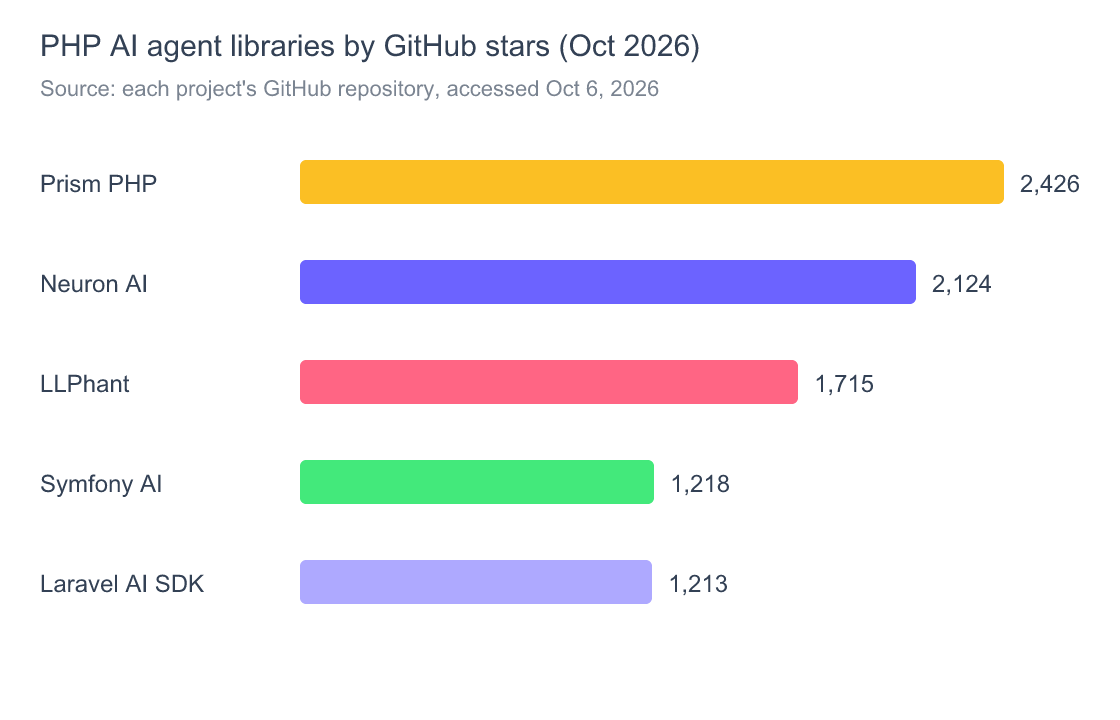
Source: each project’s GitHub repository, October 6, 2026. Stars measure attention, not production fitness.
Here’s how I’d pick. If your stack is Laravel 12 or 13 and you want the first-party path, evaluate the Laravel AI SDK first (composer require laravel/ai): it now covers agents, tools, structured output, embeddings, vector stores and MCP client tools across OpenAI, Anthropic, Gemini, Mistral, Ollama and more. I haven’t run it in production yet, so treat it as the default to evaluate, not a battle-tested pick. If you want the LangChain mental model (extend an Agent class, declare a provider, declare tools, add RAG and workflows), pick Neuron AI, which is what the code below uses. Prism still has the nicest fluent API, but its release cadence has slowed since March 2026. If you’re on Symfony, pick Symfony AI because it’ll get long-term core support. LLPhant is framework-agnostic, with the strongest RAG primitives of any PHP library I’ve used. One to skip: llm-agents-php/agents hasn’t shipped a release since September 2024 and sits at ~170 stars.
The mistake I made the first time was picking the library that had the most stars on the day I started. Six weeks in, I realized I needed MCP support that the library didn’t have yet, and I had to rewrite the agent class against Neuron AI. Pick on capability fit, not popularity. The detailed framework-shape comparison from the Python world in our AI agent frameworks compared write-up maps surprisingly cleanly onto the PHP libraries: Neuron AI plays the LangGraph role, LLPhant plays LangChain, and Prism and the Laravel AI SDK are closer to the Vercel AI SDK’s spirit.

How do you build your first AI agent in Laravel?
The fastest path is Neuron AI in a fresh Laravel 13 app. You install one package, define an agent class that extends Neuron’s Agent, declare a provider, and send a message. The whole thing is about 40 lines of code, and it worked the first time on a clean install. Let’s walk through it.
Step 1: Install Neuron AI
composer require neuron-core/neuron-ai
That’s the entire install. The package moved from inspector-apm/neuron-ai (now marked abandoned on Packagist) to neuron-core/neuron-ai, so older tutorials will point you at the wrong name. Neuron requires PHP 8.1+, which covered 85.9% of Packagist installs in mid-2025 (Stitcher.io, June 2025). Add your provider key to .env:
ANTHROPIC_API_KEY=sk-ant-...
Step 2: Define the agent
Create app/Agents/SupportAgent.php:
<?php

namespace App\Agents;

use NeuronAI\Agent\Agent;
use NeuronAI\Agent\SystemPrompt;
use NeuronAI\Providers\AIProviderInterface;
use NeuronAI\Providers\Anthropic\Anthropic;

class SupportAgent extends Agent
{
    protected function provider(): AIProviderInterface
    {
        return new Anthropic(
            key: env('ANTHROPIC_API_KEY'),
            model: 'claude-sonnet-5-5',
        );
    }

    protected function instructions(): string
    {
        return (string) new SystemPrompt(background: [
            'You are a support agent for a SaaS product.',
            'Answer in two sentences max. Always cite the doc URL.',
        ]);
    }
}
That’s the whole agent. No factories, no service providers, no kernel registration. It works because Neuron’s Agent base class is a fully-formed object, you override the pieces that change.
Step 3: Call it
From a Laravel route, controller, or Artisan command:
use App\Agents\SupportAgent;
use NeuronAI\Chat\Messages\UserMessage;

$reply = SupportAgent::make()
    ->chat(new UserMessage('How do I reset my password?'))
    ->getMessage();

return response()->json(['reply' => $reply->getContent()]);
Hit the route. You’ll get a JSON response from Claude in a second or two. Congratulations, you’ve shipped a PHP agent.
The first time I did this, I expected something to break. PHP’s relationship with new infrastructure has been “you’ll fight the type system for an afternoon, then it’ll work.” Neuron breaks that pattern. The cleanest test was that my IDE auto-completed getMessage()->getContent() correctly because the library actually ships PHPDoc. That alone puts it ahead of half the Python equivalents.
If you want to understand what the agent is doing under the hood, the loop, the message accumulation, the stop conditions, the context engineering architecture piece covers the universal mechanics regardless of language.
How do you give a PHP agent tools (function calling)?
Tools are how an agent stops being a chatbot. In Neuron AI (v4), each tool is a small class that extends Tool: properties() declares the typed inputs the model must supply, and __invoke() does the work. You return the tools from a tools() method on the agent. Here’s a working example that lets the agent look up a user by email from your Eloquent models:
<?php

namespace App\Agents\Tools;

use App\Models\User;
use NeuronAI\Tools\PropertyType;
use NeuronAI\Tools\Tool;
use NeuronAI\Tools\ToolProperty;

class LookupUserTool extends Tool
{
    protected string $name = 'lookup_user';

    protected ?string $description = 'Find a user account by their email address.';

    protected function properties(): array
    {
        return [
            new ToolProperty(
                name: 'email',
                type: PropertyType::STRING,
                description: 'The user\'s email address.',
                required: true,
            ),
        ];
    }

    public function __invoke(string $email): array
    {
        $user = User::where('email', $email)->first();

        return $user
            ? ['plan' => $user->plan, 'created' => $user->created_at->toDateString()]
            : ['error' => 'not found'];
    }
}
Then register it on the agent:
// app/Agents/SupportAgent.php (add: use App\Agents\Tools\LookupUserTool;)
protected function tools(): array
{
    return [
        LookupUserTool::make(),
    ];
}
Arrays you return from __invoke() are JSON-encoded and handed back to the model. Older Neuron tutorials show a Tool::make(...)->setCallable(...) closure style; in v4 Tool is abstract, so use the class form above.
The model now decides when to call lookup_user. You don’t write routing code: the agent’s internal loop handles tool selection, executes your closure, feeds the result back to the model, and continues until the model produces a final response. That loop is the magic, and it’s the same pattern used by every modern agent framework. If you’ve read about ReAct or function-calling loops elsewhere, the mental model carries over one-to-one.
Citation Capsule: Tool-using agents shift work from prompt engineering to interface design: the typed schema you describe in
ToolPropertybecomes the model’s contract for when to call which function, which is exactly the pattern Anthropic, OpenAI, and Google converged on by 2025. The agent loop runs entirely server-side in your Laravel app, so your tool callbacks have full database, queue, and auth context.
A working “what’s my order status” tool in 25 lines
You can wire a real-world tool to an Eloquent model the same way. Copy LookupUserTool, declare an order_id property, and make __invoke() this:
public function __invoke(string $order_id): array
{
    return Order::with('items')
        ->whereKey($order_id)
        ->firstOrFail()
        ->toArray();
}
That’s a complete agent capability. Your customers can now ask the chat widget “where’s order #1042?” and it works: same auth, same database, same models you’ve been using for years.
How do you add RAG (retrieval) to a Laravel AI agent?
Retrieval-Augmented Generation is how the agent answers questions about your content: your docs, your knowledge base, your CRM. The Neuron pattern uses an EmbeddingsProvider to vectorize text, stores those vectors somewhere (Postgres with pgvector, Pinecone, Qdrant, or even SQLite for prototypes), and a VectorStore retrieves the closest matches at query time.
The minimum viable Laravel implementation looks like this:
use NeuronAI\Providers\AIProviderInterface;
use NeuronAI\Providers\Anthropic\Anthropic;
use NeuronAI\RAG\Embeddings\EmbeddingsProviderInterface;
use NeuronAI\RAG\Embeddings\VoyageEmbeddingsProvider;
use NeuronAI\RAG\RAG;
use NeuronAI\RAG\VectorStore\PineconeVectorStore;
use NeuronAI\RAG\VectorStore\VectorStoreInterface;

class DocsAgent extends RAG
{
    protected function provider(): AIProviderInterface
    {
        return new Anthropic(
            key: env('ANTHROPIC_API_KEY'),
            model: 'claude-sonnet-5-5',
        );
    }

    protected function embeddings(): EmbeddingsProviderInterface
    {
        return new VoyageEmbeddingsProvider(
            key: env('VOYAGE_API_KEY'),
            model: 'voyage-4',
        );
    }

    protected function vectorStore(): VectorStoreInterface
    {
        return new PineconeVectorStore(
            key: env('PINECONE_API_KEY'),
            indexUrl: env('PINECONE_INDEX_URL'),
            topK: 5,
        );
    }
}
You then ingest your docs once with $agent->addDocuments(...), and every query automatically retrieves the top-K relevant chunks before the model generates a response. LLPhant has a similar shape with its QuestionAnswering class, and the Laravel AI SDK ships a SimilaritySearch tool over Eloquent models. Prism leaves retrieval up to you (which I prefer for fine-grained control).
My take on PHP RAG: it works, but the embedding step is the slow path. In my runs, Voyage and OpenAI embedding calls took roughly 200-600ms for a small chunk, and PHP-FPM’s per-request lifecycle means you can’t easily pool an embedding model in-process the way a Python FastAPI worker can. For high-volume ingestion you’ll want to push the vectorize-and-store work into Laravel queues, not run it inline. That’s not a deal-breaker, it’s just a different shape from the Python ecosystem’s “load the model once, embed forever” pattern. If your stack is high-cardinality, also look at the architectural trade-offs in GraphRAG vs vector RAG before committing.

Can PHP agents use MCP servers?
Yes, and this is the part that surprised me most. Neuron AI ships an MCP Connector. The Laravel AI SDK can pull tools from a remote MCP server via Laravel MCP’s client. The Symfony AI MCP Bundle exposes your Symfony app as an MCP server, and Laravel MCP does the same for Laravel. So PHP is no longer the language MCP forgot.
In Neuron, you connect to an external MCP server (filesystem, GitHub, Postgres, Slack, anything with an MCP server) by adding it to the agent’s toolbox:
use NeuronAI\MCP\McpConnector;

protected function tools(): array
{
    return [
        ...McpConnector::make([
            'command' => 'npx',
            'args' => ['-y', '@modelcontextprotocol/server-filesystem', '/tmp/sandbox'],
        ])->tools(),
    ];
}
The connector handles the MCP handshake, lists the server’s tools, and exposes them to your agent as if you’d defined them locally. Your agent can now read files, query a database, search GitHub (whatever the MCP server offers) without writing a custom tool.
Citation Capsule: MCP support means PHP agents can plug into the same ecosystem as Claude Desktop and Cursor, filesystem, browser automation, database, Slack, GitHub, without writing platform-specific tool wrappers. As of October 2026, Neuron AI’s
McpConnector, the Laravel AI SDK’s MCP client tools and the Symfony AI MCP Bundle make this a few lines of code; Laravel’s Laravel Boost goes the other direction, exposing your Laravel app as an MCP server so external agents can inspect routes, run Tinker, and query your DB.
Where does PHP still lose to Python for AI agents?
PHP can do everything Python can for LLM workflows. But there are two places where the experience is objectively worse, and I’d be lying if I told you otherwise. The first is tokenizer support. The second is keeping a long-running agent loop alive under PHP-FPM.
Citation Capsule: OpenAI’s canonical tokenizer ships as the tiktoken library in Python, written in Rust, kept current by OpenAI. PHP has community ports such as
yethee/tiktoken-phpanddanny50610/bpe-tokeniser, but no first-party equivalent. You’ll be installing a community package and accepting the maintenance risk. For most agents this matters only if you precount tokens before sending (cost estimation, context-window management).
The second gap is more structural. Under PHP-FPM, every request boots the framework from scratch and throws away its state afterwards. That means a fresh agent conversation pays a cold-boot tax on every turn: re-instantiating providers, re-reading config, re-opening DB connections. For chat-style agents that hold state across turns, this is fine because the state lives in your database, not in process memory. For high-throughput “background agent” loops that need to react in milliseconds, you need Laravel Octane to keep PHP processes warm, and long-lived Octane workers come with real memory-leak risks you need to mitigate.
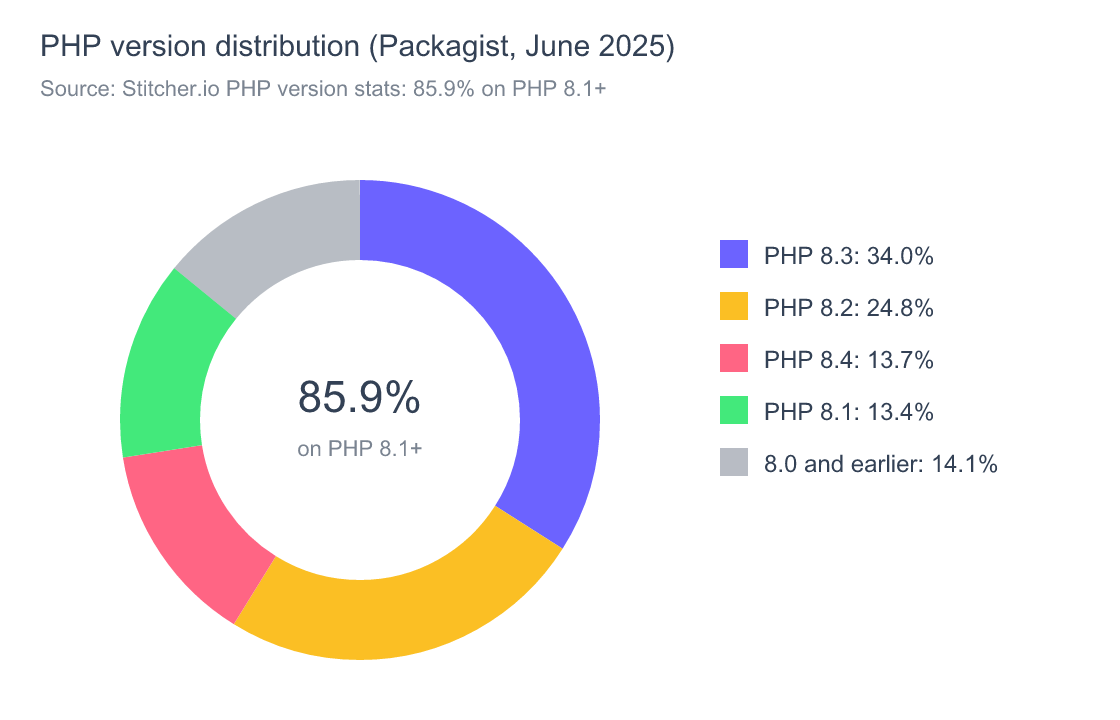
Source: Stitcher.io, June 2025.
On the agent I deployed in March, my Octane workers were growing by roughly 6 MB a minute, and most of it traced back to query recording I’d left switched on from debugging. One thing I got wrong at first: APP_DEBUG=false on its own doesn’t fix this, because Laravel’s query log is off unless something turns it on. The usual suspects are Telescope or Debugbar running in production, or a stray DB::enableQueryLog(). Disable those in production first. Recycling workers with --max-requests=500 handles the rest; that is already Octane’s default, and the docs say it exists to help prevent stray memory leaks. Read the Managing Memory Leaks section before you go to production: anything you push into a static array survives every request a worker handles. If your agent needs to survive crashes and resume cleanly, the durability patterns in durable execution for AI agents translate directly to a Laravel queue-driven approach.
How do you run a PHP AI agent in production?
Three things matter: keep workers warm (Octane), trace what the agent does (OpenTelemetry), and put the agent loop behind a queue if any step takes more than two seconds. The default Laravel queue + Octane setup handles a surprising amount of agent traffic. I’ve run a 30-tool customer-service agent on a single $40/month Hetzner box for a small SaaS at ~8k conversations/month.
For tracing, Neuron AI integrates with Inspector (the project started there), and the OpenTelemetry PHP project publishes a Laravel auto-instrumentation package (open-telemetry/opentelemetry-auto-laravel). The OTel-for-agents patterns in OpenTelemetry GenAI tracing without leaking PII work unchanged on PHP because OTel itself is language-agnostic. For evaluating whether the agent actually does the right thing in production, the framework in eval-driven agent development is what I’ve been using to score conversations against a golden set.
The production checklist that’s worked for me:
// config/octane.php
'max_requests' => 500,    // recycle workers
'warm' => [
    Illuminate\Database\Capsule\Manager::class,
],

// routes/console.php (Laravel 11+ has no Console Kernel)
Schedule::command('queue:restart')->daily(); // belt-and-braces

// app/Agents/SupportAgent.php - keep chat history in the DB, not in process
protected function messageStore(): MessageStoreInterface
{
    return new EloquentMessageStore(ChatMessage::class);
}

// in the controller: one thread per conversation
SupportAgent::make()
    ->setThreadId("conversation-{$conversationId}")
    ->chat(new UserMessage($request->input('message')));
For the agent’s working memory (the part where it forgets earlier turns once you exceed the context window) the architecture patterns in agent memory architecture apply identically to PHP. Neuron trims history to fit the context window for you; if you want older turns summarized rather than dropped, you’ll add a summary column, a job that summarizes with a cheap model, and a line that feeds the summary back into the system prompt.

Frequently Asked Questions
Is PHP fast enough to run an AI agent in production?
Yes, for almost every use case. In my agents the bottleneck is the LLM call (hundreds of milliseconds to several seconds), not the PHP runtime. Where PHP loses to Python is in long-running, multi-step background loops, but Laravel Octane and queues close most of that gap. And 89% of PHP developers were already on PHP 8.x in 2025 (JetBrains).
Should I use Neuron AI or LLPhant for a Laravel project?
For Laravel specifically, start with Neuron AI or the Laravel AI SDK. Neuron has the deepest agent abstractions (RAG, MCP, workflows, structured output, observability), and the AI SDK is first-party and fits Laravel conventions out of the box. LLPhant is excellent but its mental model is closer to Symfony, and you’ll feel less “at home” if you’ve been writing Laravel for years.
Does Laravel have an official AI library?
Yes. Laravel now has three first-party AI packages: Laravel Boost (an MCP server that exposes your app to AI coding agents), Laravel MCP (for building MCP-server apps), and the Laravel AI SDK (laravel/ai), which reached v1.0 in September 2026 and handles agents, tools, embeddings and structured output. It needs PHP 8.3+ and Laravel 12 or 13. It competes most directly with Prism; Neuron AI still goes further on RAG pipelines and workflows.
Can a PHP AI agent use Anthropic’s Claude, not just OpenAI?
Yes. Neuron AI lists 16 provider integrations including Anthropic, OpenAI, Gemini, Vertex AI, Ollama, Mistral, AWS Bedrock, and DeepSeek. Prism covers Anthropic, OpenAI, Gemini, Mistral, Groq, xAI, DeepSeek, Ollama, OpenRouter and more. LLPhant supports OpenAI, Anthropic, Mistral, Ollama and OpenAI-compatible APIs. Switching providers is usually a one-line change in the agent’s provider() method.
How much does it cost to run a PHP AI agent?
Hosting is essentially free on top of your existing Laravel infrastructure; agents add no special compute requirements. The variable cost is the LLM API. Claude Sonnet 5.5 and GPT-6.1 Sol both list at $2 per million input tokens and $10 per million output tokens (Claude pricing, OpenAI pricing, October 2026), so a turn with 1,000-4,000 input tokens and a 200-500 token reply costs roughly $0.004-$0.013. At about three turns per conversation, 10,000 conversations a month lands around $120-$390, before prompt caching. Haiku 4.5 ($1/$5) roughly halves that.
Wrapping up
The “PHP got skipped” story is a year out of date. As of October 2026, you can install one Composer package, write 40 lines of code, and have a tool-using, MCP-connected agent talking to Claude from inside your Laravel app. Neuron AI, LLPhant, Symfony AI and the new Laravel AI SDK all shipped releases in the past two weeks and cover RAG, function calling, streaming, and observability; Prism is still solid but moving slower. The remaining gaps (tokenizer, Octane memory hygiene) are real but bounded.
If you’ve been on the sidelines, this is the easy on-ramp. Stand up the support agent from the section above on a Friday afternoon, point it at one of your knowledge-base tables with the RAG pattern, and you’ll have something working before Monday. The infrastructure you already know (Eloquent, queues, Octane, Inspector or Sentry) does almost all of the work.
For deeper structural choices about how the agent reasons and remembers across turns, context engineering architecture is the next thing I’d read. And if you want to know whether your agent actually performs well in the wild rather than just runs, the three-grader pattern in eval-driven agent development is the one I’ve stayed with.